
AI Video Upscaler

Upscale videos to 1080P
or 4K online.

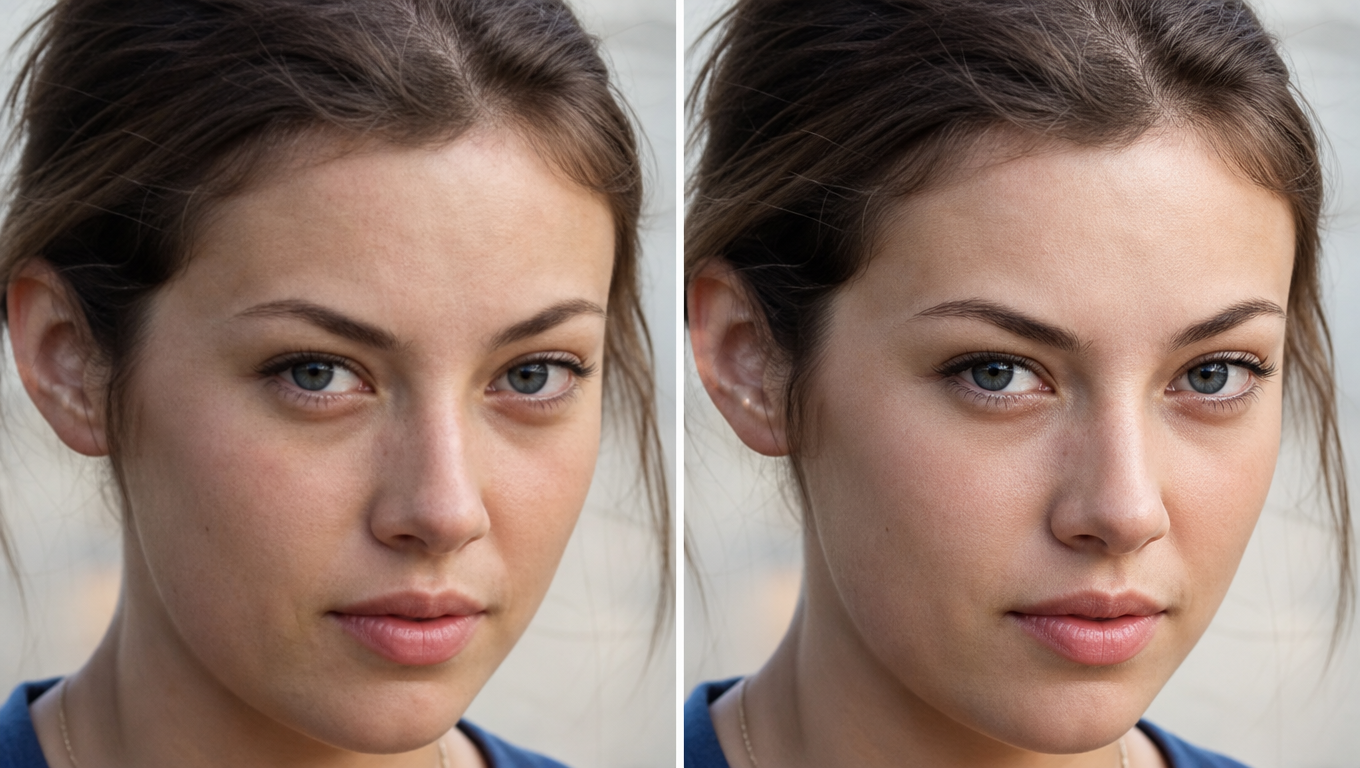
Increase video resolution while preserving detail. Improve your video from low rate to higher resolution with the Wink AI video upscaler without back and forth.

AI Video Upscaler Interface
1080P → 4K
Detail Restoration

See the Difference

Incredible upscaling results powered by advanced neural networks.

AI Video Upscaler Showcase 1
AI Video Upscaler Showcase 2
AI Video Upscaler Showcase 3

How to Upscale Your Video

Enhance your footage with the AI Upscaler in three simple steps.

01

Upload The Video

Open the Wink AI video upscaler and import your videos or images. The AI supports batch uploads, so you can upload multiple files for video upscale processing at once.

02

Upscale

Select your preferred type of upscale: 1080P, 2K, 4K. You can opt for any and get the processed output in a few seconds.

03

Export

Review the quality improvements and export the videos to download directly to your device without losing detail.

Upscale Videos to 1080P, 2K, or 4K with AI

Upscale your videos to high-quality resolutions for a crystal-clear visual. The Wink AI makes your file look better - whether you want to see it on screen or share as product photos. With smart AIGC technology, it enhances every frame and detail. From 1080P to 2K and 4K, upscale every part without missing pixels while restoring lost details. Make the switch and see your sharp videos look even better on phones and large displays.

Boost resolution and refine every detail

Extend your video resolution beyond the basics and boost the quality. The Wink's AI does more than mere surface scratch; it touches every frame. Increase the video resolution and sharpen the texture. No worries about losing clarity; it maintains the natural color depth after edits, even as the file size gets bigger. With the video upscale, your footage looks sharper and more lifelike.

All-Format Compatibility for every Creation

Do you have different categories of video files? Wink's AI video upscaler works for all. Process your MP4s and other video formats without compatibility issues. The AI tool works just as well. And you can make preferred quality modifications with the AI technology on the side. Upload your recordings, downloads, or live videos.

Upscale videos with AI in bulk

Upload and enhance multiple videos at once with the Wink AI. If you want to process more than one file on your device, the batch upload feature is a usable option. And you can save more time without the hassle of back-and-forth. Simply select the files in your folder and upload. The AI tool processes every copy at once, leaving no part behind; no distortions. Upscale all files in your folders instantly.

[ Trusted Globally ]

Upscaling approved by
professionals.

Verified reviews from filmmakers, archivists, and creators who use our AI Video Upscaler to restore lost details and push pixels to 4K.

4.9
from 11+ verified reviews

I often shoot architecture with long lenses. After using the AI free Video Upscaler, the resolution of my photos and time-lapses improved dramatically. Even when zoomed in, the building lines are razor-sharp. No more blurry shots!

Wink AI UpscalerArchitecture
Alex P.
Alex P.
Photographer
June 2026

In my work, I often need to enlarge low-resolution design drafts and product videos. Previously, enlarging would make them blurry, but with this 4K AI Video Upscaler, my designs stay crisp and detailed. It has really boosted my productivity!

4K NeuralE-commerce
Emily T.
Emily T.
E-commerce Product Manager
May 2026

Many of my drone videos don't have high enough resolution because of transmission compression. Using this AI Video Upscaler ensures my work stays high-quality and sharp, perfect for 4K YouTube uploads. I'm so grateful for this tool!

1080p → 4KYouTube
Jack R.
Jack R.
Traveler / Content Creator
June 2026

I used the AI video upscaler for old home movies. I had digitized VHS tapes that looked terrible on modern TVs. This tool completely removed the compression artifacts and made them look like they were shot yesterday.

VHS RestoreArchival
Sarah M.
Sarah M.
Archivist
May 2026

The batch upscale videos AI free feature is a lifesaver. I can drop an entire folder of low-res background plates, and it processes them all to 4K without me having to babysit the software. Incredible browser-based performance.

Batch UpscaleVFX Plates
David K.
David K.
VFX Artist
June 2026

Figuring out how to upscale anime video to 4k ai without losing the line-art detail was always hard. This tool understands 2D animation perfectly. No blurry edges, just crisp, clean vectors.

Anime ModeAnimation
Kenji Y.
Kenji Y.
Anime Editor
April 2026

When clients send me low-res vertical video for Instagram, it used to be a nightmare. Now I just drop it into this AI video quality enhancer free online, and the algorithm sharpens the blurry footage instantly.

Social EnhanceInstagram Reels
Lisa W.
Lisa W.
Social Media Manager
May 2026

Probably the best AI video upscaler for blurry CCTV footage. We needed to read a license plate from a dark, underexposed clip, and the AI video sharpener restored enough detail for us to make it out.

Detail RestoreSecurity
Mark T.
Mark T.
Security Consultant
June 2026

I was looking for an AI video upscaling workflow for Premiere Pro, but honestly, this browser-based tool is faster. I increase video size 1080p to 4k online here, then drop the high-res file back into my timeline.

Wink AI UpscalerPost Production
Chloe S.
Chloe S.
Video Editor
May 2026

The fact that this AI video enhancer works for mp4 formats natively on both Mac and Windows browser without a watermark is crazy. Best free AI video resolution increaser online right now.

4K NeuralTech Reviews
Tom B.
Tom B.
Tech Reviewer
June 2026

Upscaling 480p to 1080p AI free online used to look muddy and artificial. Kenerate's algorithm actually hallucinates the missing skin pores and textures accurately. It's magic.

Texture GenIndie Film
Nina K.
Nina K.
Filmmaker
May 2026

Frequently Asked Questions

Everything you need to know about AI video upscaling.

A video upscaler is a tool that increases the resolution of a video file. An AI video upscaler uses advanced artificial intelligence and neural networks to intelligently generate and fill in missing pixels, restoring lost details and sharpening the footage rather than just stretching it.

Yes, you can upscale low-quality videos to 4K resolution. Our AI video upscaler analyzes every frame of your low-resolution file and uses generative AI to hallucinate the missing details, making the video look crisp and sharp on 4K displays.

Yes. Upscaling increases your video file size. Higher resolution results in more pixels, which increases the video size. If you have a 1080P video you want to upscale to 2K or 4K resolution, the increase in pixel details will increase the processed size. The extent of the new size often depends on the content and compression format.

To upscale old home movies and VHS footage, simply upload your digitized MP4 files to our AI video enhancer. The AI will remove compression artifacts, reduce grain, and sharpen blurry edges, bringing your nostalgic memories into modern 1080P or 4K standards.

Yes! Kenerate AI provides a free AI video upscaler online with no watermark. You can use your free credits to upscale your footage directly in the browser and export it without any intrusive branding on your final video.

To upscale 720p to 4K for YouTube, upload your 720p video to the Wink AI Upscaler, select the 4K output option, and let the neural network enhance the resolution. Exporting in 4K ensures YouTube allocates a higher bitrate to your video, resulting in better quality streaming.

Compression artifacts (blocky, pixelated areas) can be removed using our AI video quality enhancer. The AI understands the context of the scene and smooths out macroblocking while retaining the natural texture of the subject.

For security cameras, Kenerate AI acts as a powerful AI video sharpener for dark or underexposed clips. It can restore lost details in low-resolution video, helping to clarify blurry CCTV footage so you can identify important information like license plates or facial features.

Yes, our browser-based platform allows you to batch upscale videos. You can upload an entire folder of video clips, select your target resolution (like 1080P or 4K), and the AI batch video processing upscaler will enhance all files simultaneously, saving you hours of manual work.

If you have a blurry vertical video from an older phone or one that has been compressed by social media, you can upload it to our free AI video resolution increaser. The tool will sharpen the blurry video and optimize it for Instagram Reels or TikTok without cropping.

Upscaling 2D animation requires specific algorithms. Our AI video enhancer detects sharp line-art and flat colors, ensuring that when you upscale anime videos to 4K, the lines stay razor-sharp and the colors remain vibrant without introducing realistic, unwanted textures.

While the AI works on all formats, results vary based on the original quality. High-quality 1080P videos upscale to 4K flawlessly. Extremely degraded, highly compressed 144p videos will see massive improvements, but the AI may have to 'guess' more details.

Our online tool supports upscaling your source video to standard HD (1080P), 2K (1440P), and 4K (2160P). It also supports custom aspect ratios for social media.

Video upscaling specifically refers to increasing the pixel count and dimensions (e.g., from 1080p to 4K). Video enhancement is a broader term that includes color correction, noise reduction, frame interpolation, and sharpening. Our tool does both simultaneously.

Since our tool is browser-based, the best workflow is to export your final timeline or low-res assets from Premiere Pro, run them through our AI video upscaler online, download the 4K results, and replace the footage in your editing timeline.

Yes, Kenerate AI is 100% browser-based, meaning it is the perfect AI video upscaler for both Mac and Windows. You don't need to download heavy software or own an expensive GPU; we handle all the rendering in the cloud.

Absolutely. MP4 is the most common and recommended format. Our AI video upscaler natively supports MP4, MOV, and WebM file uploads.

The AI is trained on millions of high-resolution video pairs. When it analyzes a low-resolution pixel, it references its training data to understand what that object (like skin, hair, or brick) should look like in high definition, generating and injecting those missing details.

Yes, brands frequently use our tool as an AI video upscaler for ecommerce product videos. If your product showcase looks grainy, upscaling it to 4K ensures the textures, colors, and premium feel of your product translate perfectly to your customers.

If you use standard software, it just stretches the pixels, which looks soft. If you use our AI to increase video size from 1080p to 4k online, it actually generates new pixel data, making the resulting video genuinely sharper, more detailed, and higher quality.

More from Kenerate AI

Explore our complete suite of frontier AI creative tools and models.

View all tools
Go to AI Video Generator

AI Video Generator

Generate cinematic 4K videos from text or images using Veo 3.1 & Kling v3.

Explore
Go to AI Image Generator

AI Image Generator

Create hyper-realistic images and perfect typography with FLUX 2 Pro.

Explore
Go to AI Music Generator

AI Music Generator

Generate full tracks with vocals or instrumentals from a single prompt.

Explore
Go to AI Ads Generator

AI Ads Generator

Produce high-converting 15s commercial video ads in minutes.

Explore
Go to Gemini Omni Video

Gemini Omni Video

Multimodal AI video understanding and generation by Google.

Explore
Go to Seedance 2.5

Seedance 2.5

ByteDance's next-gen AI video model for 30s native 4K continuous shots.

Explore
Go to Ideogram V4

Ideogram V4

The ultimate text-rendering image model for graphic designers.

Explore