Wan 2.7 Spicy is Kenerate's image-to-video mode for adults 18+, built on Alibaba's Wan 2.7 video model. It doesn't generate from text alone. You upload a start image you own or have permission to use, describe the motion and camera move, and the model animates it into a short clip. The rules are simple and strict: adults 18+ only, only your own or consented images, no real people without their consent, no minors in any form, and follow the laws where you live and the rules of anywhere you post.
This guide explains what the mode is, how image-to-video works, and how to write motion and camera prompts that look smooth. Every example is safe for work.
What is Wan 2.7?
Wan 2.7 is a video generation model from Alibaba. Its image-to-video API reference documents four ways to animate:
- First frame to video: your image is the opening frame.
- First and last frame to video: you set where the clip starts and ends.
- Video continuation: extend an existing clip.
- Audio-driven generation: a voice or music track guides the motion.
Alibaba's documented specs for image-to-video:
| Spec (Alibaba API) | Value |
|---|---|
| Clip length | 2 to 15 seconds |
| Output resolution | 720P or 1080P (default 1080P) |
| Input image size | 240 to 8,000 px per side, up to 20 MB |
| Input aspect ratio | 1:8 to 8:1 |
| Input formats | JPEG, JPG, PNG (no alpha), BMP, WEBP |
| Prompt length | Up to 5,000 characters |
| Negative prompt | Up to 500 characters |
Cloudflare's model docs show the same 2 to 15 second range and 720P / 1080P options. Options inside a specific app can differ, so check the settings panel in the studio you use. For more model background, see Kenerate's Wan model page.
What "Spicy" means on Kenerate
"Spicy" is a Kenerate mode, not a feature Alibaba ships. It's built for adult creators who want more creative latitude than general-audience tools allow, within clear limits. Three things define it:
- Adults 18+ only. The mode is for adult users, and every person shown must be an adult.
- Image-to-video only. Every clip starts from an image you supply. There's no text-only Spicy generation.
- Your content, your responsibility. You need the rights to the image and consent from anyone in it.
You'll find the mode on the Wan 2.7 Spicy page and in the Video Studio model picker.
The rules, in plain terms
| Rule | What it means in practice |
|---|---|
| Adults 18+ | You must be 18 or older, and everyone depicted must be an adult |
| Your own or consented images | Use photos or art you made, or images where you have clear permission |
| No real people without consent | No celebrities, public figures, exes, coworkers or strangers |
| No minors, ever | Nothing involving minors or anyone who looks underage, in any context |
| Laws and platform rules | Follow the laws where you live and the rules of every site you post to |
| Label AI content | Make it clear the clip is AI-generated when you share it |
If someone has shared intimate images of you without consent, StopNCII.org helps adults 18+ get matching images blocked on participating platforms. For images taken of anyone under 18, NCMEC's Take It Down service does the same. Before you upload anything to any adult AI tool, read its privacy policy. Our guide on how to read an NSFW AI tool's privacy policy walks through what to check.
How image-to-video works
Image-to-video splits the job in two:
- The image sets the look. Identity, outfit, setting, lighting, color and composition all come from your start frame. The model tries to keep them consistent.
- The prompt sets the change. Your text tells the model what moves, how the camera behaves and how fast things happen.
That's why a prompt that re-describes the whole picture ("a woman with long hair in a red dress in a studio…") often helps less than one that describes only the motion. The model can already see the dress. What it can't know is whether she turns, walks or laughs, or whether the camera pushes in or orbits.
Step by step on Kenerate
- Sign in to Kenerate (new accounts get 25 free credits, and credits never expire).
- Open the Video Studio and choose Wan 2.7 Spicy.
- Upload your start image. Generate one in Kenerate's Image Studio if you need a fresh, original character.
- Write a motion prompt: subject action, camera move and pace.
- Pick the aspect ratio and length shown in the studio, then generate.
- Review, adjust one thing at a time, and regenerate.
Prepare a source image that animates well
The start frame decides more about quality than any prompt.
- Sharp and well lit. Blur, heavy noise and crushed shadows turn into flicker and smearing once they move.
- Leave room for the motion. If the subject will walk forward, frame them with space ahead. If the camera will pull back, don't crop tight at the edges.
- Full body for full-body motion. A dance or walk needs legs and feet in frame. A head-and-shoulders crop can only do head-and-shoulders motion.
- Simple backgrounds move more cleanly. Busy patterns and crowds are where warping shows first.
- Match the output shape. Use a vertical image for 9:16 clips and a horizontal one for 16:9, so nothing gets cropped.
The motion prompt formula
A reliable structure:
Subject action → secondary motion → camera move → pace and mood.
For example: "She turns slowly toward the window (action), her hair and the curtain sway (secondary motion), slow dolly in (camera), calm and dreamy (pace and mood)."
Camera moves that work
| Camera term | What you get | Good for |
|---|---|---|
| Static shot / locked-off | Camera holds still | Dance, gestures, subtle portraits |
| Slow dolly in | Camera moves toward the subject | Building intimacy and focus |
| Dolly out / pull back | Reveals the setting | Endings, establishing shots |
| Orbit / arc | Camera circles the subject | Fashion, showing outfits |
| Tracking shot | Camera follows alongside | Walking, runway |
| Low angle | Looks up at the subject | Confident, powerful feel |
| Handheld | Slight natural shake | Candid, documentary mood |
Use one camera move per clip. "Orbit while dollying in and tilting up" usually produces a muddled shot.
Safe-for-work example prompts
These show the structure. Swap in your own subject and setting.
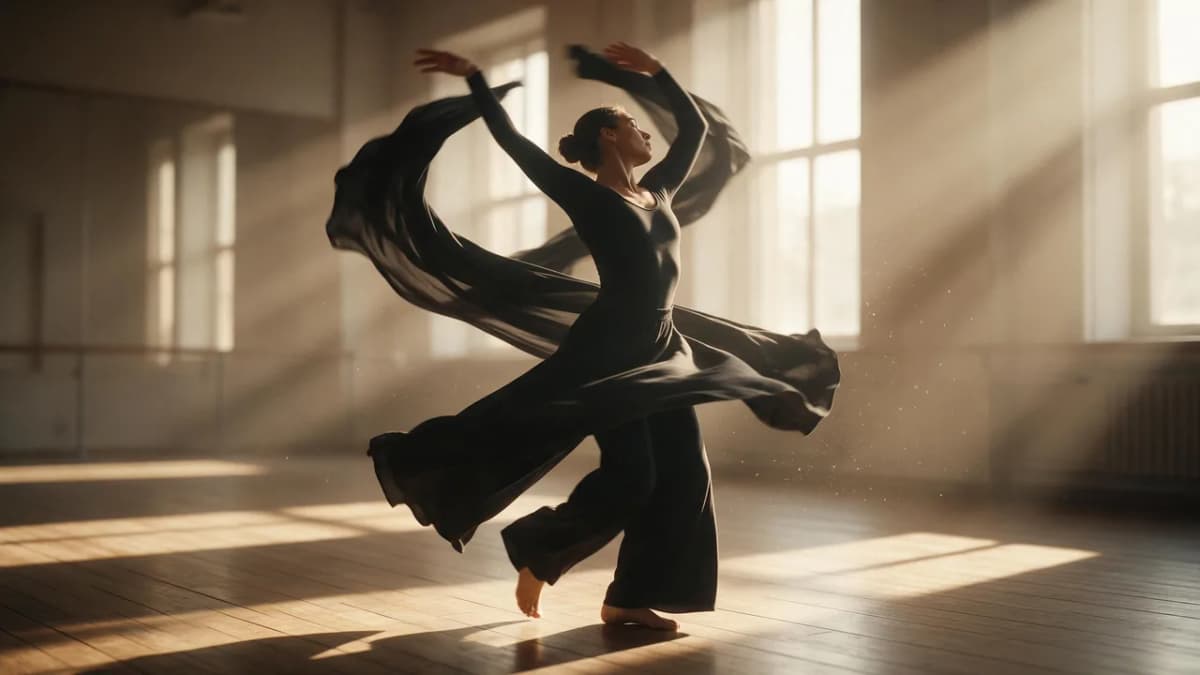
AI Prompt RecipeFlux.1 Pro16:9“A dancer in a black long-sleeve leotard and wide trousers performs a slow contemporary turn in an empty studio, arms sweeping up, fabric flowing with the motion. Static camera, warm side light from tall windows, dust in the light beams, calm graceful pace.”
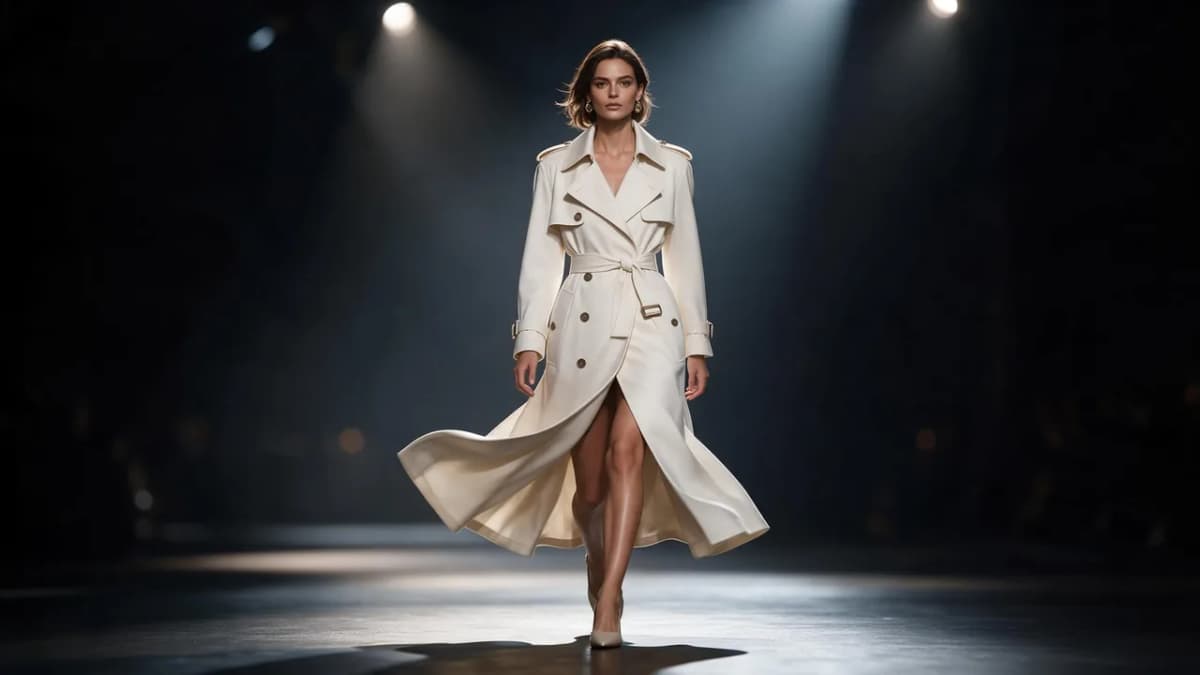
AI Prompt RecipeFlux.1 Pro16:9“A model in a tailored ivory trench coat walks toward the camera on a dark runway, coat hem swinging with each step, confident steady stride. Smooth tracking shot moving backward in front of her, soft spotlights, shallow depth of field.”
AI Prompt RecipeFlux.1 Pro16:9“Close portrait of a woman in a knitted cream sweater by a rainy window. She looks up from her book and smiles softly; raindrops trickle down the glass and her hair moves slightly. Slow dolly in, cozy and quiet mood.”
AI Prompt RecipeFlux.1 Pro16:9“A man in a linen shirt stands on a cliff path at golden hour; the wind ripples his shirt and the tall grass around him. He turns his head toward the sea. Slow orbit around him, warm backlight, peaceful pace.”
Animate your image in the Video Studio
Quality tips that fix most problems
- One main action per clip. A turn, a walk or a smile works well. "Walks, sits, stands up, waves" in one clip invites glitches.
- Match motion to length. A short clip fits one gesture. Save multi-step actions for longer clips.
- Name the secondary motion. Hair, fabric, water, smoke and light flicker add realism cheaply.
- Use a negative prompt for recurring issues. Terms like "distorted hands, flicker, warping, extra limbs" help, and Alibaba's API supports up to 500 characters of negative prompt.
- Change one variable at a time. If a clip fails, change only the camera move or only the action, so you learn what fixed it.
- Upscale at the end. Finish the clip, then run it through the AI video upscaler instead of chasing maximum resolution on every draft.
Wan 2.7 Spicy vs other Spicy options on Kenerate
Wan 2.7 isn't the only option. To compare looks and workflows, see the Wan 3 NSFW page, our Seedance 2.5 Spicy guide, and the head-to-head Seedance 2 Spicy vs Wan 2.7 vs Kling comparison. The same rules apply on every model: adults 18+, image-to-video, and only your own or consented images. Plan details are on the pricing page.
Bottom line
Wan 2.7 Spicy is an image-to-video mode for adults 18+ on Kenerate, built on Alibaba's Wan 2.7. The workflow is simple: a sharp start image you have the rights to, plus a short motion prompt with one action, one camera move and a clear pace. Keep the rules front and center (consent, no real people without permission, no minors, local laws and platform rules), and spend your effort on the source image and the motion. That's where good clips come from.