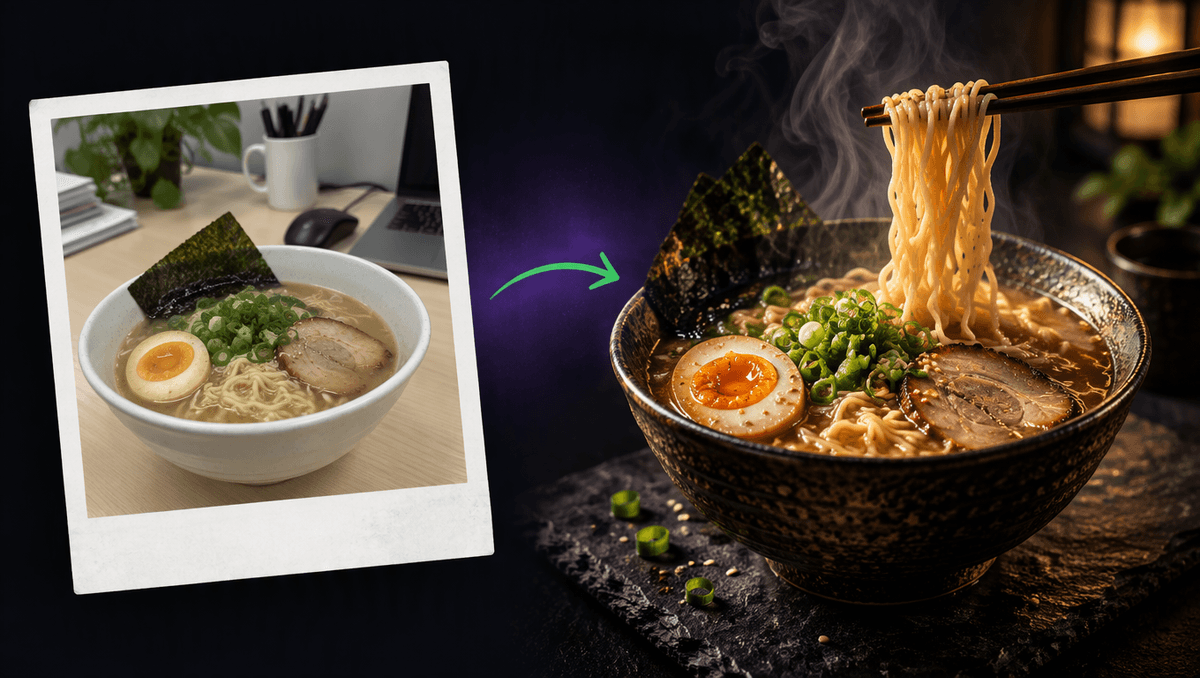
A dull phone photo of lunch on a desk is not a menu ad. But it can become one in a few minutes. With the right AI food video prompts you can take a real dish, restyle it into a moody restaurant shot and then make it move: noodles lifting, broth dripping, steam curling through warm light, with the quiet sound of a kitchen behind it. This guide shares the exact prompts we used this hour, explains why each part is there, and gives you a template and a list of prompts you can copy for cafés, bakeries, street food and home cooking.
Everything below was made on Kenerate AI in one sitting: one plain photo, one restyle prompt, then one motion prompt that turned it into a 5 second clip with its own sound.
Why food clips work so well
Food is one of the few subjects that people feel through a screen. A slow noodle pull, a glossy drip or a curl of steam makes someone hungry before they read a word. That is why restaurants, cafés and home cooks post food clips more than almost anything else.
The good news is that a food clip only needs a few small, believable movements. You do not need a chef, a studio or a slow-motion camera. You need three things:
- A dish that looks its best. Good light, a dark or simple background, one hero element (the noodles, the yolk, the crust).
- One slow action. A lift, a pour, a drip, a break. One is plenty for 5 seconds.
- Steam and sound. Steam proves the food is hot. Sound (a sizzle, a drip, a quiet restaurant hum) makes it real.
Step 1: start with your real photo
Start with the photo you already have. Ours was as plain as it gets: a white bowl of ramen on an office desk under flat ceiling light, a crumpled napkin in the corner and a laptop at the edge of the frame.
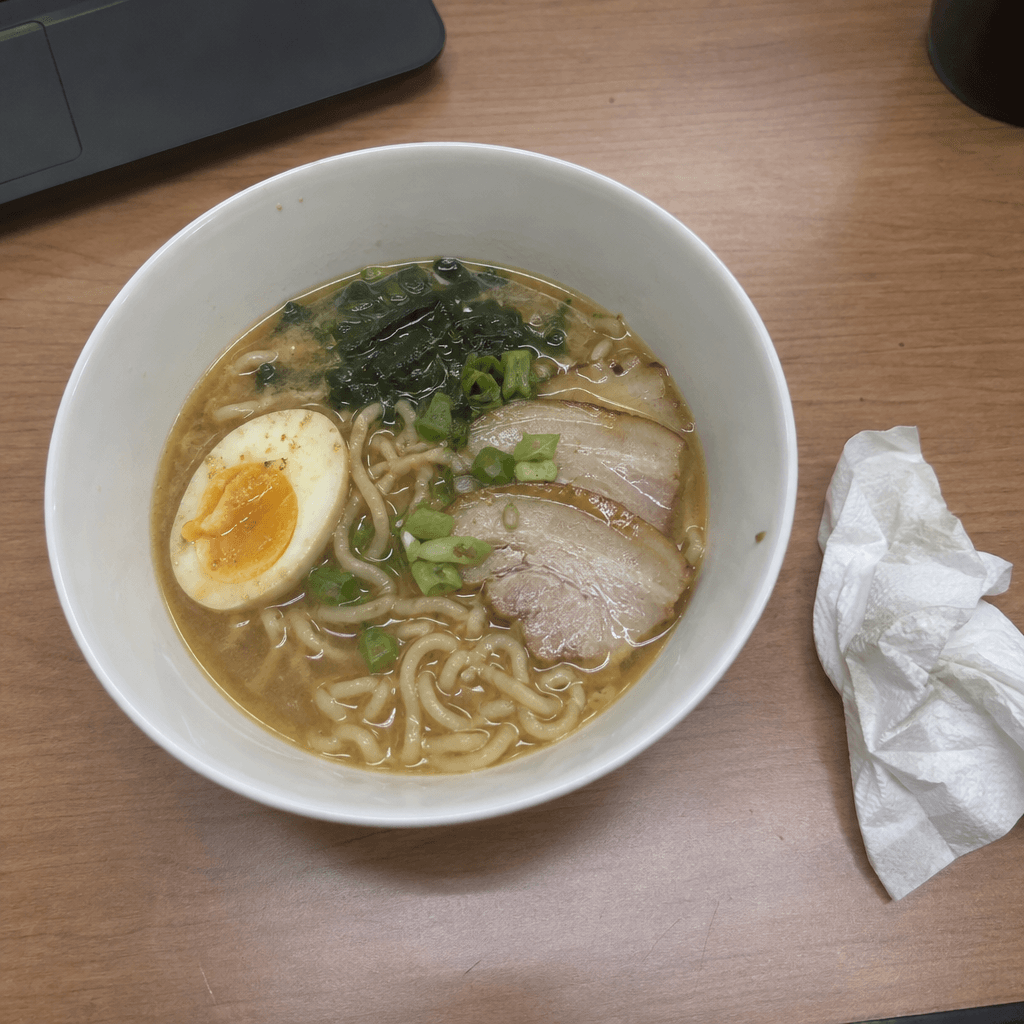
That is fine. The point of the first step is not a good photo. It is the real food: the egg, the pork slices, the nori and the spring onions you actually served. Starting from your own dish means the final ad still shows what people will get.
Step 2: restyle it into a menu shot
Now describe the scene you want and, just as important, what must stay the same. This is the restyle prompt we used, with the plain photo attached as the reference:
Turn this into a premium restaurant menu ad photo: the same ramen bowl, same toppings (egg, pork slices, nori, spring onions), now in a dark stoneware bowl on a black slate counter, moody warm side light, a soft glow on the broth, chopsticks lifting a few noodles, light steam rising, dark background with a hint of a warm lantern bokeh. Remove the desk, napkin and laptop. Square frame, food photography, no text.
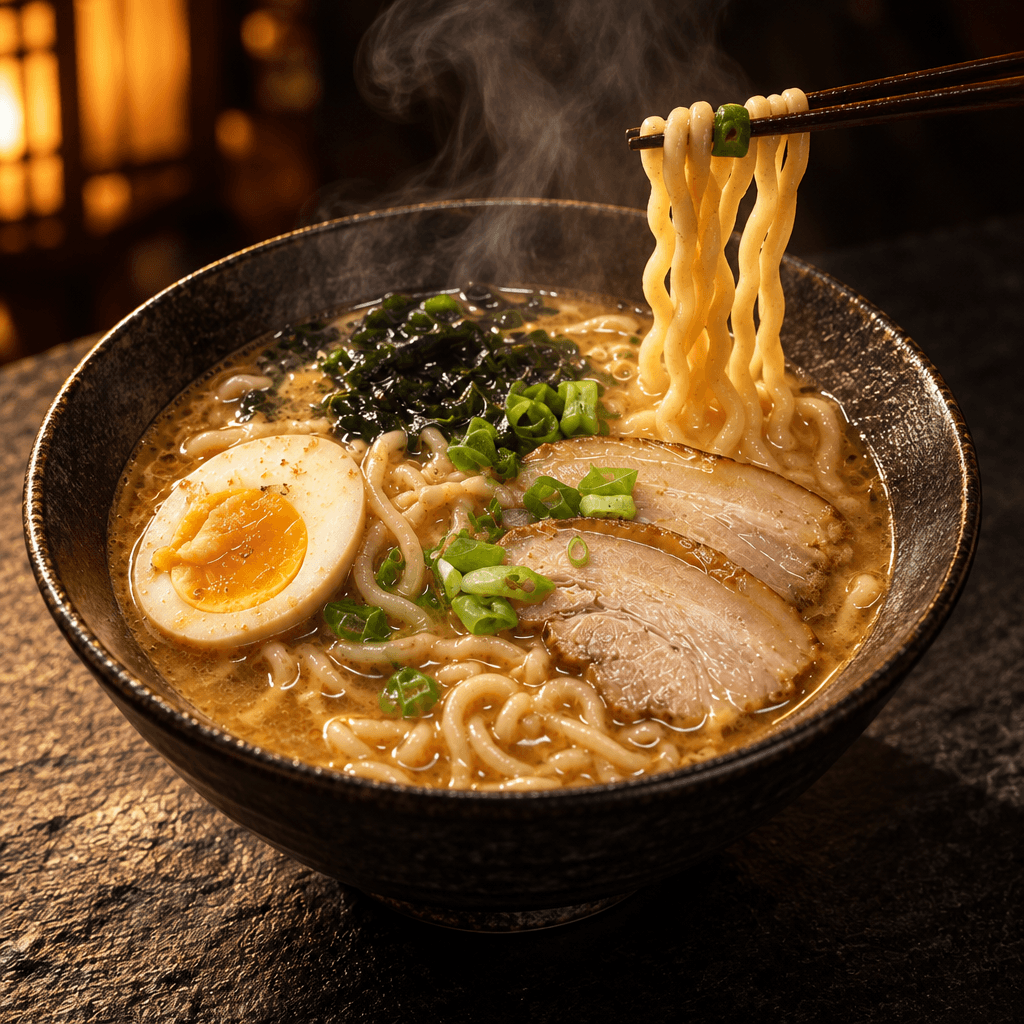
Four things make this prompt work:
- "The same ramen bowl, same toppings." Naming what stays keeps your real dish in the shot.
- A new set. Bowl, surface and background in a few words. Dark stoneware and slate make warm food glow.
- One light direction. "Warm side light" gives texture to noodles and shine to broth.
- What to remove. Say it out loud: the desk, the napkin, the laptop.
Step 3: write the motion prompt
The motion prompt only says what moves. Do not describe the bowl again: the image already holds it. This is the prompt that made our clip:
The chopsticks slowly lift the noodles higher, broth drips back into the bowl in glossy drops, steam curls up through the warm side light, the spring onions glisten, very slow push-in. Sound: a soft noodle lift, gentle drips of broth, a quiet restaurant hum.
<video src="https://localcdn.t3.tigrisfiles.io/video/6a683840cf8c6907df9e9f00/6ae872144433577df04e5edb/1793618587260_6r9gd8.mp4" controls playsinline></video>
It follows the same four parts we use on every clip:
- One action: the chopsticks lift the noodles higher.
- One or two tiny details: broth drips back, the spring onions glisten.
- One camera move: a very slow push-in.
- The sound: drips and a quiet restaurant hum.
Keep the word "slowly" in there. Fast motion makes food look messy and can smear fine textures like noodles or crumbs.
AI food video prompts you can copy
Each idea below has a start image prompt and a motion prompt. Swap in your own dish, keep the structure.
Café latte pour
- Image: A ceramic cup of latte on a light oak café counter, morning window light from the left, a croissant on a small plate, soft background with plants, close-up, food photography.
- Motion: Milk pours slowly into the cup and blooms into a heart, a thin curl of steam rises, very slow push-in. Sound: a gentle pour, quiet café chatter, a cup on a saucer.
Bakery crust break
- Image: A crusty sourdough loaf on a floured wooden board, warm low light, dark background, flour dust in the air, close-up.
- Motion: Two hands slowly tear the loaf open, steam escapes from the soft crumb, a few crumbs fall onto the board, still camera. Sound: a crisp crackle of crust, a soft tear.
Street food sizzle
- Image: Skewers of grilled chicken over glowing charcoal at a night market stall, string lights in the bokeh, smoke rising, close-up.
- Motion: The skewers sizzle and a brush glazes them with sauce, smoke drifts up through the lights, a slow sideways slide. Sound: sizzling fat, crackling charcoal, a busy market.
Dessert drip
- Image: A tall slice of chocolate cake on a matte black plate, glossy ganache on top, a single raspberry, soft side light, dark background.
- Motion: Warm ganache drips slowly down the side of the slice, the raspberry glistens, very slow push-in. Sound: a soft drip, a fork set down on the plate.
Home cooking, Sunday dish
- Image: A cast iron pan of shakshuka on a rustic table, eggs in red sauce, fresh herbs on top, crusty bread beside it, warm window light.
- Motion: The sauce bubbles gently around the eggs, a spoon breaks one yolk and it runs slowly, steam rises, still camera. Sound: soft bubbling, a spoon on cast iron.
A fill-in template
Copy this and fill the brackets.
Image (or restyle): [Your dish] in [bowl or plate] on [surface], [light direction] light, [simple background], close-up, food photography. Keep [what must not change].
Motion: [One slow action], [one or two tiny details], [one camera move]. Sound: [two or three real sounds].
Good camera moves for food are a very slow push-in, a slow sideways slide or a still camera. Avoid orbits and fast zooms: they bend the plate and blur the food.
Mistakes that ruin food clips
- Too much action. A pour, a cut and a sprinkle in 5 seconds turns into mush. Pick one.
- Bright, flat light. Overhead light kills texture. Ask for side light or window light.
- Busy backgrounds. A full restaurant behind the plate pulls the eye away. Keep it dark or blurred.
- No steam on hot food. Without it, a hot dish looks cold. Ask for "light steam rising".
- Describing the dish twice. In the motion prompt, only say what moves.
- Forgetting what stays. In the restyle step, name the toppings or the dish can change.
Where to use your food video
A 5 second loop fits almost every place a menu lives:
- Instagram Reels and Stories: vertical, sound on, one line of text.
- Delivery app banners and menu boards: square or wide, sound off, loop.
- Your website's hero: wide, a slow loop behind the menu link.
- Ads: lead with the slowest, most mouth-watering second.
If you want a full set of product shots, ads and short videos from one photo, the Marketing Studio builds them for you. For a printable menu, try the AI menu generator. And when you only need a still image to move, image to video is the quickest route.
Settings we used
- Start photo: a plain snapshot, then restyled in the Kenerate AI image studio, square frame.
- Video: image to video, 5 seconds, native sound on.
- Editing: for social we stacked the before photo over the moving clip, added a short title and an end card. Nothing else.
More than 201,000 creators have made over a million images, videos and sounds on Kenerate AI. A food clip from a photo you already have is one of the easiest ways to start.