




Skip to content
VEED · Sync Labs · LatentSync · InfiniteTalk · free plan

AI Lip Sync — match any video to new audio

Upload a video and a new audio track, and the AI redraws the mouth so the lips match — for dubbing, dialogue fixes or music videos. 7 lip-sync engines, clips up to 10 minutes, free plan.

  • Video + any audio
  • 7 engines
  • Up to 10 min
  • Free plan
Engines
7
Longest clip
10 min
Two speakers
Yes
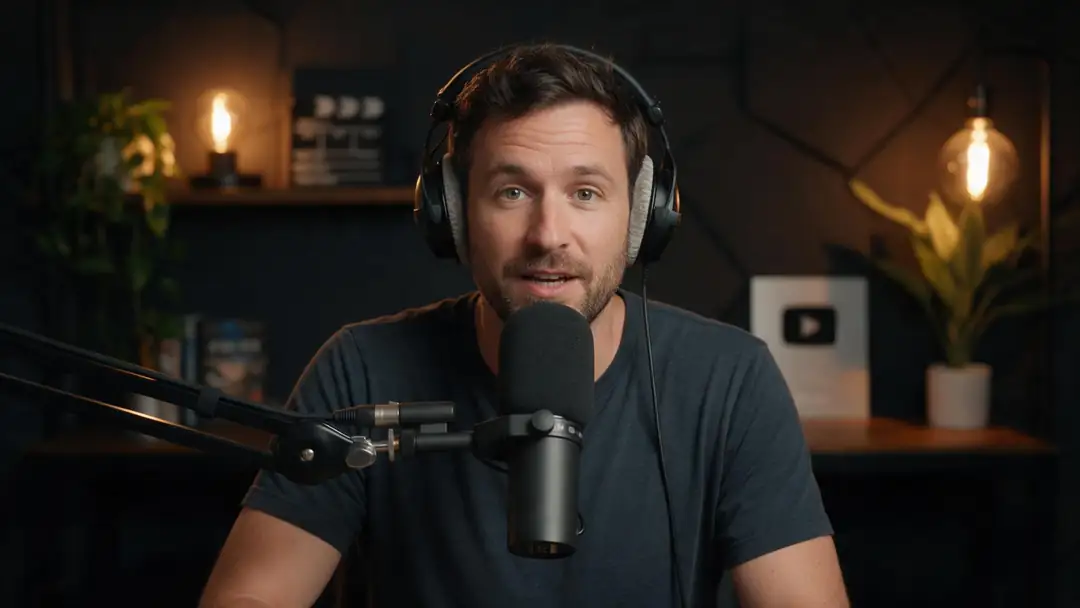
Podcast host
Real clip 1 / 5

Talking head

Podcast host

He leans into the microphone and says to the camera: "Welcome back to the show, today we're talking about sleep." Clear speech, natural expressions

Wan 3 · 5 s · 720p · with soundAnimate

Quick answer

AI lip sync redraws a speaker's mouth and lower face so the lips match a new audio track. Dubbing swaps the language, talking photos animate a still — lip sync is the step that makes either believable. In Kenerate's Avatar Talk (video mode) you upload a video and an audio file and pick one of 7 engines: VEED Lipsync 2 (up to 5 min), Sync Lipsync 3 and LatentSync (5 min), Sync React-1 (15 s, with emotion control) and InfiniteTalk (up to 10 min, including a two-speaker version). It works on the free plan. The demo below: an English podcast clip, dubbed to Spanish, then lip-synced.

Updated 27 September 2026 · specs read from Kenerate's code

  • Engines7
  • Longest clip10 min
  • Two speakersYes
  • Free planYes

Real demo

Same clip, three versions

Switch versions and turn the sound on. The Spanish voice alone doesn't match the lips — lip sync fixes that.

  • Original (English). A Wan 3 clip with an English line.
  • Spanish dub. ElevenLabs dubbing — new language, same lips.
  • Spanish + lip sync. VEED Lipsync 2 redraws the mouth to the Spanish audio.

All three are unedited outputs of Kenerate's tools.

Lip sync your video

Short answers

What people ask first

  • What is AI lip sync?

    AI that redraws a speaker's mouth and lower face so the lips match a new audio track — for dubbing, dialogue fixes or music.

  • How is lip sync different from dubbing?

    Dubbing replaces the voice with another language; lip sync changes the mouth to match audio. The demo shows both: the Spanish dub alone, then the dub with lip sync.

  • What is a lip dub?

    Originally a one-take music video where a crowd lip syncs to a song; today it also means AI dubbing with the lips re-synced.

  • Does lip sync work in any language?

    Yes — it follows the sounds in the audio, so any spoken language works.

Real clips

Clips that talk

Real 5-second Wan 3 clips with speech — the kind of footage you'd lip sync to a new line, a new language or a song.

Real Wan 3 clips (5 s, 720p) from Seedream 5.0 Pro stills. Open one to watch with sound and copy both prompts.

Start image for Podcast host
Result · start image top right

How it works

Video + audio = matched lips

Keep the performance; replace the words.

  1. 01

    Start image

    Seedream 5.0 Pro at 2K — or upload your own photo.

  2. 02

    Motion prompt

    He leans into the microphone and says to the camera: "Welcome back to the show, today we're talking about sleep." Clear speech, natural expressions

  3. 03

    Wan 3

    Wan 3 · 5 s · 720p · with sound. The clip on the left is the real result.

Animate this scene

Tips

Lip sync that looks real

From VEED's, Kling's and Sync Labs' guides and our tests.

  • Show the whole face — hands or mics over the mouth break it.
  • Front or three-quarter angles work best.
  • Match the audio length to the video, or pick a sync mode.
  • Use clean speech without music under it.
  • Two people talking? Use an InfiniteTalk Duo engine.
  • Only lip sync people who agreed to it.

Step by step

How to use the ai lip sync generator

  1. Step 1: Open Avatar Talk in video mode

    Sign in — lip sync works on the free plan.
  2. Step 2: Upload the video

    A clear, front-facing speaker works best. Up to 200 MB.
  3. Step 3: Add the new audio

    A dub, a corrected line or a song. Up to 50 MB.
  4. Step 4: Pick an engine and generate

    VEED Lipsync 2 by default; InfiniteTalk for up to 10 minutes; React-1 for emotion control.

Engines

7 lip-sync engines

From Avatar Talk's video-mode engine list.

  • VEED

    VEED Lipsync 2Default

    Everyday dubbing and fixes

    You give it
    Video + audio, up to 5 min
    You get
    Lips matched to the audio
    Open VEED Lipsync 2
  • Sync Labs

    Sync Lipsync 3

    Control when audio and video lengths differ

    You give it
    Video + audio, up to 5 min
    You get
    Five sync modes
    Open Sync Lipsync 3
  • Sync Labs

    Sync React-1

    Emotion-controlled performances

    You give it
    Video + audio, up to 15 s
    You get
    Lips, face or head
    Open Sync React-1
  • ByteDance

    LatentSync

    Open diffusion lip sync

    You give it
    Video + audio, 3 s–5 min
    You get
    Lips matched to the audio
    Open LatentSync
  • WaveSpeed

    InfiniteTalk Fast · Video

    Long talks and lessons

    You give it
    Video + audio, up to 10 min
    You get
    Lips + natural head motion
    Open InfiniteTalk Fast · Video
  • WaveSpeed

    InfiniteTalk Duo · Video2 speakers

    Two-person conversations

    You give it
    Video + two audio tracks
    You get
    480p or 720p
    Open InfiniteTalk Duo · Video

The example clips were made with Wan 3; the demo above ran on ElevenLabs dubbing and VEED Lipsync 2.

Every clip on this page started as one still image. Make yours, then animate it.

In depth

AI Lip Sync Generator, explained

What the models can do, how to prompt them, and what isn't allowed.

How lip sync models work

The model reads the audio — ByteDance's LatentSync uses Whisper audio features — and regenerates the mouth region frame by frame to match, keeping the rest of the face and the scene untouched.

Dub, then sync

For a translated video, dub the audio first (Kenerate's dubbing tool does 33 languages), then lip sync the video to the new track. The demo on this page is exactly that pipeline.


Sources

    FAQ

    AI Lip Sync Generator questions

    7 questions

    Still stuck?

    A real person answers — usually within a day.

    01

    What is AI lip sync?

    AI that redraws a speaker's mouth and lower face so the lips match a new audio track — for dubbing, dialogue fixes or music.

    02

    How is lip sync different from dubbing?

    Dubbing replaces the voice with another language; lip sync changes the mouth to match audio. The demo shows both: the Spanish dub alone, then the dub with lip sync.

    03

    What is a lip dub?

    Originally a one-take music video where a crowd lip syncs to a song; today it also means AI dubbing with the lips re-synced.

    04

    Does lip sync work in any language?

    Yes — it follows the sounds in the audio, so any spoken language works.

    05

    How long can the video be?

    Up to 10 minutes on InfiniteTalk, 5 minutes on VEED Lipsync 2, Sync Lipsync 3 and LatentSync, 15 seconds on React-1.

    06

    Can I lip sync a photo instead?

    Yes — that's a talking photo. Use Avatar Talk in photo mode (19 engines).

    07

    Is AI lip sync free?

    It works on the free plan with sign-up credits; longer videos use one-time credit packs that never expire.

    See more of Kenerate AI in your Google resultsAdd kenerateai.com as a preferred source — Google shows more from your preferred sources in Top Stories and AI answers.

    Explore

    Every Kenerate video tool

    Generators, tools, models and guides — one studio, one credit balance.

    Written by the Kenerate AI team

    We build and run Kenerate's video studio. Every clip here is a real, unedited Wan 3 output (5 s, 720p) and every start image a real Seedream 5.0 Pro output; model specs and limits were read from the app's code; facts about other tools link to their own pages. Last updated 27 September 2026. Corrections: hello@kenerateai.com.

    Sources

    Ready when you are

    Try the ai lip sync generator

    One studio for images and video.

    • 25 free credits
    • No watermark
    • Credits never expire