
















Skip to content
Updated 26 Sep 2026 · remove.bg changes on 1 December

remove.bg alternatives: what to use after 1 December

On 1 December 2026 the remove.bg website closes (background removal moves to Canva), the self-service API moves to Leonardo.Ai and credits expire. Here is what is changing, a checklist for the switch, and the alternatives worth trying — including our own.

  • Sources linked
  • Free and paid options
  • API & open-source options
  • No sign-up needed to read
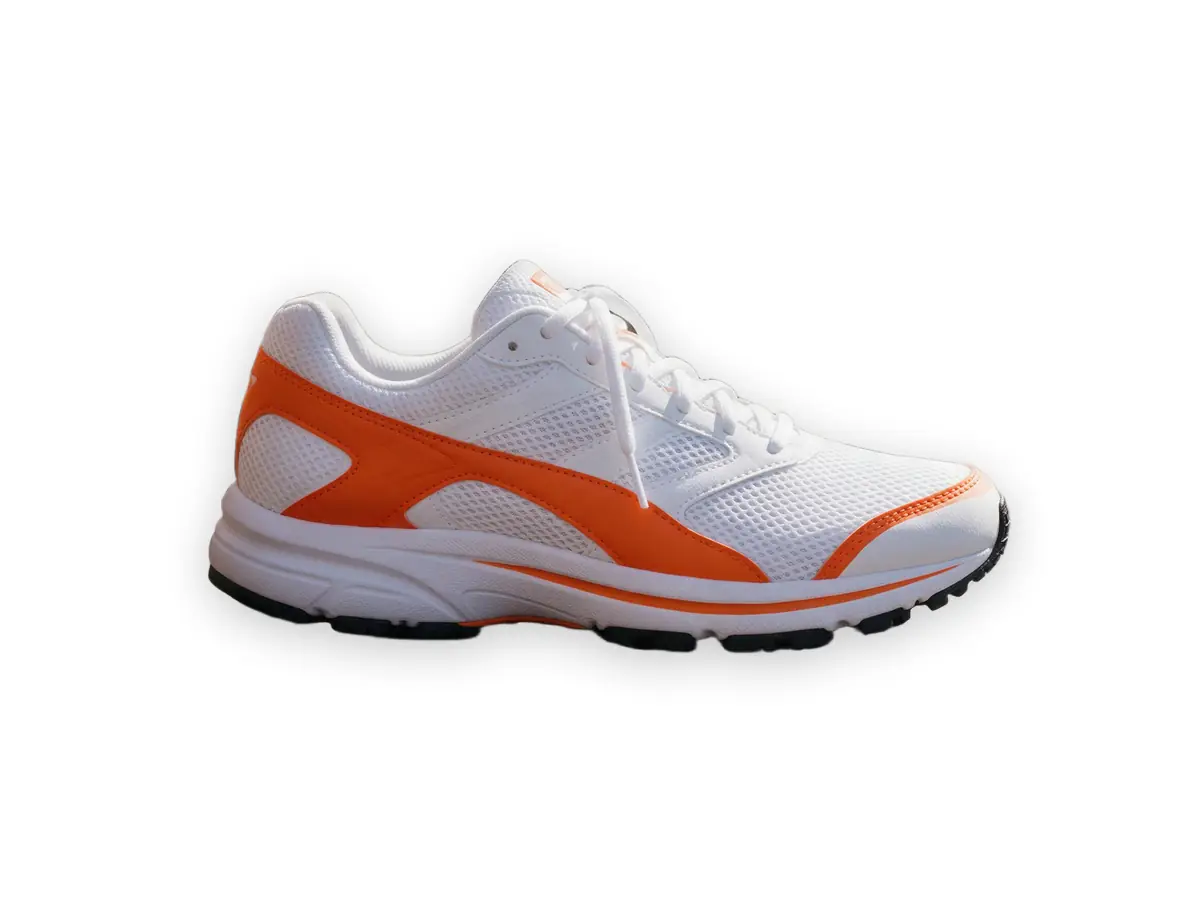
White and orange running sneaker on a wooden bench — original photo
White and orange running sneaker on a wooden bench — background removed
BEFOREAFTER

Kenerate Cutout · Sneaker

Try this photo
  • Kenerate Cutout
  • Cutout HD · hair & glass
  • Object Pick · keep what you name
  • Magic Eraser
  • AI Edit · Qwen Image 2.0
  • Edit Text in Image · GPT Image 2
  • White, black & colour backdrops
Sneaker — background removed
Curly hair — background removed
Glass bottle — background removed
Dog fur — background removed
Gold chain — background removed
Ceramic mug — background removed
Mid-air jump — background removed
Signature — background removed
Sneaker — background removed
Curly hair — background removed
Glass bottle — background removed
Dog fur — background removed
Gold chain — background removed
Ceramic mug — background removed
Mid-air jump — background removed
Signature — background removed

Quick answer

Updated

On 1 December 2026 (9:00 AM CET) the remove.bg website closes — its background removal moves to Canva — and the self-service API moves to Leonardo.Ai; remove.bg pay-as-you-go credits expire the same day and Enterprise API contracts continue. For a simple replacement with no subscription, try Kenerate AI (25 free credits, Cutout HD for hair and glass). Canva suits Pro users, Leonardo.Ai suits developers, and Photoroom, Pixelcut and others are compared below.

Website closes
1 Dec 2026, 9:00 AM CET → moves to Canva
Self-service API
Stops 1 Dec 2026 → Leonardo.Ai
remove.bg credits
PAYG credits expire 1 Dec 2026
Kenerate
No subscription, 25 free credits, 4 cut-out modes

Real results

See it on real photos

Every slider is a real Kenerate result. Drag to compare, then run the same photo yourself.

  1. White and orange running sneaker on a wooden bench — before
    White and orange running sneaker on a wooden bench — after
    BeforeAfter

    01Products

    A listing photo in one click

    A sneaker lifted off a wooden bench, ready for a white or coloured backdrop.

    Kenerate Cutout

    Cut this photo out
  2. Woman with big curly backlit hair on a city street — before
    Woman with big curly backlit hair on a city street — after
    BeforeAfter

    02Hair

    Every curl, not a helmet

    Backlit curly hair separated strand by strand from a city street.

    Kenerate Cutout HD

    Cut this photo out
  3. Glass perfume bottle with peonies on a marble table — before
    Glass perfume bottle with peonies on a marble table — after
    BeforeAfter

    03Glass

    See-through glass, kept see-through

    A glass bottle and the flowers beside it, with the transparency intact.

    Kenerate Cutout HD

    Cut this photo out
  4. Golden retriever sitting on grass in a park — before
    Golden retriever sitting on grass in a park — after
    BeforeAfter

    04Fur

    Pet fur without a green fringe

    Long feathery fur cut out from grass without the halo.

    Kenerate Cutout HD

    Cut this photo out

The facts

What is changing at remove.bg?

remove.bg's FAQ: the website's background removal is moving to Canva and the standalone site won't be available from 1 December 2026 at 9:00 AM CET; the self-service API stops accepting requests that day and moves to Leonardo.Ai.

  1. Now → 30 Nov 2026

    remove.bg works as usual

    Use your remaining credits and download anything you want to keep.

  2. 1 Dec 2026, 9:00 AM CET

    Website closes, credits expire

    remove.bg's website background removal moves to Canva; pay-as-you-go credits expire.

  3. From 1 Dec 2026

    Self-service API moves to Leonardo.Ai

    New Leonardo account and key needed. Enterprise API contracts continue as normal.

Good to know: remove.bg credentials don't carry over to Leonardo.Ai, and Leonardo's API doesn't support every remove.bg option (for example zip output and multipart uploads). Check the migration guide before switching.

Before 1 December

Switching checklist

Spend or write off remaining remove.bg credits before 1 December.

Download the originals and results you still need from your remove.bg account.

List every place remove.bg is wired in — desktop app, design-tool plugins, scripts, the API — so nothing breaks silently.

Try two alternatives on your own hardest photos (hair, glass, white-on-white) before you commit.

If you use the API, test the replacement's output size, speed and limits against your real volume.

7 options

The best remove.bg alternatives

Ordered by who they suit. We make Kenerate, so it is listed first — the others are described from their own sites and we link to every one.

  1. Kenerate AIOur tool

    Best for: Occasional use, no subscription

    Four modes — Cutout, Cutout HD for hair and glass, Object Pick (type what to keep) and Magic Eraser — plus white, black, colour and photo backdrops and an AI upscaler. Nothing changes on 1 December.

    How you pay: One-time credit packs that never expire; 25 free credits

    Try Kenerate free
  2. Leonardo.Ai

    Best for: remove.bg API users

    The official new home of the remove.bg self-service API from 1 December 2026, also part of Canva. Same background-removal technology plus upscaling and scene generation; you need a new Leonardo account and API key.

    How you pay: Pay-as-you-go API

    Visit Leonardo.Ai
  3. Canva

    Best for: remove.bg website users with Canva Pro

    remove.bg says its website's background removal is moving to Canva, and Canva's remover uses the same technology. One click inside the editor — worth it if you already pay for Canva.

    How you pay: Background Remover is a paid-plan feature (Canva Pro, Business)

    Visit Canva
  4. Adobe Express

    Best for: Quick one-offs with an Adobe account

    A “remove background” quick action in the browser, with Firefly generative tools if you want to replace the background.

    How you pay: Free plan with limits; Premium plan

    Visit Adobe Express
  5. Photoroom

    Best for: Product photos and e-commerce batches

    Built around product shots, templates and batch editing, with a background-removal API for shops and marketplaces.

    How you pay: Free plan with limits; Pro subscription; API

    Visit Photoroom
  6. Pixelcut

    Best for: Mobile-first sellers

    A simple web and phone app for cut-outs, white backgrounds and product scenes.

    How you pay: Free web tool; Pro subscription

    Visit Pixelcut
  7. rembg / BiRefNet (open source)

    Best for: Developers who want to self-host

    Open-source background-removal models you run yourself. Full control and no per-image fee, but you handle hosting, GPUs, updates and edge quality.

    How you pay: Free — you pay for your own server

    Visit rembg / BiRefNet

Kenerate on hard photos

See the output before you switch

Real Kenerate cut-outs of the photos shown — tap “Original” to compare.

Try it free
  • Woman with big curly backlit hair on a city street — background removed with Kenerate Cutout HDCutout HD

    Curly hair

  • Golden retriever sitting on grass in a park — background removed with Kenerate Cutout HDCutout HD

    Dog fur

  • Glass perfume bottle with peonies on a marble table — background removed with Kenerate Cutout HDCutout HD

    Glass bottle

  • Thin gold chain necklace on green velvet — background removed with Kenerate Cutout HDCutout HD

    Gold chain

Look closer

Check the edges, not the thumbnail

The difference between background removers shows up at 200% and beyond. Zoom into a Cutout HD result before you pick your replacement.

  • Glass stays see-through instead of turning solid
  • Petals keep their soft edges
  • No white fringe from the marble table

Move your pointer over the image to zoom into the edge.

Glass perfume bottle with peonies on a marble table — cut out with Kenerate Cutout HD. The checkerboard is transparent.

Three ways to switch

Kenerate vs Leonardo.Ai vs self-hosting

The three most common paths away from remove.bg, compared on what changes for you.

  • Kenerate AIweb tool

    Subscription needed
    No
    Works in the browser
    Yes
    Needs code
    No
    You run the servers
    No
    Official remove.bg path
    No
  • Leonardo.Aiofficial successor

    Subscription needed
    Plans or API credits
    Works in the browser
    Yes
    Needs code
    For the API
    You run the servers
    No
    Official remove.bg path
    Yes
  • rembgopen source

    Subscription needed
    No
    Works in the browser
    No
    Needs code
    Yes
    You run the servers
    Yes
    Official remove.bg path
    No

Checked 26 September 2026

remove.bg alternatives compared

How each option is sold and who it suits. Plans change often — check each site for current plans.

  • Kenerate AIThis site

    How you pay
    One-time credit packs that never expire; 25 free credits
    Best for
    Occasional use, no subscription
  • Leonardo.Ai

    How you pay
    Pay-as-you-go API
    Best for
    remove.bg API users
  • Canva

    How you pay
    Background Remover is a paid-plan feature (Canva Pro, Business)
    Best for
    remove.bg website users with Canva Pro
  • Adobe Express

    How you pay
    Free plan with limits; Premium plan
    Best for
    Quick one-offs with an Adobe account
  • Photoroom

    How you pay
    Free plan with limits; Pro subscription; API
    Best for
    Product photos and e-commerce batches
  • Pixelcut

    How you pay
    Free web tool; Pro subscription
    Best for
    Mobile-first sellers
  • rembg / BiRefNet (open source)

    How you pay
    Free — you pay for your own server
    Best for
    Developers who want to self-host

Developers

Moving off the remove.bg API

If remove.bg is wired into a shop, a CMS or a batch script, plan the move now rather than on 1 December.

  • Least change: Leonardo.Ai is the official destination. remove.bg says it keeps a simple integration and adds upscaling, background generation and animation.
  • Another vendor: commercial APIs such as Photoroom's are built for product catalogues. Compare output size and latency on your own images.
  • Self-host: rembg wraps several open models (including BiRefNet). There is no per-image fee, but you run the servers and handle edge quality.

Want to compare right now? Run your hardest photo through Kenerate — start with 25 free credits.

Use cases

Who is switching, and to what

Typical remove.bg users and the path that fits each.

  • Marketplace seller

    Sneakers & apparel

    Uploads a few dozen product photos a month by hand. One-time credits fit that volume with no monthly plan, and the white backdrop is built in.

    Kenerate · Cutout · white backdrop

  • Social media manager

    Fashion brand

    Needs cut-outs of models for Stories and thumbnails, with hair and sheer fabric intact. Cutout HD handles the tulle and flyaways.

    Kenerate · Cutout HD

  • Developer

    E-commerce platform

    Calls the remove.bg API from a product pipeline. Tests Leonardo.Ai's API and a self-hosted rembg model side by side before 1 December.

    Leonardo.Ai API or self-hosted rembg

Example workflows built on real Kenerate outputs — not customer reviews.

In depth

remove.bg: from Vienna start-up to Canva

The history behind the 1 December 2026 change, and what's under the hood of one-click removal — with sources.

Who made remove.bg

remove.bg was built by Kaleido, a Vienna company that also made Unscreen for video; Canva acquired Kaleido in February 2021 [1]. remove.bg's own FAQ now says its background removal moves to Canva — and its self-service API to Leonardo.Ai — from 1 December 2026 [2].

What one-click removal actually does

Tools like remove.bg estimate an alpha value for every pixel — the transparency channel introduced by Porter and Duff in 1984 [3]. Edges are the hard part, because each edge pixel mixes subject and background colour [4]; modern segmentation models such as U²-Net and BiRefNet were built to get that detail right without a manual trimap [5][6].

Switching without surprises

Download any remove.bg results you want to keep before your credits expire, keep PNG masters (they preserve soft edges [7]), and run your hardest photos — hair, glass, white-on-white — through the replacement before you move a whole workflow.


Start free

Start free, top up only when you need to

25 free credits on sign-up. The same credits work in every Kenerate tool.

  • 25 free credits on sign-up

    Test on your own images before you buy anything.

  • Credits never expire

    One-time packs — use them this week or next year.

  • No subscription, no watermark

    Nothing to cancel. Free results download clean.

  • One balance, every tool

    The same credits work across images, video, voice and 3D.

Tried it? Tell us how it went

We only publish real, verified reviews — never invented quotes. Send a line about your result (and whether we may quote you), and it will appear here.

Send a review

FAQ

remove.bg alternative questions

7 questions

Still stuck?

A real person answers — usually within a day.

01

Is remove.bg shutting down?

The standalone website is. remove.bg's FAQ says its background removal is moving to Canva and the website won't be available from 1 December 2026 at 9:00 AM CET. The self-service API stops accepting requests on the same day and moves to Leonardo.Ai; Enterprise API contracts continue as normal.

02

What happens to my remove.bg credits?

remove.bg says pay-as-you-go credits expire on 1 December 2026 (9:00 AM CET). Use them before then and download anything you still need; its FAQ also covers refunds for annual subscriptions.

03

What is the official replacement for remove.bg?

Two, depending on how you use it: Canva for the website's background removal, and Leonardo.Ai for the self-service API. Both are part of Canva.

04

What is the best remove.bg alternative for occasional use?

A tool without a subscription. Kenerate uses one-time credit packs that never expire, with 25 free credits to start and no watermark. Self-hosting open-source models has no per-image fee but costs time and servers.

05

Is there a free remove.bg alternative?

Yes. Kenerate gives 25 free credits with no watermark, Adobe Express has a free plan, and open-source tools like rembg are free if you run them yourself.

06

Which alternative is best for hair and fur?

Use a tool with a high-detail mode. On Kenerate that is Cutout HD, built for flyaway hair, fur, lace and glass.

07

I use the remove.bg API. What should I do?

remove.bg says the self-service API stops accepting requests on 1 December 2026 and points users to Leonardo.Ai (a new account and API key are needed). Enterprise API contracts are not affected. Test your replacement on real images before the deadline.

Clean edges. Every time.

Hair, fur, glass and white-on-white — cut out in seconds, with no watermark.

Cut-out modes
4
Cut-out modes
Backdrops: clear, white, black
3
Backdrops: clear, white, black
Free credits to start
25
Free credits to start
Watermarks, ever
0
Watermarks, ever

Explore the toolkit

More background and photo-fix tools

Every Kenerate tool, guide and comparison for removing and replacing backgrounds.

Written by the Kenerate AI team

We make Kenerate AI, one of the tools on this list; we have tried to describe the others fairly and link to each. Last updated 26 September 2026. Corrections: hello@kenerateai.com.

Sources

Ready when you are

Try the switch on your own photos

25 free credits, no subscription, no watermark. Credits never expire.

  • 25 free credits
  • No watermark
  • Credits never expire