


Marketing Studio · Posters · Carousel set
AI Carousel Generator for Instagram & LinkedIn
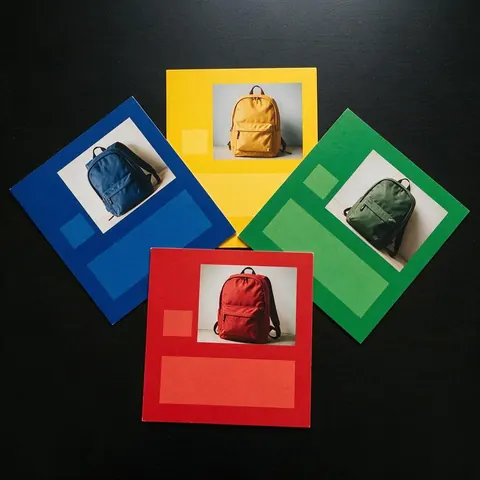
Turn a product photo and a short brief into three to five carousel cards in one style: the hook on card 1, one benefit per card, the offer and CTA button last. Every card downloads as its own image.
- Sunscreen color pop motion

- French press 2D motion

- Leggings set product showcase

Made in Marketing Studio · Seedream 5.0 Pro + Wan 3.0
- 3, 4 or 5 cards
- One consistent style
- Your words, spelled exactly
- No watermark
Updated by the Kenerate AI team
On this page
Quick answer
Updated
What is an AI carousel generator?
An AI carousel generator writes and designs a set of swipeable social cards from one brief. In Kenerate AI's Marketing Studio, the Carousel set style makes three to five cards in one look from your product photo, hook first and CTA last, on Seedream 5.0 Pro or GPT Image 2. Each card downloads as a watermark-free image.
Key facts
- Style
- Posters › Carousel set
- Cards
- 3, 4 or 5 per set
- Image models
- Seedream 5.0 Pro (default) · GPT Image 2 for text
- Output
- One image per card, square by default
- Not included
- PDF export, auto-posting
- Access
- Paid plan or one-time pack · no subscription required
Ad showcase
5 ad videos made with Kenerate AI
Short ads of fictional, unbranded products: each starts as a Seedream 5.0 Pro frame and is animated with Wan 3.0. Open one to see the prompt and the Marketing Studio style it matches.
Real results
Made with Kenerate AI
Which style to use
Which Marketing Studio style to use for a carousel
The Carousel set is the main tool. These styles fill the gaps around it.
Carousel set
Three to five cards in one style: hook, benefits, offer and CTA. Start from the Benefit Carousel template to see the layout.
Static banner
A single card with one message, a headline and a CTA button, for a cover image or a one-card post.
Social proof
A grid of candid scenes with your product, without invented ratings or quotes, for a proof card in the middle of the set.
Studio white
A clean product image with no copy, to use as a plain card between designed ones.
How to
How to make an AI Instagram carousel in 4 steps
From a product photo to a set of cards.
- Time needed
- Steps
- 4 steps
Step 1
Add your product
Open the Marketing Studio, choose Image, pick Posters › Carousel set and upload your product photo.
Step 2
Write the brief
The hook for card 1, one benefit per line for the middle cards, the offer and CTA last. Leave a field empty and the writer fills it in.
Step 3
Pick the cards and model
Choose three, four or five cards and an image model: Seedream 5.0 Pro by default, or GPT Image 2 when the cards carry more text.
Step 4
Generate and post
Download each card and upload the set in order on Instagram, LinkedIn or Facebook.
See it in the app

Open Marketing Studio and pick Image for product shots and posters, or Video for UGC and motion ads.


Watch the tour · 2:10
75 templates, your product, styles, image & video ads, every format, CTA & chat
Chapters
AI LinkedIn carousel generator and other uses
Who uses a carousel set, and how.
LinkedIn posts
Turn one lesson or framework into a short card set for a LinkedIn multi-image post.
Instagram product carousels
Show a product one benefit per card, with your product photo as the reference on every card.
Facebook carousel ads
Use the cards as the images of a carousel ad, or as a mockup for a client before the ad runs.
Agency social work
Make client sets in one style each month and change the words per client.
FAQ
AI carousel generator questions
What is an AI carousel generator?
An AI carousel generator is a tool that writes and designs a set of swipeable social cards from one brief. In Kenerate AI's Marketing Studio, the Carousel set style in Posters makes three, four or five cards in one consistent look from your product photo: the hook first, one benefit per card, and the offer and CTA button last.
Link to this answerCan I use it as an AI Instagram carousel generator?
Yes. Each card downloads as its own watermark-free image, square by default, so you can upload the set as an Instagram carousel in the right order. Card 1 carries the hook that stops the scroll. The studio does not post for you or schedule posts; you upload the cards in Instagram or in the scheduler you already use.
Link to this answerDoes it work as an AI LinkedIn carousel generator?
Yes, as a multi-image post. Download the three to five cards and add them to a LinkedIn post as images. Kenerate AI does not export a multi-page PDF document, so if you want LinkedIn's document-style carousel, combine the downloaded cards into a PDF in another tool before you upload them.
Link to this answerCan I make a Facebook carousel ad mockup?
Yes. Make a Carousel set for the product you advertise, then use the cards as the images of a Facebook or Instagram carousel ad, or to show a client how the ad will look before it runs. Write the headline and CTA yourself so the words match your offer, and check every card before you upload it to your ad manager.
Link to this answerHow many cards can a carousel have?
A Carousel set has three, four or five cards. Card 1 is the hook, the middle cards carry one benefit each, and the last card holds the offer and a CTA button. For a longer story, make a second set in the same style and post them together, or split the topic into two carousels a few days apart.
Link to this answerIs there a free AI carousel generator?
Not for the Carousel set: the Marketing Studio needs a paid plan or a one-time credit pack, and free accounts can't run it. No subscription is required. A free account can still start in the Image Studio on the free models, for example to try a single cover image, before you unlock the studio for full card sets.
Link to this answerIn depth
AI Carousel Generator, explained
What the carousel generator does not do
It makes the card images and the words you approve. It does not post, schedule or measure results, and it does not export a PDF. Every card is an image you download and upload yourself.
The studio never adds ratings, review counts or claims you didn't write, so check each card's words before you post.


Create your first carousel set
Marketing Studio needs a paid plan or a one-time credit pack. No subscription required, no watermark.
Tried it? Tell us how it went