



Skip to content
LTX 2.5 · LTX 2.3 · LTX 2 · Lightricks · open weights

LTX 2.3 & 2.5 — Lightricks' open video models

Lightricks' LTX-2 models are open-weight video models that run up to 20 seconds per clip. Run LTX 2.5 (up to 4K), LTX 2.3 and LTX 2 in the browser — no 80 GB GPU needed.

  • Up to 20 s
  • Up to 4K (2.5)
  • Open weights
  • No GPU needed
Longest clip
20 s
Top resolution
4K · 2.5
Open weights
Yes
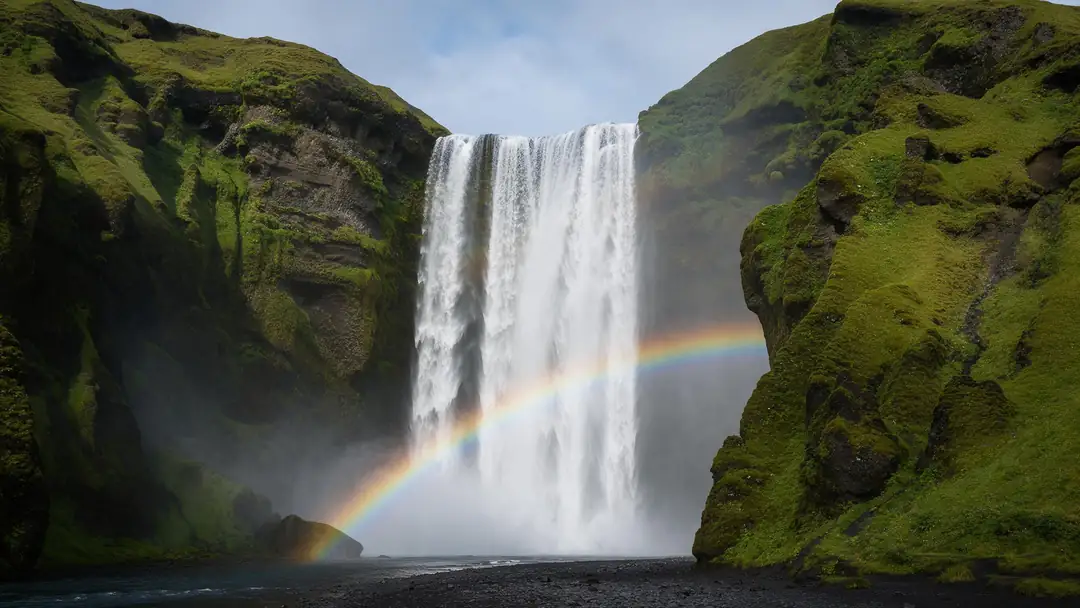
Iceland waterfall
Real clip 1 / 5

Nature

Iceland waterfall

Water thunders over the cliff, spray drifts and the rainbow shimmers, slow push-in

LTX 2.3 · 5 s · 720p · with soundAnimate

Quick answer

LTX is Lightricks' family of video models. LTX-2 (announced October 2025, fully open-sourced in January 2026) generates synchronised audio and video; LTX-2.3 (March 2026) added a redesigned VAE and native portrait up to 1080×1920; LTX-2.5 (August 2026) added multi-shot with a consistent character and voice. The full model needs an 80 GB+ GPU to run locally. In Kenerate's studio you can run LTX 2.5 (5–20 s, up to 4K, start and end frames), LTX 2.3 (5–20 s, up to 1080p, extend) and LTX 2 — no GPU. The clips here are real LTX 2.3 outputs.

Updated 27 September 2026 · specs read from Kenerate's code

  • Longest clip20 s
  • Top resolution4K · 2.5
  • Open weightsYes
  • Local GPU80 GB+ for full model

Real demo

LTX 2.3 vs Wan 3 — same image, same prompt

Switch between the two and turn the sound on. Same start image and motion prompt, two models.

  • LTX 2.3. LTX 2.3 image to video, 5 s at 720p.
  • Wan 3. Wan 3 image to video, 5 s at 720p with sound.

Both are unedited outputs from Kenerate's video studio.

Try LTX 2.3

Short answers

What people ask first

  • What is LTX Video?

    Lightricks' family of open-weight video models: LTX-Video, LTX-2 (with audio), LTX-2.3 and LTX-2.5.

  • Is LTX-2 open source?

    LTX-2 was fully open-sourced — code, weights and trainer — in January 2026, under Lightricks' own LTX model licence (not Apache 2.0).

  • Can LTX-2 do image to video?

    Yes — LTX 2.5, 2.3 and 2 all do image to video; LTX 2.5 also takes an end frame.

  • How long can LTX clips be?

    Up to 20 seconds per generation; LTX 2.3 clips can be extended.

Real clips

Real LTX 2.3 clips

Five LTX 2.3 image-to-video clips (5 s, 720p), each from a Seedream 5.0 Pro still.

Real LTX 2.3 clips (5 s, 720p). Open one to copy both prompts.

Start image for Iceland waterfall
Result · start image top right

How it works

An LTX clip in three steps

Start image, a flowing prompt, LTX 2.3.

  1. 01

    Start image

    Seedream 5.0 Pro at 2K — or upload your own photo.

  2. 02

    Motion prompt

    Water thunders over the cliff, spray drifts and the rainbow shimmers, slow push-in

  3. 03

    LTX 2.3

    LTX 2.3 · 5 s · 720p · with sound. The clip on the left is the real result.

Animate this scene

Tips

Prompting LTX like Lightricks suggests

From the LTX prompting guide.

  • Write 4–8 flowing, present-tense sentences for one shot.
  • Say how and when the camera moves, relative to the subject.
  • Put spoken lines in quotes and give language and delivery.
  • Avoid long on-screen text and crowded frames.
  • Don't reuse prompts written for other models unchanged.
  • Keep it to one chronological paragraph.

Step by step

How to use the ltx 2.3 video generator

  1. Step 1: Open the video studio

    Pick LTX 2.5, LTX 2.3 or LTX 2.
  2. Step 2: Start from text or an image

    LTX 2.5 also takes an end frame.
  3. Step 3: Write one flowing paragraph

    Lightricks suggests 4–8 present-tense sentences for a single shot.
  4. Step 4: Pick 5–20 s and a resolution

    Up to 4K on LTX 2.5, 1080p on 2.3; extend 2.3 clips by up to 20 s.

Engines

LTX versions in the studio

From the studio's own model list.

  • Lightricks

    LTX 2.5Newest

    4K and long clips

    You give it
    Text or image (+ end frame)
    You get
    5–20 s · 720p–4K
    Open LTX 2.5
  • Lightricks

    LTX 2.3Used here

    Long clips; extend by up to 20 s

    You give it
    Text or image
    You get
    5–20 s · 480p–1080p · extend
    Open LTX 2.3
  • Lightricks

    LTX 2

    The first LTX-2 model

    You give it
    Text or image
    You get
    5–20 s · 480p–1080p
    Open LTX 2

The clips above were made with LTX 2.3; the comparison uses Wan 3.

Every clip on this page started as one still image. Make yours, then animate it.

In depth

LTX 2.3 Video Generator, explained

What the models can do, how to prompt them, and what isn't allowed.

LTX, version by version

LTX-Video 0.9 (November 2024) was the first; LTX-2 (October 2025) added synchronised audio and native 4K and went fully open in January 2026; LTX-2.3 (March 2026) brought a new VAE and native portrait video; LTX-2.5 (August 2026) added multi-shot with consistent characters.

Sources

    FAQ

    LTX 2.3 Video Generator questions

    7 questions

    Still stuck?

    A real person answers — usually within a day.

    01

    What is LTX Video?

    Lightricks' family of open-weight video models: LTX-Video, LTX-2 (with audio), LTX-2.3 and LTX-2.5.

    02

    Is LTX-2 open source?

    LTX-2 was fully open-sourced — code, weights and trainer — in January 2026, under Lightricks' own LTX model licence (not Apache 2.0).

    03

    Can LTX-2 do image to video?

    Yes — LTX 2.5, 2.3 and 2 all do image to video; LTX 2.5 also takes an end frame.

    04

    How long can LTX clips be?

    Up to 20 seconds per generation; LTX 2.3 clips can be extended.

    05

    What GPU do I need for LTX-2?

    The full model needs 80 GB+ of VRAM; distilled and fp8 versions fit 32 GB GPUs. In Kenerate's studio you need no GPU.

    06

    How do I prompt LTX-2?

    One flowing paragraph of 4–8 present-tense sentences, with camera moves described relative to the subject, per Lightricks' guide.

    07

    What's new in LTX 2.5?

    Multi-shot generation with a consistent character and voice across cuts (August 2026).

    See more of Kenerate AI in your Google resultsAdd kenerateai.com as a preferred source — Google shows more from your preferred sources in Top Stories and AI answers.

    Explore

    Every Kenerate video tool

    Generators, tools, models and guides — one studio, one credit balance.

    Written by the Kenerate AI team

    We build and run Kenerate's video studio. Every clip here is a real, unedited Wan 3 output (5 s, 720p) and every start image a real Seedream 5.0 Pro output; model specs and limits were read from the app's code; facts about other tools link to their own pages. Last updated 27 September 2026. Corrections: hello@kenerateai.com.

    Sources

    Ready when you are

    Try the ltx 2.3 video generator

    One studio for images and video.

    • 25 free credits
    • No watermark
    • Credits never expire