

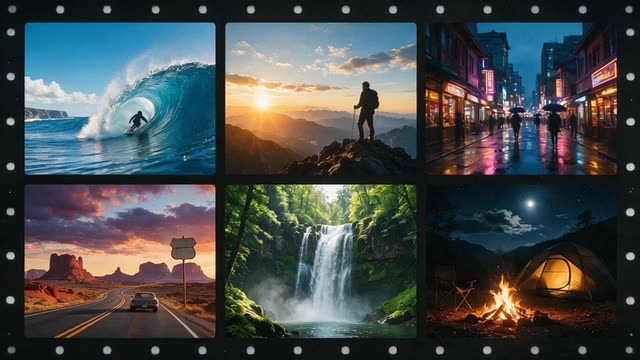
Kenerate Agent montage · video editor
AI Video Montage Maker Free Join Your Clips with Music, Voiceover and Fades
AI Video Montage Maker Free to start on Kenerate AI: ask Kenerate Agent to join 2 to 20 clips into one video of up to 3 minutes, fitted to 16:9, 9:16 or 1:1, with background music, a voiceover and soft fades or hard cuts. Use your own clips or generate new ones, and score it with Ken Music.
- Clips
- 2–20
- Length
- Up to 3 minutes
- Frames
- 16:9 · 9:16 · 1:1
- Audio
- Music + voiceover
- Transitions
- Fade or cut
- Free to start
- No Watermarks
- Image and video models
- No subscription required
Updated by the Kenerate AI team
On this page
Real results
AI video montage maker free — examples
Generated with the AI models in Kenerate. No watermarks.
How the AI montage maker works
Up to 20 clips
Kenerate Agent joins 2–20 finished clips in the order you give, up to 3 minutes in total, with optional trims.
One frame for every clip
Every clip is fitted to one frame — 16:9, 9:16 or 1:1 — so mixed sources play cleanly together.
Music and voiceover
Mix in a Ken Music track and a voiceover; the music is lowered under the voice.
Fades or cuts
Pick soft fades for a highlight reel or hard cuts for fast edits.
Fine edits on a timeline
For exact timing, the video editor has separate tracks for video, audio and text.
Generate missing shots
Need more footage? Generate clips in the Video Studio with a credit pack, then add them to the montage.
Comparison
Kenerate Agent montage vs the timeline editor
A fast first cut by chat, or exact control on a timeline.
| Feature | Kenerate Agent | Video editor timeline |
|---|---|---|
| How you work | Ask in chat; it joins the clips | Drag clips on tracks yourself |
| Clips | 2–20, up to 3 minutes | Your own arrangement |
| Audio | Music under an optional voiceover | Separate audio track |
| Text | Add Auto Subtitles afterwards | Text and subtitles track |
| Best for | Quick highlight reels and recaps | Exact timing and placement |
How it works
How it works in the app
Step 1
Describe the scene
Open Video Studio in Text to Video mode and write the shot — subject, action, camera move and light.
Step 2
Or start from an image
Switch to Image to Video and add a start frame; an end frame is optional.
Step 3
Pick a video model
Open the model card to choose the video model and version that fits your shot.
Step 4
Set ratio and length, then Create
Pick the aspect ratio and clip length, turn audio on or off, and press Create.
See it in the app

Open Video Studio in Text to Video mode and write the shot — subject, action, camera move and light.


FAQ
Frequently Asked Questions
How do I make a video montage with AI?
Upload your clips to Kenerate Agent — or generate them first — and ask for a montage. Say the order, the frame (16:9, 9:16 or 1:1), fades or cuts, and add a music track or a voiceover. The agent joins 2 to 20 clips into one video of up to 3 minutes and saves it to your Video Studio history.
Link to this answerIs the AI video montage maker free?
Free to start. Joining clips with Kenerate Agent uses credits, and a new Kenerate AI account starts with free credits. Generating new clips in the Video Studio needs a one-time credit pack. There is no subscription required, credits never expire, and the finished montage downloads without a watermark.
Link to this answerCan I add music to my montage?
Yes. Make a track in the Music Studio with Ken Music, or use one you own, and Kenerate Agent mixes it under the clips. Add a voiceover and the music is lowered under the voice. Without music, the clips can keep their own sound instead.
Link to this answerCan I make a vertical montage for Reels or TikTok?
Yes. Ask Kenerate Agent for a 9:16 frame and every clip is fitted to it, whatever its original shape. Keep each clip short for social feeds, then run the finished montage through Auto Subtitles if you want animated captions. Downloads have no watermark.
Link to this answerIs there an AI video editor for montages with more control?
Yes. The Kenerate video editor gives you separate video, audio and text tracks on a timeline, so you can trim each clip, place captions and set exactly where the music starts. Use the agent for a fast first cut and the editor for the final polish.
Link to this answerIn depth
AI Video Montage Maker Free, explained
AI video editor montage: from clips to a finished reel
Pick the story first. A montage works when the clips follow one idea — a trip, a product launch, a season of games. Put the strongest shot first and the most emotional one last.
Let the music set the pace. Short clips and hard cuts suit fast tracks; longer clips with soft fades suit slow ones. Ken Music makes tracks of up to about three minutes, and ElevenLabs Music in the Music Studio sets an exact length up to 10 minutes.
Finish with captions. Auto Subtitles burns animated captions into videos up to 4 minutes long, so a spoken recap or voiceover is readable with the sound off.

Make your montage
Free credits to start. No watermarks. No subscriptions.
Tried it? Tell us how it went