12 prompts to copy · real results · no chat history needed
ChatGPT Caricature Trend — the prompt, and how to make yours
The trend asked ChatGPT for “a caricature of me and my job based on everything you know about me”. Here's the prompt written out, real results for three jobs, and how to make yours from a photo — without handing over your chat history.
- The exact prompt
- Works from one photo
- OpenAI's GPT Image model
- No watermark
Updated by the Kenerate AI team
On this page
Quick answer
What is the ChatGPT caricature trend, and what's the prompt?
The ChatGPT caricature trend started in early February 2026: people asked ChatGPT to “create a caricature of me and my job based on everything you know about me”, and it drew them with a big head, a small body and props from their work and hobbies — often in a 3D animated-movie style. You can make the same picture from one photo by writing the job and hobbies into the prompt. On Kenerate AI it runs on GPT Image 2.5 Sunburst, OpenAI's image model.
Key facts
- Trend started
- Early February 2026
- Original prompt
- “…based on everything you know about me”
- What you need here
- One photo + your job and hobbies
- Model used
- GPT Image 2.5 Sunburst (OpenAI)
- Faces kept
- Yes, in all four tests
- Watermark
- None
Gallery
Three jobs, made with the trend prompt
Real GPT Image 2.5 Sunburst edits of two test photos, one try each. Open any one to copy the prompt.
Same prompt
One photo in, the trend out
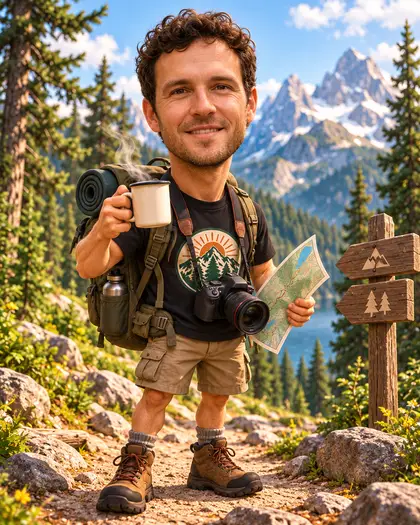
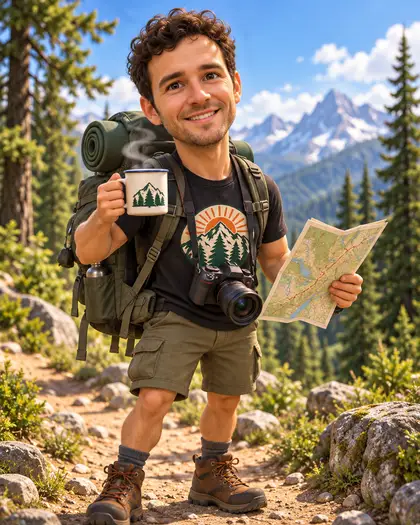
Our test photo, the trail-guide caricature, and a retry asking for a fully animated 3D face. The retry got smoother skin and bigger eyes, but not all the way to a cartoon face.
PromptCreate a caricature of this man and his job: he is a mountain trail guide who loves coffee and photography. Keep his face recognisable, big head on a small body, 3D animated-movie style.
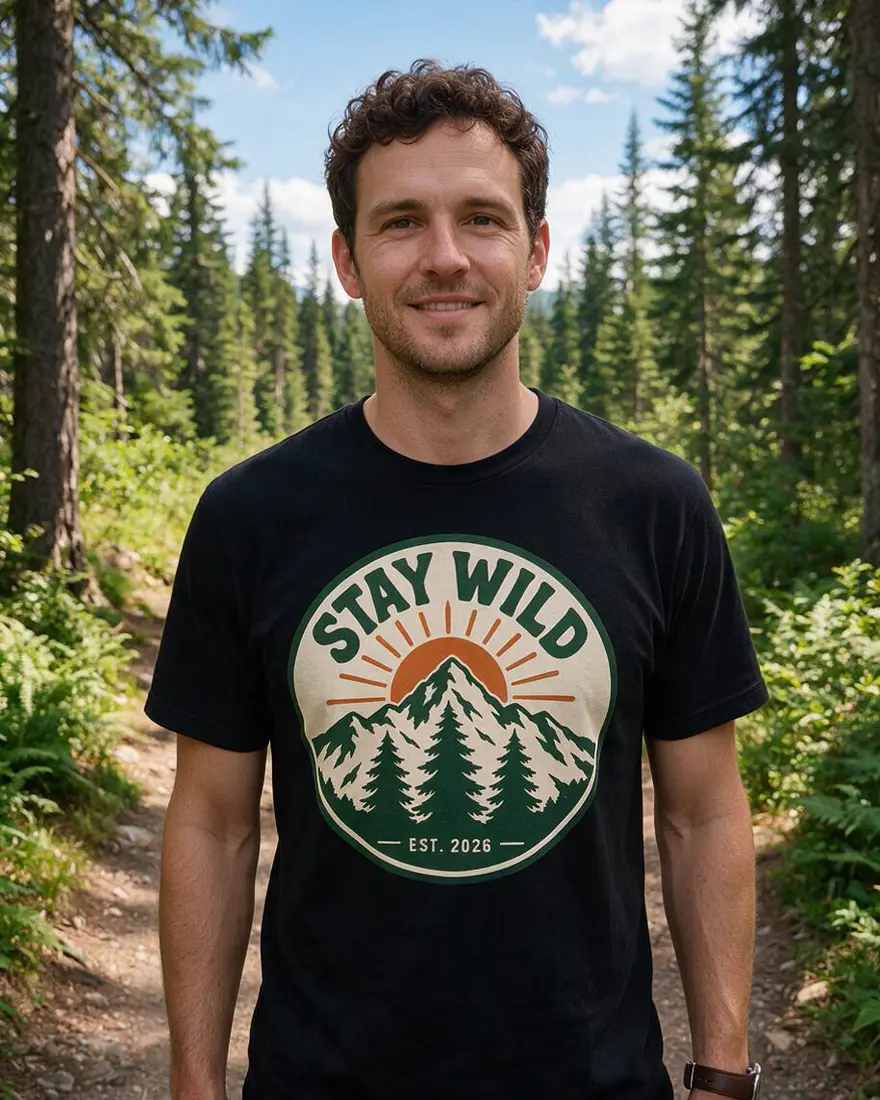 PhotoInput
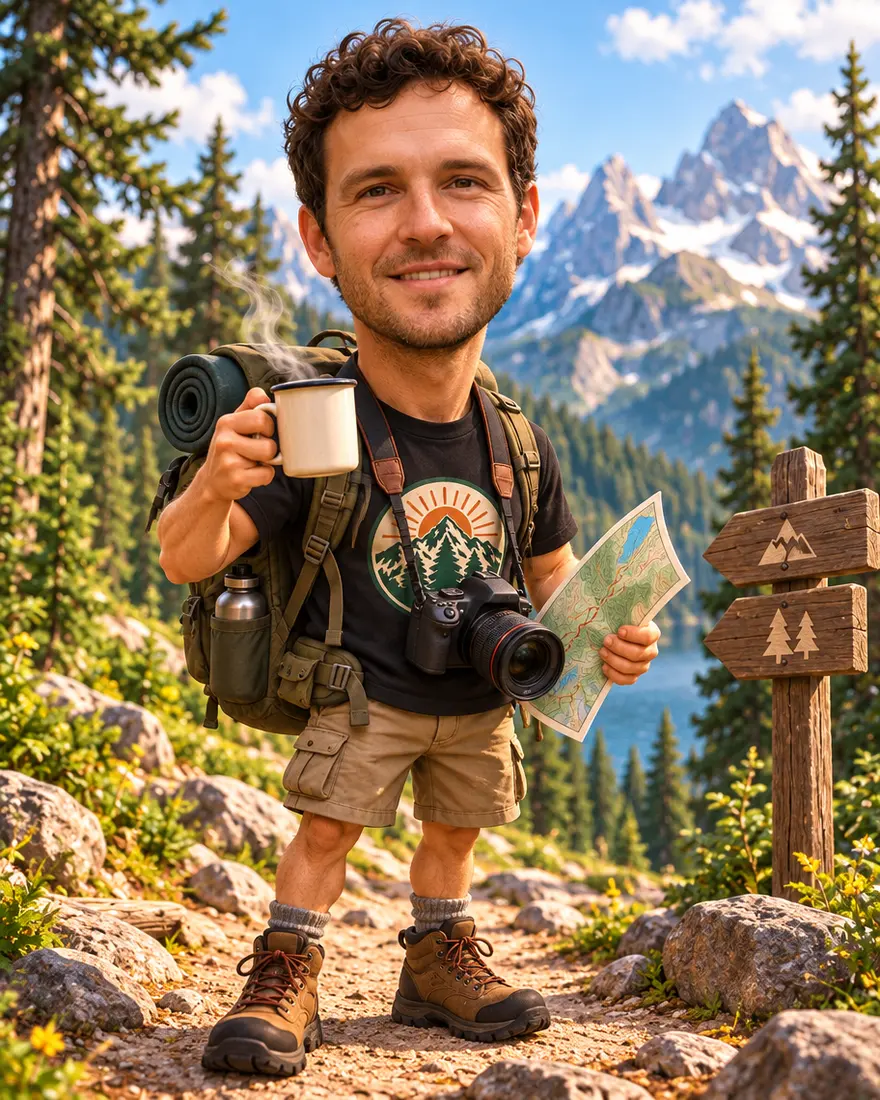 3D movie styleFirst try
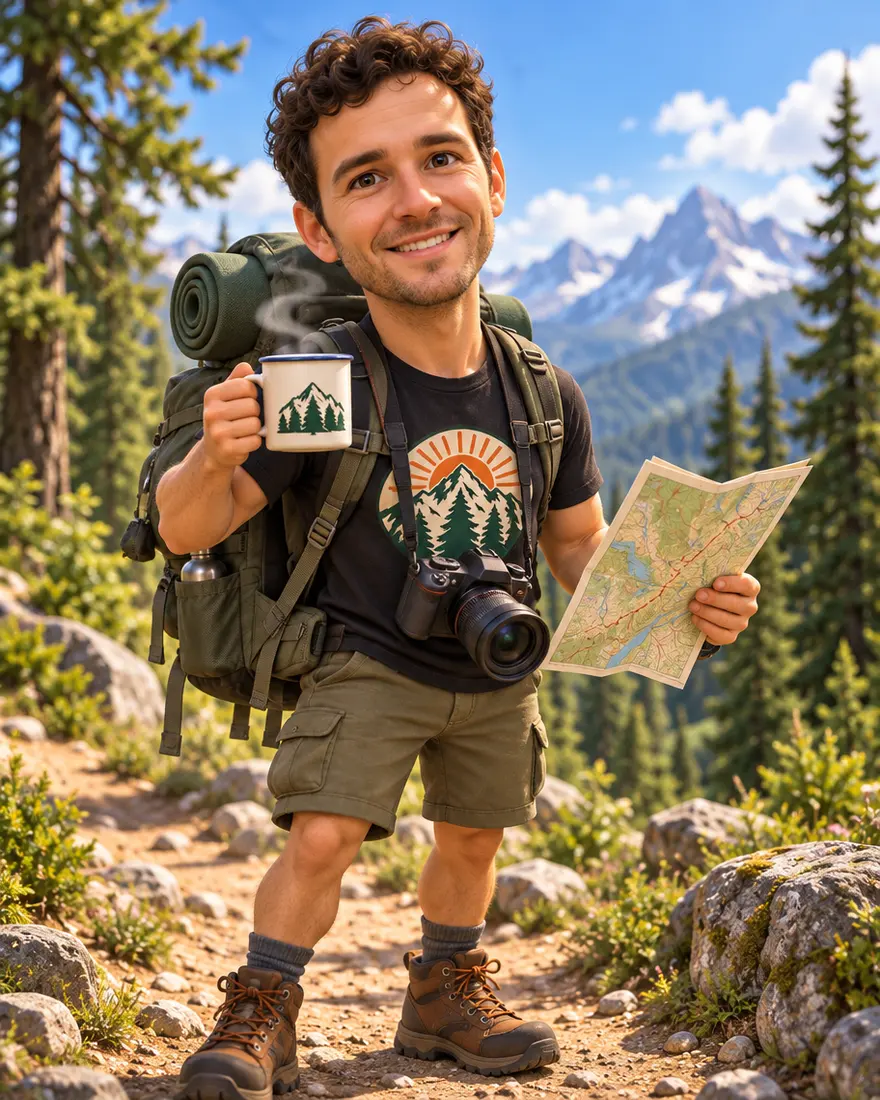 “Fully animated 3D face”Retry
How to
How to use the ChatGPT caricature
- Time needed
- Steps
- 4 steps
Step 1
Add your photo
In /app/image, upload a clear photo as a reference. Sign in free for starter credits.
Step 2
Pick GPT Image 2.5 Sunburst
OpenAI's image model — the same family behind ChatGPT's pictures.
Step 3
Paste the prompt with your details
“Create a caricature of me and my job: I'm a [job] who loves [hobby] and [hobby]. Big head on a small body, 3D animated-movie style.”
Step 4
Download and share
Regenerate if a detail is off, then download without a watermark.
See it in the app

Open Image Studio and type what you want to see — subject, style, lighting and mood.


Watch the tour · 1:23
Prompts, styles, references, edit, Arena & chat
Chapters
Tips
Make the trend prompt work for you
What worked in our tests.
Attach one clear, front-facing photo and say “keep the face recognisable”.
Write the job yourself: “a hospital nurse”, “a software engineer”, “a mountain trail guide”.
Add two hobbies as props — cats, coffee, hiking boots, a camera.
Pick a style: “3D animated-movie style” for the trend look, or “flat 2D cartoon”.
Expect a near-photo face in the 3D look; for a full animated face, try the Pixar filter.
Check the picture for extras the model adds — ours got a dog nobody asked for.
Models
Models for the caricature trend
What each model is good at. Open any one straight in the generator.
OpenAI
GPT Image 2.5 Sunburst
- Reference images
- Up to 16
- Output
- 1K–4K
Open GPT Image 2.5 SunburstBest for
Made all four caricatures
Google
Nano Banana 2.1
- Free plan
FAQ
ChatGPT Caricature questions
9 questions
What is the ChatGPT caricature trend?
A social-media trend that took off in early February 2026. People asked ChatGPT for “a caricature of me and my job based on everything you know about me”. ChatGPT used what it remembered from past chats to add the job and hobbies, and drew a big-headed caricature — often in a 3D animated-movie style.
Link to this answerWhat is the ChatGPT caricature prompt?
The original is: “Create a caricature of me and my job based on everything you know about me.” With a photo and without chat history, write the facts in: “Create a caricature of me and my job: I'm a hospital nurse who loves cats. Keep my face recognisable, big head on a small body, 3D animated-movie style.”
Link to this answerWhat are the best ChatGPT caricature prompts?
Start from the trend prompt and write your details in: “Create a caricature of me and my job from this photo: I'm a [job] who loves [hobby] and [hobby]. Keep my face recognisable, big head on a small body, 3D animated-movie style.” Then swap the setting (your desk, the office party, your hobby) or the style line (2D cartoon, pencil sketch, watercolour). Twelve ready-made versions are listed on this page.
Link to this answerHow do I make an office party or team caricature?
For a party, add the props to the prompt: party hat, confetti, cake, plus one work tool. For a team, attach one photo per person (GPT Image 2.5 Sunburst takes up to 16 references), name each person's role and prop, and ask for one shared background. Only use photos of colleagues who have agreed.
Link to this answerCan I do the ChatGPT caricature without ChatGPT?
Yes. Upload a photo in Kenerate's Image Studio, pick GPT Image 2.5 Sunburst — OpenAI's image model — and use the prompt with your job and hobbies written in. Our three test jobs all came back with the right props and a recognisable face.
Link to this answerWhy does my caricature have a real-looking face?
In our tests, GPT Image 2.5 kept a near-photo face on a cartoon body in the 3D movie look — even when we asked for “a fully animated 3D face”, the retry only got partway there. For a full animated-movie face, the Pixar filter is the better tool.
Link to this answerIs it free?
Free to start. A new Kenerate account gets starter credits on sign-up, which also work on Qwen Image 3.0, a free-plan model. GPT Image 2.5 Sunburst uses credits from one-time packs that never expire — no subscription. Downloads carry no watermark.
Link to this answerIs the ChatGPT caricature trend safe?
The main worry raised during the trend was privacy: asking a chatbot to use “everything you know about me” rewards sharing more personal details. Writing the job and hobbies yourself means you decide exactly what goes in. Upload only your own photo, or one you have permission to use.
Link to this answerIs this ChatGPT?
No. Kenerate AI isn't affiliated with OpenAI. It runs OpenAI's GPT Image model alongside others in its own Image Studio, so you can make the same kind of caricature from a photo without a ChatGPT account.
Link to this answerIn depth
ChatGPT Caricature, explained
What works, what to avoid, and how to pick a model.
On this page
12 ChatGPT caricature prompts to copy
Attach one clear photo of yourself, paste a prompt and fill in the brackets. The style lines (2D, pencil, watercolour) replace the last sentence of any job prompt. Use your own photo, or one you have permission to use — never a celebrity or someone who hasn't agreed.
- The original: “Create a caricature of me and my job based on everything you know about me.”
- Photo + job (no chat history): “Create a caricature of me and my job from this photo: I'm a [job] who loves [hobby] and [hobby]. Keep my face recognisable, big head on a small body, 3D animated-movie style, bright colours. No text.”
- Big-head classic: “Turn this photo into a classic caricature with an oversized head, a tiny body and gently exaggerated smile and eyebrows. Keep my face recognisable. Plain pastel background.”
- At my desk: “Create a caricature of me at work: I'm a [job] at my [desk / ward / kitchen / classroom / workshop], surrounded by my [three tools]. Big head, small body, 3D animated-movie style.”
- Office party: “Create a caricature of me at the office party: party hat, confetti, a slice of cake in one hand and my laptop under my arm. I work as a [job]. Big head, small body, bright 3D cartoon style.”
- Team photo: attach one photo per person, then “Create a group caricature of our [team name] team. [Name 1] is the [role] holding [prop]; [Name 2] is the [role] with [prop]. Keep each face recognisable, big heads, small bodies, one shared office background.”
- Leaving or birthday card: “Create a caricature of my colleague from this photo as a [farewell / birthday] card: they're a [job] who always [habit]. Big head, small body, friendly cartoon style, leave space at the top for a message.”
- Me and my hobby: “Create a caricature of me doing my favourite hobby, [hobby], with all the gear. Big head on a small body, action pose, 3D animated-movie style.”
- 2D cartoon: “…flat 2D cartoon style with bold black outlines and bright flat colours.”
- Pencil sketch: “…black-and-white pencil caricature like a street artist's sketch, cross-hatched shading, white paper background.”
- Watercolour: “…loose watercolour caricature with soft washes and ink lines, like a seaside portrait artist.”
- LinkedIn-friendly: “Create a polite caricature of me for a work profile: I'm a [job]. Only slightly bigger head, smart clothes, my laptop and coffee, clean light-grey background, no text.”
Where the trend came from
In the first week of February 2026, people started posting ChatGPT caricatures of themselves at work, surrounded by the tools of their job and the things they love. The hook was the prompt's last words, “based on everything you know about me”: ChatGPT filled in the details from its memory of past chats, so the picture felt personal.
It followed the Ghibli-style portrait wave of 2025, and the look settled on a big head, a small body and a bright 3D animated-movie style, though 2D cartoon and sketch versions circulated too.
What we got
Four tries on GPT Image 2.5 Sunburst, one each:
- Trail guide (3D): every prop right — backpack, coffee, camera, map — with a near-photo face.
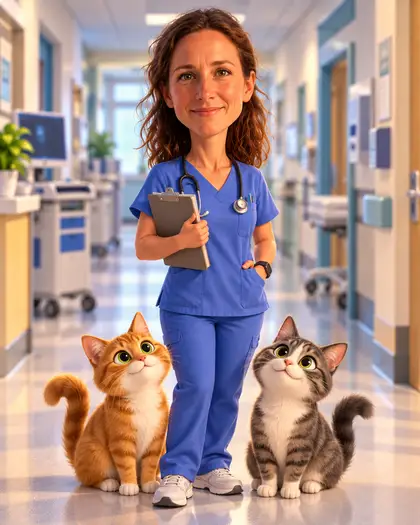
- Nurse who loves cats (3D): scrubs, stethoscope, clipboard and two animated cats; her hair shifted towards auburn.
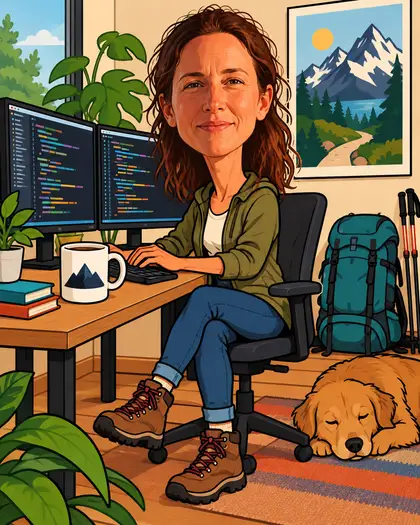
- Software engineer who hikes (2D): a clean flat cartoon with code screens, boots, backpack and a mountain poster — plus a dog we didn't ask for.
- Retry with “fully animated 3D face”: smoother and more stylised, but still not a full cartoon face.