Most people who get a flat AI clip blame the tool. Usually the prompt is the problem: it describes a whole film when the clip only lasts 5 seconds. A good video prompt describes one moment.
This guide gives you four AI video prompts examples we made in a single morning, word for word, with the reason each line is there. Copy them, swap the subject and you have your own clip.
All four were made on Kenerate AI the same way: first a picture, then one sentence about what moves.
What makes a video prompt work
A good video prompt has four parts and nothing else: one subject action, one camera move, a mood or setting detail, and the sounds you want to hear. When you start from a picture, you can skip the scene description, because the picture already holds it.
Here is the pattern we use for every clip:
[Subject] does [one action], [one small detail moves], [one camera move]. Sound: [2 or 3 real sounds].
The rule behind it is simple. Five seconds is enough time for one thing to happen. Ask for three things and the model rushes all of them, which is where warped hands and melting objects come from.
Example 1: a sports shot with real speed
Sports clips need one direction of travel. Here is the picture prompt:
Cinematic photograph of a surfer crouched low inside a huge turquoise barrel wave at sunrise, seen from the front inside the tube, wearing a full black wetsuit, one hand trailing along the glassy wave wall, golden sunlight glowing through the curling water, fine spray in the air, sharp subject, shallow depth of field, vertical composition, realistic sports photography. No text.
And the motion prompt:
The surfer glides forward through the barrel, one hand trailing along the wave wall, spray flying, the wave curls and glows gold, slow tracking shot moving backward with him. Sound: deep roar of the wave, rushing water, spray hissing.
Why it works:
- "Seen from the front inside the tube" puts the face in frame, so the viewer has someone to follow.
- "Slow tracking shot moving backward with him" matches the camera to the subject, which makes the speed feel real.
- "Golden sunlight glowing through the curling water" gives the wave something to do as it moves. Light passing through water is what catches the eye.
Example 2: a satisfying sound clip
Satisfying clips live or die on sound, so the sound gets as much attention as the picture. Here is the picture prompt:
Extreme macro photograph of a hand-blown glass kiwi fruit on a dark walnut cutting board, the fruit fully transparent crystal with green and amber glass layers and tiny black glass seeds, a sharp steel chef knife resting on top about to slice it, one thin clean cut started, soft studio side light, crisp reflections, black background, vertical composition, ultra detailed product photography. No hands, no text.
And the motion prompt:
The steel knife presses down and slices slowly through the glass kiwi, a thin transparent slice tips over and lands on the board with a clean clink, light refracts through the glass, locked macro shot with a very slow push-in. Sound: crisp crunchy glass cracking, a soft clink on wood, quiet room, satisfying ASMR.
Why it works:
- "No hands" removes the hardest thing to animate at macro distance.
- "Locked macro shot" keeps the frame still, so all the attention goes to the cut.
- "Quiet room" matters as much as the crunch. It tells the model to leave silence around the sound.
An impossible material is the whole trick here. Glass fruit, soap fruit and crystal bread all look strange enough to stop a thumb, and the format has been a favourite for satisfying clips since 2025.
Example 3: a festive product ad from a phone photo
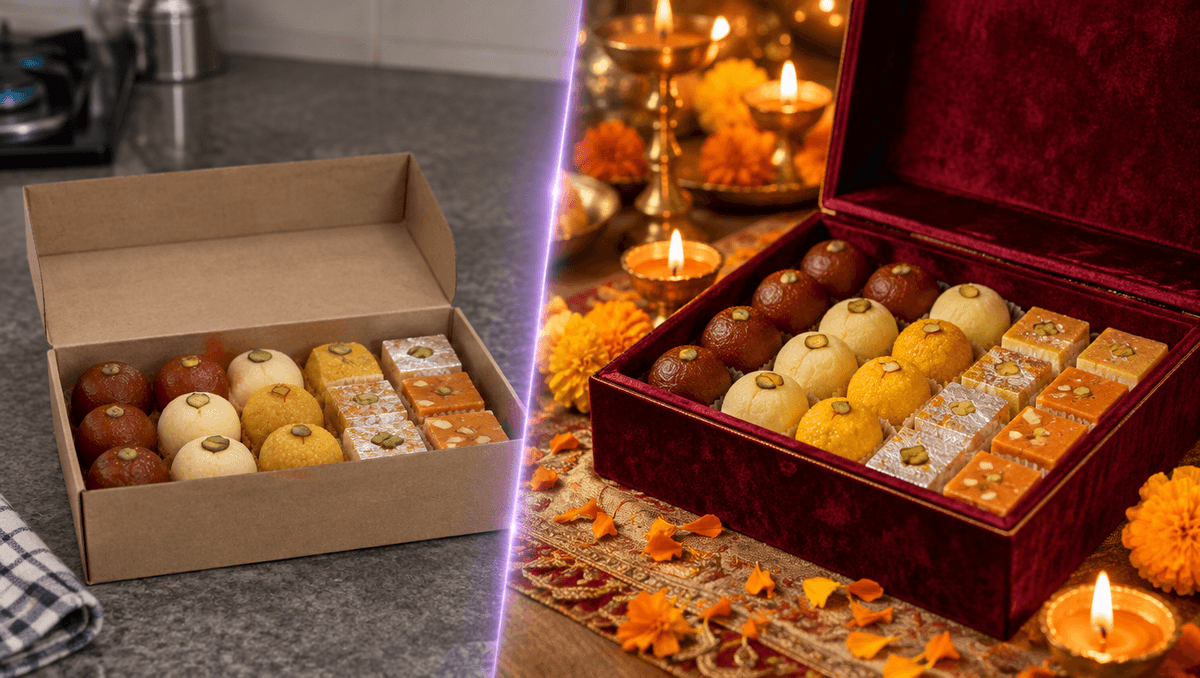
This one is for small shops. It starts with an ordinary photo of a box of sweets on a kitchen counter, and the first step is an edit, not a new picture. Here is the edit prompt:
Turn this into a premium festive Diwali shop ad photo. Keep the exact same sweets and their arrangement unchanged. Replace the cardboard box with an elegant deep maroon velvet-lined gift box with a thin gold edge, on dark velvet cloth. Add small lit brass diyas and a few marigold petals around it, warm golden bokeh string lights in the background, rich low-key studio light. Square framing, no text, no logos.
And the motion prompt:
The diya flames flicker gently, warm string lights twinkle in the background, a marigold petal drifts down onto the velvet, the sweets stay still and perfect, slow cinematic push-in toward the box. Sound: soft crackle of flames, faint temple bells far away, warm festive evening ambience.
Why it works:
- "Keep the exact same sweets and their arrangement unchanged" protects your actual product. Without that line you get sweets that look nice and aren't yours.
- "The sweets stay still and perfect" does the same job in the video step. The setting moves and the product doesn't.
- "Slow cinematic push-in" is the safest camera move for products. It adds life without changing the shape of anything.
Swap the sweets for candles, jewellery or a gift hamper and the same two prompts still work. For Christmas, change the diyas to candles and the marigolds to pine and red berries.
Example 4: a poster with text that stays readable
Text is the first thing to break when a picture starts moving, so this prompt says directly that the words must hold still. The picture prompt names the exact words in quotes and keeps them short. Then the motion prompt:
The five glass tiles float gently up and down and softly pulse with violet light, the glow on the horizon breathes slowly, tiny stars twinkle, all text stays perfectly still and sharp, locked camera. Sound: soft airy synth shimmer, quiet.
Why it works:
- "All text stays perfectly still and sharp" is the most useful line in the prompt.
- "Locked camera" stops any zoom that would drag the letters with it.
- Small movements only. Floating, pulsing and twinkling all stay away from the words.
The fill-in template
Use these AI video prompts examples as a pattern, not a script. Fill in the blanks:
| Part | What to write | Example |
|---|---|---|
| Action | One thing the subject does | "a thin slice tips over" |
| Small detail | One thing that moves around it | "a marigold petal drifts down" |
| Camera | One move, or none | "slow push-in" |
| Protection | What must not change | "the sweets stay still" |
| Sound | 2 or 3 real sounds | "soft crackle, faint bells" |
Mistakes that ruin a clip
- Too many actions. Keep one per clip. If you want more, make a second clip and join them.
- Describing the picture again. When you start from an image, write only what changes.
- Two camera moves. A pan plus a zoom plus an orbit reads as a shaky mess in 5 seconds.
- Forgetting sound. Leave it out and you get whatever the model guesses. Name the sounds you want.
- Fast action near faces or hands. Slow it down, or frame the shot so hands stay out of it.
Settings we used
- Picture: one image prompt, vertical for Reels and square for the split screen.
- Video: image to video, 5 seconds, native sound on.
- Editing: a short title in the first 2 seconds and an end card. Nothing else.
More than 202,000 creators have made over a million images, videos and sounds on Kenerate AI. Pick the example closest to your idea, swap the subject and see what you get.