To make an AI skeleton video, write a one-line "what if" hook, turn it into a 5–8 scene script, generate one skeleton character as a vertical 9:16 image, animate each scene with an image-to-video model, then add narration and burned-in captions and join the clips in an editor. On Kenerate AI that is Image Studio → Video Studio (Wan 3.0 or Seedance 2.0) → Voice Studio → the Subtitles tool. A 30-second short is usually five or six 5-second clips under one voice track.
Updated 24 October 2026. Credit prices are taken from Kenerate's model config as of that date.
What is an AI skeleton video?
An AI skeleton video is a short vertical clip, usually 30–60 seconds, in which a stylised skeleton plays the main character. It became one of the busiest short-form formats of 2026 on TikTok, YouTube Shorts and Reels. Two styles dominate:
- Narrative journey. A skeleton in costume is dropped into a "what if" — ancient Egypt, the Ice Age, the last night on the Titanic — and the narrator talks to you: "What if you were born in ancient Rome?"
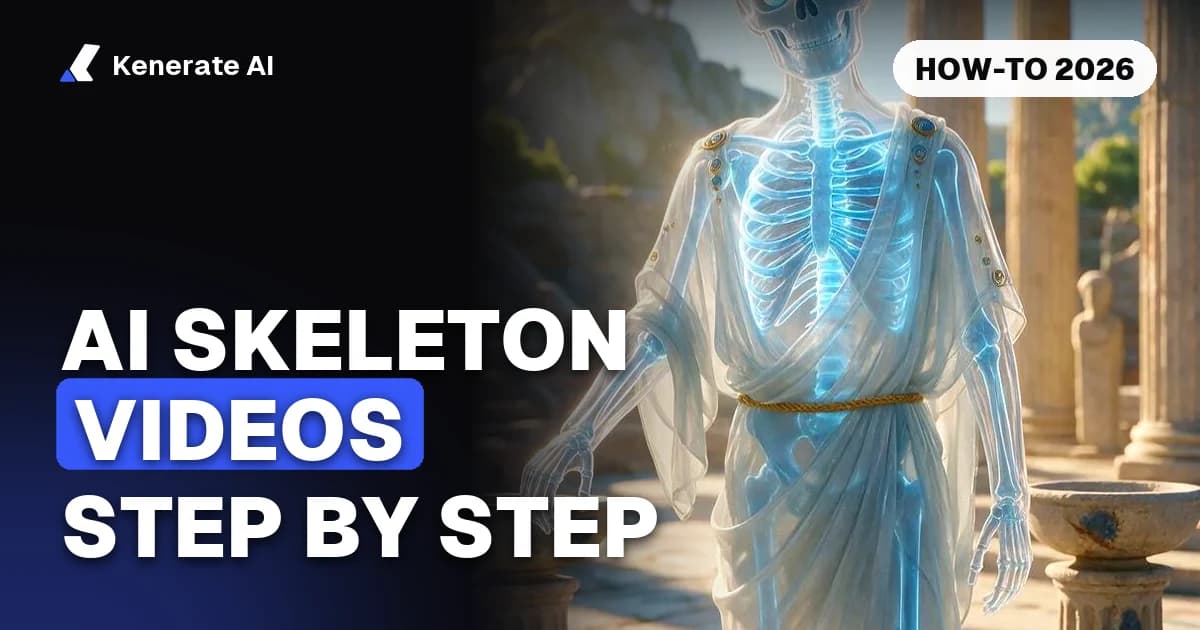
- Body journey. A translucent, glass-like body with a glowing X-ray skeleton explains what happens inside you: "What happens to your body if you stop sleeping?"
The skeleton works because it is faceless. It has no age, accent or likeness, so it can stand in for the viewer, and one character can carry an entire channel. GhostShorts' guide to the trend describes the narrative style as the viral lane and the body style as the calmer, educational one (GhostShorts).
What do you need before you start?
You need four things: a hook, a script, one character image and a plan for sound. Everything else is generation and editing.
| Piece | What it is | Tool on Kenerate | Typical cost (credits) |
|---|---|---|---|
| Hook + script | One "what if" line and 5–8 narration lines | Any chatbot, or write it yourself | 0 |
| Skeleton character | One 9:16 image you reuse in every scene | Image Studio · Seedream 5.0 Pro | 13.5 per image |
| Scene clips | 3–6 s of motion per scene | Video Studio · Wan 3.0 (480p) | 15 per second |
| Talking clips | Clips where the skeleton speaks a line | Video Studio · Seedance 2.0 (480p) | 36 per second |
| Narration | One voice track for the whole script | Voice Studio | Varies by voice model |
| Captions | Burned-in, high-contrast subtitles | Subtitles tool · 10 styles | See tool |
| Assembly | Joining clips, voice and music | Your own editor (CapCut, DaVinci, Premiere) | 0 |
Image and video prices are Kenerate's app prices as of 24 October 2026. Wan 3.0 costs 15 credits per second at 480p, 30 at 720p and 60 at 1080p. Seedance 2.0 costs 36 per second at 480p and 72 at 720p. Video generation needs a paid credit pack, and new accounts get 25 free credits for images (pricing).
How do you write a skeleton video script?
Write the script before you generate anything. Credits go into clips, and a clip for a scene you later cut is wasted.
Start with a hook that opens a loop
The first two or three seconds decide whether anyone keeps watching. Good hooks take something familiar and push it to an extreme or into another era:
- "What if you were raised by wolves?"
- "What happens to your body if you only drink coffee for a week?"
- "A day as a gladiator in ancient Rome."
- "What if you woke up on the Titanic's final night?"
- "Surviving one week on Mars."
AITuber's guide to the body-journey format recommends starting from an everyday habit and making the prompt specific, for example a fixed number of days without sleep rather than "not sleeping" (AITuber).
Use a five-beat structure
A structure that fits 30 seconds:
- Hook (0–3 s): the skeleton faces the camera and the narrator asks the question.
- Setup (3–9 s): where you are and what is at stake.
- Progression (9–18 s): time passes and things change ("After one day… after one week…").
- Action (18–25 s): the biggest moment, such as a battle, a storm or an organ giving up.
- Payoff (25–30 s): a reveal or a line aimed straight at the viewer.
For a 60-second body video, stretch the progression into more timeframes (one hour, one day, one week, one month). Allow about 6–7 seconds of narration per scene.
Write it in the second person
"You" carries the format. "You wake up in a stone hut. Your hands are bone. Somewhere outside, a horn sounds." Keep each line under about 15 words so it fits on screen as a caption.
How do you create the skeleton character?
Make one character image and reuse it. That keeps the same skeleton in every scene, which is what makes these videos look like a series and not a slideshow.
- Open Image Studio and pick Seedream 5.0 Pro (13.5 credits per image).
- Set the aspect ratio to 9:16.
- Describe the material, the outfit, the place and the mood, and add "not scary, no blood."
- Generate two or three variations and keep the one you would happily watch for a minute.
Two starter prompts, both used for the start frames on our AI skeleton video generator page:
Vertical 3D render of a friendly translucent glass-like human skeleton character with a soft blue X-ray glow inside a clear body outline, wearing a toga-style robe, standing in a sunlit ancient Greek marketplace with marble columns, looking into the camera with a curious expression, cinematic lighting, shallow depth of field, clean stylized render, not scary, no blood
Vertical 3D render of a cartoon-style white skeleton character in a black hoodie sitting at a modern office desk with a laptop and a coffee mug, slumped and exhausted at 3 a.m., warm desk lamp light against a dark blue room, cinematic, stylized and humorous, not scary, no blood
Which skeleton look should you choose?
| Look | Prompt words | Best for |
|---|---|---|
| Glass X-ray | "translucent glass-like body, glowing blue X-ray skeleton inside a clear outline" | Body explainers, history "what ifs" |
| Cartoon white | "cartoon-style white skeleton character" | Relatable jokes, office humour |
| Costumed | Add the outfit: "Roman armour", "fur cloak", "lab coat" | Era and job stories |
| Organ highlight | "the stomach glowing orange", "the brain glowing red" | "What happens to your body" scripts |
For each new scene, keep the character words identical and change only the place and the action. Feed the first image back in as a reference so the bones, glow and proportions stay the same.
How do you animate the skeleton?
Send each scene's still to Video Studio as the start frame. Image-to-video keeps the character far more consistent than text-to-video, because the model starts from your exact skeleton.
Which video model should you use?
| Wan 3.0 | Seedance 2.0 | |
|---|---|---|
| Clip length | 2–30 s | 4–15 s |
| Resolutions | 480p, 720p, 1080p | 480p, 720p, 1080p, 4K |
| Aspect ratios | 16:9, 9:16, 1:1, 4:3, 3:4 | 16:9, 9:16, 4:3, 3:4, 1:1, 21:9 |
| Reference images | Up to 10 | Up to 9 |
| Native sound | Yes (toggle) | Yes (toggle) |
| Credits per second (480p / 720p) | 15 / 30 | 36 / 72 |
| Use it for | Cheap drafts, silent b-roll, walking and reacting | Spoken lines, expressive faces and motion |
A 5-second Wan 3.0 clip at 480p costs 75 credits, so a six-scene, 30-second short costs about 450 credits in video before retries. At 720p the same short costs about 900. If two scenes need the skeleton to speak on camera, render those with Seedance 2.0 (180 credits each for 5 s at 480p) and the rest with Wan 3.0. More detail on both models is on the Wan 3.0 page and in our image to video AI guide.
How should you write motion prompts?
- One action per clip. "The skeleton turns its head to the camera" works. "Walks, sits, eats and waves" in 5 seconds turns to mush.
- Simple camera moves. "Slow push-in" or "static shot" beats "orbiting drone shot."
- Keep the full body in frame and the skeleton centred for phones.
- Name the sound if audio is on: "market chatter, birds", "wind and crackling fire".
- Quote a short spoken line if you want it said in the clip: The skeleton looks up and says "What if you woke up in ancient Athens?"
Draft at 480p. When a scene works, re-render only that one at 720p or 1080p, or upscale it.
How do you add the voice, captions and music?
Narration
For a full script, one narrator over every clip sounds better than lines spoken clip by clip. Generate the whole script as a single track in Voice Studio, which offers ElevenLabs Eleven v3, MiniMax Speech and Qwen3 voices. Pick a calm, curious documentary voice for body videos and a more dramatic one for history stories. Our YouTube Shorts voice generator page covers voice choice for shorts.
Captions
Plenty of people scroll with the sound off, so burned-in captions are worth adding to every short. Kenerate's Subtitles tool transcribes the speech and burns captions in, with 10 styles, a choice of position and clips up to 4 minutes. Choose a high-contrast style and keep it in the middle third of the frame, clear of TikTok's and YouTube's interface buttons.
Music and assembly
Kenerate does not stitch clips together. Join them in your own editor:
- Lay the clips in script order on a 1080×1920 timeline.
- Drop the narration track on top and trim each clip to its line.
- Add a low music bed (around −20 dB under the voice) and short crossfades.
- Run the finished cut through the Subtitles tool, or caption it in the editor.
- Export as a vertical MP4.
How long should a skeleton video be?
Thirty seconds is the safest place to start: it is short enough to finish and long enough for the five beats. Body-journey videos often run closer to 60 seconds because each timeframe needs a scene. TikTok, Reels and Shorts all accept vertical clips well past a minute, but the format rewards tight pacing. Cut any scene that does not move the story forward.
What mistakes should you avoid?
- A weak premise. Nice visuals do not save a hook nobody cares about. Test three hooks before you render anything.
- A different skeleton in every scene. Always animate from your saved character image.
- Gore or horror. The trend is curious and funny. "Not scary, no blood" in the prompt keeps it that way and keeps it within platform rules.
- Real people. Write "a Roman general" or "an ancient Greek philosopher", never a real person's name or face.
- Text inside the video. AI video garbles small lettering. Add on-screen text and captions afterwards.
- One-offs. Channels in this niche grow through series: "What if you lived in…" week after week, with the same character.
If you plan to run a whole channel this way, our guide on making faceless YouTube videos with AI covers niche choice, posting cadence and repurposing.
Quick recipe: a 30-second skeleton short on Kenerate
- Write a "what if" hook and five narration lines in the second person.
- Make one 9:16 skeleton character in Image Studio with Seedream 5.0 Pro (13.5 credits).
- Make five or six scene stills with the same character words and the first image as a reference.
- Animate each still for 5 seconds in Video Studio with Wan 3.0 at 480p (75 credits per clip). Use Seedance 2.0 for any line the skeleton speaks on camera.
- Generate the full narration in Voice Studio.
- Join the clips, voice and music in your editor at 1080×1920.
- Burn in captions with the Subtitles tool and post.
Start with the character: open the AI skeleton video generator for ready-made start frames and prompts.