The best AI photo editor prompt for a birthday starts by telling the model to keep your face exactly as it is, then describes one scene: the cake, balloons or neon sign, the outfit, the light, any words in quotes, and the aspect ratio. Below are 34 copy-paste birthday prompts for your own photo (and your pet's), the model to use for each job, the right sizes for Instagram and WhatsApp status, and a real before-and-after edit with its exact prompt — as of 2 November 2026.
What makes a good AI birthday photo prompt?
AI photo editors follow instructions in order, so the prompts that work best are built the same way every time. Use this nine-part formula and fill in the blanks:
- Keep line — "Keep the person exactly the same: same face, skin tone, hair and glasses."
- Scene — the birthday setting: studio, garden party, rooftop, café, beach.
- Decor and props — cake with lit candles, balloons, bunting, confetti, flowers, gifts.
- Outfit — what you're wearing, or "keep my outfit".
- Light — golden hour, warm candlelight, soft studio light, neon glow.
- Camera — close-up, half-body, full-body; "shot on 35 mm film" for a retro look.
- Text — the exact words in quotes, where they go and the lettering style: a gold banner that reads "HAPPY BIRTHDAY ANA".
- Only-text rule — "No other text anywhere in the image."
- Shape — 4:5 for an Instagram post, 9:16 for Stories, Reels and WhatsApp status.
That eighth line matters more than it looks. In one tester's run of seven ChatGPT birthday images, all seven spelled the requested name correctly, but five added text nobody asked for (SaaS CRM Review). Saying which words are allowed fixes most of it.
How do you keep your face the same in an AI birthday edit?
Face drift is the most common complaint with birthday edits. These habits keep the result looking like you:
- Start with one good photo. Sharp, front-facing, evenly lit, nobody else in the frame. A blurry or side-on selfie gives the model less to hold on to.
- Name what must stay. "Keep my face, skin tone, hairstyle, glasses and smile unchanged" works better than "keep me the same".
- Change one thing at a time. Add the cake first, then the balloons. Big multi-part rewrites are where faces change.
- Describe what you want, not what to avoid. "Plain cream backdrop" beats "no balloons".
- Keep groups small. Two to four people per photo is reliable; crowds invent extra faces.
- Pick an edit model built for consistency when the face matters most (see the table below).
Which Kenerate model should you use for birthday photo edits?
All of these run in Kenerate's AI image editor on one credit balance. Credits below are for one edit with one photo, from Kenerate's model config as of 2 November 2026.
| Model | Credits per edit | Photos you can add | Best for |
|---|---|---|---|
| Qwen Image 3.0 | 9 (9.9 with one photo) | Up to 3 | Cheap party backgrounds and decor; open to free accounts |
| Seedream 5.0 Flash | 8.1 | Up to 10 | Fast drafts and lots of variations |
| GPT Image 2.5 Sunburst | 11.7 | Up to 16 | Names, ages and banners lettered in cleanly |
| Seedream 5.0 Pro | 13.5 | Up to 10 | Illustrated, anime or painterly birthday looks |
| Nano Banana 2.1 | 21 | Up to 14 | Keeping a face or pet the same across a whole set |
A new account gets 25 free credits on sign-up, and Qwen Image 3.0 is one of the models open on the free plan — enough for two birthday edits before you buy anything. Downloads have no watermark.
Need a name on it? Use GPT Image 2.5 Sunburst. Making a matching carousel? Use Nano Banana 2.1 with your first finished edit as a second reference.
A real example: from a park photo to a birthday party
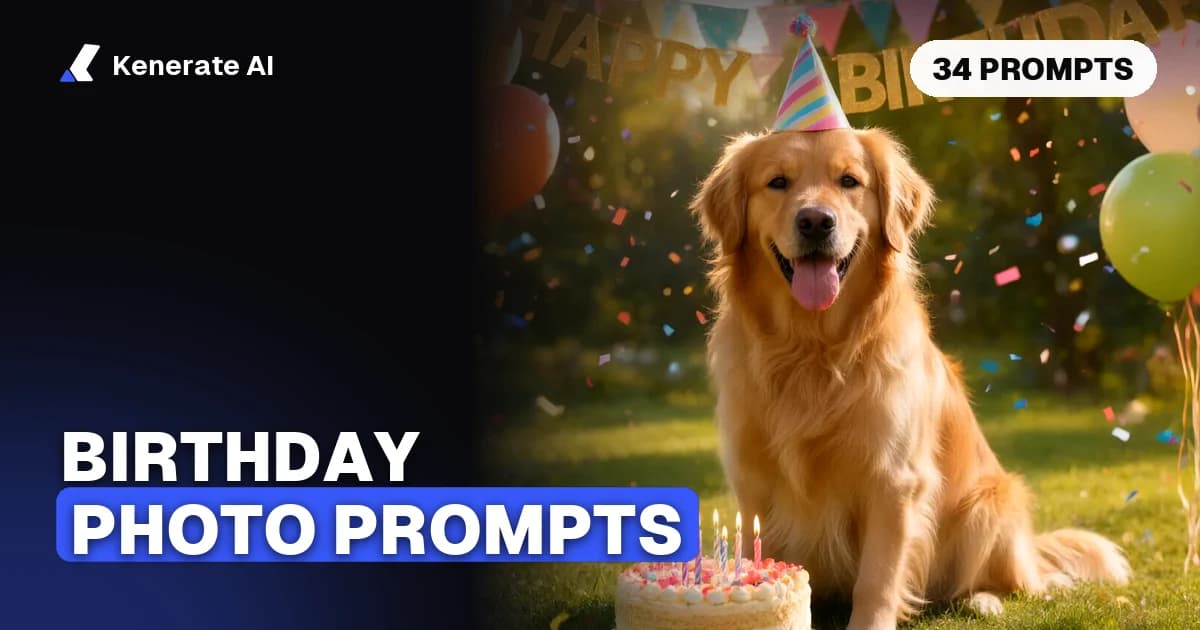
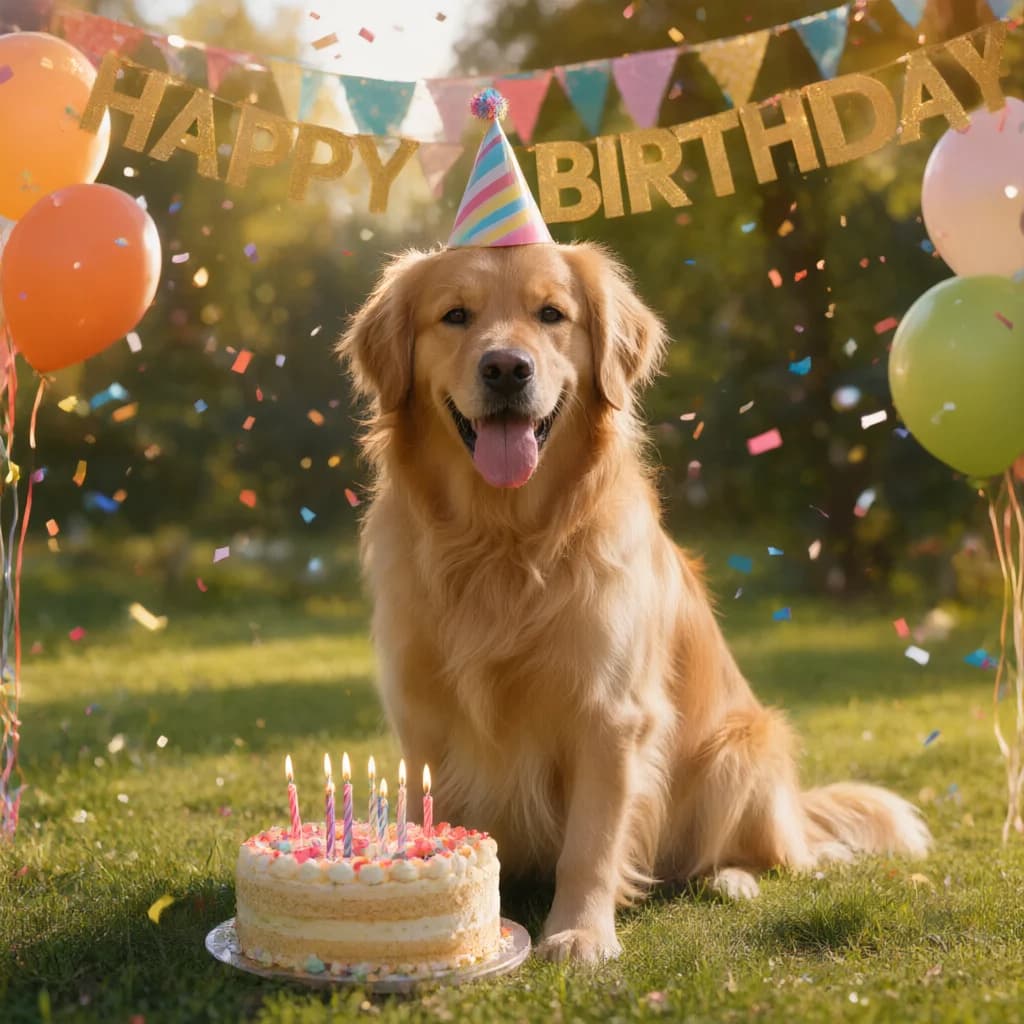
The cover of this post is a real edit, unretouched. We started with an ordinary photo of a golden retriever sitting in a park and ran this prompt once on Qwen Image 3.0, for 9.9 credits:
Turn this photo into a birthday party scene. Keep the dog exactly the same: same face, fur colour, pose and expression. Add a small striped party hat on its head, a round birthday cake with lit candles on the grass in front of it, colourful balloons and paper bunting in the background, warm golden-hour light and soft confetti in the air. A gold banner across the top reads "HAPPY BIRTHDAY". Photorealistic.
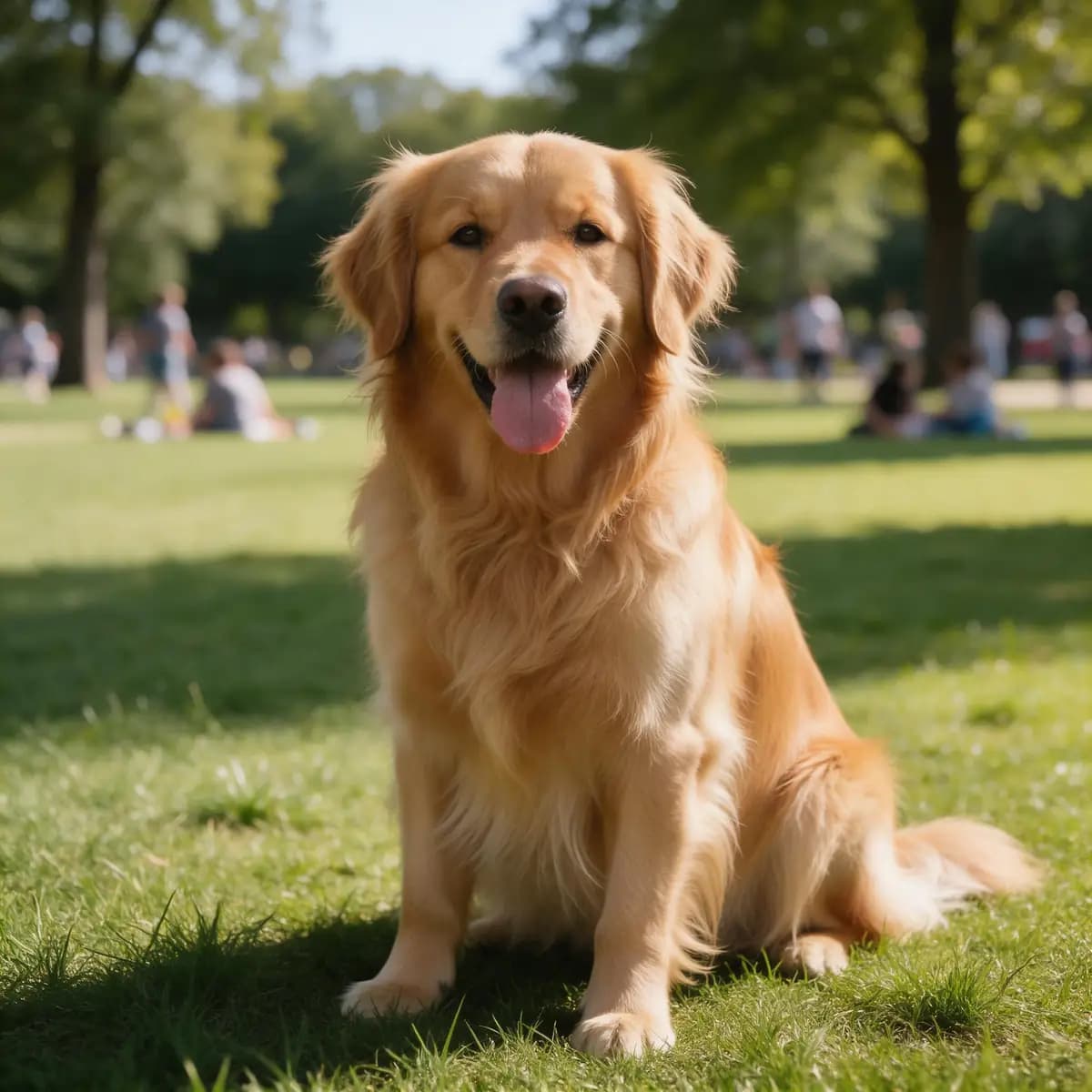
The dog's face, fur, pose and the park light held; the hat, cake, balloons, confetti and a correctly spelled banner were added. Note the order: keep line first, then props, light and text.
34 copy-paste AI birthday photo prompts
Upload your photo, paste a prompt, and swap the words in [brackets]. Every prompt assumes the photo is of you or someone who said yes.
Cake and candles
- Keep my face, hair and expression exactly the same. Place me at a candlelit table leaning toward a two-tier white birthday cake with [number] lit candles, warm bokeh lights behind, soft cinematic light, half-body shot.
- Keep my face unchanged. I'm holding a chocolate drip cake with sparklers, confetti falling, pastel pink background, studio flash, 4:5.
- Keep the person exactly the same. Add a slice of strawberry cake on a plate in their hands, a café table with coffee and flowers, morning window light.
- Keep my face and outfit. Me blowing out candles on a cake in a dark room, faces lit only by candlelight, film grain, close-up.
- Keep the person unchanged. A cupcake tower with one candle on top in front of them, gold and white balloons behind, bright and airy, 9:16.
Balloons and studio portraits
- Keep my face, skin tone and hair exactly the same. Studio portrait against a seamless peach backdrop, a cluster of cream, gold and blush balloons to one side, soft beauty light, 4:5.
- Keep me unchanged. Giant gold number balloons reading "[30]" beside me, black backdrop, glossy floor reflections, editorial fashion style.
- Keep the person's face and pose. Fill the ceiling with clear balloons holding gold confetti, ribbons hanging down around them, soft daylight.
- Keep my face and glasses. Me holding a bunch of heart-shaped red balloons on a city street at dusk, motion-blurred traffic lights behind.
- Keep me exactly the same. Minimal birthday portrait: white background, one oversized silver star balloon, crisp shadow, magazine look.
Neon signs with your name
- Keep my face unchanged. A pink neon sign on a brick wall behind me reads "HAPPY BIRTHDAY [NAME]" in script lettering. No other text anywhere.
- Keep the person exactly the same. Blue and purple neon party lights, a neon sign reading "[NAME] TURNS [AGE]" above, glossy dark room, 9:16.
- Keep my face and outfit. Rooftop bar at night, a warm neon sign reading "CHEERS TO [AGE]" behind me, city lights in soft focus.
- Keep me unchanged. Retro diner booth, a red neon sign reading "B-DAY [NAME]", milkshake and a slice of pie on the table.
Retro and film looks
- Keep my face exactly the same. 1990s point-and-shoot flash photo at a house party, slightly overexposed, date stamp in the corner reading "[DATE]".
- Keep the person unchanged. 1970s birthday snapshot: warm faded colours, wood-panelled room, paper streamers, square format with a white border.
- Keep my face and hair. Black-and-white 35 mm film portrait holding a lit sparkler, heavy grain, high contrast.
- Keep me exactly the same. Polaroid-style collage of four birthday moments — cake, gifts, balloons, toast — on a cork board.
- Keep the person's face. Disposable-camera look at a beach birthday picnic at sunset, light leaks, soft focus.
Party scenes with friends
- Keep both faces exactly the same. Two friends clinking glasses at a candlelit birthday dinner, flowers on the table, warm restaurant light.
- Keep all three people unchanged. Friends throwing confetti at the birthday person in the middle, garden party, fairy lights, golden hour.
- Keep the couple's faces the same. A surprise birthday reveal: living room full of balloons, a "HAPPY BIRTHDAY [NAME]" banner, both laughing.
- Keep everyone unchanged. Group of four adults in party hats around a long table with a big cake, string lights overhead, 16:9.
Milestone birthdays
- Keep my face unchanged. 21st birthday: champagne-gold balloons spelling "21", glitter backdrop, glam makeup, 4:5.
- Keep me exactly the same. 30th birthday editorial: black suit or dress, gold "30" balloons, moody studio light, magazine-cover framing with the headline "THIRTY" at the top.
- Keep my face and smile. 40th birthday garden brunch: long table, peonies, a cake reading "40 & FABULOUS", soft daylight.
- Keep the person exactly the same. 50th birthday golden celebration: gold and black decor, a "50" cake topper, warm ballroom light.
- Keep everyone's faces unchanged. 60th birthday family portrait outdoors, the birthday person seated in the centre holding a cake, everyone else standing behind.
Your pet's birthday
- Keep my dog exactly the same. Add a party hat, a small dog-safe cake with one candle, balloons and bunting behind, golden-hour garden.
- Keep my cat unchanged. The cat sits beside a tiny cake with a candle, curious expression, pastel background, confetti.
- Keep the pet and me exactly the same. Me holding my dog in front of a "HAPPY BIRTHDAY [PET NAME]" banner, both in party hats.
- Keep my dog's face and fur. Studio portrait in a bow tie, a gold "[AGE]" balloon, plain blue backdrop.
- Keep my pet unchanged. A picnic blanket in the park with treats, a paw-print cake and a small gift box.
Turning it into a card
- Keep my face exactly the same. Make this a birthday card: me in the centre, a hand-lettered "HAPPY BIRTHDAY [NAME]" at the top, watercolour flowers in the corners, cream paper texture, 2:3 portrait.
For a full card with a message inside, the AI birthday card generator has card sizes and greeting layouts. More general editing prompts are in our guide to Nano Banana photo editing prompts.
What size should a birthday photo be for Instagram and WhatsApp?
Pick the shape before you edit, so the model composes for it and nothing gets cropped later.
| Where it's going | Aspect ratio | Pixels |
|---|---|---|
| Instagram feed post | 4:5 portrait | 1080 × 1350 |
| Instagram Stories and Reels | 9:16 | 1080 × 1920 |
| WhatsApp status | 9:16 (full phone screen) | 1080 × 1920 |
| Printed card or frame | 2:3 | Upscale before printing |
Instagram sizes are from Adobe Express's Instagram size guide. Kenerate's edit models offer 4:5 and 9:16 directly; for Stories and status, keep names and faces away from the top and bottom edges, where the app's buttons sit.
How to edit your birthday photo on Kenerate, step by step
- Open the editor. Go to Kenerate's AI image editor and choose AI Edit. Sign in free for 25 starter credits.
- Upload your photo. One clear photo of yourself, or of your pet.
- Pick a model. Qwen Image 3.0 for a cheap first try, GPT Image 2.5 Sunburst if there's a name to spell, Nano Banana 2.1 for a matching set.
- Paste a prompt from the list and swap in your name, age and colours.
- Choose the ratio — 4:5 or 9:16 — and generate.
- Check and download. Zoom in on the face and the lettering. If one word is wrong, fix just that text rather than starting again, then download without a watermark.
Want it moving? The AI birthday video maker animates a still into a short birthday clip.
Common problems and quick fixes
- The face changed. Put the keep line first, name the features, and use a sharper, front-facing photo. Switch to Nano Banana 2.1 if it keeps drifting.
- The name is misspelled. Put it in quotes, in capitals, and say where it goes. Short names spell more reliably than long greetings.
- Extra words appeared. Add "No other text anywhere in the image."
- Extra people showed up. State the number of people: "exactly two people".
Frequently asked questions
What is the best prompt for an AI birthday photo edit?
Start with "Keep my face exactly the same", then one scene (cake, balloons or a neon sign), the light, any text in quotes with "no other text", and the aspect ratio. The cake-and-candles and neon-sign prompts above are good first tries.
Can AI add my name to a birthday photo?
Yes. Write the exact words in quotes and say where they go, for example a gold banner at the top that reads "HAPPY BIRTHDAY ANA". GPT Image 2.5 Sunburst is the best pick on Kenerate for lettering. Always zoom in to check the spelling.
How do I stop AI from changing my face?
Use one sharp, front-facing photo, name the features to keep (face, skin tone, hair, glasses), change one thing per edit, and keep groups small. Nano Banana 2.1 is built for consistent faces across several images.
Is there a free AI birthday photo editor?
Kenerate gives 25 credits on sign-up, and Qwen Image 3.0 is open to free accounts at about 10 credits per edit, so you can make two edits free. After that, credits come in one-time packs with no subscription.
What aspect ratio should I use for Instagram and WhatsApp?
Use 4:5 (1080 × 1350) for an Instagram feed post and 9:16 (1080 × 1920) for Instagram Stories, Reels and WhatsApp status.
Can I edit a pet's photo into a birthday scene?
Yes — the example in this post is a dog. Say "Keep my dog exactly the same: same face, fur colour and pose", then add the hat, cake and balloons.
Can I use someone else's photo?
Only with their permission. Edit your own photos, or photos of friends and family who said yes, and don't use pictures of celebrities or strangers.
Sources
- AI Birthday Photo Prompts for Gemini and ChatGPT, Plus a Fill-In Template — SaaS CRM Review
- Instagram image sizes — Adobe Express
- Kenerate model config (edit models, credits, free-plan models), checked 2 November 2026