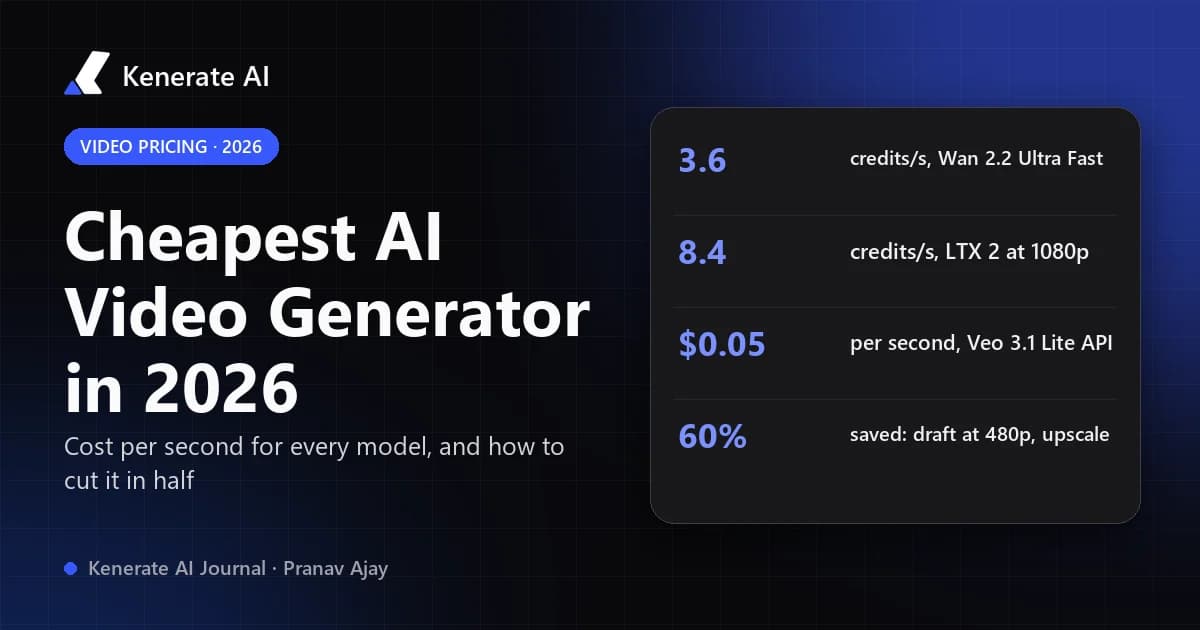
The cheapest AI video generation in 2026 comes from small, fast models: on Kenerate, Wan 2.2 Ultra Fast makes a 5-second 480p clip for 15 credits (about $0.17 on the Starter plan) and LTX 2 does 5 seconds at 1080p for 36 credits (about $0.42). If you're paying a provider directly, Google's Veo 3.1 Lite is $0.05 per second at 720p on the Gemini API. Premium models like Veo 3.1 and Seedance 2.5 cost 10 to 30 times more per second, so the real saving comes from drafting cheap and only paying premium rates for the final shot.
This guide compares the per-second price of every major video model we run, as of 20 October 2026, using the exact credit formulas in our app. It also shows what those credits cost in dollars, how they stack up against buying direct from Google, and a workflow that cuts the cost of a finished clip by more than half.
How is AI video priced in 2026?
Almost every serious AI video service now charges per second of output, scaled by resolution. A 10-second clip costs twice a 5-second clip, and 1080p usually costs two to four times 480p. Some subscription apps hide this behind a monthly credit allowance, but the math underneath is the same.
Three things move the price:
- The model. Small, distilled models (Wan 2.2 Ultra Fast, LTX 2, Seedance 1 Pro Fast) are cheap. Flagships with native sound, physics and multi-shot control (Veo 3.1, Seedance 2.5, Sora 2 Pro) are not.
- Resolution. On most models, each step up from 480p to 720p to 1080p roughly doubles the per-second rate.
- Retakes. The sticker price is per attempt, not per usable clip. Luma's own cost guide (14 October 2026) notes that most clips take two or three generations, so multiply the per-second rate by the retakes you expect.
That last point is why "cheapest" depends on how you work, not just the rate card.
What is the cheapest AI video model on Kenerate?
Here are the lowest-cost models in our AI video generator, ranked by the price of a 5-second text-to-video clip at their lowest resolution. Credits come straight from the pricing functions in our model config; dollar figures use the Starter plan ($15 for 1,300 credits, about $0.0115 per credit) and are rounded.
| Model | Cheapest setting | Credits per second | 5-second clip | Approx. cost on Starter | Max length |
|---|---|---|---|---|---|
| Wan 2.2 Ultra Fast | 480p | 3.0 | 15 credits | $0.17 | 8 s |
| LTX 2 | 480p | 3.6 | 18 credits | $0.21 | 20 s |
| Seedance 1 Pro Fast | 480p | 3.6 | 18 credits | $0.21 | 12 s |
| Seedance 1 Lite | 480p | 4.8 | 24 credits | $0.28 | 12 s |
| LTX 2.3 | 480p | 6.0 | 30 credits | $0.35 | 20 s |
| Pixverse v6 | 360p | 7.5 | 38 credits | $0.44 | 15 s |
| Gemini Omni 1.1 Flash | 360p | 9.0 | 45 credits | $0.52 | 10 s |
| MiniMax H3 | 480p | 10.0 | 50 credits | $0.58 | 15 s |
| Kling v2.6 Standard | default | 12.6 | 63 credits | $0.73 | 10 s |
| Wan 3.0 | 480p | 15.0 | 75 credits | $0.87 | 30 s |
A few things stand out:
- Wan 2.2 Ultra Fast is the cheapest clip in the app, but it tops out at 720p and 8 seconds. It's ideal for testing a prompt or a motion idea.
- LTX 2 is the cheapest way to get 1080p and long clips. At 1080p it's 7.2 credits per second, so a full 20-second 1080p clip is 144 credits, about $1.66.
- LTX 2.3 is the value pick when you want more polish. It's 12 credits per second at 1080p and runs up to 20 seconds. See our LTX 2.3 video generator page for what it does well.
- Wan 3.0 is the cheapest modern all-rounder. It's not the lowest price, but it runs from 2 to 30 seconds, takes reference images, video and audio, and has a sound toggle, which the budget models don't.
What do premium video models cost per second?
For comparison, here are the flagship and mid-tier models at common settings. These are the models you reach for on the final render, not for drafts.
| Model | Setting | Credits per second | Clip | Credits | Approx. cost on Starter |
|---|---|---|---|---|---|
| Seedance 2.0 Mini | 480p | 18 | 5 s | 90 | $1.04 |
| Hailuo 02 Standard | default | 14 | 6 s | 84 | $0.97 |
| Wan 3.0 | 720p | 30 | 5 s | 150 | $1.73 |
| Veo 3.1 Fast | 720p | 45 | 4 s | 180 | $2.08 |
| Kling v3 Standard | default | 37.8 | 5 s | 189 | $2.18 |
| Seedance 2.0 | 720p | 72 | 5 s | 360 | $4.15 |
| Veo 3.1 | 720p | 120 | 4 s | 480 | $5.54 |
| Seedance 2.5 | 720p | 108 | 5 s | 540 | $6.23 |
| Sora 2 Pro | 1080p | 210 | 4 s | 840 | $9.69 |
The gap is large. One 5-second Seedance 2.5 shot at 720p costs the same as 36 Wan 2.2 Ultra Fast drafts. That's not a reason to avoid premium models, but it is a reason not to use them for prompt experiments. You can browse every option, with specs, on our AI video models hub.
Is it cheaper to buy from Google or OpenAI directly?
Sometimes, yes, and it's worth being straight about it. Google's Gemini API pricing page lists these per-second rates for Veo 3.1 (video with audio) as of October 2026:
| Veo model on the Gemini API | 720p | 1080p | 4K |
|---|---|---|---|
| Veo 3.1 | $0.40 | $0.40 | $0.60 |
| Veo 3.1 Fast | $0.10 | $0.12 | $0.30 |
| Veo 3.1 Lite | $0.05 | $0.08 | Not supported |
Google lists no free tier for any of the three, and says you're only charged when a video is generated successfully.
If you're a developer who only needs Veo, the API is cheaper per second than buying Veo through any reseller, including us. Where an all-in-one studio wins is everywhere else: one balance across 60-plus video models, no API keys or code, cheaper budget models for drafts, and built-in tools such as upscaling and subtitles. The cheapest workflow is usually a mix, not a single provider.
OpenAI also bills Sora 2 per second through its API. Published rates have shifted during 2026, so check OpenAI's own pricing page before budgeting.
How do you make AI video cheaper without losing quality?
The biggest saving isn't a cheaper model. It's not paying premium rates for attempts you throw away.
Step 1: Lock the prompt on a budget model
Write your shot description and run it on Wan 2.2 Ultra Fast or LTX 2 at 480p. You're checking composition, motion and timing, not final detail. Five drafts on Wan 2.2 Ultra Fast cost 75 credits, less than a single 720p Wan 3.0 clip.
Step 2: Fix the first frame with an image
Image-to-video keeps the subject, framing and colors you approved, so fewer video retakes are needed. Generate or edit the start frame as an image first, where a retry costs a fraction of a video retry, then animate it.
Step 3: Render the keeper at low resolution on the final model
Once the prompt works, run it on the model you actually want, at its lowest resolution. Wan 3.0 at 480p is 15 credits per second; at 1080p it's 60.
Step 4: Upscale only the clip you'll publish
Our AI video upscaler charges 9 credits per second to 1080p and 24 per second to 4K. Here's how that compares for one 5-second Wan 3.0 shot:
| Route | Credits | Approx. cost on Starter |
|---|---|---|
| Wan 3.0 rendered natively at 1080p | 300 | $3.46 |
| Wan 3.0 at 480p, then upscaled to 1080p | 75 + 45 = 120 | $1.38 |
| Saving | 180 credits (about 60%) | $2.08 |
Native 1080p will hold fine texture better than an upscale, so for hero shots it can be worth paying for. For social clips viewed on a phone, the draft-then-upscale route is usually indistinguishable.
Step 5: Keep clips short and cut them together
Price scales with seconds, and most social edits use shots of 2 to 5 seconds anyway. Several short clips are cheaper to retake than one long one, because a mistake in second 9 of a 10-second render throws away the whole thing.
Which cheap AI video model should you use?
| If you want | Use | Why |
|---|---|---|
| The lowest cost per test | Wan 2.2 Ultra Fast | 3 credits per second at 480p |
| Cheap 1080p or long clips | LTX 2 | 7.2 credits per second at 1080p, up to 20 s |
| Value with better motion | LTX 2.3 | 6 credits per second at 480p, 12 at 1080p |
| Cheap vertical social clips | Pixverse v6 | 13.5 credits per second at 720p, up to 15 s |
| A modern all-rounder on a budget | Wan 3.0 at 480p | Up to 30 s, references, sound toggle |
| Cheap previews before Seedance | Seedance 2.0 Mini | 18 credits per second at 480p |
| The final hero shot | Seedance 2.5 or Veo 3.1 | Best quality; budget for few takes |
If you go with Wan 3.0, our Wan 3.0 prompt guide will help you get usable clips in fewer tries, which is the quickest saving of all.
Can you generate AI video for free?
Kenerate gives 25 free credits when you sign up, which you can use on images. Video generation needs a paid plan: the free plan sees video models locked in the studio. Plans start with Starter at $15 for 1,300 credits, which is enough for about 86 Wan 2.2 Ultra Fast drafts or 17 Wan 3.0 clips at 480p. Larger plans lower the per-credit price, down to about $0.01 per credit on the biggest packs. Full details are on the pricing page.
Other services offer free daily credits or watermarked free tiers, but these usually limit resolution, length or commercial use. Check each one's terms before relying on it for client work.
Compare video models in the studio
Bottom line
The cheapest AI video generator depends on what you're making. For pure cost per clip, Wan 2.2 Ultra Fast, LTX 2 and Seedance 1 Pro Fast run between 3 and 3.6 credits per second at 480p, roughly $0.03 to $0.04 a second on our Starter plan. For developers who only need Veo, Google's Veo 3.1 Lite API at $0.05 a second is hard to beat. And for anyone producing finished video, the real saving is the workflow: draft on a budget model, animate an approved frame, render low, and upscale only the keeper.
Prices are taken from our live model configuration and Google's published API rates as of 20 October 2026. Model prices change, so check the credit estimate in the studio before you generate.