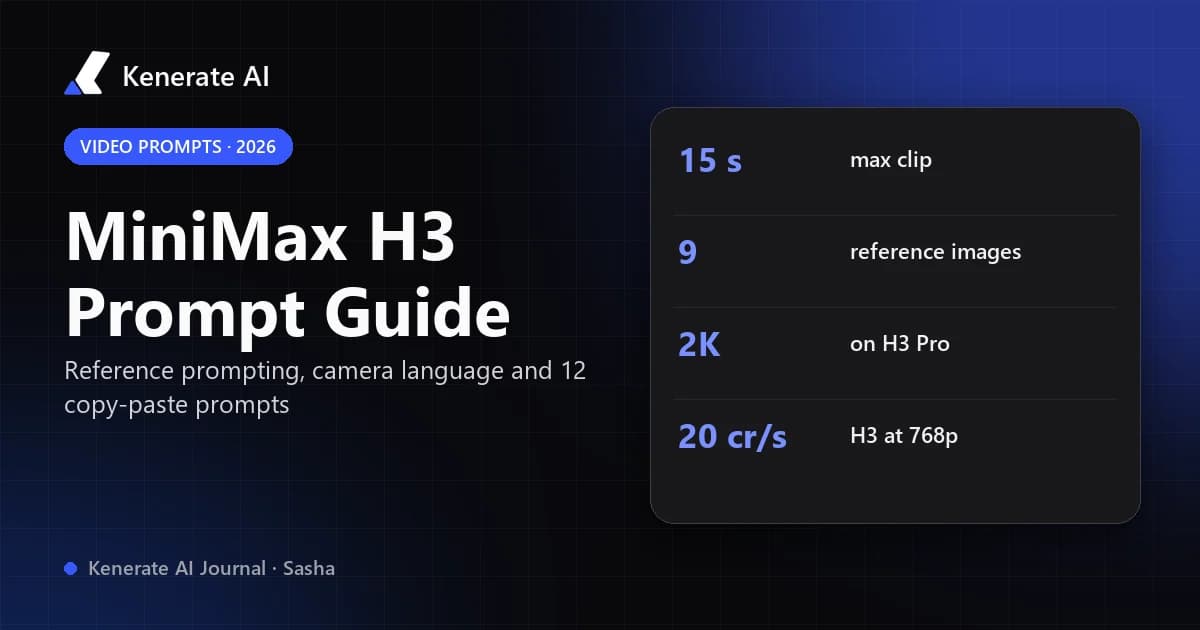
The best way to prompt MiniMax H3 is to give every reference one clear job, then describe the shot in playback order: references, scene, action, one camera move, sound and the ending frame. Name each upload by number ("Image 1 is the lead's face, Video 1 sets the camera move") and say what must stay the same. Below is the full formula, the reference syntax, 12 copy-paste prompts and what each mode costs on Kenerate AI as of 17 October 2026.
What is MiniMax H3?
MiniMax H3 (also called Hailuo 3.0 or Hailuo 03) is the third generation of MiniMax's Hailuo video line. MiniMax released it on 31 July 2026 as an omni-modal model: text, images, video clips and audio go into a single generation, and it returns up to 15 seconds of video with native stereo sound (DataNorth). It covers text-to-video, image-to-video, first-and-last frame, subject reference, motion reference, video editing and multi-shot clips in one model.
What makes H3 different from older Hailuo models is reference prompting. Instead of hoping the model guesses what you mean, you hand it several files and tell it which one controls identity, wardrobe, location, motion, camera or voice. That is why prompts that worked on Hailuo 02 often feel vague on H3: the model rewards precise role assignment.
On Kenerate AI you can run MiniMax H3 from the AI video generator. This guide covers the two general-purpose ones, MiniMax H3 and MiniMax H3 Pro.
MiniMax H3 vs H3 Pro: which one should you prompt?
Both models read prompts the same way. The difference is resolution, length floor and price. These numbers come straight from Kenerate's model config (video-models.ts) as of 17 October 2026:
| MiniMax H3 | MiniMax H3 Pro | |
|---|---|---|
| Modes | Text-, image- and reference-to-video | Text-, image- and reference-to-video |
| Duration | 3–15 s (any whole second) | 4–15 s (any whole second) |
| Resolution | 480p or 768p | 768p or 2K |
| Aspect ratios | 16:9, 9:16, 1:1, 4:3, 3:4, 21:9, 9:21 | 21:9, 16:9, 4:3, 1:1, 3:4, 9:16 |
| References | Up to 9 images, 3 videos, 3 audio clips | Up to 9 images, 3 videos, 3 audio clips |
| Reference video / audio budget | 15 s total each | 15 s total each |
| Price (text / image-to-video) | 10 cr/s at 480p · 20 cr/s at 768p | 30 cr/s at 768p · 42 cr/s at 2K |
| Price with references | 12.5 cr/s at 480p · 31.25 cr/s at 768p, + 5 cr per reference image | Same per-second rate; first 5 reference images free, 15 cr per extra image |
Two things fall out of that table:
- For cheap drafts, use H3 at 480p. A 5-second 480p text-to-video clip is 50 credits.
- For reference work at 768p, H3 Pro is usually cheaper. An 8-second 768p clip with two reference images costs 260 credits on H3 (8 × 31.25 + 2 × 5) and 240 on H3 Pro (8 × 30, images free). Reference-clip seconds are billed like output seconds on both, so a 5-second motion clip adds 5 seconds to the bill.
How should a MiniMax H3 prompt be structured?
Treat the prompt as a short shot spec, not a caption. The guides from RunDiffusion and Kapwing agree on the same order, which we have simplified into seven lines:
- Look – style, lighting, lens, mood ("warm 35mm film look, soft window light").
- Reference roles – one sentence per upload ("Image 1: the woman's face and hair. Image 2: the café interior.").
- Opening frame – where everything is at second 0.
- Action in order – what happens, as a trajectory from start state to end state.
- One camera move – dolly in, track left, slow arc, locked-off.
- Sound – the sounds the action makes, any short dialogue line, music or "no music".
- Ending – the pose or composition the clip should land on.
A simple shot needs only lines 1, 3, 4 and 5. A multi-reference product ad might need all seven.
Why does the order matter?
H3 builds the clip in playback order. If you describe the ending before the action, or mix camera and subject motion in one sentence, the model has to guess what happens when. Kapwing's guide specifically warns against blending subject motion, camera motion and cuts into one instruction, and against short verbs like "picks up the bottle" instead of a full movement from start to finish.
How long should the prompt be?
Long enough to cover the seven lines, no longer. A clean 60–120 word prompt usually beats a 400-word wall of adjectives. RunDiffusion notes H3 accepts prompts up to 7,000 characters for complex structured briefs, but its beginner advice is one subject, one action, one main camera move and short dialogue.
How do you reference images, videos and audio in MiniMax H3?
This is the part most people get wrong. Every upload needs a number and a job.
What syntax does H3 use for references?
There are two styles in the wild:
- Plain names:
Image 1,Image 2,Video 1,Audio 1. Easy to read and widely supported. - Tag style:
<Picture 1>,<Video 1>,<Audio 1>. This is the format in MiniMax's structured prompts and in ComfyUI's H3 node, which feeds references in a fixed order: images first, then videos, then standalone audio (ComfyUI docs).
Both work as long as you are consistent. Number your files in the order you upload them and never switch styles mid-prompt.
What jobs can a reference do?
| Reference | Good jobs | Tip |
|---|---|---|
| Image | Face and hair, outfit, product, location, art style, storyboard panel | Two or three compatible images of one character beat nine mixed ones |
| Video | Camera move, body motion, pacing, cut timing, voice delivery | Use a clean clip with one readable action |
| Audio | Voice timbre, delivery, ambience | Audio cannot be the only reference – pair it with an image or video |
How do you keep a character consistent?
Upload an identity view (face, medium close-up), a full-body view and, optionally, a detail shot of the outfit. Then name the stable features in words: "short copper bob, round tortoiseshell glasses, olive field jacket". RunDiffusion's guide notes that writing "the same woman" is weaker than listing the features you want preserved, and that references conflicting on age, hair or clothing confuse the model. Keep faces in medium or close framing – identity holds worse in wide shots where the face is small.
Only use faces, voices and likenesses you have permission to use. All prompts below use fictional people.
How do you write camera movement for H3?
Use plain film terms and pick one main move per shot: push-in, pull-out, pan, tilt, tracking, arc, crane, handheld or locked-off. Add speed and timing ("slow dolly in over the first 4 seconds"). Kapwing advises writing camera direction in natural language rather than the bracketed [Zoom in] commands from older Hailuo models, and avoiding vague phrases like "make it cinematic".
| You want | Write |
|---|---|
| Reveal a subject | "Slow dolly in from a wide shot to a medium close-up" |
| Follow someone walking | "Steady tracking shot at shoulder height, moving with her" |
| Show a product from all sides | "Slow 180° arc around the bottle, locked focus" |
| Calm, observational | "Locked-off tripod shot, no camera movement" |
| Energy | "Handheld, light natural shake, quick pan to the door at 4 s" |
Never stack conflicting instructions such as "static shot" and "handheld shake" in the same moment.
12 MiniMax H3 prompts you can copy
All prompts are SFW and use fictional people. Swap the reference descriptions for your own uploads.
Text-to-video (no references)
-
Rainy street film shot – "Moody 35mm film look, blue hour. A cyclist in a yellow raincoat rides through a narrow cobbled street, wheels splashing through puddles, neon shop signs reflecting on wet stones. Steady tracking shot from the side at wheel height. Sound: rain, tyre hiss, a distant tram bell. No music. Ends as she turns the corner out of frame."
-
Coffee macro – "Clean commercial look, soft top light. Macro shot of espresso pouring into a white ceramic cup, crema swirling. Slow push-in over 6 seconds. Sound: the hiss of the machine and the pour. Ends on the full cup, centred."
-
Mountain sunrise – "Epic nature documentary style. Sunrise over a misty alpine valley, light spilling over the ridge and burning off the fog. Slow crane up from the pine tops to a wide view. Sound: wind and birdsong, soft orchestral music. Ends on the sun clearing the peak."
-
Kitchen dialogue – "Warm indie-film look. A grey-haired chef in a white apron tastes soup from a wooden spoon, pauses, then smiles at the camera. Locked-off medium shot. He says: "Needs one more pinch of salt." Sound: simmering pot, kitchen clatter. Ends on his smile."
Image-to-video (start frame)
-
Portrait comes alive – "Image 1 is the exact opening frame. The woman slowly turns from the window toward the camera, a strand of hair moving in the breeze, and gives a small smile. Very slow push-in. Sound: quiet room tone, birds outside. Keep her face, hair and sweater exactly as in Image 1."
-
Product hero – "Image 1 is the opening frame: a matte black water bottle on a stone plinth. The camera makes a slow 180° arc around the bottle while water droplets slide down its side. Keep the logo, shape and colour exactly as in Image 1. Sound: a soft whoosh, no dialogue, minimal electronic music. Ends front-on to the logo."
-
Landscape photo to cinemagraph – "Image 1 is the opening frame. Clouds drift slowly across the sky and the lake surface ripples; everything else stays still. Locked-off camera. Sound: gentle wind and water lapping. No music."
Reference-to-video (multi-reference)
-
Character in a new location – "Image 1: the man's face and beard. Image 2: his navy wool coat and scarf. Image 3: the train station platform. He walks along the platform in the coat from Image 2, checks his watch and looks up at the departure board. Tracking shot at shoulder height, then a slow stop on a medium close-up. Sound: station announcements, footsteps, a train arriving. Keep his face from Image 1 and the coat from Image 2."
-
Motion transfer – "Image 1: the dancer's face, hair and red tracksuit. Video 1: the dance routine and its timing only – ignore the person and background in Video 1. She performs the routine from Video 1 on a rooftop at sunset. Wide-to-medium push-in. Sound: upbeat music, sneaker squeaks."
-
Camera move from a clip – "Image 1: the bakery storefront. Video 1: camera movement only – copy its slow handheld push toward the door. Recreate the push from Video 1 toward the bakery door in Image 1, morning light, steam rising from a vent. Sound: street ambience, a shop bell as the door opens at the end."
-
Two-character scene – "Image 1: Mia – curly black hair, green cardigan. Image 2: Theo – tall, shaved head, grey hoodie. Image 3: a bright co-working space. Mia hands Theo a laptop; he reads the screen and laughs. Locked-off medium two-shot. Theo says: "You actually fixed it." Sound: keyboard taps, low office chatter. Ends with both looking at the screen."
-
Storyboard to shot – "Image 1: storyboard panel 1 – wide shot of a lighthouse at dusk. Image 2: storyboard panel 2 – close-up of the lamp turning on. Follow the shot order from Image 1 to Image 2: start wide, slow push-in, then cut at 6 s to the lamp lighting up. Sound: waves, wind, a low hum as the lamp starts. No music."
How do you write a prompt in Kenerate, step by step?
- Open the AI video generator and pick MiniMax H3 (drafts) or MiniMax H3 Pro (finals, 2K).
- Choose the mode: text-to-video, image-to-video with a start frame, or reference-to-video with your uploads.
- Upload references in the order you will name them (Image 1, Image 2…).
- Write the prompt with the seven lines above. If you are stuck, run your rough idea through the prompt enhancer and then add the reference roles by hand.
- Set duration, resolution and aspect ratio in the panel, not in the prompt. Start with 5 seconds.
- Generate a draft, change one thing, and regenerate. When it works, rerun on H3 Pro at 2K.
Video generation on Kenerate needs a paid plan; plans start at $15 for 1,300 credits (Starter).
What are the most common MiniMax H3 prompting mistakes?
| Problem you see | Likely cause | Fix |
|---|---|---|
| Character changes mid-clip | Conflicting references, or features not named | Use 2–3 compatible images and list the stable features |
| Wrong detail copied from a reference | No role given to that image | One sentence per upload saying what it controls and what to ignore |
| Start image drifts away | Image used as a loose reference, not a start frame | Say "Image 1 is the exact opening frame" or use image-to-video |
| Motion looks rushed | Too many actions for the duration | One subject, one action per 5 seconds |
| Camera does something random | Camera move missing or mixed with subject motion | Write a separate camera sentence with one move |
| Unwanted music | Music not addressed | Add "No music" |
| Product logo changes | Style words overpower preservation | "Keep the logo, shape and colour exactly as in Image 1" |
The best workflow, per RunDiffusion, is incremental: prove the character and scene first, then add motion, then sound, then cuts or a second character – one change per run. It is also the cheapest way to work, because a 5-second 480p draft on H3 costs a fraction of a 15-second 2K render.
Is MiniMax H3 the right model for your shot?
H3's strength is reference control: keeping a character, product or camera move consistent across clips. If you only need quick silent b-roll, a cheaper model may do; if you need 30-second clips, look at Seedance 2.5 or Wan 3 in the AI video generator. For still images of the same character to use as references, MiniMax H3 Image on the MiniMax model page takes up to 9 references.
Updated 17 October 2026. Prices and limits are from Kenerate's live model configuration on that date and can change.