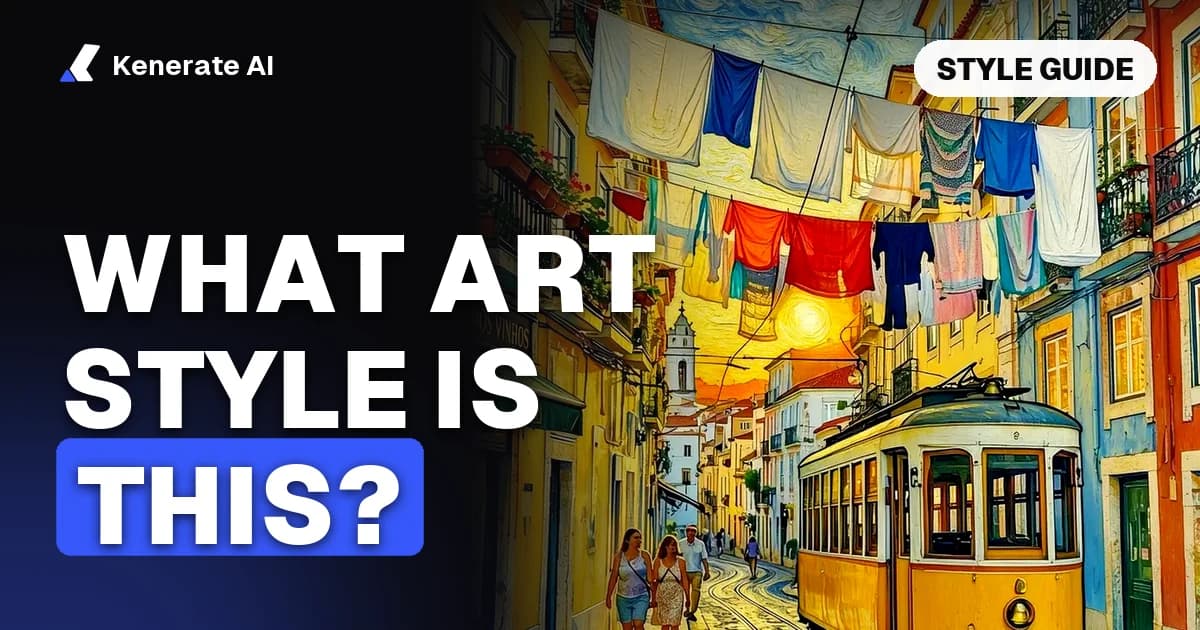
To answer "what art style is this?", look at four things in order: the medium (paint, ink, pixels, 3D), the edges and shading (hard outlines and flat colour, or soft blended light), the colour palette, and the subject and era. Those clues narrow almost any image to a name such as anime cel shading, watercolor, impasto oil, ukiyo-e or Pixar-style 3D. If you're still unsure, ask a style classifier or a vision AI for its top guesses, then check them against the visual cues table below.
Updated 24 October 2026 · by Sasha
You've found an image you love, maybe a poster, an album cover, a game screenshot or an AI picture someone shared. You want more like it, or you want your own photo to look that way. But you don't know what the style is called, so you can't search for it, brief an artist, or write a prompt. This guide gives you a four-step checklist, a cheat sheet of 16 common styles and the cues that give them away, the tools that can name a style for you, and how to recreate the style once you have its name.
How do I identify the art style of an image?
Go through the image in this order. Each step rules out whole families of styles, so by the end you're usually picking between two or three names.
Step 1: What is it made of?
Start with the medium, because it splits styles into big groups:
- Paint: visible brushstrokes, canvas or paper texture, colours that blend into each other (oil, acrylic, watercolor, gouache)
- Drawing: lines do most of the work (pencil, charcoal, ink, line art)
- Print: flat areas of colour with crisp edges, sometimes dots or grain (woodblock, screen print, risograph, halftone)
- Digital 2D: clean flat colour or painted digital brushes (anime, cartoon, vector, pixel art)
- 3D render: real-looking volume, materials and light (Pixar-style 3D, low poly, claymation, isometric)
- Photo: a real camera image, maybe with a film look or grade
Zoom in if you can. Pixel art falls apart into visible square pixels, watercolor shows paper grain and pooled pigment, and a 3D render has smooth surfaces with soft shadows.
Step 2: How are edges and shadows drawn?
This is the step that separates most digital styles:
- Hard black outlines and two or three flat shadow tones: cel shading, the anime and cartoon look. Wikipedia describes cel shading as rendering that looks hand-drawn by using fewer shading colours instead of a smooth gradient (Wikipedia: Cel shading).
- No outlines, soft gradients, realistic light: painterly digital art, concept art, or a 3D render
- Thick raised paint you can almost feel: impasto. The paint is laid on so thickly that brush or knife marks stay visible (Wikipedia: Impasto).
- Soft, bleeding edges where colours run together: watercolor
- Even outlines with flat colour fills and no shading: line art, comic flats, vector illustration or ukiyo-e
Step 3: What does the colour palette say?
Colour often names the style on its own:
- Pink, purple and teal with sunset gradients: vaporwave or synthwave
- Neon magenta and cyan on dark, wet streets: cyberpunk
- Saturated blocks with halftone dots: pop art
- Muted earth tones, gold and deep shadows: Renaissance or Baroque painting
- Soft greens and blues, warm skies: Studio Ghibli-style anime
- A limited palette of four to sixteen colours: pixel art or risograph print
Step 4: What is the subject, and when could it have been made?
The subject and setting add the final clue. Floating geometric shapes in primary colours point to Bauhaus or Constructivism. Waves, Mount Fuji and kimonos in flat colour point to ukiyo-e. Gods, saints and dramatic light point to Baroque. Chrome, low-poly dolphins and old computer windows point to vaporwave. If the picture is clearly AI-made, the "era" is less useful, but the medium, edges and palette still work the same way.
What are the most common art styles, and how do I spot them?
Use this table once you have your four answers. Many images mix two styles (for example, anime characters on a watercolor background), so it's fine to name both.
| Art style | Medium | Edges and shading | Palette | How to spot it |
|---|---|---|---|---|
| Anime (cel-shaded) | Digital 2D | Clean outlines, 2–3 flat shadow tones | Bright, clean | Big eyes, sharp hair highlights, hard shadow shapes |
| Studio Ghibli style | Digital 2D / painted backgrounds | Soft cel shading on characters | Warm greens and blues | Hand-painted skies and landscapes, gentle faces |
| Manga | Ink | Strong black lines, screentone | Black and white | Halftone dot shading, speed lines, panels |
| Watercolor | Paint | Soft, bleeding edges | Light, see-through | White paper showing, pooled pigment at edges |
| Oil painting (impasto) | Paint | Thick raised strokes | Rich, deep | Visible ridges of paint, knife or brush marks |
| Impressionism | Paint | Short broken strokes, no hard lines | Light and dappled | Blurry up close, clear from far away |
| Post-Impressionism (Van Gogh) | Paint | Swirling, directional strokes | Vivid blues and yellows | Strokes follow the shapes, thick paint |
| Ukiyo-e | Woodblock print | Fine even outlines, flat fills | Indigo, muted reds | Waves, Mount Fuji, kimonos, no cast shadows |
| Pop art | Screen print | Bold black outlines | Saturated primaries | Halftone dots, repeated panels, comic look |
| Line art | Ink / digital | Even lines, no fill or shading | Usually black on white | Only outlines; no tone at all |
| Pixel art | Digital 2D | Square pixels, hard steps | Limited palette | Jagged edges when you zoom in |
| Vaporwave | Digital collage | Glows and gradients | Pink, purple, teal | Greek statues, palm trees, grids, retro computers |
| Cyberpunk | Digital painting or 3D | Strong rim light | Neon on dark | Rain, holograms, signs, night cities |
| Pixar-style 3D | 3D render | Soft shadows, no outlines | Warm, saturated | Big expressive eyes, smooth skin, studio lighting |
| Low poly | 3D render | Visible flat facets | Simple gradients | Shapes built from obvious triangles |
| Art Deco | Graphic / print | Crisp geometric lines | Gold, black, cream | Fans, sunbursts, symmetry, stepped shapes |
Is there a tool that tells you what art style an image is?
Yes, there are three kinds, and each fits a different job.
Art style classifiers. These are trained only to name styles. RASTA, from researchers at Université Paris-Dauphine, was trained on about 60,000 paintings labelled with their style. It recognises 25 painting styles, from Baroque and Cubism to Pop Art and Ukiyo-e, and returns its three most likely matches with probabilities. Nyckel's art movements identifier works in a similar way: it's trained on the WikiArt Movements dataset, returns a predicted movement with a confidence score, and you can try it on the page without signing up. Both are good for paintings and art history. Neither was built for digital looks like cel-shaded anime or Pixar-style 3D.
Vision chatbots. General assistants that can read images (ChatGPT, Gemini, Claude and others) can describe an image and suggest style names, including digital and AI-era styles that classifiers don't cover. They can also be wrong with confidence, so ask for reasons, not just a name.
Your own eye plus the table above. For most images, the four-step check takes a minute and tells you why it's that style, which is what you need for a good prompt or brief.
How do I ask a vision AI to name an art style?
Upload the image and use a prompt that asks for evidence, not a single label:
Identify the art style of this image. Give your top 3 guesses, most likely first. For each, list the visual clues that support it: medium, edges and shading, colour palette, and subject. Then write one sentence I could use as an AI image prompt to recreate this style.
Asking for clues lets you check the answer against the image. If the AI says "watercolor" but you see hard black outlines and flat shadows, it's probably anime with a painted background, and you can push back.
How do I tell similar art styles apart?
Some pairs get confused all the time. Here are the deciding clues:
- Anime vs. cartoon: anime usually has more detailed eyes and hair and more realistic body proportions; western cartoons use bigger shape exaggeration and simpler faces. Both are cel-shaded.
- Impressionism vs. Post-Impressionism: Impressionist strokes are short and broken, about light and colour; Post-Impressionists like Van Gogh used stronger, more expressive strokes and outlines.
- Watercolor vs. gouache: watercolor is see-through and lets the paper show; gouache is opaque and matte, with flat areas of colour.
- Ukiyo-e vs. modern flat illustration: ukiyo-e has fine carved outlines, wood grain or paper texture, and traditional subjects; flat vector art has perfectly smooth fills and no texture.
- Pixar-style 3D vs. claymation: Pixar-style renders are smooth and glossy; claymation shows fingerprints, slightly lumpy shapes and a handmade feel.
- Vaporwave vs. synthwave: vaporwave is ironic collage (statues, old software, pastel pinks); synthwave is 1980s neon with sunsets, grids and sports cars.
How do I recreate an art style once I know its name?
Once you have the name and two or three cue words, you can use the style in a new image or put your own photo into it. On Kenerate AI there are three ways, all in the browser.
Option 1: Make a new image in the style (text to image)
- Open the AI art generator or the image studio.
- Write your subject first, then the style name and its cues. For example: "a fox in a snowy forest, Japanese ukiyo-e woodblock print, fine outlines, flat indigo and red, paper texture".
- Add what you don't want in plain words (for example, "no 3D shading") if the first result drifts.
- Generate 2–4 takes and keep the closest one.
For anime looks specifically, the AI anime generator is set up for that style family. Our AI art prompts post has 64 copy-paste prompts across art styles if you want a starting point.
Option 2: Put your own photo into the style (image to image)
- Open Edit Studio and upload your photo.
- Choose the Style tool and pick one of the 56 preset looks (as of 24 October 2026 they include Ghibli, 90s Anime, Watercolor, Oil Painting, Van Gogh, Ukiyo-e, Charcoal Sketch, Pop Art, Pixel Art, Vaporwave, Art Deco and Pixar 3D), or type the style yourself.
- Add "keep the same composition and subject" so only the look changes.
- Run 1, 2 or 4 variations and download the best one, with no watermark.
Our AI style transfer page shows real before-and-after edits made this way, and photo to painting covers the painting styles in more depth.
Option 3: Copy the style of the image you found (reference image)
If you can't name the style at all, skip the naming. Upload your photo and the image you like as a second reference, then write: "Redraw image 1 in the art style of image 2. Keep the subject and composition of image 1." This is the same idea as classic neural style transfer, which Gatys, Ecker and Bethge described in 2015 as separating an image's content from its style and recombining them (arXiv:1508.06576). Today's edit models do it from a plain-language instruction. The image-to-image AI page explains how references work. Only use a reference image you have the right to use, and avoid copying a living artist's exact work.
Which model should I use, and what does it cost?
Credit prices below are from Kenerate's model config as of 24 October 2026. New accounts get 25 free credits on sign-up.
| Model | Credits per image | Best for |
|---|---|---|
| Flux 2 Dev | 3 | Cheap tests; on the free plan |
| Qwen Image 3.0 | 9 | Default for the Style Transfer tool; free plan |
| Seedream 5.0 Pro | 13.5 (1K) · 27 (2K) | Keeping the subject and composition while changing the medium |
| Nano Banana 2.1 | 21 (1K) | Many reference images (up to 14) |
In our own Seedream 5.0 Pro edits for the style transfer page, the street, the tram and the composition survived every change of medium, from Van Gogh brushwork to an ink sketch.
Why does knowing the style name matter?
A style name is a shortcut for a whole set of visual choices. "Make it look nice and artistic" gives an AI model, an illustrator or a search engine almost nothing to work with. "Ukiyo-e woodblock print, fine outlines, flat indigo and red" tells them the medium, the edges and the palette in eight words. The name also helps you find more of what you like: searching a museum collection, an artist marketplace or a stock library by style name works far better than describing the picture.
It also helps you avoid surprises. If you know an image is impasto oil, you know a print of it will lose the raised texture. If you know it's cel-shaded, you know a "realistic" prompt will fight against it.
Quick checklist: what style is this?
- Medium: paint, drawing, print, digital 2D, 3D render or photo?
- Edges and shading: hard outlines and flat tones, soft gradients, thick paint or bleeding edges?
- Palette: neon, pastel, earth tones, limited, saturated primaries?
- Subject and era: traditional, retro, futuristic, everyday?
- Second opinion: a classifier (RASTA, Nyckel) for paintings, a vision chatbot for digital styles.
- Recreate: style name plus two or three cue words in a prompt, a preset look, or the image itself as a reference.