

56 looks · your own words · a style reference
AI Style Transfer — apply any art style to your photo
Turn a photo into an oil painting, a woodblock print, an ink sketch or a 3D render while the scene stays the same. Pick one of 56 looks, describe a style in words, or add a second image and copy its style.
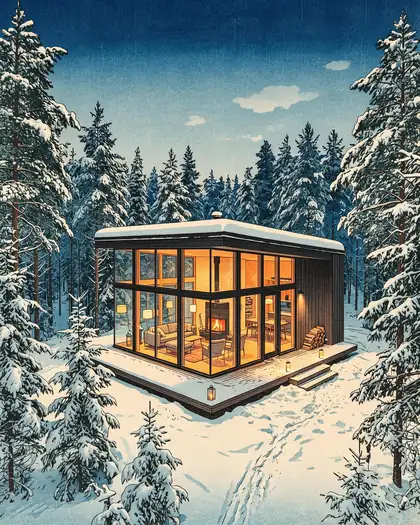
- Keeps the subject and layout
- 56 one-click looks
- Copy a reference image's style
- No watermark
Updated by the Kenerate AI team
Made with Kenerate
On this page
Quick answer
What is AI style transfer?
AI style transfer redraws a photo in another art style — oil paint, anime, ukiyo-e, pencil, 3D — while keeping its subject and composition. On Kenerate AI there are three ways: pick one of 56 looks in Edit Studio's Style tool or AI Filter, describe the style in words, or add a second image and ask the model to copy its style. In our Seedream 5.0 Pro edits the street, tram and composition survived every change of medium.
Key facts
- Ways to do it
- Preset look · your words · a reference image
- Preset looks
- 56 in 7 groups (Style tool, AI Filter)
- Default model
- Qwen Image 3.0 (free plan)
- Models to choose
- 13 edit models incl. Seedream 5.0 Pro, GPT Image 2.5, Nano Banana 2.1
- Takes per run
- 1, 2 or 4 variations
- Watermark
- None
Styles
Styles you can apply, and the words behind them
14 of the 56 looks in the Style tool and AI Filter. Pick the look in one tap, or paste the prompt words into AI Edit or Image Studio with your photo.
| Style | Group | What changes | Prompt words |
|---|---|---|---|
| Ghibli | Trending | Hand-painted anime warmth | a hand-painted anime frame: soft cel shading, warm painterly backgrounds, gentle rounded features |
| Pixar 3D | Trending | Big-eyed 3D character | a 3D animated character render: smooth skin, large expressive eyes, soft studio lighting, cinematic depth of field |
| 90s Anime | Trending | Retro cel shading | a 1990s TV anime cel: sharp cel shading, muted VHS-era colours, thin ink outlines |
| Pop Art | Trending | Warhol screen print | a pop-art screen print: flat saturated colour blocks, halftone dots, bold black outlines |
| Oil Painting | Art & Paint | Thick classical brushwork | a classical oil painting on canvas: thick impasto brushstrokes, Rembrandt lighting, visible canvas texture |
| Watercolor | Art & Paint | Wet washes, paper grain | a loose watercolor painting: translucent washes, wet-on-wet bleeding edges, white paper showing through |
| Van Gogh | Art & Paint | Swirling impasto | a post-impressionist painting: swirling thick impasto strokes, starry-night blues and golden yellows |
| Ukiyo-e | Art & Paint | Japanese woodblock | a Japanese ukiyo-e woodblock print: flat colour planes, bold black keylines, muted indigo and vermilion |
| Charcoal Sketch | Art & Paint | Smudged studio drawing | a charcoal drawing on toned paper: smudged shading, sharp accent lines, white chalk highlights |
| Stained Glass | Art & Paint | Leaded cathedral window | a stained-glass window: jewel-toned glass panes, thick black lead lines, sunlight glowing through |
| Claymation | 3D & Toy | Fingerprints and all | a stop-motion claymation character: soft plasticine with fingerprints, miniature set lighting |
| Film Noir | Photo & Cinema | Venetian-blind shadows | a 1940s film-noir still: black-and-white, hard venetian-blind shadows, fedora-era styling |
| Pixel Art | Retro & Culture | 16-bit sprite | 16-bit pixel art: chunky visible pixels, limited palette, dithered shading |
| Art Deco | Retro & Culture | Gatsby gold geometry | a 1920s Art Deco poster: geometric gold and black patterns, sunburst motifs |
Sources: Kenerate AI Filter
Prompts
Style transfer prompts to copy
Each one opens Image Studio on Seedream 5.0 Pro with the prompt filled in — add your photo (and, for the first, the style image) and press Create.
- Style
- Name the medium and its marks
- Reference
- “image 2” = the style source
- Lock
- Same subject, composition, framing
- Takes
- Run 2–4, keep the best
Copy a reference image's style
Repaint image 1 in the exact art style of image 2 — its brushwork, palette, line work and texture. Take only the style from image 2, not its content. Keep the same subject, composition and framing.
Anime from a portrait
Turn this photo into a hand-painted anime frame: soft cel shading, warm painterly background, gentle rounded features. Keep her face recognisable, the same pose and framing.
Oil painting
Turn this photo into a classical oil painting on canvas: thick impasto brushstrokes, warm Rembrandt lighting, visible canvas texture. Keep the same subject, composition and framing.
Woodblock print
Turn this photo into a Japanese ukiyo-e woodblock print: flat colour planes, bold black keylines, muted indigo and vermilion, rice-paper grain. Keep the same subject, composition and framing.
More prompts (2)
Pencil sketch
Turn this photo into a realistic graphite pencil sketch on white paper, fine hatching and soft shading. Keep the same subject, composition and framing.
3D animated look
Turn this photo into a colourful 3D animated-movie render with soft global illumination and glossy materials. Keep the same subject, composition and framing.
Gallery
Same scenes, new styles
Real Seedream 5.0 Pro edits of our own images, one try each. Open any one to copy the prompt and run it on your photo.
Same prompt
Before and after
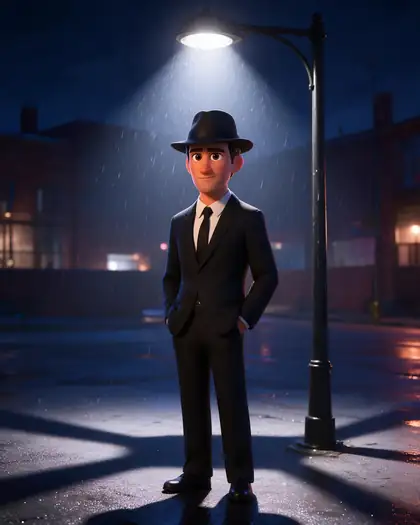
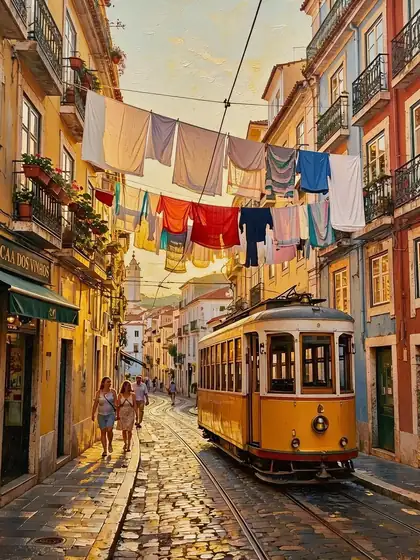
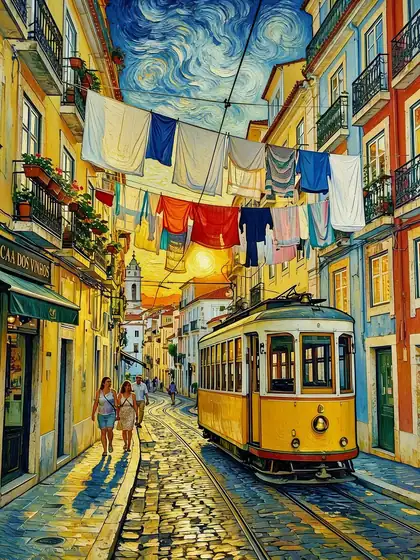
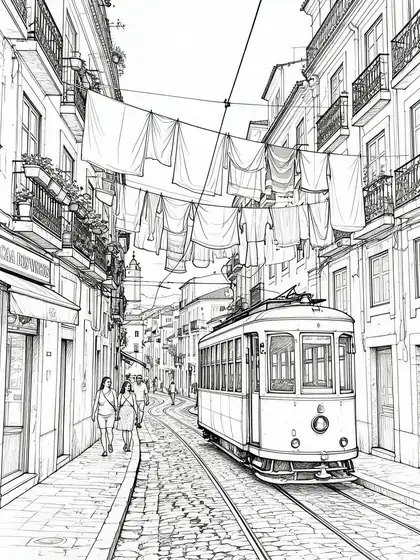
Two of the inputs next to a result. The noir image kept the man, the fedora and the street lamp; the street photo kept the tram, the laundry lines and the people.
PromptTurn this photo into a colorful Pixar-style 3D animated render. Keep the man, the suit, the fedora and the street lamp composition.
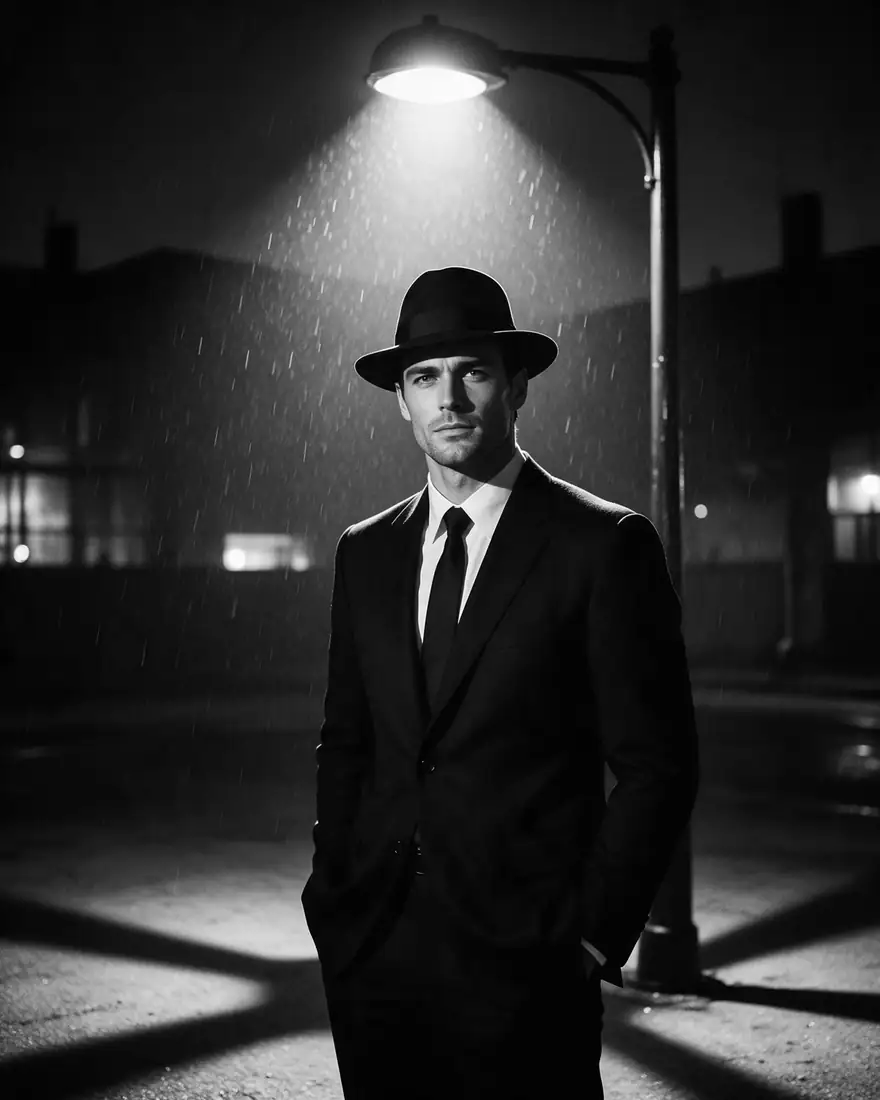 OriginalFilm-noir image
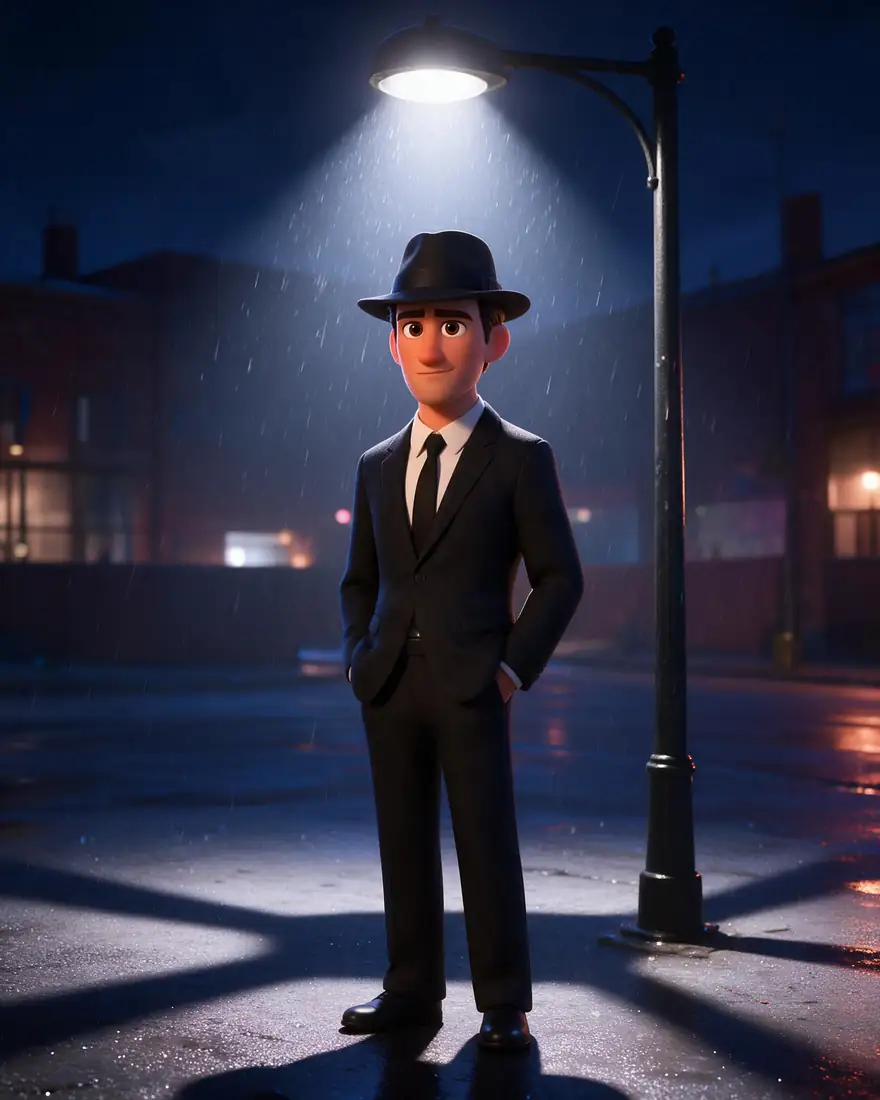 3D renderSeedream 5.0 Pro edit
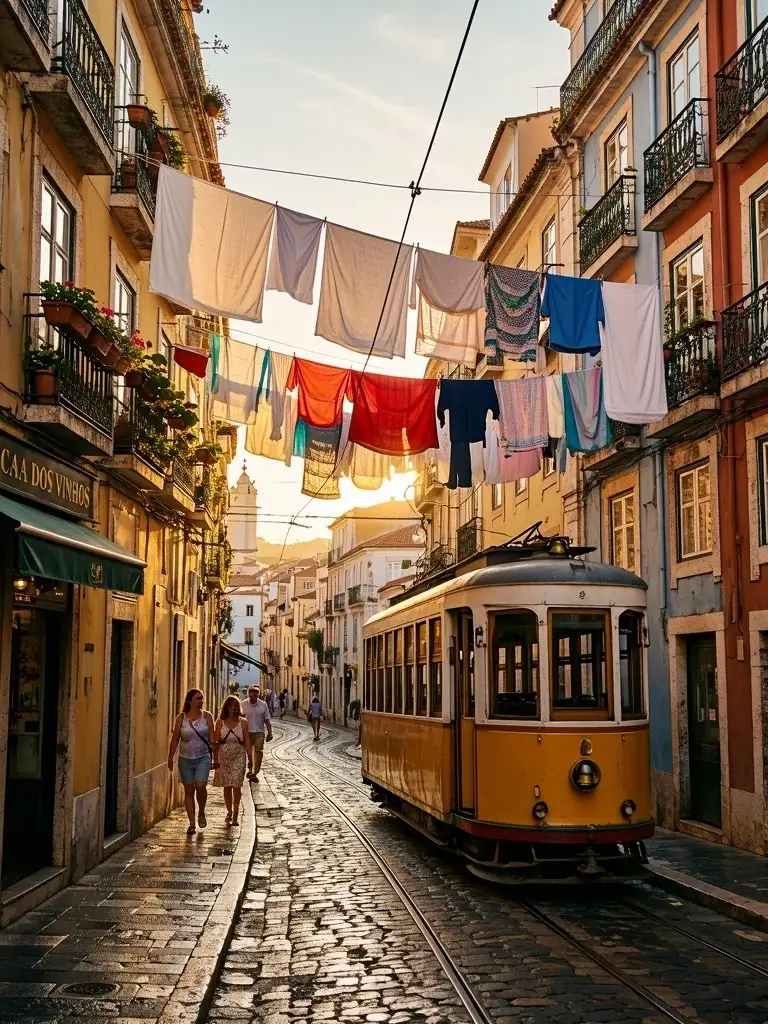 OriginalStreet photo
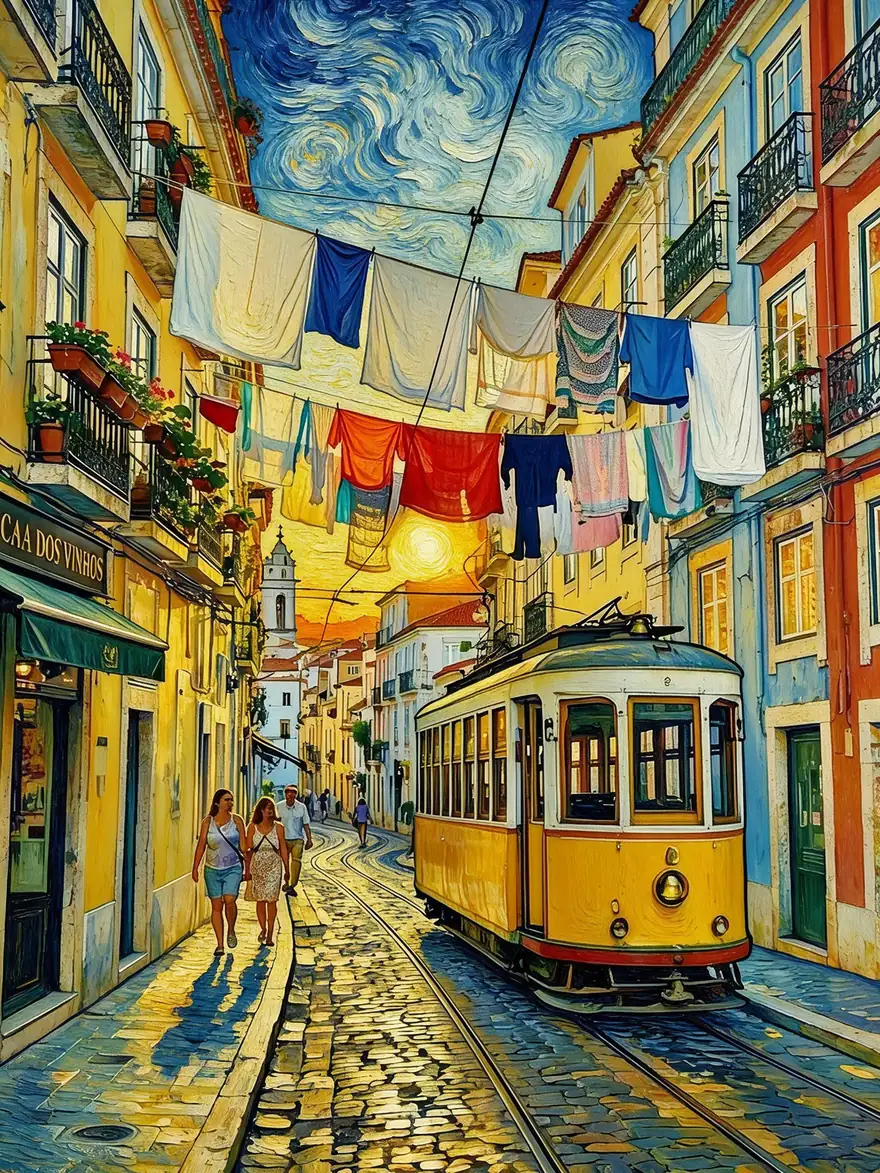 Van Gogh styleSeedream 5.0 Pro edit
How to
How to use the AI style transfer
- Time needed
- Steps
- 4 steps
Step 1
Open your photo in Edit Studio
Upload it at /app/edit (up to 50 MB). Sign in free for starter credits.
Step 2
Choose Style, or AI Edit for a reference
Style: pick one of the 56 looks and add an optional note. AI Edit: add the style image as a reference and call it “image 2”.
Step 3
Pick a model and the number of takes
Qwen Image 3.0 is the default; Seedream 5.0 Pro made the examples here. Run 1, 2 or 4 variations.
Step 4
Compare and download
Keep the best take, upscale it if you'll print it, and download without a watermark.
See it in the app

Open Image Studio and type what you want to see — subject, style, lighting and mood.


Watch the tour · 1:23
Prompts, styles, references, edit, Arena & chat
Chapters
Tips
Style transfer that keeps your photo
What worked in our edits.
End every prompt with “keep the same subject, composition and framing”.
For people, add “keep the face recognisable” and name what must stay: hair, glasses, beard.
Name the medium and the marks: impasto strokes, soft washes, flat colour planes, ink outlines.
Copying another image's style? Say “take only the style from image 2, not its content”.
Run 2 or 4 variations — the strength of a style varies from take to take.
Use a sharp, well-lit photo; blur and noise carry into the new style.
Models
Models for AI style transfer
What each model is good at. Open any one straight in the generator.

ByteDance
Seedream 5.0 Pro
- Reference images
- Up to 10
- Output
- Up to 2K
Open Seedream 5.0 ProBest for
Made every example on this page
- Free plan

Alibaba
Qwen Image 3.0
- Reference images
- Up to 3
- Output
- 1K · 2K
Open Qwen Image 3.0Best for
Default for the Style tool · free plan

OpenAI
GPT Image 2.5 Sunburst
- Reference images
- Up to 16
- Output
- 1K–4K
Open GPT Image 2.5 SunburstBest for
Follows long, detailed style notes
Google
Nano Banana 2.1
FAQ
AI Style Transfer questions
8 questions
What is AI style transfer?
AI style transfer redraws an image in a different art style while keeping its content: the same people, objects and layout, painted, drawn or rendered in a new medium. The idea goes back to Gatys, Ecker and Bethge's 2015 paper “A Neural Algorithm of Artistic Style”; today's image-editing models do it from a one-line instruction.
Link to this answerHow do I transfer the style of one image to another?
Open your photo in Kenerate's Edit Studio, choose AI Edit and add the style image as a reference. Then write: “Repaint image 1 in the exact art style of image 2 — its brushwork, palette and texture. Take only the style from image 2, not its content.” Seedream 5.0 Pro, GPT Image 2.5 and Nano Banana 2.1 all take several reference images.
Link to this answerIs AI style transfer free?
Free to start. A new account gets starter credits, and Qwen Image 3.0 — the Style tool's default model — is on the free plan. Other models use credits from one-time packs that never expire. Downloads carry no watermark.
Link to this answerWhich styles can I choose?
The Style tool and AI Filter share 56 looks in seven groups: Trending (Ghibli, Pixar 3D, 90s Anime, Pop Art…), Anime & Cartoon, Art & Paint (oil, watercolor, Van Gogh, ukiyo-e, charcoal), 3D & Toy, Photo & Cinema, Retro & Culture and Fun & Wild. You can also describe any style in your own words with AI Edit.
Link to this answerWill it keep my face and my photo's layout?
That's what the looks are written for: each one tells the model to keep the same identity, expression, pose, framing and composition. In our edits the tram, laundry lines and people stayed in place, and the noir man kept his suit, fedora and lamp post. Faces can still drift on strong styles, so run 2 or 4 takes and keep the closest.
Link to this answerWhat is the best AI for style transfer?
It depends on the style. In our tests Seedream 5.0 Pro gave convincing painting, print and sketch looks at 2K. Qwen Image 3.0 is the fast free-plan default. GPT Image 2.5 Sunburst handles long, specific style notes, and Nano Banana 2.1 is built for working from several reference images.
Link to this answerCan I do anime style transfer?
Yes. Pick Ghibli, 90s Anime, Shonen Manga, Shoujo Sparkle, Chibi or Webtoon in the Style tool, or write “a hand-painted anime frame with soft cel shading” in AI Edit. For a full guide to anime looks, see the photo-to-anime and anime filter pages.
Link to this answerCan I copy a famous artist's style?
You can ask for broad historical styles — impressionist, ukiyo-e, Art Deco, “in the style of Van Gogh” for painters long out of copyright. Don't use style transfer to pass work off as a living artist's, and only restyle photos you own or have permission to edit.
Link to this answerIn depth
AI Style Transfer, explained
What works, what to avoid, and how to pick a model.
On this page
How AI style transfer works
The classic method, from Gatys, Ecker and Bethge in 2015, uses a neural network trained on photos to pull an image apart into “content” (what is where) and “style” (textures, colours, brush marks), then rebuilds the content with another picture's style [1].
Today's instruction-following edit models — Qwen Image, Seedream, GPT Image, Nano Banana — skip the optimisation step. You give them the photo and a sentence, or a second image, and they redraw it in one pass. That is why one tool can do oil paint, pixel art and a 3D render without a separate model for each style.
Three ways to restyle a photo on Kenerate
Pick the one that matches how exact you need the style to be:
- A preset look — the Style tool in Edit Studio or AI Filter. One tap, 56 looks, an optional extra note. AI Filter can also mix two looks.
- Your own words — AI Edit with a prompt like “a loose watercolour with ink outlines”. Any style you can describe.
- A reference image — AI Edit with the style picture added as image 2. Best when you want to match one specific painting, illustration or brand look.
What we got
Six edits on Seedream 5.0 Pro, one try each:
- Van Gogh: the clearest style change — a swirling sky and thick strokes, with the tram, laundry and people still in place.
- Ink sketch: a clean line drawing that kept every balcony and wire.
- 3D render: the noir image's man, suit, fedora and lamp post carried over into a bright animated look.
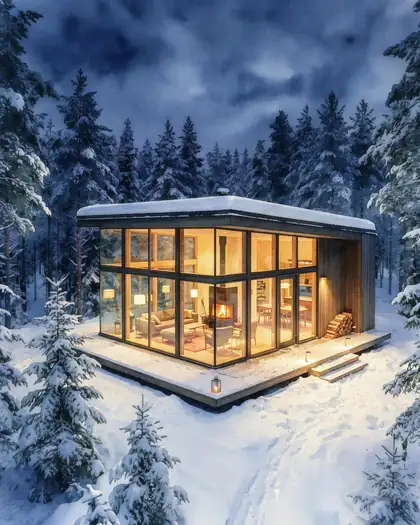
- Woodblock: flat colour and outlines, but the cabin was redrawn from a slightly different angle.
- Watercolor: the weakest take — closer to a softened photo than a painting. Ask for “loose wet-on-wet washes, visible paper grain” for a stronger effect.