A good ChatGPT family photo prompt does three things: it tells the model to keep every face as it is, it says who stands where, and it changes only the setting, the outfits or the light. Below are 24 copy-paste prompts for settings, matching outfits and group poses, plus how to keep each face the same with reference photos, as of 5 November 2026.
These prompts work in ChatGPT, Gemini and any image editor that accepts photos. They are written for your own family photos and for adult relatives who have said yes. If you only want a finished portrait made from separate photos, the AI family portrait generator walks through it step by step.
How do you write a family photo prompt for ChatGPT?
Vague prompts give you a family, just not yours. Build each prompt in this order:
- Keep line: tell the model not to change faces, hair, skin tones or ages.
- Positions: say who sits, who stands and who is next to whom.
- Setting: one place, written as a scene.
- Outfits: two or three colours, or "keep their own clothes".
- Light and finish: one light source and one photo style.
Change one or two of these per attempt. If you rewrite everything at once, you can't tell which part made a face drift.
Which keep line should you paste first?
Every prompt below starts with one of these two lines. Paste the right one, then add the scene.
Keep line A, for one group photo:
Using the family in the attached photo, keep every person exactly as they are: same faces, hair, skin tones, ages and expressions. Do not add or remove anyone.
Keep line B, for separate photos:
Make one family photo of the people in these images. Keep each person exactly as in their own photo: same face, hair, skin tone and age. Everyone is lit the same way and shown at a natural relative height. Do not add anyone.
What are the best family photo prompts for different settings?
Pick the setting first, because it decides the light. Simple places keep attention on the faces.
Studio settings
- Classic studio: "Warm grey studio backdrop, soft key light from the left, 85mm portrait, sharp focus on every face."
- Black and white heirloom: "Plain dark backdrop, black and white photo with soft contrast and gentle film grain, everyone looking at the camera."
- Cream and linen: "Cream backdrop, everyone on a low linen bench, bright even light, clean magazine portrait."
- Old family album: "Painted canvas backdrop, formal seated pose, warm sepia tones, the look of a 1950s studio print."
Outdoor settings
- Golden hour field: "Open grass field at golden hour, low sun behind the group, soft warm rim light, faces evenly lit."
- Beach at sunset: "Quiet beach at sunset, everyone barefoot on wet sand, light breeze, calm sea behind them."
- Autumn park: "Park path lined with orange trees, overcast soft light, relaxed walking pose."
- City rooftop: "Rooftop at blue hour, city lights softly blurred behind the group, warm string lights on the faces."
At home
- Sofa morning: "Everyone together on a sofa, soft window light from the right, relaxed smiles, candid lifestyle photo."
- Kitchen table: "Sitting around a wooden kitchen table with mugs, warm morning light, natural documentary style."
- Front steps: "Sitting on the front steps of a house, late afternoon light, 35mm film look."
What matching outfit prompts work best?
Name a palette, not a costume. Add one sentence to any setting above. The word "coordinated" usually looks better than "matching", because identical clothes can read as a uniform.
| Look | Add this line | Works well with |
|---|---|---|
| Neutral | "Coordinated outfits in cream, beige and soft brown." | Studio, beach |
| Classic | "Coordinated outfits in navy, white and soft grey." | Studio, front steps |
| Earthy | "Coordinated outfits in olive, rust and cream." | Field, autumn park |
| Pastel | "Coordinated outfits in sage, dusty pink and ivory." | Garden, sofa |
| Formal | "Everyone in dark formal wear, one muted colour." | City rooftop, black and white |
Three more prompts for outfits:
- Change clothes only: "Change only the clothes to coordinated navy, white and grey outfits. Keep the pose, background and light the same."
- Traditional dress: "Dress everyone in elegant traditional clothing in deep red and gold, with fabric and jewellery that look real. Warm indoor light." Name your own tradition here, such as a sari, hanbok or kente, for a better result.
- Keep one favourite: "Keep the outfit of the person in image 1 exactly as it is, and match everyone else's clothes to its colours."
Which group pose prompts look natural?
Pose is where most family prompts stay too vague. Say who goes where, using image numbers if you uploaded separate photos.
- Two rows: "The person from image 1 and the person from image 2 seated in front. The person from image 3 and the person from image 4 standing behind them, hands on their shoulders."
- Sofa triangle: "The oldest two seated in the middle, everyone else leaning in from both sides, heads at different heights."
- Walking together: "Everyone walking toward the camera, arm in arm, laughing, candid, faces fully visible."
- Three generations: "Grandparents seated in the centre, their adult children standing on either side, everyone facing the camera."
- Back to the camera, then turned: "Everyone walking away down a path, looking back over their shoulders with a smile."
- Close huddle: "Everyone in a tight group hug with faces close together, all facing the camera."
Keep faces visible and turned toward the camera. Side profiles and heads that overlap give the model less to hold on to, so those are often the first faces to change.
What is the ChatGPT family photo trend?
There is no single trend. The prompt libraries that rank for this search mostly list the same looks: black and white, cinematic, blurry vintage and traditional dress, according to Filmora's prompt page. Here are those looks as prompts, without the Christmas versions. For the holidays, see our Christmas family photo ideas.
- Cinematic: "Cinematic family portrait at dusk, soft teal and amber colour, shallow depth of field, like a still from a family drama."
- Blurry vintage: "Slight motion blur, faded 1990s colours, on-camera flash, as if taken on a disposable camera at a family gathering."
- Watercolour: "Turn this into a soft watercolour family portrait on textured paper, with faces still clearly recognisable."
- Oil painting: "Turn this into a classic oil painting with visible brush strokes, dark background and warm light, like an heirloom in a gold frame."
For the two painted styles, expect some loss of likeness. In our own test, an oil painting kept all four faces but came out closer to a photo than a painting, so ask for "visible brush strokes".
How do you keep every face the same with reference photos?
No prompt can promise this. Image models redraw the picture rather than editing its pixels, so likeness can drift, and Techpresso's prompt guide notes that accuracy falls as the group grows. It suggests 2 to 5 people for the best results. OpenAI's guide also warns that its image models may struggle with visual consistency for recurring characters.
These steps help the most:
- Use one clear photo per person. Pick a sharp, front-facing, well-lit picture with the whole face visible.
- Upload in a fixed order and refer to "image 1", "image 2" and so on.
- Say what must stay, not just what should change. OpenAI's guide says to describe the change and the details you want to keep.
- Keep the light simple. Heavy snow, smoke or dramatic shadow can hide faces. RoboRhythms also suggests restating that features must stay identical.
- Fix one thing at a time. If one face drifts, say so: "Keep everything the same, but restore the person on the left to match image 2."
How many reference photos can each model take?
The upload limit isn't the same as the number of people a model can hold. Google's image generation docs say Nano Banana 2.1 can mix up to 14 reference images, but only up to 4 of those are images of characters kept consistent.
Here are the limits on Kenerate, from our edit model settings. Credits are per image at 1K, which is the size we priced here.
| Model | Max photos | Credits at 1K | Best for |
|---|---|---|---|
| Qwen Image 3.0 | 3 | 9 + 0.9 per photo (11.7 for 3) | Small families, free plan |
| Seedream 5.0 Pro | 10 | 13.5 | Painted or illustrated styles |
| Nano Banana 2.1 | 14 | 21 | Keeping faces from separate photos |
| GPT Image 2.5 Sunburst | 16 | 7.2 + 4.5 per photo (25.2 for 4) | Larger uploads, clean layouts |
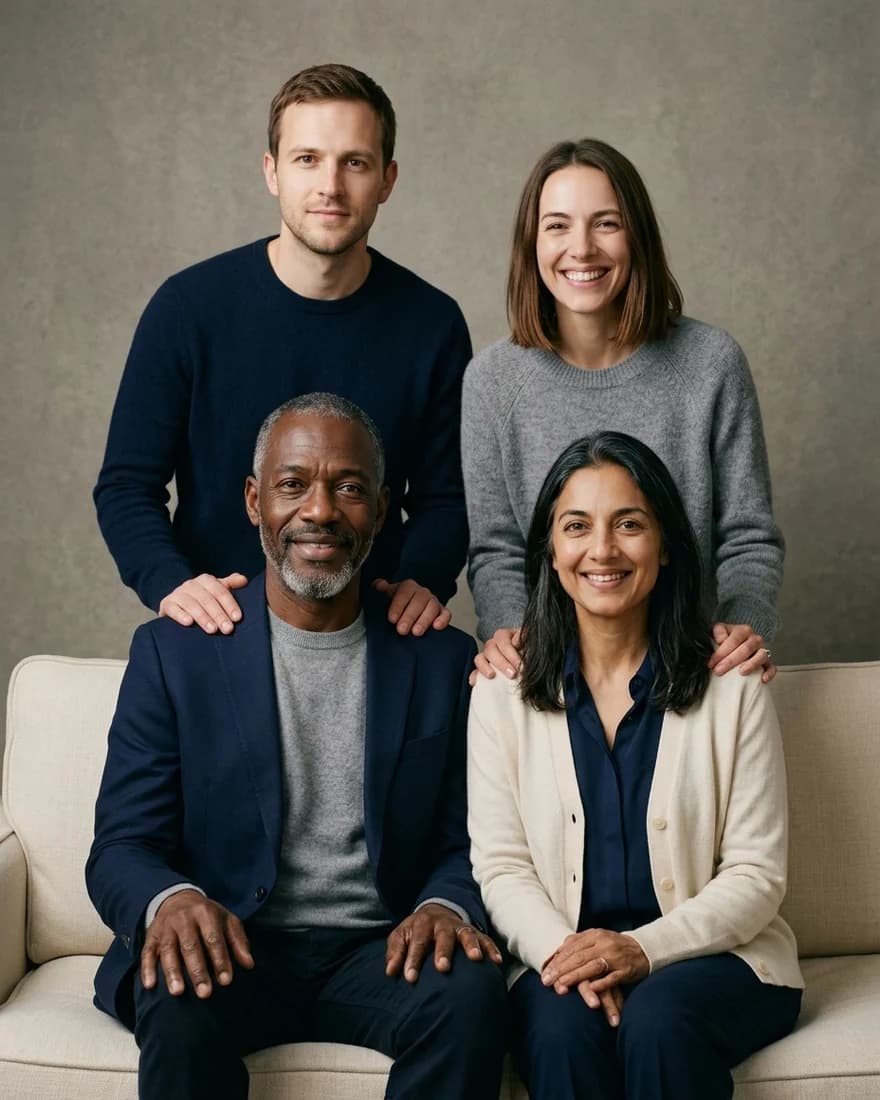
In our test for the family portrait page, Nano Banana 2.1 turned four separate AI-made headshots into one studio portrait with all four faces kept, for 21 credits. That was one try with four people, so treat it as a single example and not a guarantee.
What should you do with a family of more than four?
If you have one good group photo, start from it, since nobody has to be placed from scratch. If everyone was photographed separately, build the picture in two rounds: make a portrait of the first four, then add the others to that result while telling the model to keep the existing people unchanged. Check each face after every round. Our AI group photo generator page covers bigger groups, and the AI couple photo generator is simpler if there are only two of you.
How do you use these prompts in ChatGPT or Kenerate?
The steps are almost the same in both:
- Choose your photos and check everyone agrees to it.
- Upload one group photo or one photo per person.
- Paste keep line A or B.
- Add one setting, one outfit line and one pose.
- Generate, then compare each face with its original.
- Fix one problem per follow-up message.
In ChatGPT, go by what the upload box allows, because we could not confirm an in-app photo limit and OpenAI's API guide doesn't list a maximum. In Kenerate, open Image Studio, pick a model from the table and upload your photos. For more general prompts, see our ChatGPT image prompts.
What should you check before sharing an AI family photo?
Look at hands, teeth, ears and glasses first, since they tend to go wrong in group pictures. Then check that no extra person has appeared and that heights look right.
Ask before you upload someone's photo, and only change pictures of people who agree. Google's docs put it simply: "Make sure you have the necessary rights to any images you upload." If you share the result, say it was made with AI, especially when it shows people who were never in the same room.