Separate photos · studio, Christmas or oil painting
AI Family Portrait Generator — one portrait from everyone's own photo
Upload one clear photo of each relative and get them together in one family portrait — a studio sitting, a Christmas card photo or an heirloom oil painting — with every face kept the same.
- One photo per person
- Faces kept the same
- Studio, holiday or painted
- No watermark
Updated by the Kenerate AI team
On this page
Quick answer
How do you make a family portrait from separate photos with AI?
An AI family portrait generator puts relatives who were photographed separately into one shared portrait. On Kenerate AI you upload one clear photo of each person to the Image Studio, say where everyone sits and what they wear, and an edit model draws the group. In our test, Nano Banana 2.1 turned four separate headshots into one studio portrait with every face kept, for 21 credits whatever the number of photos.
Key facts
- Portraits made
- 3 (studio · Christmas · oil painting)
- Photos in
- 4 separate headshots
- Faces kept
- Yes, all four, in all three
- Best model
- Nano Banana 2.1 (up to 14 photos)
- Free plan
- Qwen Image 3.0, up to 3 photos
- Watermark
- None
Gallery
Four photos, three family portraits
Real edits from the same four separate photos, one try each. Open any one to copy the prompt.
Same prompt
Separate photos in, one family portrait out
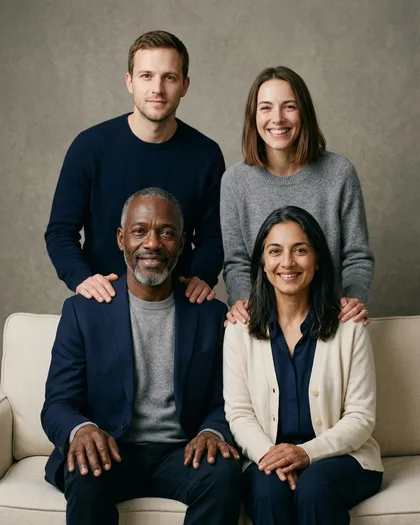
Four headshots taken apart — the fourth, a woman with a brown bob, isn't shown here — became one sitting. Hair, grey beard, skin tones and smiles carried over; the clothes are new, as the prompt asked.
PromptMake one classic studio family portrait of these four adults together: the older man from image 1 and the woman from image 2 seated in the front on a cream sofa, the man from image 3 and the woman from image 4 standing behind them. Keep every face exactly as in its photo.
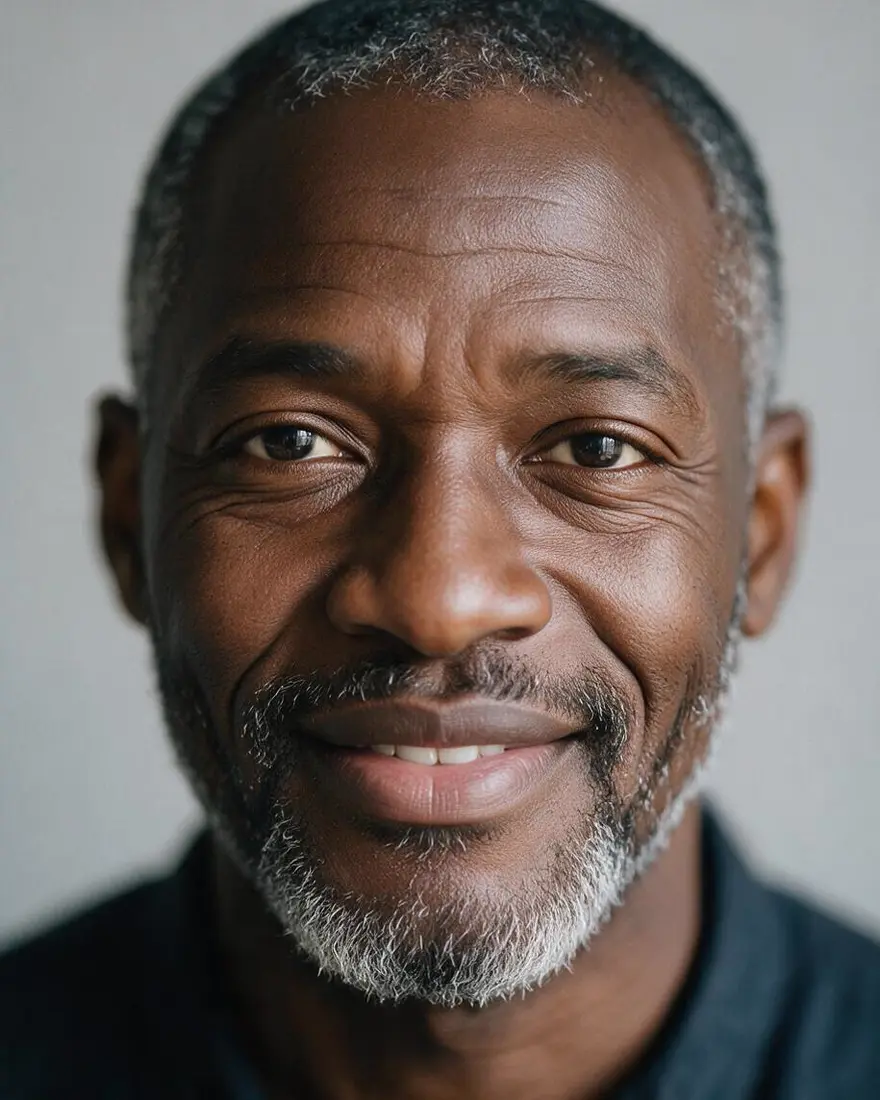 Photo 1Input
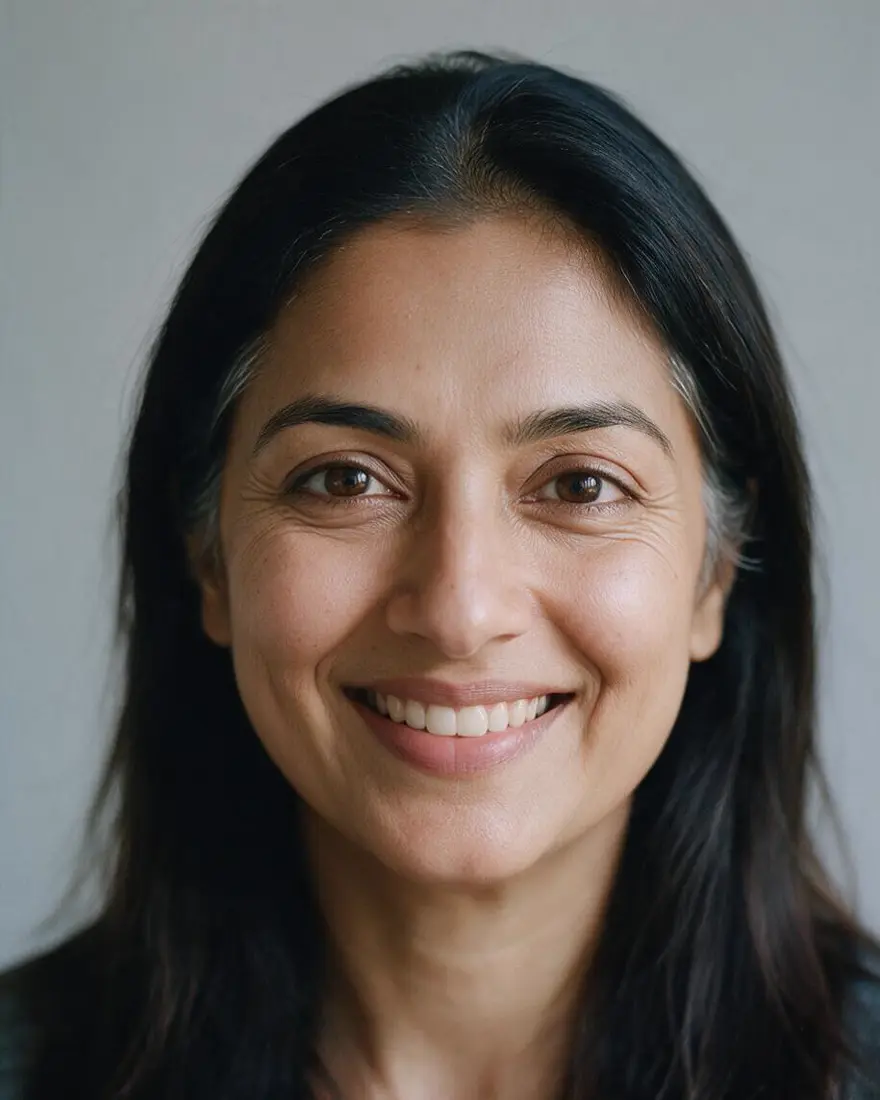 Photo 2Input
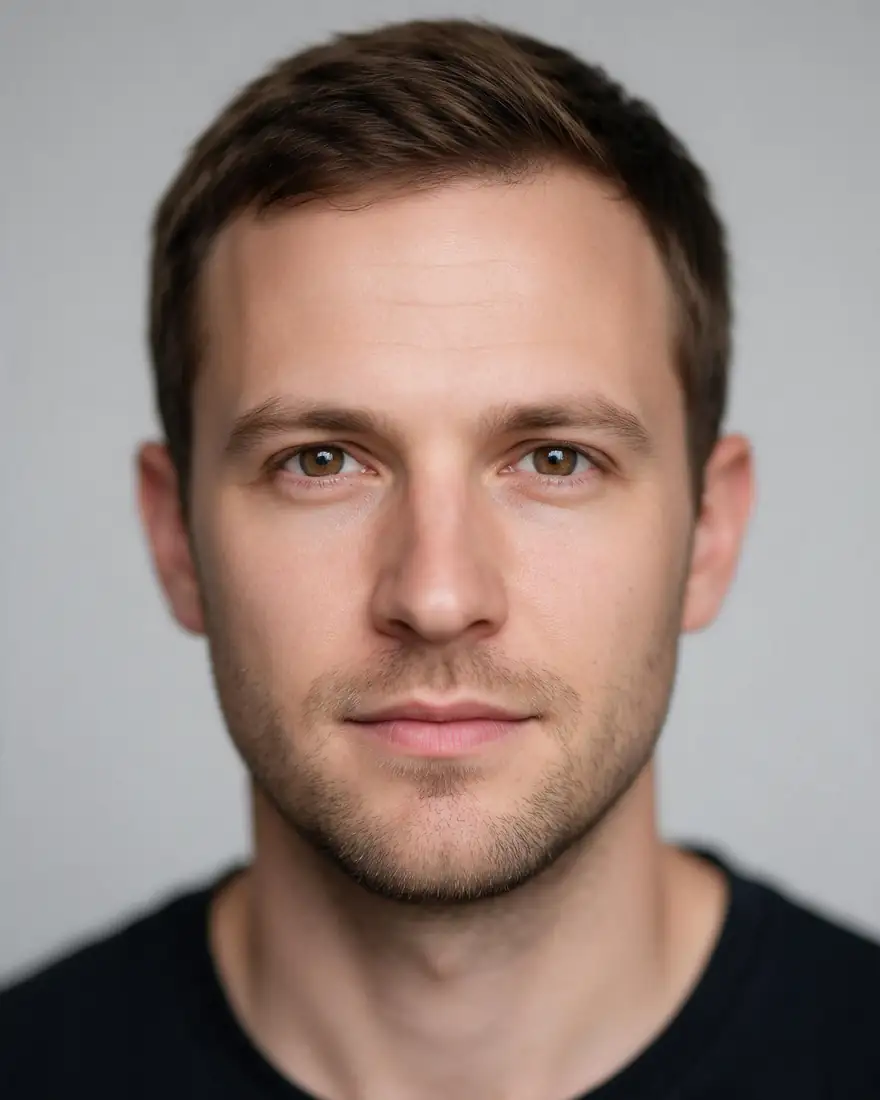 Photo 3Input
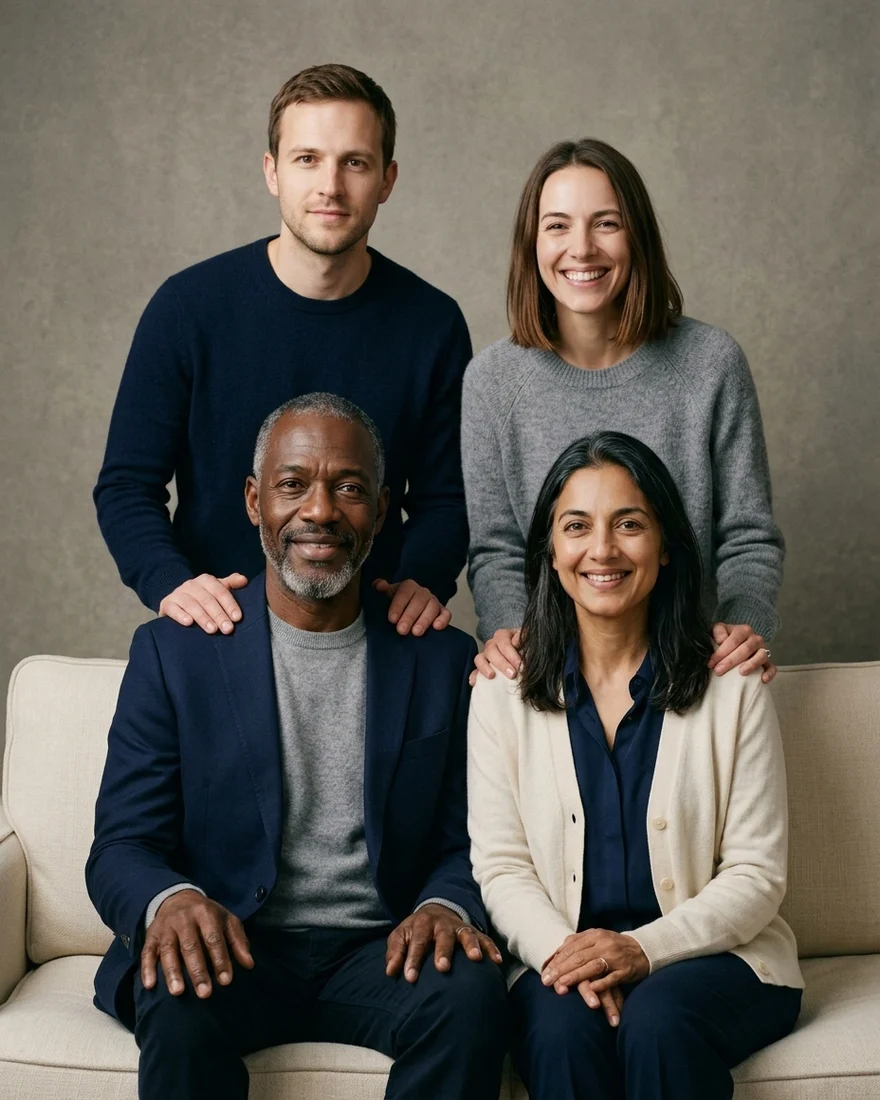 Family portraitNano Banana 2.1
How to
How to use the AI family portrait generator
- Time needed
- Steps
- 4 steps
Step 1
Add one photo per person
In /app/image, add a clear photo of each relative as a reference. Sign in free for starter credits.
Step 2
Pick Nano Banana 2.1
It takes up to 14 photos and kept all four faces in our studio test.
Step 3
Describe the portrait
Who sits where, matching outfits, the backdrop and the light, then “keep every face exactly as in its photo”.
Step 4
Download
Regenerate if a face drifts, then download without a watermark.
See it in the app

Open Image Studio and type what you want to see — subject, style, lighting and mood.


Watch the tour · 1:23
Prompts, styles, references, edit, Arena & chat
Chapters
Tips
Get a family portrait where everyone looks like themselves
What worked in our tests.
One clear, front-facing photo per person, in good light — the face is what the model copies.
Number the people: “the man from image 1 … the woman from image 2” and say where each one sits or stands.
Write “keep every face exactly as in its photo — same hair, skin tone, age and smile”.
Ask for “everyone lit the same way and at a natural relative height” so nobody looks pasted in.
Pick one outfit scheme — navy and cream, matching sweaters, dark formal — to tie the group together.
Name the style last: studio photo, Christmas card, or oil painting with visible brushstrokes.
Models
Models for family portraits
What each model is good at. Open any one straight in the generator.
Google
Nano Banana 2.1
- Reference images
- Up to 14
- Output
- 1K–4K
Open Nano Banana 2.1Best for
Made the studio portrait · same price for any family size

ByteDance
Seedream 5.0 Pro
- Reference images
- Up to 10
- Output
- Up to 2K
Open Seedream 5.0 ProBest for
Made the Christmas and painted portraits

OpenAI
GPT Image 2.5 Sunburst
- Reference images
- Up to 16
- Output
- 1K–4K
Open GPT Image 2.5 SunburstBest for
The most photos in one run
- Free plan

Alibaba
Qwen Image 3.0
- Reference images
- Up to 3
- Output
- 1K · 2K
Open Qwen Image 3.0Best for
Free plan · up to 3 people
FAQ
AI Family Portrait Generator questions
9 questions
How do I make a family portrait from separate photos?
Open Kenerate's Image Studio, add one clear photo of each person, pick Nano Banana 2.1 and describe the sitting: “the older man from image 1 and the woman from image 2 seated on a sofa, the man from image 3 and the woman from image 4 standing behind, keep every face exactly as in its photo”. Our four separate headshots came back as one studio portrait with all four faces kept.
Link to this answerHow many people can be in one AI family portrait?
It depends on the model's photo limit: Qwen Image 3.0 takes 3 photos, Seedream 5.0 Pro 10, Nano Banana 2.1 14 and GPT Image 2.5 Sunburst 16. Google's own docs say Nano Banana keeps up to about four or five characters consistent, so for big families make two or three smaller portraits, or check every face before you print.
Link to this answerIs the AI family portrait generator free?
Free to start. A new Kenerate account gets 25 starter credits, and Qwen Image 3.0 — on the free plan — takes up to 3 photos at 9 credits plus 0.9 per photo. Nano Banana 2.1 (21 credits) and Seedream 5.0 Pro (13.5 credits) use one-time credit packs that never expire. No subscription, and downloads carry no watermark.
Link to this answerCan I make a Christmas family photo with AI?
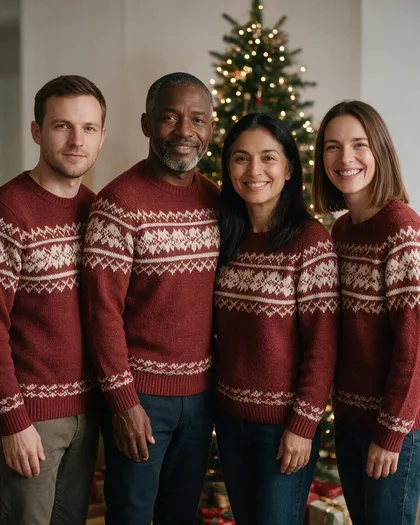
Yes. Add everyone's photo and ask for “matching red and cream knit sweaters in front of a decorated Christmas tree with fairy lights”. Our Seedream 5.0 Pro version put all four people in matching sweaters by a lit tree for 13.5 credits. Add the greeting later in the AI Christmas card generator, or ask for it in quotes.
Link to this answerCan I turn a family photo into an oil painting?
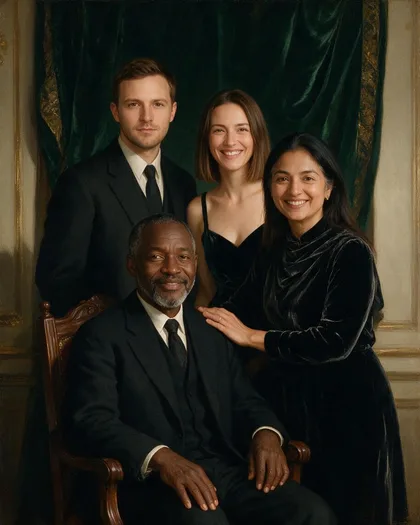
Yes — either upload an existing family photo, or one photo per person, and ask for “a classical oil painting family portrait, visible brushstrokes, Rembrandt lighting”. Our painted version kept every face and the green-velvet backdrop, but it still looked closer to a photo than a painting; say “thick impasto brushstrokes on the faces too” for a stronger painted look.
Link to this answerHow do I add someone to an existing family photo?
Upload the family photo plus a clear photo of the missing person, then say where they stand: “add the woman from image 2 standing on the left, same light and height as the others, keep everyone else unchanged”. Nano Banana 2.1 and GPT Image 2.5 Sunburst handle this kind of precise edit best.
Link to this answerWill the faces really look like my family?
In our three tests every face carried over — hair, the grey beard, skin tones and smiles. Clothes are redrawn to match the prompt, and details from a photo can sneak in: the strappy top from one input appeared in the oil painting. Use sharp, well-lit, front-facing photos and regenerate if a face drifts.
Link to this answerCan I use a Gemini family portrait prompt here?
Yes. Nano Banana 2.1 is Google's Gemini image model, so prompts written for Gemini work in Kenerate's Image Studio. Number the people (“the man from image 1”), say where each one goes, and add “keep every face exactly as in its photo”.
Link to this answerIs it OK to upload photos of my family?
Only upload photos you have the right to use, of people who agreed — Google's own image docs ask the same. Don't make portraits of public figures or anyone who hasn't agreed, and label AI portraits as AI when you share them. Switch on Private in the studio to keep results out of the public feed.
Link to this answerIn depth
AI Family Portrait Generator, explained
What works, what to avoid, and how to pick a model.
On this page
Why separate photos are the hard part
A family portrait is easy to describe and hard to fake: four people who were never in the same room need the same light, the same lens and believable heights. The model copies faces from the photos you give it and invents everything else — clothes, pose, backdrop.
That is why the prompt has to do the photographer's job: who sits, who stands, where the light comes from, and one outfit scheme for everyone. Leave those out and you get four well-copied faces that don't look like one sitting.
A family portrait prompt, written out
The structure that worked for all three portraits:
- Who: “the older man from image 1 and the woman from image 2 … the man from image 3 and the woman from image 4”.
- Pose: who sits on the sofa or chair, who stands behind, hands on shoulders.
- Faces: “keep every face exactly as in its photo — same hair, skin tone, age and smile”.
- Wardrobe: “coordinated navy, cream and soft grey”, “matching red knit sweaters”, “dark formal clothes”.
- Scene and style: studio backdrop with soft key light, a lit Christmas tree, or an oil painting with Rembrandt lighting.
What we got
Three portraits from the same four photos, one try each:
- Studio (Nano Banana 2.1, 21 credits): followed the seating plan exactly — parents on the sofa, son and partner behind with hands on their shoulders.
- Christmas (Seedream 5.0 Pro, 13.5 credits): all four in matching sweaters by the tree, standing in a row rather than posed.
- Oil painting (Seedream 5.0 Pro, 13.5 credits): faces and velvet backdrop right, but closer to a photo than a painting, and one input's strappy top carried over.