The best ChatGPT image prompts say what the picture is for, then describe the scene, the subject, the key details and the limits, in that order. Any words that must appear in the image go in quotes. That is the structure OpenAI recommends in its own prompting guide for the GPT Image models behind ChatGPT. Below are 45 copy-paste prompts sorted by job (posters with text, product shots, infographics, photo edits, style transfer), plus how to run the same OpenAI models on Kenerate. Checked October 23, 2026.
Most "ChatGPT prompt" lists are just interesting subjects. This one is built around the things GPT Image models do better than most: exact text, layouts, following long instructions, and editing a photo without redrawing the parts you wanted to keep.
Which model makes images in ChatGPT?
ChatGPT's images come from OpenAI's GPT Image family. On September 8, 2026, OpenAI announced ChatGPT Images 2.5 for ChatGPT, ChatGPT Work and Codex. In the API the same generation is sold as two models: GPT Image 2.5 Flare (fast, everyday work) and GPT Image 2.5 Sunburst (more precise, slower per image) (OpenAI developer community announcement). Before that, ChatGPT Images 2.0 ran on gpt-image-2 (April 2026).
Inside ChatGPT you can't reliably choose between Flare and Sunburst. Users in that announcement thread disagree on which one the app uses for a given request. That doesn't change how you should write prompts. OpenAI's GPT Image prompting guide gives the same advice for gpt-image-2, gpt-image-1.5 and the older models.
| Model | Where you get it | Best at |
|---|---|---|
| GPT Image 2.5 Flare | ChatGPT Images 2.5, API, Kenerate | Fast drafts and everyday images |
| GPT Image 2.5 Sunburst | API, Kenerate | Fine detail, precise edits, dense text |
| GPT Image 2 | API, Kenerate (was ChatGPT Images 2.0) | Realism, text-heavy layouts |
| GPT Image 1.5 | API, Kenerate | Transparent PNGs, edits that keep faces and logos |
How should you structure a ChatGPT image prompt?
OpenAI's guide recommends a fixed order: scene, subject, key details, constraints. Start by saying what the image is for, since "a poster" and "a product listing image" get different layouts. Here are the steps.
- Say what it's for. "A vertical event poster", "a square Amazon main image", "a 16:9 slide".
- Set the scene. The place, background and time of day.
- Name the subject and what it's doing. One clear subject works better than five.
- Add the key details. Materials, textures, the medium (photo, watercolor, 3D render), lighting, framing and viewpoint.
- Write the exact text. Put it "in quotes" or ALL CAPS, describe the font, and spell unusual words letter by letter.
- List the limits. "No watermark, no extra text, no logos." For edits: "Change only X. Keep everything else the same."
- Change one thing at a time. Keep a clean base prompt and adjust it with small follow-ups instead of rewriting it.
A reusable template:
[Use]: a [format/aspect] [poster / product photo / infographic]. [Scene]: … [Subject]: … [Details]: medium, materials, lighting, camera angle. [Text]: the exact words "…" in [font style]. [Constraints]: no watermark, no extra text.
Here is how small changes add up:
| Weak prompt | Stronger prompt | What changed |
|---|---|---|
| "A coffee poster" | "Vertical cafe poster, the exact text 'COLD BREW SEASON' in bold condensed sans-serif, a glass of iced coffee on a sunlit marble counter, warm summer light, no other text" | Use, text in quotes, scene, light, a limit |
| "Make my photo better" | "Brighten this photo slightly and remove the trash can on the left. Keep the people, faces, clothes and background exactly the same." | One change, a list of what must stay |
| "Infographic about sleep" | "Clean 4:5 infographic titled 'HOW SLEEP WORKS' with four labelled stages in a horizontal timeline, flat icons, navy and soft yellow, short labels only" | Format, title, layout, palette, text limit |
45 ChatGPT image prompts you can copy
Paste them into ChatGPT or any GPT Image model. Swap the bracketed parts. Use a new chat for unrelated batches so styles don't carry over.
Posters and graphics with text (8)
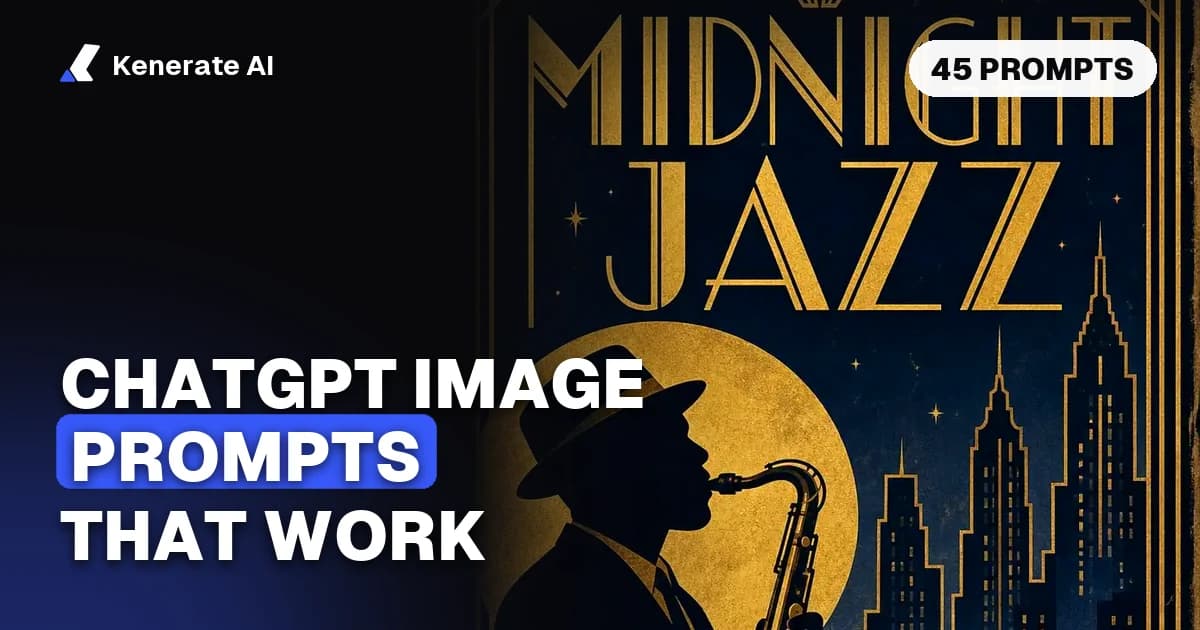
- "Vintage jazz festival poster, the exact text 'MIDNIGHT JAZZ' and 'FRIDAY 9 PM' in gold art deco lettering, saxophone player silhouette against a full moon, navy and gold, no other text."
- "Minimal Swiss-style concert poster, the title 'NORTHERN LIGHTS TOUR' in large black Helvetica-like type, one thick red diagonal band, off-white paper texture, grid layout."
- "Retro 1970s travel poster for a mountain town, the words 'VISIT ALPENROSE' in rounded bold letters, layered orange and teal mountains, sunburst sky, screen-print grain."
- "Farmers market chalkboard sign, handwritten text 'FRESH STRAWBERRIES 4 / BOX' with doodled berries, wooden frame, morning light, slightly smudged chalk."
- "Movie-style poster for a fictional sci-fi film titled 'ORBITAL', a lone astronaut on a red desert under two moons, cinematic teal and orange, credit block at the bottom in small grey text."
- "Book cover for a cozy mystery titled 'THE LAST CUP' by 'A. MORROW', a teacup on a rainy windowsill, watercolor illustration, serif title, lots of empty space at the top."
- "Wedding save-the-date card, the text 'SAVE THE DATE / 14.06.2027 / LISBON' in elegant script and small caps, eucalyptus leaves, cream paper, gold foil look."
- "Chalkboard cafe menu with readable items 'Espresso 3', 'Latte 4', 'Croissant 3.5', hand-drawn coffee cup doodles, slightly uneven handwriting."
Product shots (7)
- "Product photo of a glass perfume bottle with a label reading 'NOIR 09' on black sand, dramatic rim light, dark background, 4:5."
- "Amazon-style main image: a white ceramic mug centered on a pure white background, soft even studio lighting, gentle shadow, no props, no text."
- "Lifestyle shot of matte green running shoes mid-stride on a wet city street at dawn, low angle, splash frozen, shallow depth of field."
- "Flat lay of a skincare set (serum, cream jar, cleanser) on pale pink stone with eucalyptus sprigs, top-down, soft window light, clean negative space on the right for text."
- "Floating product shot of wireless earbuds and their open case, levitating above a reflective black surface, blue and purple gradient backlight, sharp detail."
- "Rustic food photo of a sourdough loaf on a linen cloth, flour dust, a bread knife, warm side light from a window, 3:2."
- "Packaging mockup of a kraft-paper coffee bag labelled 'HIGHLAND ROAST / MEDIUM' in a stamped serif font, on a wooden shelf next to a pour-over kettle."
Infographics, diagrams and slides (6)
- "Clean 4:5 infographic titled 'HOW COFFEE IS MADE' with five labelled steps (Grow, Pick, Dry, Roast, Brew) in a curved path, flat icons, brown and cream palette, short labels only."
- "Simple labelled diagram of a plant cell for a school slide, clear sans-serif labels for nucleus, chloroplast, cell wall and vacuole, white background, flat colors."
- "16:9 presentation slide titled 'Q3 GOALS' with three rounded cards: 'Grow revenue', 'Ship mobile app', 'Hire 4 engineers', minimal icons, navy and white."
- "Isometric illustration of a small home office network: laptop, router, printer and phone connected with labelled dotted lines, pastel colors, white background."
- "Recipe card infographic for 'Classic Pancakes' with an ingredient list on the left and four numbered illustrated steps on the right, warm hand-drawn style."
- "Comparison chart graphic with two columns, 'Tea' and 'Coffee', rows for caffeine, taste and price shown with simple icons, clean modern layout, no long sentences."
Social media and marketing (6)
- "YouTube thumbnail, 16:9: a surprised cartoon chef holding a giant burger, bold yellow text 'I TRIED IT', bright red background, thick white outline around the chef."
- "Instagram carousel cover, 4:5, the text '5 HABITS FOR BETTER FOCUS' in large rounded type on a soft beige background with a small desk-plant illustration."
- "Black Friday sale banner, 3:1, the text '40% OFF EVERYTHING' in chunky white letters on black, neon pink accent stripe, room on the right for a product."
- "Podcast cover art, square, the title 'SMALL BUSINESS, BIG IDEAS' in a bold geometric font, a retro microphone illustration, orange and dark green."
- "LinkedIn banner, 4:1, a calm abstract gradient of blue and teal waves, the text 'Data design for growing teams' aligned left in clean sans-serif."
- "Story ad, 9:16, a hand holding an iced matcha latte against a pastel pink wall, the text 'NEW: OAT MATCHA' at the top, bright natural light."
Edits of your own photos (8)
Upload a photo you took or have the rights to. Name the one change, then repeat what must stay the same.
- "Remove the person in the background on the right and fill the space with the same brick wall. Keep everything else exactly the same."
- "Change the sky to a soft orange sunset and warm the light on the building to match. Do not change the building, people or street."
- "Add a small wooden sign in the sand that reads 'OPEN 9–5' in hand-painted letters. Keep everything else the same."
- "Replace the background with a clean light-grey studio backdrop. Keep the person's face, hair, clothes and pose unchanged."
- "Translate all the text on this infographic into Spanish. Keep the layout, colors, icons and font style the same."
- "Turn this daytime photo of my living room into an evening scene with lamps on and warm light. Keep the furniture and layout identical."
- "Image 1 is my product, image 2 is a kitchen counter. Place the product from image 1 on the counter in image 2 with matching light and shadow. Don't change the product's label or shape."
- "Restore this old scanned photo: remove scratches and dust, fix the faded colors and sharpen slightly. Don't change the faces or expressions."
Style transfer (6)
- "Redraw this photo as a Japanese ukiyo-e woodblock print with flat colors and fine black outlines. Keep the composition and subject."
- "Turn this street photo into a warm oil painting with visible impasto brushstrokes. Keep the same buildings and layout."
- "Make this photo look like a hand-drawn storybook illustration with soft pencil lines and gentle watercolor washes."
- "Convert this pet photo into a cute 3D clay figure on a plain pastel background, same pose and fur colors."
- "Restyle this landscape as a 1990s anime background painting, painterly clouds, saturated summer colors, same horizon line."
- "Turn this product photo into a clean black-and-white technical line drawing, like a patent illustration, white background."
Logos, icons and stickers (4)
- "Minimal logo for a bakery called 'Rise & Crumb', a simple wheat-and-sun mark above the name in a warm rounded serif, flat brown on cream, no gradients."
- "Set of 6 flat app icons for weather, calendar, notes, music, camera and maps, same rounded-square shape, consistent pastel palette, white background."
- "Die-cut sticker of a happy cactus wearing sunglasses, bold outline, white sticker border, bright colors, plain background."
- "Mascot for a running app: a friendly fox in sneakers, simple vector style, three poses side by side (waving, running, thumbs up), same character in each."
How do you edit an image in ChatGPT without ruining it?
Most bad edits come from vague requests like "make it better." The model redraws more than you wanted. OpenAI's guide gives three fixes:
- Say "change only X", then list what stays. Name the face, the label, the layout and the background. Repeat that list in every follow-up, because each new turn can drift.
- Number your references. With several uploads, say "image 1 is…, image 2 is…" and state exactly what moves where (prompt 34).
- Use a higher quality setting when it matters. The guide suggests trying medium or high quality for small text, dense infographics, close-up portraits and edits where a person must still look like themselves.
Only edit photos of yourself, or of people who have agreed to it. Don't use ChatGPT or any other tool to change a real person's face, body or clothing without their consent. OpenAI also filters prompts and images under its content policy, so some edit requests will be refused (OpenAI image generation docs).
Why does ChatGPT get text wrong, and how do you fix it?
GPT Image models handle text far better than older image models, but long or unusual words still go wrong. These steps help:
- Put the exact words in quotes or ALL CAPS: the exact text "SAVE THE DATE".
- Keep each text block short. A headline and one line of details beat a paragraph.
- Describe the font: "bold condensed sans-serif", "hand-painted script".
- Spell tricky names letter by letter: "the brand name K-E-N-E-R-A-T-E".
- Add "no other text" so the model doesn't invent extra labels.
- If one letter is still wrong, ask for an edit: "Fix the spelling of the second word to 'CRUMB'. Keep everything else the same."
Can you run the same prompts outside ChatGPT?
Yes. The GPT Image models are also available through OpenAI's API, and Kenerate AI runs four of them in the browser alongside other image models. You don't need a ChatGPT subscription for this. You do need Kenerate credits, and you choose the model, aspect ratio, resolution and quality yourself. ChatGPT doesn't let you pick those reliably.
| On Kenerate | Sizes | Quality tiers | Reference images | Credits per image (1K) |
|---|---|---|---|---|
| GPT Image 2.5 Sunburst | 15 aspect ratios, 1K / 2K / 4K | low, medium, high, xhigh, max | Up to 16 | 3 low · 7.2 medium · 27 high · 108 max |
| GPT Image 2.5 Flare | 15 aspect ratios, 1K / 2K / 4K | low, medium, high, xhigh, max | Up to 16 | Same as Sunburst |
| GPT Image 2 | 15 aspect ratios, 1K / 2K / 4K | low, medium, high | Up to 16 | 3 low · 18 medium · 66 high |
| GPT Image 1.5 | 1024×1024, 1024×1536, 1536×1024 | low, medium, high | Up to 10 | 3 low · 12 medium · 42 high (square) |
Prices are from Kenerate's credit calculator as of October 23, 2026. 2K and 4K cost more, up to 300 credits for GPT Image 2.5 at max quality in 4K. Edits add a small charge per reference image (4.5 credits each on GPT Image 2.5). GPT Image 1.5 is the one to use for transparent-background PNGs and has a high/low input-fidelity switch for edits that must keep faces and logos.
To run a prompt:
- Open the Image Studio and pick a GPT Image model. Use Flare for drafts and Sunburst or GPT Image 2 for the final image.
- Paste the prompt and set the aspect ratio in the settings instead of describing it.
- Start at low or medium quality and 1K, then raise the quality once the layout is right.
- For edits, add your photos as references and describe only the change.
New accounts get 25 sign-up credits, which work on the free-plan models (FLUX.2 and Qwen Image). The GPT Image models unlock on a paid plan or credit pack. For a closer look at the two 2.5 models, read GPT Image 2.5: Flare vs Sunburst. The GPT Image 2 model page shows real outputs with their prompts.
Want a ready-made layout instead of a blank prompt? The AI poster generator, AI infographic generator and AI product photo generator start you from templates. For restyling a photo, try AI style transfer.
Frequently asked questions
What is the best prompt format for ChatGPT images?
Use OpenAI's order: what the image is for, the scene, the subject, key details (medium, lighting, framing), the exact text in quotes, then limits such as "no watermark, no extra text". One to three clear sentences is usually enough. Add detail only where the result is wrong.
Can ChatGPT put readable text in images?
Yes. GPT Image models are among the strongest at text. Put the words in quotes or capitals, keep each block short, describe the font and add "no other text". Spell unusual names letter by letter, and fix single typos with a follow-up edit.
Which model does ChatGPT use for images in 2026?
ChatGPT Images 2.5, announced September 8, 2026, is built on OpenAI's GPT Image 2.5 generation. In the API it ships as GPT Image 2.5 Flare and Sunburst. Earlier, ChatGPT Images 2.0 used gpt-image-2.
How do I stop ChatGPT from changing my whole photo when I edit it?
Ask for one change and list what must stay: "Change only the sky. Keep the people, building and street exactly the same." Repeat that list in every follow-up. If the image keeps drifting, start a new chat with the original photo.
Can I edit photos of other people with ChatGPT?
Only with their consent, and within OpenAI's content policy. Never change a real person's face, body or clothing without permission, and don't make images that pass as real photos of someone. Use your own photos or fictional characters.
How do I get a transparent background from a GPT Image model?
In the API, ask for a transparent background with PNG or WebP output. On Kenerate, GPT Image 1.5 has a transparent-background switch that always saves a PNG. Ask for "a single isolated subject, no backdrop, no shadow".
Are ChatGPT image prompts the same for GPT Image 2 and 2.5?
Yes, the same prompts work on both. OpenAI's prompting guide applies across the GPT Image family. The main difference is the settings: GPT Image 2.5 adds xhigh and max quality tiers, and Sunburst spends longer per image for finer detail.
Can I use these prompts without a ChatGPT subscription?
Yes. Kenerate AI runs GPT Image 2.5 Sunburst, 2.5 Flare, GPT Image 2 and 1.5 in the browser with credits, from 3 credits per low-quality 1K image. You set the aspect ratio, resolution and quality yourself.
Sources
- OpenAI Cookbook: GPT Image Generation Models Prompting Guide (model list as of April 21, 2026)
- OpenAI API docs: Image generation guide
- OpenAI Developer Community: Introducing GPT Images 2.5 in the API and ChatGPT (September 8, 2026)
- Kapwing: ChatGPT Image Prompt Guide: 13 Tips from 9 Months of Tests (June 26, 2025)