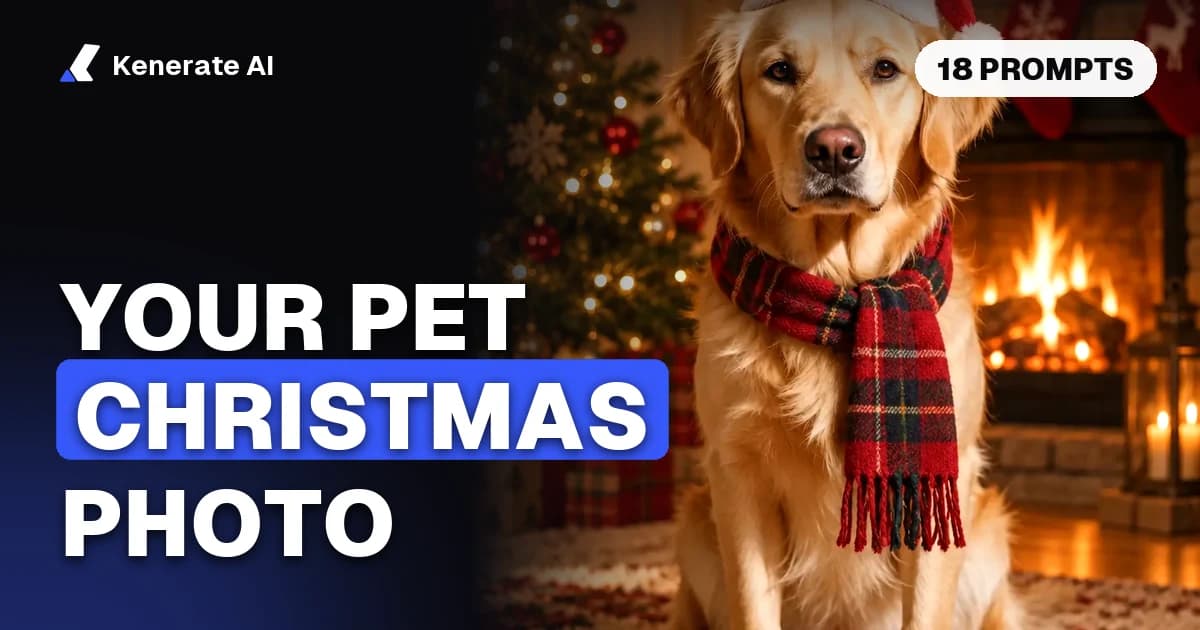
To make an AI pet Christmas photo, upload one sharp photo of your dog or cat to an image model that edits from a reference, describe the holiday scene (Santa hat, fireplace, snow, ugly sweater), and add one line that says what must stay the same: breed, fur colour, markings and face. On Kenerate AI, GPT Image 2.5 Sunburst does this for 11.7 credits per one-photo edit, and a free account can try it with Qwen Image 3.0 for 9.9 credits. Below are 18 copy-paste prompts, the model to pick, and the fixes for the usual mistakes, as of 31 October 2026.
What is an AI pet Christmas photo?
An AI pet Christmas photo is a real photo of your pet re-made inside a holiday scene: a tree, presents, a snowy garden, a Victorian portrait frame or a matching-pyjamas family shot. The model reads your photo as a reference, keeps the animal, and redraws everything around it.
That last part matters. A plain text-to-image prompt ("a golden retriever in a Santa hat") gives you a golden retriever, not yours. Your dog's crooked ear, the white patch on its chest and the exact shade of its coat only survive when the model sees the photo. That's why this guide uses image-edit prompts throughout.
If you just want the tool, open the AI Christmas photo generator. For year-round portraits (royal, astronaut, watercolour), the AI pet portrait generator has tested examples.
Which AI model keeps my pet's face the same?
Any model that accepts reference images can do a pet edit, but they differ in price, how many photos they take and what they're best at. These are the four we'd use for pet Christmas photos on Kenerate, with prices taken from the app's credit calculator at 1K, medium quality:
| Model | Cost for a 1-photo edit (1K) | Max reference photos | Best for | Free plan? |
|---|---|---|---|---|
| GPT Image 2.5 Sunburst | 11.7 credits (+4.5 per extra photo) | 16 | Realistic photos, card text in the image | No |
| Nano Banana 2.1 | 21 credits | 14 | Same pet across a whole set of shots | No |
| Seedream 5.0 Pro | 13.5 credits (27 at 2K) | 10 | Painted, illustrated and Victorian styles | No |
| Qwen Image 3.0 | 9.9 credits | 3 | Trying it free | Yes |
What we've seen in our own tests:
- On the AI Christmas photo generator page, GPT Image 2.5 Sunburst turned a dog photo into a Santa-hat-by-the-fireplace shot on the first try and kept the dog's markings (the cover of this post is that edit).
- On the AI pet portrait generator page, Seedream 5.0 Pro kept a cat and a dog recognisable across five styles, from a royal oil painting to pop art.
Pick GPT Image 2.5 Sunburst for photo-real holiday shots and anything with "Merry Christmas" written on it. Pick Seedream 5.0 Pro for painted looks. Pick Nano Banana 2.1 when you want ten matching shots of the same pet for a calendar. Start on Qwen Image 3.0 if you haven't bought credits yet.
How do I make an AI Christmas photo of my pet? (step by step)
- Choose the photo. Sharp, well lit, your pet looking at or near the camera, face not cut off. Daylight by a window beats a flash photo with glowing eyes.
- Open the Image Studio at kenerateai.com/app/image and sign in. New accounts get 25 credits.
- Upload the photo as a reference image. For a two-pet scene, upload one photo of each pet.
- Pick the model from the table above.
- Paste a prompt from the list below and swap in your pet's details ("black-and-white border collie", "orange tabby").
- Keep the consistency line at the end of every prompt: "Keep the same [dog/cat], same breed, fur colour, markings and face."
- Generate, then compare the result with your photo. Check the eyes, ears, nose colour and any patches. If something drifted, regenerate or say exactly what changed ("the white chest patch is missing; keep it").
- Choose the shape for its use. 4:5 for Instagram and cards, 2:3 for a 4×6 print, 9:16 for a phone wallpaper or story, 1:1 for a profile picture.
- Upscale the keeper if you're printing it, then download. Kenerate downloads have no watermark.
18 copy-paste prompts for AI pet Christmas photos
Every prompt is written as an edit of your uploaded photo. Replace the words in brackets. Costs are for GPT Image 2.5 Sunburst at 1K with one photo (11.7 credits) unless noted.
Classic cosy Christmas
- Santa hat by the fireplace: "The same [dog] wearing a small red Santa hat, lying on a rug in front of a lit stone fireplace with three stockings hanging above it, warm evening light. Keep the same dog, breed, fur colour, markings and face. Real photograph."
- Under the tree: "The same [cat] curled up in an open gift box under a decorated Christmas tree, tissue paper and red ribbon around it, soft fairy-light bokeh. Keep the same cat, fur colour, markings and face. Real photograph."
- Christmas morning: "The same [dog] sitting beside a pile of wrapped presents on Christmas morning, soft window light, a cup of cocoa on a side table. Keep the same dog and face. Real photograph, 50mm lens."
- Reindeer antlers and scarf: "The same [dog] wearing plush reindeer antlers and a red knitted scarf, sitting on a sofa with a plaid blanket, warm lamp light. Keep the same dog, markings and face. Real photograph."
- Window and falling snow: "The same [cat] sitting on a windowsill looking out at falling snow at dusk, a small wreath on the window, warm light inside. Keep the same cat and face. Real photograph."
Snow and outdoors
- First snow: "The same [dog] running through fresh snow in a pine forest, a few snowflakes in its fur, a red bandana around its neck, bright winter morning. Keep the same dog and face. Real photograph, fast shutter."
- Christmas market: "The same [dog] on a lead at a Christmas market at night, wooden stalls with warm lights behind, wearing a green knitted jumper. No shop names, no text. Keep the same dog and face. Real photograph."
- Sledge ride: "The same [dog] sitting in a red wooden sledge on a snowy hill, a striped wool hat on its head, blue sky. Keep the same dog, breed and markings. Real photograph."
Costumes and ugly sweaters
- Ugly Christmas sweater: "The same [dog] wearing a loud ugly Christmas sweater with reindeer and snowflakes, sitting in front of a tinsel-free tree, flash-photo party look. Keep the same dog and face." (For more sweater ideas, see the ugly Christmas sweater generator.)
- Santa's little helper: "The same [cat] dressed as one of Santa's elves, green felt hat with a bell, sitting at a wooden workbench with toy trains and wrapping paper. Keep the same cat and face. Real photograph, workshop lighting."
- Pet as Santa: "The same [dog] as Santa Claus: red velvet suit with white trim, tiny round glasses, sitting in a big armchair next to a sack of presents. Keep the same dog, breed and face. Real photograph."
Painted and portrait styles
Use Seedream 5.0 Pro for these (13.5 credits at 1K, 27 at 2K).
- Victorian Christmas portrait: "Turn this [cat] into a Victorian Christmas oil portrait: green velvet collar with a holly sprig, gold-framed painting style, dark warm background with candlelight. Keep the same cat, fur colour and face."
- Royal winter portrait: "Turn this [dog] into a royal Renaissance oil portrait in winter: crimson cape with white fur trim, small gold crown with a red berry, snowy palace window behind. Keep the same dog and face."
- Watercolour card: "Turn this photo into a soft watercolour Christmas illustration on white paper, a few holly leaves and red berries around the pet. Keep the same [dog] and face."
Cards, profile pictures and families
- Christmas card with text: "The same [dog] in a red Santa hat in front of a snowy cabin. Add the words "Merry Christmas" in elegant cream script across the top. Keep the same dog and face. Real photograph." Put the words in quotes; GPT Image 2.5 Sunburst writes them into the picture. For more layouts, try the AI Christmas card generator.
- Profile picture: "Close-up head-and-shoulders of the same [cat] in a tiny Santa hat, plain deep-red background, centred, soft studio light. Keep the same cat and face." Generate at 1:1, or use the Christmas PFP generator.
- Dog and cat together (2 photos, 16.2 credits): "Put these two pets together on a sofa under a plaid blanket in front of a lit Christmas tree. Pet 1 on the left, pet 2 on the right. Keep each pet's breed, fur colour, markings and face exactly as in its photo. Real photograph."
- Family in matching pyjamas (3 photos, 20.7 credits): "Put this person and these two dogs on a rug by the Christmas tree, the person in red plaid pyjamas and both dogs in matching red plaid bandanas. Keep every face, coat and marking exactly as in the photos. Real photograph."
Can I use ChatGPT or Gemini for a pet Christmas photo?
Yes. Both let you upload a photo and describe changes, and the prompts above work there too. The trade-off is choice: one chat app gives you one image model. On Kenerate you can run the same prompt through GPT Image 2.5 Sunburst, Nano Banana 2.1 and Seedream 5.0 Pro side by side and keep whichever got your pet's face right.
A handy trick that works in any tool: ask a chat assistant to write a prompt for your photo ("describe this dog's breed, coat, markings and eye colour in one sentence"), then paste that sentence into the consistency line. The more precise the description, the less the model guesses.
Is there a free AI pet Christmas photo generator?
You can start free on Kenerate. A new account gets 25 credits on sign-up, and Qwen Image 3.0 works on the free plan at 9.9 credits for a one-photo edit, so you get two pet Christmas photos before paying anything. GPT Image 2.5 Sunburst, Seedream 5.0 Pro and Nano Banana 2.1 unlock once you buy a credit pack. Packs are one-time payments, not a subscription.
Many "free" generators online add a watermark, cap the resolution, or only give a handful of tries. Check those three things before you put time into a set of photos.
Why doesn't the AI photo look like my pet? (common mistakes)
| Problem | Likely cause | Fix |
|---|---|---|
| Wrong breed or generic face | Text prompt with no photo, or a blurry photo | Upload a sharp photo; describe breed and markings in the prompt |
| Markings moved or vanished | Model "tidied up" the coat | Name each marking: "white blaze on the nose, brown left ear" |
| Eyes look odd or glow | Flash photo as reference | Use a daylight photo without flash reflections |
| Extra legs or paws | Busy pose plus a costume | Choose a simpler pose (sitting, lying) and fewer props |
| Pet shrinks into the background | Scene described more than the pet | Say "close-up" or "the dog fills most of the frame" |
| Random signs or text | Market and shop scenes | Add "no shop names, no text" |
| Two pets merged into one | One photo containing both pets | Upload a separate photo of each and say who sits where |
If one detail is wrong, don't rewrite the whole prompt. Regenerate with a single correction line; models respond better to one clear change than to a new paragraph.
How do I print an AI pet Christmas photo or use it on a card?
- Shape first. A 4×6 inch print is exactly 2:3. A 5×7 card sits between 2:3 and 4:5, so leave space around your pet so the printer's crop doesn't cut off ears or a tail.
- Resolution. Generate at 1K to test prompts cheaply, then re-run the winner at 2K or upscale it to 4K before printing.
- Text. Short greetings ("Merry Christmas from Biscuit") can go in the image. Longer messages look cleaner added in a card editor afterwards. Our Christmas card ideas post has layouts.
- Mugs, ornaments and calendars. Use a plain or simple background for anything printed small; detail gets lost on a 3-inch ornament.
Are real Christmas props safe to recreate with my pet?
Many AI scenes include tinsel, ribbons, lilies, mistletoe or lit candles. In a picture they're harmless. In your living room, the ASPCA's holiday safety tips warn that tinsel can block a cat's intestines, mistletoe and holly can cause stomach and heart problems, lilies can cause kidney failure in cats, and loose wires and candles are a burn and shock risk. If you're tempted to stage the real thing after seeing the AI version, swap in faux plants and keep ribbon and tinsel out of reach. The upside of an AI pet Christmas photo is that your cat never has to go near the tinsel.
Should I say the photo is AI-made?
For a family card or your own feed, it's up to you, though a short "AI-edited" caption avoids confusion. If you post it as a reel or short video on a platform with AI-content labels, follow that platform's rules. Use photos of your own pet, and don't present an AI scene as a real event in contexts where that matters, such as a lost-pet poster or a pet-sitting listing.
Quick recap
Start from a sharp photo, keep the consistency line in every prompt, pick GPT Image 2.5 Sunburst for photo-real shots and Seedream 5.0 Pro for painted ones, and fix drift one detail at a time. With 25 sign-up credits you can make your first two pet Christmas photos free on Qwen Image 3.0, and the prompts above give you a full season of cards, profile pictures and prints.