Greeting in the design · print sizes · couples, pets, scenes
AI Christmas Card Generator — design the card, greeting included
Describe the card — a snowy village, a gold-foil tree, your dog in a scarf — and put your greeting in quotes. You get a finished front with the words lettered in, ready to print at 5×7 or send as an e-card.
- Greeting lettered in
- Print sizes explained
- Free credits to start
- No watermark
Updated by the Kenerate AI team
On this page
Quick answer
How do you make a Christmas card with AI?
An AI Christmas card generator designs the whole card — artwork, layout and your greeting lettered in — from a short description. On Kenerate AI, GPT Image 2.5 Sunburst writes the words you put in quotes, at 7.2 credits a design at 1K (12 at 2K); Recraft V4.1 and Ideogram v4 are the alternatives for type-led designs. A printed 5×7 card needs about 1500×2100 pixels, so render at 2K or upscale to 4K, and check every letter before you print. To put your own photo into a Christmas scene, use the AI Christmas photo generator.
Key facts
- Best for lettering
- GPT Image 2.5 Sunburst, 1K to 4K
- Type-led alternatives
- Recraft V4.1 · Ideogram v4
- 5×7 print
- ≈ 1500×2100 px at 300 DPI, + 0.125 in bleed
- Ratios to pick
- 3:4 for 5×7 · 2:3 for 4×6 · 1:1 square · 1:2 panoramic
- Fix a word
- Edit Text in Image in Edit Studio
- Free start
- Starter credits · Qwen Image 3.0 on the free plan
- Watermark
- None
Gallery
A real Christmas card from Kenerate AI
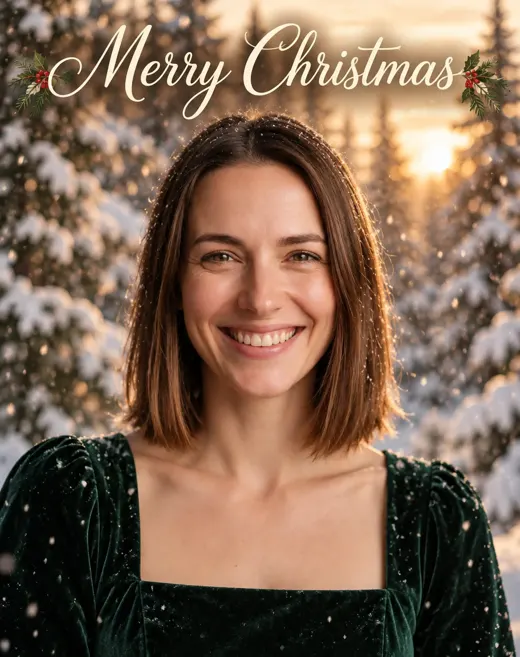
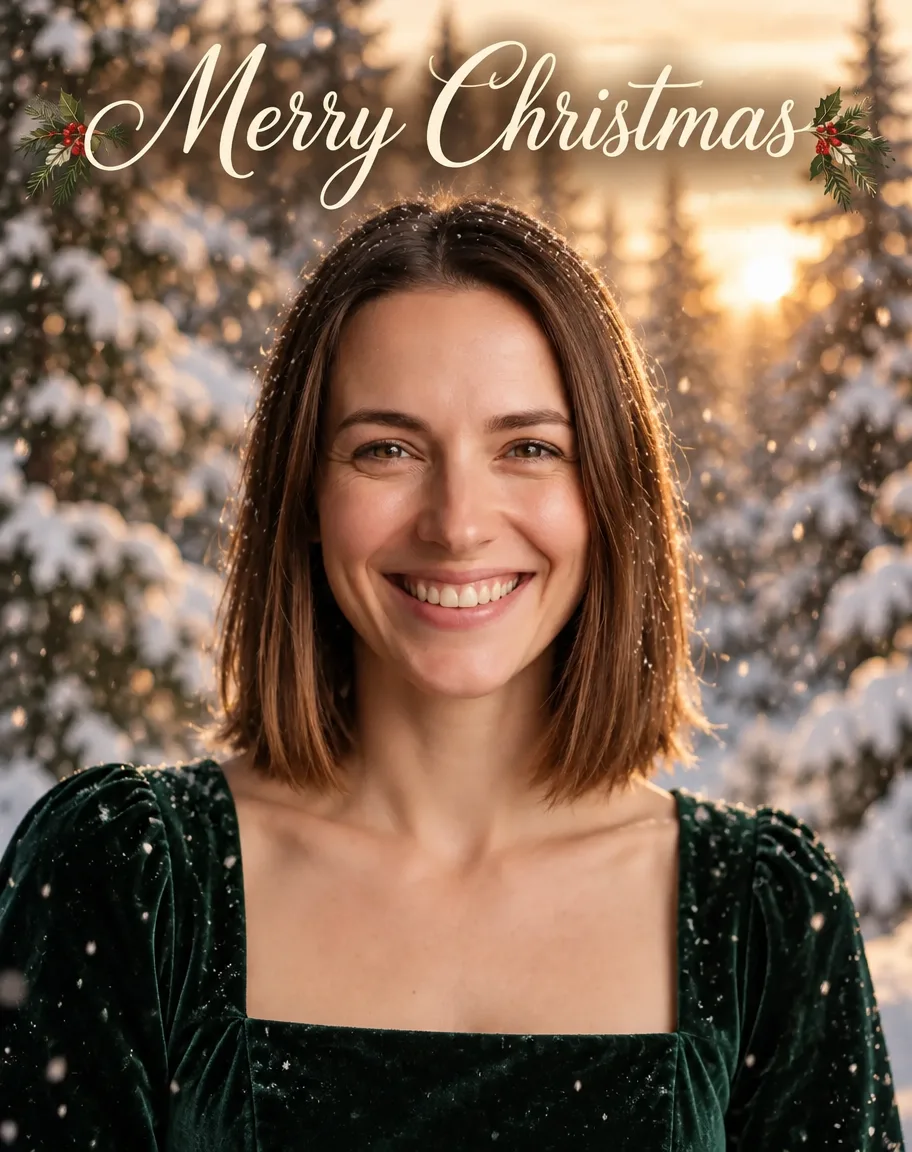
One GPT Image 2.5 Sunburst edit of a fictional portrait, first try: “Merry Christmas” came out spelled right in the script we asked for, with holly sprigs the model added on its own. Open it to copy the prompt.
How to
How to use the AI christmas card generator
- Time needed
- Steps
- 4 steps
Step 1
Open the Image Studio
Go to /app/image and pick GPT Image 2.5 Sunburst. Sign in free for 25 starter credits.
Step 2
Choose the ratio
3:4 for a 5×7 card, 2:3 for 4×6, 1:1 for square — and 2K if you'll print.
Step 3
Describe the card
Scene or design style, colours, and the greeting in quotes with its position. Add a photo or a logo as a reference if you want one in the design.
Step 4
Check, fix, download
Zoom in on the lettering, fix any word with Edit Text in Image, upscale to 4K for print, then download without a watermark.
See it in the app

Open Image Studio and type what you want to see — subject, style, lighting and mood.


Watch the tour · 1:23
Prompts, styles, references, edit, Arena & chat
Chapters
Tips
Get a card you can actually print
Lettering and print are where AI cards go wrong. This avoids both.
Put every word in quotes and say where it goes: “Merry Christmas” in gold serif across the top, “The Harper Family” small at the bottom.
Keep the front to one greeting and one name line — long messages belong inside the card.
Leave space: say “plain cream area in the lower third for text” if you'll add words in a card editor.
Pick the ratio for the print: 3:4 for a 5×7 (trim the sides a little), 2:3 for a 4×6, 1:1 for a square card.
Render at 2K or upscale to 4K, and keep names and dates a quarter inch away from the edges.
Zoom in on every letter before printing; if one word is off, fix it with Edit Text in Image instead of regenerating.
Models
Models for Christmas cards
What each model is good at. Open any one straight in the generator.

OpenAI
GPT Image 2.5 Sunburst
- Reference images
- Up to 16
- Output
- 1K–4K
Open GPT Image 2.5 SunburstBest for
Greetings and names lettered in; photo or logo as reference

Recraft
Recraft V4.1
- Output
- 5 ratios
Open Recraft V4.1Best for
Flat, graphic and typographic card designs
Google
Nano Banana 2.1
- Reference images
- Up to 14
- Output
- Up to 4K
Open Nano Banana 2.1Best for
A matching set of cards in one style
- Free plan

FAQ
AI Christmas Card Generator questions
9 questions
How do I make a Christmas card with AI?
Open Kenerate's Image Studio, pick GPT Image 2.5 Sunburst and a 3:4 ratio, and describe the card: the scene or style, the colours, and the greeting in quotes with where it goes — “Merry Christmas” in gold serif across the top. Generate, zoom in on the lettering, then download. A design costs 7.2 credits at 1K or 12 at 2K.
Link to this answerIs the AI Christmas card generator free?
Free to start. A new Kenerate account gets 25 credits on sign-up — enough for three GPT Image 2.5 Sunburst card designs at 1K. Qwen Image 3.0 is a free-plan model. After that, credits come in one-time packs that never expire, with no subscription. Downloads have no watermark.
Link to this answerWhich AI model writes the text on a card correctly?
On Kenerate, GPT Image 2.5 Sunburst is the first pick: it letters short greetings and names you put in quotes, and our “Merry Christmas” card came out spelled right on the first try. Recraft V4.1 and Ideogram v4 are built for typographic designs. Every model can still drop or swap a letter — getimg.ai's own card guide warns the same — so check before printing.
Link to this answerWhat size should a printed Christmas card be?
The standard is 5×7 inches with an A7 envelope (5.25×7.25 in). Vistaprint asks for at least 300 DPI at the final size — about 1500×2100 pixels for a 5×7. Print shops usually want 0.125 in of bleed on each side, so leave the edges free of text. Generate at 3:4 and crop slightly, or 2:3 for a 4×6 photo card.
Link to this answerHow is this different from the AI Christmas photo generator?
The AI Christmas photo generator puts your photo into a Christmas scene — a sweater by the tree, snow, a market. This page is about the card itself: the greeting lettered in, the layout, the print size and the envelope. You can combine them: make the photo there, then add it here as a reference for the card.
Link to this answerCan I add my own photo to the card?
Yes. Add the photo as a reference and describe the card around it, adding “keep the faces exactly the same”. A GPT Image 2.5 Sunburst edit with one photo costs 11.7 credits. Couples, friends and pets work well. Prompts that mention children are blocked by Kenerate's moderation, so this page doesn't cover photo cards of kids.
Link to this answerCan I make a business holiday card with my logo?
Yes. Add your logo as a reference image and write “place this logo small and centred at the bottom, unchanged” plus the greeting, such as “Season's Greetings from Northfield Studio”. Models can redraw logos slightly, so for brand-critical cards place the original logo in a card editor afterwards.
Link to this answerCan I write a long message inside the card?
Keep long text out of the image. AI lettering is reliable for a few words, not paragraphs. Print the inside message from a card editor or word processor, or write it by hand — it reads warmer anyway.
Link to this answerCan I send it as an e-card?
Yes. Download the image and send it by email or messaging, or post it. A 4:5 or 1:1 version fits social feeds, and 9:16 fits stories. To make it move — snow falling, lights twinkling — open the card in the Video Studio; video needs a one-time credit pack.
Link to this answerIn depth
AI Christmas Card Generator, explained
What works, what to avoid, and how to pick a model.
On this page
Card sizes, ratios and pixels
Pick the ratio before you generate, so nothing important gets cropped:
- 5×7 in (A7 envelope, 5.25×7.25 in): generate at 3:4, crop a little off the sides; about 1500×2100 px at 300 DPI.
- 4×6 in photo card: 2:3 fits exactly; about 1200×1800 px.
- 5.5×5.5 in square: 1:1; about 1650×1650 px.
- 4×8 in panoramic: 1:2 on GPT Image 2.5; about 1200×2400 px.
- With 0.125 in bleed on each side, a 5×7 file is 5.25×7.25 in — about 1575×2175 px. A 4K upscale covers it.
20 Christmas card prompt ideas
Add your greeting in quotes and say where it goes:
- Snowy alpine village at dusk with warm windows, watercolour, “Merry Christmas” in hand-lettered script.
- Minimal gold-foil Christmas tree on deep green, “Joy” in thin gold serif.
- Mid-century modern ornaments in teal, mustard and coral, flat shapes, “Happy Holidays”.
- Red fox in a knitted scarf in a snowy forest, storybook illustration.
- Your dog in a plaid scarf by the fireplace, “Season's Greetings from Biscuit”.
- Couple's silhouette under a street lamp in snow, “Merry Christmas from Sam & Alex”.
- Gingerbread house with icing details on kraft paper, “Sweet Holidays”.
- Vintage 1950s greeting-card look, tinsel tree and glitter, “Season's Greetings”.
- Linocut robin on a holly branch, two colours, “Peace on Earth”.
- Night sky with a single bright star over hills, deep navy and silver, “O Holy Night”.
- Wreath made of eucalyptus and dried oranges on white, “Warm wishes”.
- Cosy reading nook with a candle, cocoa and a blanket, “Stay cosy this Christmas”.
- Ski-lodge poster style, retro typography, “Merry & Bright”.
- Penguins skating on a frozen pond, playful cartoon, “Chill out, it's Christmas”.
- Snow globe with a tiny cabin inside, glitter snow, “Wishing you a snowy Christmas”.
- Papercut layered forest in white and red, “Noel”.
- Neon-sign style “Ho Ho Ho” on a dark brick wall, fun and modern.
- Botanical poinsettia illustration in red and green on cream, “Merry Christmas”.
- Business card: clean geometric snowflakes, “Season's Greetings from Northfield Studio”.
- New Year card: gold confetti and a city skyline at midnight, “Happy New Year 2027”.
Card or photo: which page do you need?
If what matters is your face in a Christmas scene — a sweater by the tree, a snowy street, the dog in a Santa hat — start with the AI Christmas photo generator. If what matters is a finished card — the greeting, the layout, a print-ready size — start here.
Many people do both: make the photo there, then add it as a reference here and ask for a card around it with the greeting lettered in.
Why lettering fails, and how to fix it
Image models draw letters as shapes, so they slip on long or unusual words. Short greetings in quotes, a named font style (“gold serif”, “hand-lettered script”) and a clear position help most. When one word is wrong, Edit Studio's Edit Text in Image changes just that text and keeps the design.