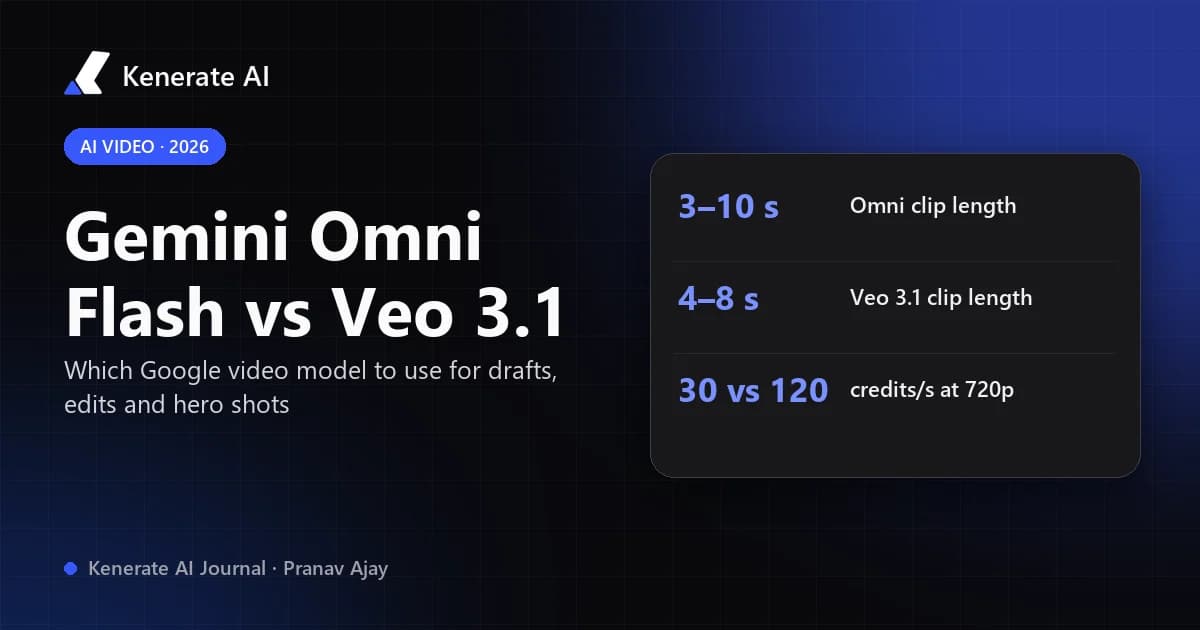
Gemini Omni Flash vs Veo 3.1: pick Gemini Omni Flash for fast drafts, conversational edits and clips up to 10 seconds, and pick Veo 3.1 for short, polished 1080p or 4K shots with tightly synced dialogue and sound. As of October 18, 2026, the version of Omni you should actually use is Gemini Omni 1.1 Flash (released August 27, 2026). It added 360p drafts, 1080p and 4K tiers, video references and first-and-last-frame control, so most of Veo 3.1's old advantages are gone. Veo 3.1 still makes sense for 8-second hero shots and for dialogue-heavy clips.
Both are Google models, which is why the choice is confusing. They aren't two sizes of the same thing, though. Veo 3.1 is a dedicated text- and image-to-video generator. Gemini Omni is Google's newer "any input" model, built around multi-turn editing. Google's own Gemini API video docs now name Gemini Omni Flash as the recommended default for video generation and position Veo for existing pipelines. This guide compares specs, quality, editing and cost per clip on Kenerate AI, then explains when Seedance 2.5 is the better third option.
What is the difference between Gemini Omni Flash and Veo 3.1?
The short version is that Omni edits and Veo renders.
- Veo 3.1 (released October 15, 2025) turns a prompt or an image into a 4-, 6- or 8-second clip with native audio. You can steer it with up to three reference images and a last frame, and extend a clip 7 seconds at a time. Every new instruction means a new generation.
- Gemini Omni Flash launched with Google I/O 2026 as "the first model in the Omni family." It takes text, images, video and voice as input, and you edit a finished clip by describing the change ("make it night," "swap the mug for a wine glass"). The model keeps characters and scenes consistent from one turn to the next.
- Gemini Omni 1.1 Flash (August 27, 2026) is the current Omni model. Google's developer post lists 360p drafts that render up to 60% faster than 720p at a third of the cost, upscaled 1080p and 4K output, up to three seconds of video as a reference, start and end frames, and scene extension in 10-second steps up to 40 seconds in Google's API. The original
gemini-omni-flash-previewwas scheduled for retirement on September 30, 2026.
If you have read our explainer on what Gemini Omni Flash is, think of this post as the follow-up. It answers when Omni beats Veo and when it doesn't.
How do the specs compare side by side?
These are the limits you get when you run the three Google models in Kenerate AI's video studio, taken from our model configuration on October 18, 2026. Google's own API may offer slightly different options, such as Omni scene extension up to 40 seconds.
| Spec (on Kenerate AI) | Gemini Omni 1.1 Flash | Gemini Omni Flash (1.0) | Veo 3.1 | Veo 3.1 Fast |
|---|---|---|---|---|
| Clip length | 3–10 s (any whole second) | 3–10 s | 4, 6 or 8 s | 4, 6 or 8 s |
| Resolutions | 360p, 720p, 1080p, 4K | 720p | 720p, 1080p, 4K | 720p, 1080p, 4K |
| Aspect ratios | 16:9, 9:16 | 16:9, 9:16 | 16:9, 9:16 | 16:9, 9:16 |
| Modes | Text, image, reference, video edit | Text, image, reference, video edit | Text, image, reference, extend | Text, image, reference, extend |
| Reference inputs | Up to 4 images + 3 video clips (≤3 s each) | Up to 4 images | Up to 3 images (fixed 8 s clip) | Up to 3 images (fixed 8 s clip) |
| End frame | Yes | No | Yes | Yes |
| Sound off option | — | — | Yes (halves the price) | Yes |
| Credits per second | 9 / 30 / 45 / 90 (360p / 720p / 1080p / 4K) | 39 | 120 with sound, 60 silent (4K: 180 / 120) | 45 with sound, 30 silent (4K: 90 / 75) |
| 8-second clip at 720p | 240 credits | 312 credits | 960 credits | 360 credits |
Two things stand out. First, Omni 1.1 at 720p costs a quarter of Veo 3.1 with sound (30 vs 120 credits per second). Second, Veo 3.1 Fast is the closest on price to Omni. It costs 45 credits per second with sound, so it's still 50% more than Omni 1.1 at 720p, but you get Veo's audio and its framing behaviour.
Which one looks better?
On blind human-preference voting, Omni comes out ahead. gradually.ai's comparison, which pulled LMArena data on September 22, 2026, lists these ratings:
| LMArena leaderboard (retrieved Sep 22, 2026) | Gemini Omni Flash | Veo 3.1 |
|---|---|---|
| Text to video | 1,513 (rank 2) | 1,364 (rank 12) |
| Image to video | 1,465 (rank 6) | 1,398 (rank 13) |
The confidence intervals don't overlap, so the gap is real for the kinds of prompts people submit to the arena. Treat it as a preference signal, though, not a verdict on your project. Arena prompts are mostly short, single-shot ideas. The same source points out that its own side-by-side sample used different durations for the two models.
In practice, here's what holds up:
- Omni wins on motion and prompt-following for everyday shots. It also handles subject consistency across multiple edits well.
- Veo 3.1 is still very strong on cinematic lighting, camera language and dialogue. Opus Clip's Gemini Omni vs Veo comparison still gives Veo the edge on dialogue sync and lip-sync. If a character has to deliver a line on camera, test Veo 3.1 first.
- Resolution matters less than it looks. Google says Omni 1.1's 1080p and 4K tiers are upscaled from the base render, which is why they cost so much less than Veo's 4K. For social video that's fine. For a large-screen hero shot, compare both at full size before you commit.
Can you edit an existing video with Veo 3.1 or Gemini Omni?
This is the biggest practical difference.
Gemini Omni Flash edits video. Upload a clip (or use one you just generated), describe the change, and Omni rewrites the scene while keeping the rest. On Kenerate AI, a video edit costs 6 credits per input second plus the output rate, for source clips of 1–10 seconds. For a 5-second clip on Omni 1.1 at 720p, that's 5 × 6 + 5 × 36 = 210 credits.
Veo 3.1 doesn't edit in place. You can extend a clip (Google's API allows 7-second extensions up to 20 times, for a total of up to 148 seconds), set a last frame, or guide it with reference images. But changing what's in a shot means generating it again.
So if your workflow is "generate, look, tweak, look again," Omni will save you both credits and time. If your workflow is "write a precise shot list, render each shot once," Veo's predictability counts for more.
Which should you use for each job?
| Job | Best pick | Why |
|---|---|---|
| Testing a prompt or idea | Gemini Omni 1.1 Flash at 360p | 9 credits per second; 10 s costs 90 credits |
| Social clips, 9:16 Reels and Shorts | Gemini Omni 1.1 Flash at 720p | Up to 10 s, 30 credits per second |
| Fixing or restyling a clip you already have | Gemini Omni 1.1 Flash (video edit) | Conversational edits, keeps the scene |
| On-camera dialogue, close-ups | Veo 3.1 | Strong speech timing, native audio |
| A polished 8 s hero or ad shot | Veo 3.1 at 1080p or 4K | Cinematic look, end-frame control |
| Same as above, on a budget | Veo 3.1 Fast | Veo look at 45 credits per second |
| Shots longer than 10 s, multi-shot scenes | Seedance 2.5 | 4–30 s per clip, rich references |
When is Seedance 2.5 better than both?
Neither Google model gives you a single long take on Kenerate AI. Omni stops at 10 seconds per generation and Veo at 8. Seedance 2.5 generates 4 to 30 seconds in one clip, at 480p, 720p, 1080p or 4K, in six aspect ratios (including 1:1 and 21:9). It accepts up to 30 reference images, 3 reference videos and 10 audio references. It costs more per second (54 credits at 480p, 108 at 720p, 270 at 1080p), so an 8-second 720p clip is 864 credits. That's close to Veo 3.1 with sound, but you're paying for length and control that neither Google model has. For a wider overview, see our AI video generator page, which lists every video model we run.
How do you try Gemini Omni Flash and Veo 3.1 on Kenerate AI?
You can run the same prompt on both models in one place and compare the clips yourself:
- Create a free account at kenerateai.com. Video generation runs on one-time credit packs that never expire. There's no subscription to cancel.
- Open the Omni studio from the Gemini Omni video generator page and choose Gemini Omni 1.1 Flash.
- Draft at 360p. Write the prompt the way you'd brief a camera operator: subject, action, setting, camera, light, sound. Keep it to 5–8 seconds.
- Edit, don't regenerate. If something is off, switch to video edit and describe only the change ("keep everything, but make the jacket red").
- Run the final prompt on Veo 3.1. Open the Veo 3.1 page or pick Veo 3.1 in the studio, set 8 s at 1080p, and compare. If it's close, keep the cheaper clip.
- Need more than 10 seconds? Move the shot to Seedance 2.5, or chain several Omni clips with matching start and end frames.
For prompt structure that works on both models, our Veo 3 prompt guide covers dialogue, camera moves and sound cues in detail.
What are the limits of each model?
Gemini Omni Flash
- 16:9 and 9:16 only, with no square or cinema-wide output.
- 1080p and 4K are upscaled, not rendered natively.
- Video references are short: each clip can be at most 3 seconds (9 seconds in total on Kenerate AI).
- The 1.0 model has no end-frame control. Use 1.1.
Veo 3.1
- Clip lengths are fixed at 4, 6 or 8 seconds, and reference-to-video is always 8 seconds.
- It's the most expensive of the four at 120 credits per second with sound.
- There's no in-place editing. Every change is a new render.
Both models add Google's SynthID watermark to generated video, according to Google's Omni announcement and Veo documentation.
The verdict: Gemini Omni Flash or Veo 3.1?
For most creators in October 2026, Gemini Omni 1.1 Flash should be the default. It's cheaper per second, tops blind-preference leaderboards, runs up to 10 seconds, and lets you fix a clip by talking to it instead of starting over. Keep Veo 3.1 for the moments where it still earns its price: a character speaking on camera, or one perfectly lit 8-second shot at 1080p or 4K. When you need a long continuous take, skip both and use Seedance 2.5.
Updated October 18, 2026. Credit prices and limits come from Kenerate AI's live model configuration on that date. Google features come from Google's own announcements and docs. Benchmark figures are LMArena ratings as reported by gradually.ai on September 22, 2026.