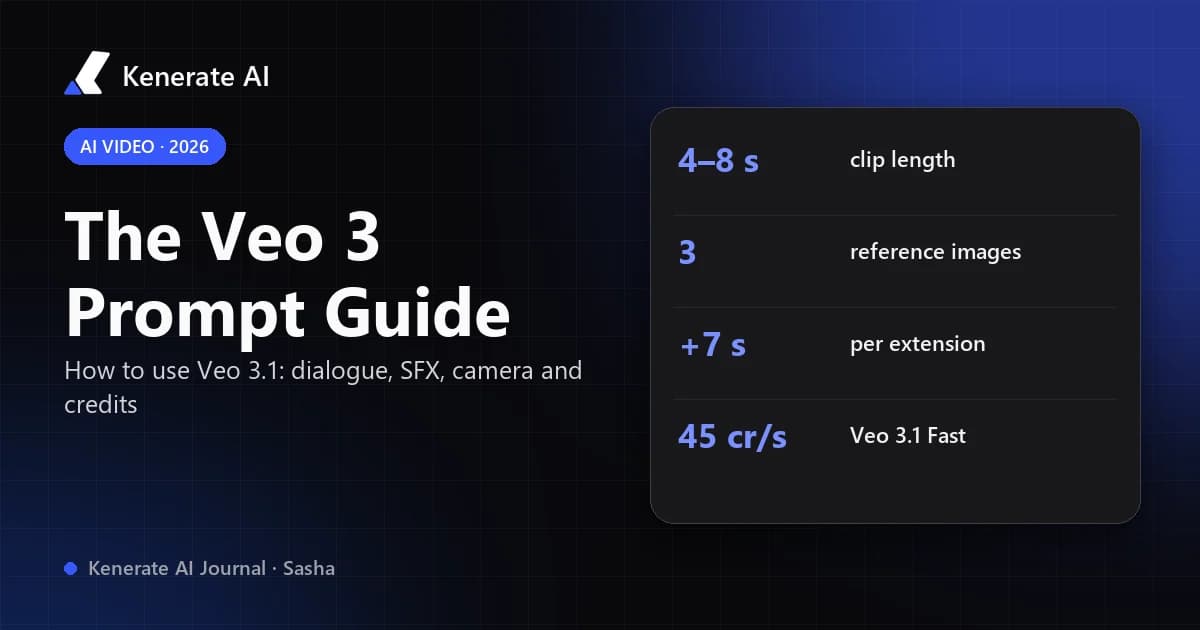
To use Veo 3 well, write each prompt like a short shot list: camera, subject, action, setting, style, then the sound. Put any spoken line in quotes, label effects with SFX: and background sound with Ambient noise:, and keep the whole thing to what fits in one 4–8 second clip. On Kenerate AI you pick Veo 3.1 or Veo 3.1 Fast in the video studio, choose length, resolution and sound, and pay in credits per second.
This guide was written on October 18, 2026. It is based on Google's own Veo 3.1 prompting guide and API documentation, plus the settings and prices in the Kenerate AI video studio on that date.
What is Veo 3.1, and how is it different from Veo 3?
Veo 3 is Google DeepMind's text- and image-to-video model that generates video and synchronized audio together: dialogue, sound effects and ambience come out of the same generation. Veo 3.1 is the update. According to Google Cloud's prompting guide (October 16, 2025), it improves prompt adherence and audiovisual quality when animating an image, and adds three controls Veo 3 did not have:
- Reference images ("ingredients to video") — up to 3 images of a character, object or setting to keep the look consistent across shots.
- First and last frame — give a start image and an end image, and Veo animates the transition between them, with audio.
- Scene extension — continue an existing clip by 7 seconds at a time.
Google's Gemini API documentation now marks the original Veo 3 and Veo 3 Fast model IDs as deprecated, so for new work you should start with Veo 3.1. Everything in this guide works on both, except the three 3.1-only features above.
Veo 3.1 specs at a glance
| Setting | Veo 3.1 (Google API docs) | Veo 3.1 on Kenerate AI |
|---|---|---|
| Clip length | 4, 6 or 8 s (8 s required for 1080p, 4K, references and extension) | 4, 6 or 8 s |
| Resolution | 720p, 1080p, 4K | 720p, 1080p (default), 4K |
| Aspect ratio | 16:9 or 9:16 | 16:9 or 9:16 |
| Frame rate | 24 fps | — |
| Audio | Native, generated with the video | On or off (silent costs less) |
| Reference images | Up to 3 | Up to 3 (fixed 8 s clip) |
| Extension | +7 s per step, up to 20 times (148 s total) | +7 s per step, 720p or 1080p |
| Prompt limit | 1,024 tokens | — |
| Watermark | SynthID on every output | SynthID (applied by Google) |
What is the best prompt structure for Veo 3?
Google's recommended formula is:
[Cinematography] + [Subject] + [Action] + [Context] + [Style & ambiance]
Then add the audio layer on top. In practice that gives you a six-part prompt:
- Cinematography — shot size, angle, movement and lens. "Slow dolly-in, medium close-up, shallow depth of field."
- Subject — who or what we are looking at, described specifically. "A grey-haired baker in a flour-dusted apron."
- Action — one clear thing that happens. Eight seconds is short; one action, maybe two.
- Context — where and when. "In a narrow bakery kitchen at 5 a.m., steam rising from trays."
- Style and ambiance — lighting, palette, film look. "Warm tungsten light, 35 mm film grain, documentary feel."
- Audio — dialogue in quotes,
SFX:for effects,Ambient noise:for the room tone, plus music if you want it.
A full example:
Slow dolly-in, medium close-up with shallow depth of field. A grey-haired baker in a flour-dusted apron pulls a tray of croissants from the oven and smiles at the camera. A narrow bakery kitchen at 5 a.m., steam rising from the trays. Warm tungsten light, 35 mm film grain, documentary feel. He says, "First batch is always the best." SFX: the oven door creaks shut. Ambient noise: a radio playing softly, the hum of an extractor fan.
Google's own docs list the same core elements (subject, action, style) and mark camera, composition, focus and ambiance as optional — but every one you skip is a decision the model makes for you.
How do you write dialogue in a Veo 3 prompt?
Dialogue is the main reason people choose Veo, so it is worth getting right.
Put the exact words in quotation marks. Google's guide uses the pattern A woman says, "We have to leave now." Quotes tell the model which words are meant to be spoken, not shown or described.
Name the speaker every time. With two or more people, attach each line to a visible description: "The man in the blue jacket says…", "The woman holding the map replies…". Replicate's Veo 3 guide (June 10, 2025) notes that clear speaker descriptions stop the model from mixing up who talks.
Size the line to the clip. Replicate recommends keeping explicit speech to about 8 seconds' worth of talking: long lines get rushed, and very short ones can leave awkward silence or filler speech. In an 8-second clip, one or two short sentences is a safe amount.
Fix pronunciation phonetically. If a brand or name comes out wrong, spell it the way it sounds.
Describe the delivery. "Whispers", "in a weary voice", "shouts over the wind" — tone words change the read as much as the words do. Google's detective example uses "says in a weary voice".
Let Veo write the line when you don't care. You can also describe the gist ("she tells him the train is late") and let the model produce the words.
How do I stop Veo 3 from adding subtitles?
Veo sometimes burns captions into the frame. Replicate's guide suggests two fixes: put the speech after a colon instead of inside quotes (He says: First batch is always the best.), and add "(no subtitles)" to the prompt. If you need captions, add them afterwards instead — they will be cleaner and editable.
How do you prompt sound effects, ambience and music?
Veo treats audio as part of the scene, so describe it as precisely as the picture.
| Audio type | Syntax | Example |
|---|---|---|
| Dialogue | Quotes after the speaker | The pilot says, "We're losing altitude." |
| Sound effect | SFX: + the sound | SFX: glass shatters on a tiled floor |
| Ambience | Ambient noise: + the soundscape | Ambient noise: distant traffic and rain on a window |
| Music | Describe genre, mood, when it starts | A soft piano score begins as she turns away. |
| Silence | Say it plainly | No music, only the sound of footsteps. |
Two habits help most:
- Tie effects to on-screen actions. "SFX: the door slams" works best when the door actually slams in the shot. Sounds with no visual source tend to drift or get dropped.
- Always define the background. Replicate observed that if you leave ambience undefined, Veo 3 may invent one — including an unwanted studio-audience laugh track. One line of
Ambient noise:prevents that.
If you only want picture, switch sound off. On Kenerate AI the Veo models have an audio toggle, and a silent clip costs less per second: 60 instead of 120 credits on Veo 3.1, 30 instead of 45 on Veo 3.1 Fast (720p and 1080p).
Which camera words does Veo 3 understand?
Standard film vocabulary works. These are the terms Google's guide calls out, grouped by what they control:
- Movement: dolly shot, tracking shot, crane shot, aerial view, slow pan, POV shot.
- Framing: wide shot, close-up, extreme close-up, low angle, two-shot.
- Lens and focus: shallow depth of field, wide-angle lens, soft focus, macro lens, deep focus.
Replicate adds eye level, high angle, worm's-eye and zoom. Pick one movement per clip; asking for a crane shot, a pan and a zoom in 8 seconds usually produces none of them cleanly.
Can you do multiple shots in one Veo clip?
Yes, with timestamp prompting. Google's guide shows a single 8-second generation split into four 2-second beats:
[00:00-00:02] Medium shot from behind a hiker pushing aside a branch. [00:02-00:04] Reverse shot of her face, amazed. SFX: rustling leaves, distant birds. [00:04-00:06] Tracking shot as she steps into a clearing. [00:06-00:08] Wide crane shot revealing a ruined temple. A gentle orchestral score begins.
Keep each beat simple. Four distinct shots in 8 seconds is the upper end; two or three is more reliable.
How do you use Veo 3.1 step by step on Kenerate AI?
- Open the video studio at kenerateai.com/app/video and choose Veo 3.1 (best quality) or Veo 3.1 Fast (cheaper drafts). Video generation needs a paid plan.
- Choose the mode. Text-to-video starts from a prompt only. Image-to-video animates a start frame you upload — the most reliable way to keep a product or face exact. Reference-to-video takes up to 3 images and returns a fixed 8-second clip.
- Set length, resolution and ratio. 4, 6 or 8 seconds; 720p, 1080p or 4K; 16:9 for YouTube, 9:16 for Reels, Shorts and TikTok.
- Decide on sound. Leave audio on for dialogue and effects, or turn it off for b-roll you'll score later.
- Write the prompt with the six-part structure above. Check the credit estimate shown before you generate.
- Draft cheap, then commit. Test the idea with Veo 3.1 Fast at 4 seconds, then re-run the winning prompt on Veo 3.1 at the length and resolution you need.
- Extend if you need more time. Use video extend to add 7 seconds to a finished clip. Google's docs warn that voices may not carry over well if nobody is speaking in the last second of the input clip, so end on the speaker if the next part continues the line.
How many credits does a Veo 3 video cost?
Prices below come from the Kenerate AI video model configuration on October 18, 2026. Credits are charged per second of output.
| Model | With sound | Silent | 8 s clip with sound | +7 s extend |
|---|---|---|---|---|
| Veo 3.1 (720p/1080p) | 120 cr/s | 60 cr/s | 960 | 960 |
| Veo 3.1 (4K) | 180 cr/s | 120 cr/s | 1,440 | — |
| Veo 3.1 Fast (720p/1080p) | 45 cr/s | 30 cr/s | 360 | 360 |
| Veo 3.1 Fast (4K) | 90 cr/s | 75 cr/s | 720 | — |
| Veo 3 / Veo 3 Fast (720p/1080p) | 120 / 45 cr/s | 60 / 30 cr/s | 960 / 360 | — |
For scale: the $15 Starter plan includes 1,300 credits and the $29 Creator plan includes 2,700 (see pricing). That is roughly three 8-second Veo 3.1 Fast clips with sound on Starter, or one full-quality Veo 3.1 clip. This is why drafting on Fast first matters.
What are the most common Veo 3 prompt mistakes?
- Using "no" lists. Google advises describing what you want rather than what you don't: "an empty desert road with no buildings in sight" instead of "no buildings, no cars". (Subtitles are the exception — "(no subtitles)" tends to work.) Our negative prompts guide covers why newer models behave this way.
- Too much story. A paragraph of plot will not fit in 8 seconds. One action per clip, then extend or cut.
- Changing the character description between shots. For consistency, Replicate recommends repeating the same detailed description word for word in every prompt — or using Veo 3.1 reference images.
- Expecting the same result twice. Identical prompts give similar but not identical clips. Change the wording to explore; keep it fixed to refine.
- Forgetting the default look. Veo leans towards a clean, polished live-action look. Name a style — "16 mm handheld", "stop-motion clay", "2D anime" — or add film grain if you want something less glossy.
- Ignoring vertical framing. If the clip is for Shorts or Reels, generate in 9:16 instead of cropping 16:9 later.
Ready-to-use Veo 3 prompt templates
Swap the bracketed parts for your own scene.
Talking head / UGC style
A selfie-style video, handheld at arm's length. [A woman in her 30s with curly hair] stands in [a sunny kitchen] holding [a coffee mug], glancing at the camera. Natural window light, slightly grainy phone-camera look. She says, "[One short sentence about the product]." Ambient noise: a kettle clicking off, birds outside. (no subtitles)
Product reveal
Slow orbit shot, close-up with shallow depth of field. [A matte black wireless speaker] rotates on a wet slate surface as water droplets catch the light. Dark studio, single hard rim light, premium commercial style. SFX: a low bass hit as the logo faces the camera. No music.
Cinematic establishing shot
Aerial crane shot rising over [a fishing village at dawn], revealing [the harbour and mountains behind it]. Mist on the water, soft golden light, anamorphic lens flare, epic film look. Ambient noise: gulls, waves against the harbour wall. A quiet string score swells at the end.
Two-person dialogue
Two-shot at eye level. [An old detective in a trench coat] sits behind a desk; [a young woman in a red coat] stands at the door. Rainy night, venetian-blind shadows, 1940s film noir. The detective says in a weary voice, "[Line one]." The woman replies, "[Line two]." Ambient noise: rain on the window, a ticking clock.
Animated style
Wide shot, 2D hand-drawn anime style. [A girl on a bicycle] rides down [a hill road beside rice fields] at sunset, her scarf blowing. Bright cel shading, soft pastel sky. SFX: bicycle bell rings twice. Ambient noise: cicadas and wind.
Should you use Veo 3.1 or another model?
Veo 3.1 is a strong choice when you need natural dialogue, synced sound effects and cinematic camera work in a clip of 8 seconds or less. If you need one continuous shot longer than that without extending, or a cheaper per-second rate for volume, other models in the same studio may fit better — our Seedance vs Kling vs Veo vs Wan vs Runway comparison lays out lengths and prices side by side, and the Google Veo 3.1 page has more examples of what the model does.
Sources
- Google Cloud Blog, "Ultimate prompting guide for Veo 3.1" (October 16, 2025): https://cloud.google.com/blog/products/ai-machine-learning/ultimate-prompting-guide-for-veo-3-1
- Google AI for Developers, "Generate videos with Veo 3.1 in the Gemini API": https://ai.google.dev/gemini-api/docs/veo
- Replicate, "Using and prompting Veo 3" (June 10, 2025): https://replicate.com/blog/using-and-prompting-veo-3
- Kenerate AI video model configuration and plan pricing, read October 18, 2026.