GPT Image 2.6 is a strong first pass for 2D game art. In our tests OpenAI's November 2026 model drew a clean 6-frame pixel-art walk cycle, a 4 × 4 sheet of 16 RPG item icons and a mascot character sheet in three consistent poses — each on the first try — and it can output the animation directly as a GIF. What it won't do is give you a game-ready atlas: cells aren't guaranteed to be perfectly equal, "pixels" aren't on a true grid, and you still slice the sheet in your engine. Here's the workflow, the prompts and the limits.
Updated 12 November 2026.
What GPT Image 2.6 can make for a game
| Asset | What we got | Ready to ship? |
|---|---|---|
| Sprite sheet (walk cycle) | 6 frames on a 3 × 2 grid, same knight in every frame | After cleanup and slicing |
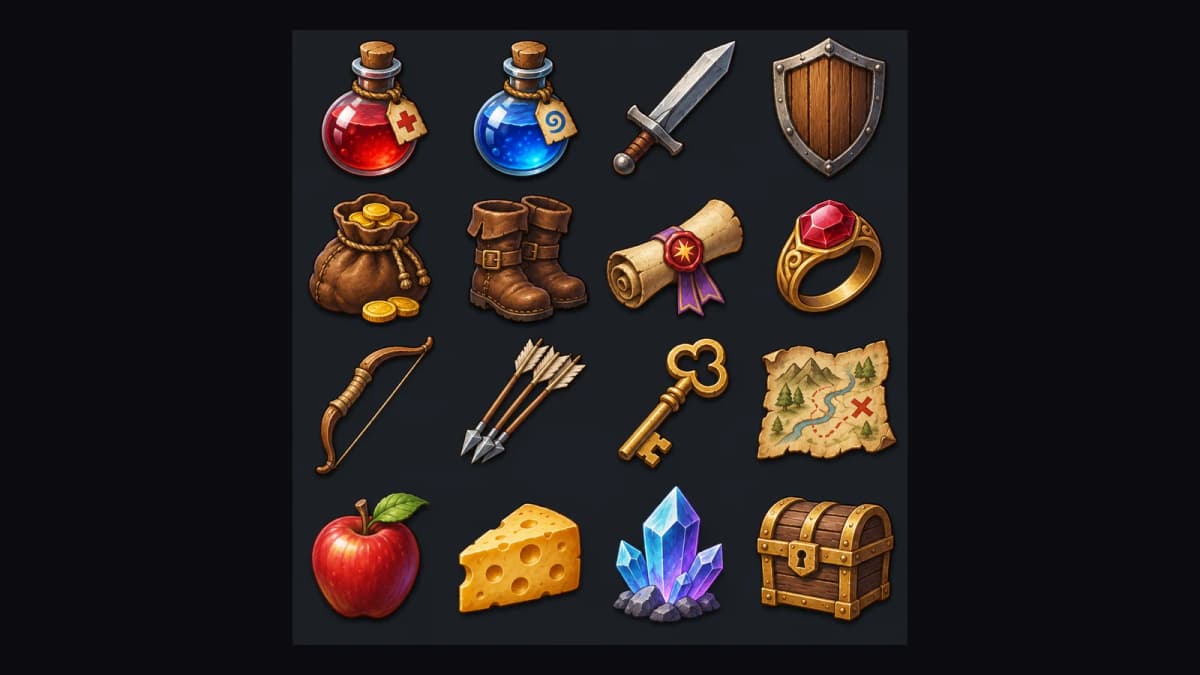
| Icon set | 16 RPG items on a 4 × 4 grid, one consistent style | After cutting out each cell |
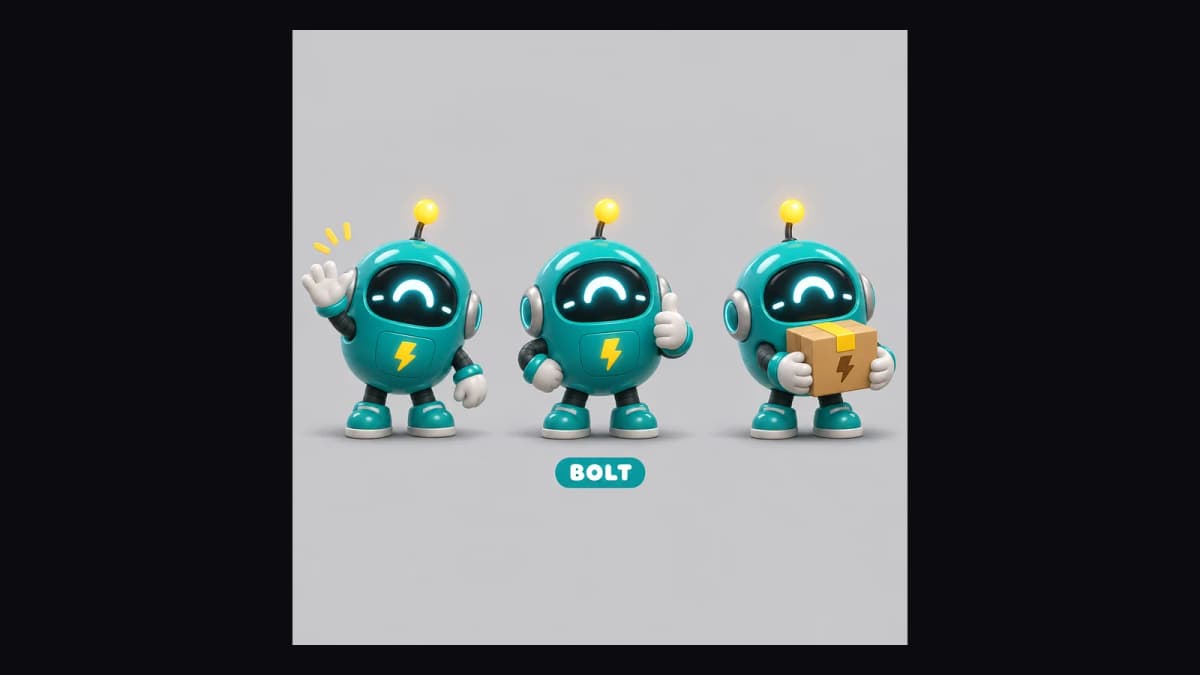
| Character sheet | One mascot in three poses with the same design | As concept art or a reference |
| Animated loop | A sprite sheet played as a GIF, or GIF output directly | For UI, stickers, menus |
How to make a sprite sheet with GPT Image 2.6
The prompt pattern that worked for us lists the frame count, the grid, the reading order, the poses and what must stay identical:
AI Prompt RecipeFlux.1 Pro16:9“One image containing a game sprite sheet: exactly 6 sequential frames of a 16-bit pixel art knight walk cycle in a precise 3-column by 2-row grid, read left-to-right then top-to-bottom. A small armored knight with a blue cape and a sword at his hip walks to the right in side view: contact, down, passing, up, contact, passing. Every panel has identical dimensions; the knight is the same size and stands on the same ground line in every panel. Plain flat dark teal background, crisp pixel edges, limited retro palette. No words, no numbers, no panel labels, no borders, no gutters.”
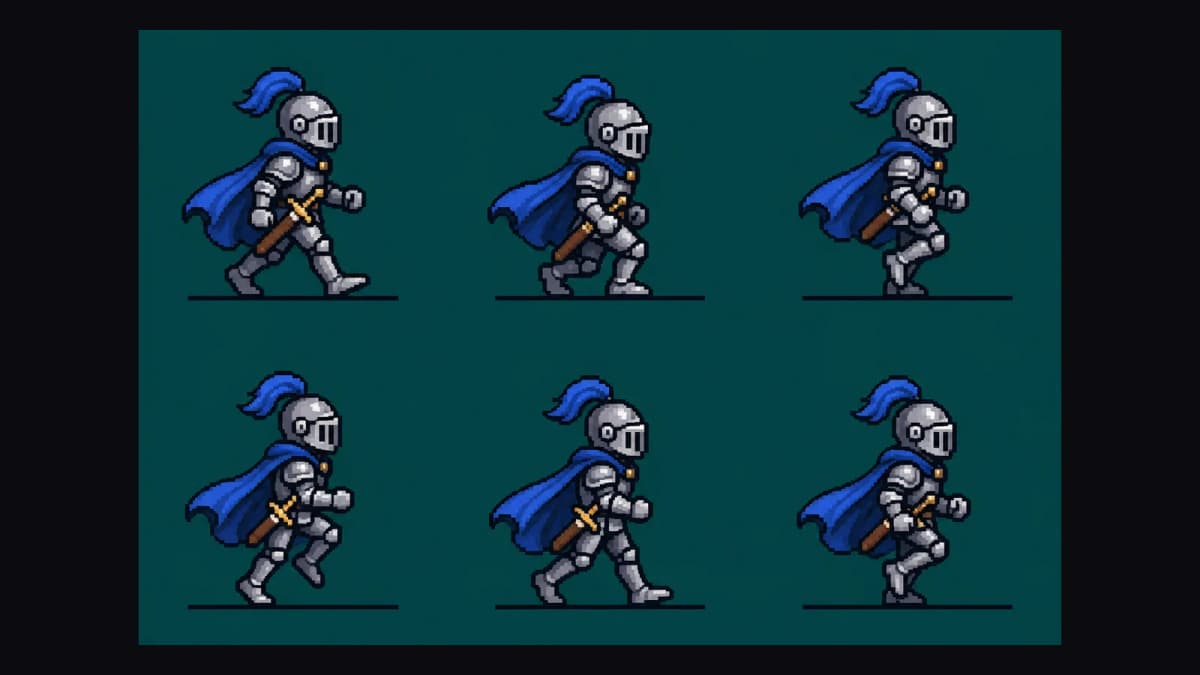
The knight kept his helmet plume, cape and sword in all six frames. It also drew a thin ground line under each frame because we mentioned one, so leave that phrase out if you don't want it in the art. Use a 3:2 ratio for a 3 × 2 grid and 1:1 for 4 × 4, so each cell stays square.
Starting the prompt with "One image containing…" matters. One of our eleven sheet requests came back as a single frame instead of a grid; rephrasing it that way fixed it.
How to make a game icon set
Icons are easier than animation because nothing has to line up between cells. Name every item, fix the grid and lock the style:
AI Prompt RecipeFlux.1 Pro16:9“RPG inventory icon sheet: 16 fantasy item icons in a precise 4 by 4 grid, each centered in its own equal square cell on a dark slate background: health potion, mana potion, iron sword, wooden shield, gold coin pouch, leather boots, magic scroll, ruby ring, bow, arrows, key, map, apple, cheese, crystal, treasure chest. One consistent hand-painted game art style, same lighting and outline weight on every icon, readable at small size. No words, no numbers, no labels, no borders between cells.”
All 16 items came back in the order we listed, with the same lighting and outline weight.
How to make a character sheet
For a new character, ask for several poses in one image so the design is fixed across them. Our robot mascot "BOLT" came back in three poses — waving, thumbs up and holding a box — with the same body, visor and antenna. It added a lightning-bolt badge on its chest that we hadn't asked for, which suited the name. Save the sheet and attach it as a reference every time you make new frames.
Turning sheets into animation
Each 3 × 2 sheet plays as a loop once the cells are shown in order. GPT Image 2.6 can also return the animation as a GIF directly — third-party guides to the API report 2–16 frames at 20–2,000 ms each — which is handy for menus, loading screens and stickers. For in-game sprites you'll usually still want the sheet itself.
Knight at 120 ms per frame, pixel heart at 130 ms, robot at 180 ms.
Getting the sheet into your engine
- Check the cells. Make sure every frame sits in its own cell and nothing crosses a boundary.
- Downscale with nearest-neighbour to your target cell size (32 or 64 pixels, say) so pixel edges stay hard, then reduce the image to your palette.
- Cut the background. Ask for a flat colour that isn't in the art, then key it out, or use a background remover and clean the edge pixels.
- Slice it. In Godot, use "Add frames from a Sprite Sheet" and set the horizontal and vertical counts. In Unity, open the Sprite Editor and slice by cell count or cell size.
Limits to know
- Cells aren't guaranteed equal. Our sheets were close, but check before slicing.
- It's a pixel-art look, not real pixels. A 1K image draws each "pixel" with several real ones.
- Motion can stall. Two frames of our rocket loop were nearly identical; ask for "a clear change between every frame".
- No atlas or JSON. You download an image; the engine does the slicing.
Make a sprite sheet with GPT Image 2.6
GPT Image 2.6 is the fastest way we've found to go from an idea to a usable sprite sheet, icon set or character sheet, as long as you budget a few minutes of cleanup for each. More examples and the model comparison are on our AI sprite sheet generator page, and looping animations are on the AI GIF generator page.