Pick GPT Image 2.5 when the image is mostly words or you want the cheapest good draft: on Kenerate it starts at 3 credits (7.2 at medium quality, 1K), takes up to 16 reference images and spelled every title right in our poster and book-cover tests. Pick Nano Banana 2.1 when an edit has to combine many references at a flat price, or you need extreme banner ratios up to 8:1 and web-grounded facts: it costs 21 credits at 1K whether you upload one photo or fourteen.
This comparison uses only the two models' official pages, Kenerate's own model settings, and real images we already made with each model on Kenerate, as of 31 October 2026. We haven't run one prompt on both models yet, so the images below are labelled with the model and prompt that made them, and we don't hand out scores.
What are Nano Banana 2.1 and GPT Image 2.5?
Nano Banana 2.1 (gemini-nano-banana-2.1) is Google's image generation and editing model, released on 6 October 2026 as an update to Nano Banana 2 (Gemini 3.1 Flash Image). Google's model page lists better realism at 1K, 2K and 4K, fixed tiling on wide and panoramic ratios, improved text and infographic layout, up to 14 reference images (4 characters and 10 objects), Google Web and Image Search grounding, and three thinking levels. What changed from the previous version is in our Nano Banana 2.1 vs Nano Banana 2 post.
GPT Image 2.5 is OpenAI's model behind ChatGPT Images 2.5, released on 8 September 2026 in two API versions. OpenAI's launch post says Flare "brings the same quality, editing, and speed improvements" while Sunburst "adds precision for detailed creative work, with longer generation times". OpenAI's Sunburst model page calls it its "most capable model for image generation and editing", with quality settings from low to max. Our GPT Image 2.5 guide covers Flare vs Sunburst in detail, and the GPT Image 2 model page runs one prompt on GPT Image 2, Sunburst and Flare.
Nano Banana 2.1 vs GPT Image 2.5: the spec table
Every row below comes from Kenerate's model configuration (kenerate/nano-banana-2.1, kenerate/gpt-image-2.5-sunburst, kenerate/gpt-image-2.5-flare) and its credit calculator.
| Nano Banana 2.1 | GPT Image 2.5 Sunburst | GPT Image 2.5 Flare | |
|---|---|---|---|
| Maker | OpenAI | OpenAI | |
| Released | 6 Oct 2026 | 8 Sep 2026 | 8 Sep 2026 |
| Credits per image, 1K | 21 | 3 low · 7.2 medium · 27 high · 48 xhigh · 108 max | Same as Sunburst |
| Credits at 2K / 4K | 31.5 / 42 | Medium 12 / 21 · max 180 / 300 | Same as Sunburst |
| Edit surcharge | None: 21 at 1K with 1 to 14 images | +4.5 credits per reference image | +4.5 per reference |
| Reference images | Up to 14 | Up to 16 | Up to 16 |
| Resolutions | 1K, 2K, 4K | 1K, 2K, 4K | 1K, 2K, 4K |
| Aspect ratios | 14, from 1:8 to 8:1 | 15, from 1:3 to 3:1 | 15, from 1:3 to 3:1 |
| Quality tiers | One | Five: low, medium, high, xhigh, max | Five |
| Web search | Yes, +4.2 credits | No | No |
| Output format choice | No | Yes | Yes |
| Seed control | No | No | No |
| Endpoints | /text-to-image, /edit | /text-to-image, /edit | /text-to-image, /edit |
| Free plan on Kenerate | No | No | No |
Two rows decide most choices.
Price depends on the job. For a plain 1K image GPT Image 2.5 at medium costs about a third of Nano Banana 2.1 (7.2 vs 21 credits). For edits the gap shrinks fast, because GPT Image 2.5 adds 4.5 credits for each reference and Nano Banana 2.1 doesn't. With one photo it is 11.7 vs 21; with three photos 20.7 vs 21; with four or more Nano Banana 2.1 is cheaper (four photos: 25.2 vs 21; fourteen photos: 70.2 vs 21). At GPT's high tier, Nano Banana 2.1 is cheaper even without references (27 vs 21).
Shapes. Nano Banana 2.1's 1:4, 4:1, 1:8 and 8:1 ratios are made for website headers, banners and tall strips; GPT Image 2.5 stops at 3:1 and 1:3, but offers 1:2, 2:1, 1:3, 3:1 and 9:21, which Nano Banana 2.1 doesn't.
Which one is cheaper for my job?
| Job on Kenerate (1K) | Nano Banana 2.1 | GPT Image 2.5 (medium) |
|---|---|---|
| Text to image | 21 | 7.2 |
| Edit one photo | 21 | 11.7 |
| Combine 4 references | 21 | 25.2 |
| Combine 14 references | 21 | 70.2 |
| Same image at 4K | 42 | 21 |
| With web search facts | 25.2 | Not available |
How do they compare on text in images?
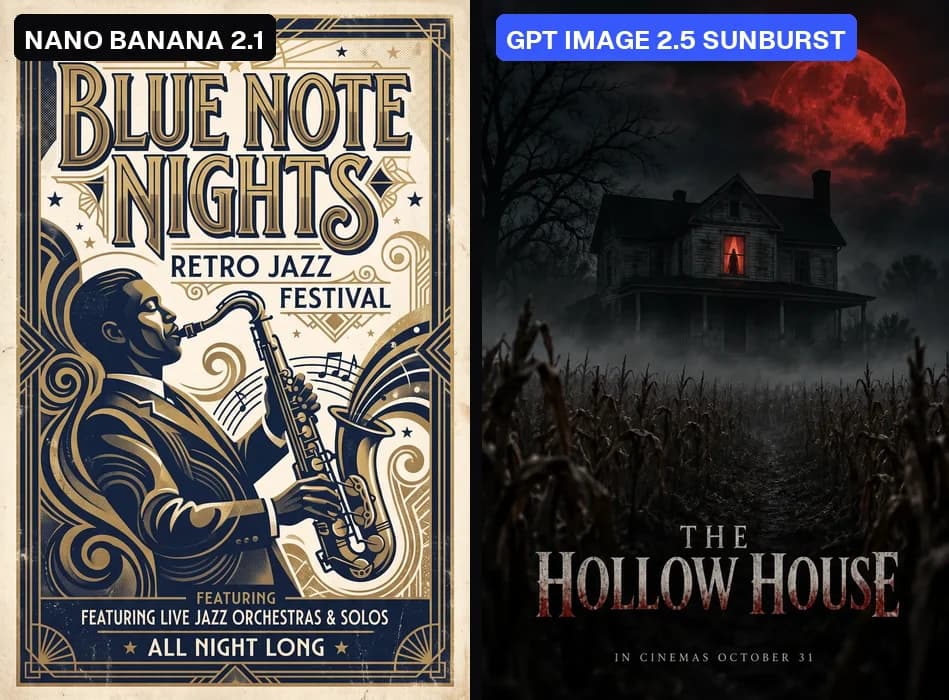
Different prompts, one try each, both at 1K or 2K on Kenerate. Left: Nano Banana 2.1, "Retro jazz festival poster with the title 'BLUE NOTE NIGHTS'..." (2K). Right: GPT Image 2.5 Sunburst, the "THE HOLLOW HOUSE" horror poster (1K, medium).
What our real outputs show:
- GPT Image 2.5 Sunburst set every quoted word right on the horror poster (title, tagline and release line), on six book covers in different genres and on the invitations we made for other pages. Its habit is adding text you didn't ask for: shop names in a street scene, a slogan sign behind a portrait, an ad sign in a train.
- Nano Banana 2.1 got the "BLUE NOTE NIGHTS" title right and every line of a "5 Steps to Better Sleep" infographic, but the small text it added on its own slipped: the jazz poster prints "FEATURING" twice.
Both models need proofreading. In our outputs, Sunburst was the more dependable speller, which matches how OpenAI positions it; Nano Banana 2.1 can look up facts with web search, which GPT Image 2.5 can't.
How do they compare on photoreal people?
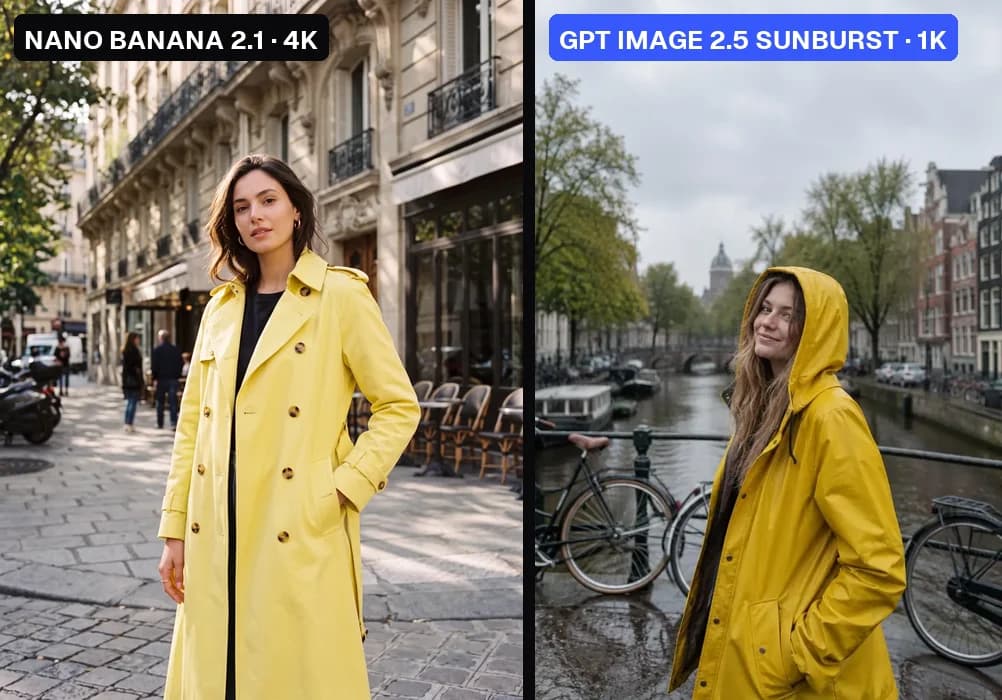
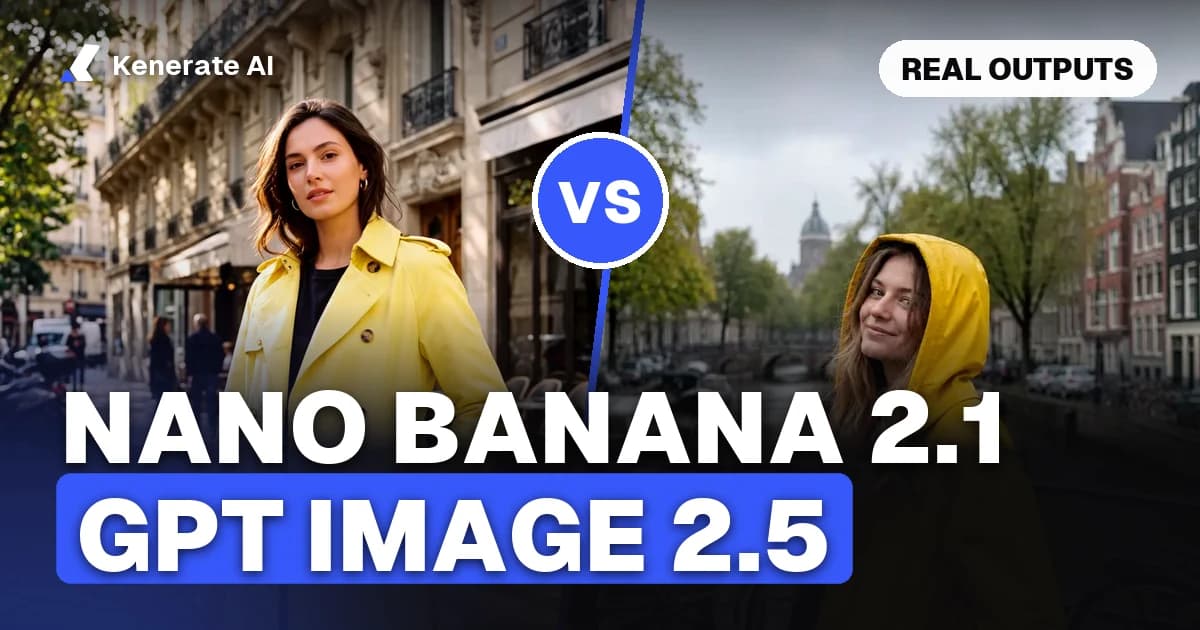
Different prompts. Left: Nano Banana 2.1 at 4K, "Editorial fashion portrait of a woman in a lemon-yellow trench coat standing in a sunlit Parisian street...". Right: GPT Image 2.5 Sunburst at 1K medium, "Photorealistic portrait of a woman in a yellow raincoat on a rainy canal bridge with bicycles...".
Both came out photographic on the first try. Nano Banana 2.1 can deliver the frame at 4K for 42 credits; GPT Image 2.5 reaches 4K too, at 21 credits on medium or more on higher tiers. Because the prompts differ, we won't call a winner on realism. On our AI human page, Sunburst also produced five fictional people in specific places (a Lisbon market with a yellow tram behind, for example) in one try each.
How do they compare on editing your own photo?
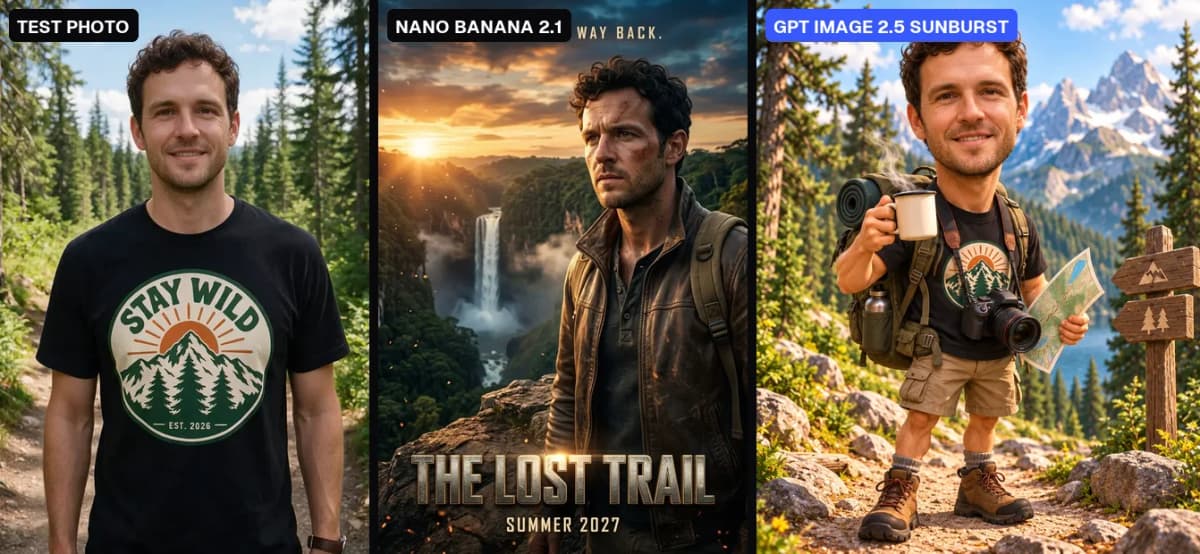
The same AI-made test photo (left), edited with two different prompts. Middle: Nano Banana 2.1 turned him into the star of "THE LOST TRAIL" (21 credits). Right: GPT Image 2.5 Sunburst made a "caricature of me and my job" (11.7 credits).
Both kept the person recognisable:
- Nano Banana 2.1 carried the face, curls and stubble onto a new jacket, a new cliff and new light, and rendered the title and tagline in the same pass. On our Nano Banana image editor page it also swapped an outfit, replaced a background, removed tourists, relit a house and placed a product in a new scene; faces held, though two of those six edits changed the crop slightly.
- GPT Image 2.5 Sunburst kept the curls, stubble and smile and got every requested prop right (backpack, coffee, camera, map), but dropped the small "STAY WILD" lettering from his T-shirt, and asking for a 3D-animated style gave a near-photo face on a cartoon body.
For edits built from many images (a product, a model, a location and a style reference at once), Nano Banana 2.1's flat price and Google's stated 4-character, 10-object consistency make it the natural pick. For a one-photo edit, GPT Image 2.5 is cheaper.
Is GPT Image 2.5 better than Nano Banana 2.1?
Neither wins everywhere, and we found no benchmark from Google or OpenAI that compares the two directly. Some API resellers publish leaderboard numbers for these models, but their tables disagree with each other, so we don't repeat them. Pick by the job:
| Pick | When |
|---|---|
| GPT Image 2.5 Sunburst | Posters, covers, labels, comics: text has to be spelled right; detailed final renders |
| GPT Image 2.5 Flare | Fast drafts and variations at the same price as Sunburst |
| GPT Image 2.5 (low tier) | Cheapest test images: 3 credits at 1K |
| Nano Banana 2.1 | Edits that combine 4 or more references at a flat 21 credits |
| Nano Banana 2.1 | Banners and strips at 4:1, 8:1, 1:4 or 1:8 |
| Nano Banana 2.1 | Images that need real-world facts via web search (maps, planets, landmarks) |
| Nano Banana 2.1 | Keeping one character or product consistent across a series |
If you're weighing the older OpenAI model as well, our GPT Image 2 vs Nano Banana page runs the same prompts on GPT Image 2, Nano Banana 2 and Nano Banana 2.1.
How do you try both on Kenerate?
- Open Image Studio and choose Nano Banana 2.1 or GPT Image 2.5 Sunburst (or Flare) from the model menu.
- Write the prompt with any on-image text in quotes and say where it goes.
- To edit, upload your photo or references: up to 14 on Nano Banana 2.1, up to 16 on GPT Image 2.5.
- Pick the ratio and 1K, 2K or 4K (and a quality tier on GPT Image 2.5). The exact cost shows before you generate.
- Run the same prompt on the other model and keep the better one.
Neither model is on Kenerate's free plan: the 25 sign-up credits run the free models only, and both need a one-time credit pack (from $15 for 1,300 credits, no subscription). Downloads carry no visible watermark. More specs and real outputs are on the Nano Banana 2.1 model page.
Prompt tips that work on both
- Put every word that must appear in quotes, and add "no other text".
- For edits, say what changes and list what must stay: face, pose, light, framing.
- With several uploads, call them "image 1", "image 2" and say which gives what.
- Draft cheap (GPT Image 2.5 low or medium, or Nano Banana 2.1 at 1K), then re-render the keeper at 4K.