Tested Hyperrealistic Portrait Prompts • Natural Skin Texture • 2026 Guide
Best Hyperrealistic Portrait AI Prompts — Skin Texture & Micro Pores
Unlock genuine human realism with natural skin pores, iris depth, and authentic chiaroscuro lighting. Copy our tested prompt engineering formulas for Flux, Midjourney, and Stable Diffusion.
- Visual Fidelity
- Up to 8K (upscaled)
- Skin Texture
- Subsurface 3D
- Generation Speed
- Fast cloud GPUs
Updated by the Kenerate AI team
On this page
Prompts
Curated Hyperrealistic Portrait Showcases
Compare chiaroscuro elderly portraits, macro beauty freckles, neon Tokyo rain, and optics breakdowns.
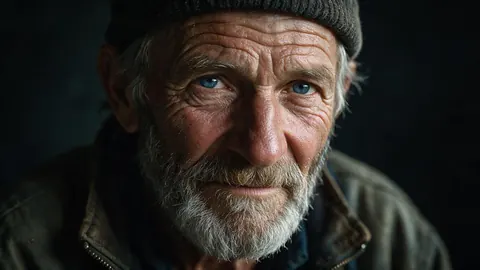
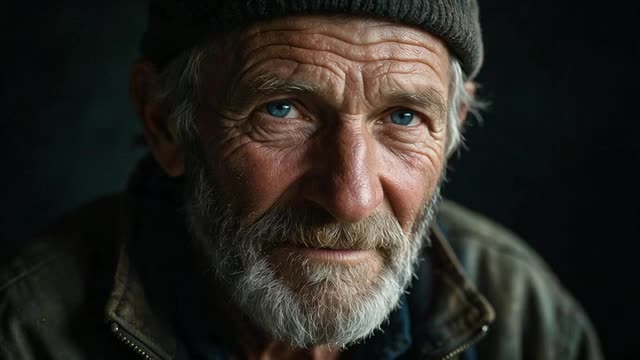
Weathered Skin & Piercing Chiaroscuro Raw 8K
Extreme 8K raw portrait of a man with weathered textured skin, piercing grey eyes, natural beard stubble, cinematic chiaroscuro lighting, 16:9.
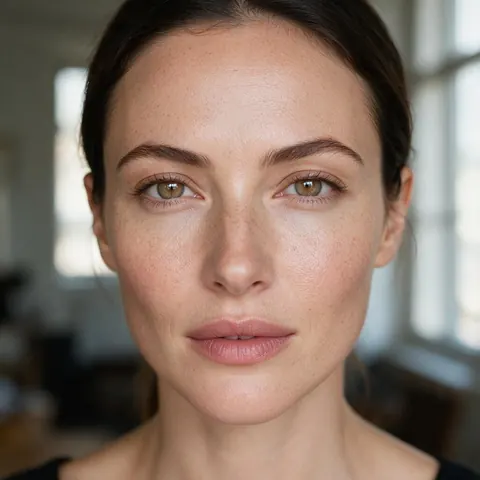
Editorial Beauty Skin Pores & Catchlight Pupils
Masterpiece editorial portrait of beautiful woman with natural skin pores, delicate freckles, and iridescent catchlight in dark pupils, 16:9.
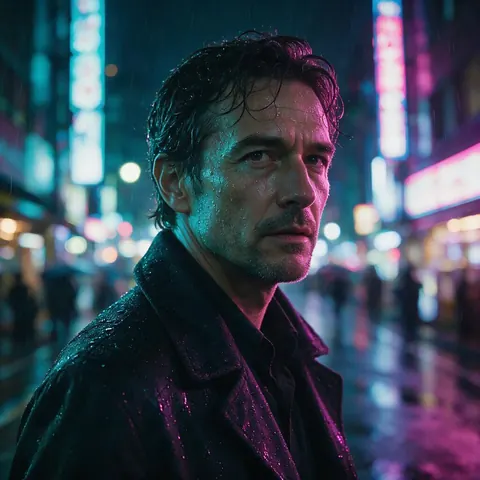
Dramatic High-Fashion Soft Neon Rim Light
Dramatic high-fashion portrait with soft neon rim lighting and volumetric atmospheric haze, shallow depth of field, 16:9.
Subsurface Scattering & Optics Prompt Breakdown
Side-by-side prompt breakdown showing subsurface scattering, pore detail, and camera settings formula, 16:9.
Prompts
Tested Hyperrealistic Portrait Prompt Formulas
Copy and paste these portrait formulas directly into the studio.
Weathered Fisherman Dramatic Chiaroscuro · Elder / Character
extreme close-up 8k raw portrait of an elderly Nordic fisherman with weathered sun-creased skin, silvery white beard stubble, piercing ice-blue eyes with intricate iris details, dramatic chiaroscuro window lighting against dark rustic wooden background, Hasselblad H6D-100c, 100mm f/2.2, photorealistic masterpiece
Editorial Beauty Micro Pores & Delicate Freckles · Beauty / Editorial
high-fashion macro beauty portrait of a 24-year-old woman with natural bare skin, visible micro-pores, fine peach fuzz, delicate bridge-of-nose freckles, soft golden catchlight reflecting in brown irises, diffused studio softbox light, Vogue cover quality, raw photographic realism
Cinematic Rain Neon Tokyo Street Portrait · Cinematic / Sci-Fi
cinematic nighttime portrait of an Asian woman standing in heavy Tokyo rain, wet strands of hair clinging to face, water droplets glistening on cheekbones, vibrant cyan and magenta neon street signs reflecting in wet asphalt and pupils, 35mm anamorphic lens, 8k raw
Studio Rembrandt Light Charcoal Background · Classic / Fine Art
classic Rembrandt lighting portrait of a distinguished man in a dark charcoal turtleneck, characteristic triangle of light on opposite cheek, rich warm skin tones, lifelike subsurface scattering, dark textured oil-painted studio backdrop, 85mm f/1.4
More prompts (2)
Sun-Drenched Golden Hour Backlit Hair Halo · Outdoor / Golden Hour
ethereal outdoor portrait of a young woman bathed in direct golden hour sunset backlighting, glowing halo effect around loose curls of hair, warm sun flare, genuine laughing expression, authentic film grain, Canon EOS R5
Sci-Fi Cybernetic Implant Bioluminescent Glow · Sci-Fi / Conceptual
photorealistic 8k portrait of cybernetic operative with delicate geometric gold and copper circuit traces integrated into temple and cheekbone, subtle cyan bioluminescent pulse, hyper-detailed skin texture, dark sci-fi tech lab background
The 4 Pillars of True AI Portrait Photorealism
How our prompt formulas avoid the plastic AI look and capture organic human micro-textures.
1. Medium Format Lens & Focal Compression
Generic Mistake: Prompts without specific camera specs default to digital rendering aesthetics. Kenerate Solution: Use 'Hasselblad H6D-100c' and '100mm f/2.2' to create natural perspective and creamy bokeh.
2. True Subsurface Scattering & Pores
Generic Mistake: Generic keywords produce oversaturated, plastic mannequin faces with zero pore depth. Kenerate Solution: Specify 'subsurface scattering', 'natural pore texture', and 'fine peach fuzz'.
3. Catchlight Geometry & Iris Striations
Generic Mistake: Unfocused reflections in the eyes make characters look vacant and lifeless. Kenerate Solution: Prompt for 'octabox catchlight in pupils' and 'intricate multi-colored iris striations'.
4. Integrated Video Animation
Generic Mistake: Static portraits lack the subtle micro-movements of real human breathing. Kenerate Solution: Animate any portrait with Wan 3.0 for natural micro-blinks and cinematic eye contact.
Comparison
Portrait Skin Realism & Engine Comparison
Side-by-side comparison of how each option works and what it costs.
| Platform | Approach | Starting Price |
|---|---|---|
| Kenerate AI (Image Studio) | Photoreal portraits, upscaled up to 8K — plus image-to-video with Wan 3.0 and Seedance 2.5 | ✅ Free to start |
| Midjourney v6 | Stylized images via Discord bot or web app | $10.00 to $120.00/mo |
| DALL-E 3 | Image generation inside ChatGPT | $20.00/mo |
| Stable Diffusion XL Local | Checkpoints and LoRAs run locally | Free software; needs a capable local GPU |
| ZenCreator | Web UI presets | $19.99/mo |
| Leonardo AI | Phoenix & Alchemy models | $12.00 to $60.00/mo |
Real results
Curated Hyperrealistic Portrait Showcases
Compare chiaroscuro elderly portraits, macro beauty freckles, neon Tokyo rain, and optics breakdowns.
How it works
How it works in the app
Step 1
Describe your image
Open Image Studio and type what you want to see — subject, style, lighting and mood.
Step 2
Pick an image model
Tap the model card to browse every image model, filter by use case and choose one.
Step 3
Set the aspect ratio and size
Open Output to choose a ratio such as 1:1, 9:16 or 16:9 and the resolution you need.
Step 4
Click Create
Choose how many images to make, then press Create — results land in your gallery.
See it in the app

Open Image Studio and type what you want to see — subject, style, lighting and mood.


FAQ
Frequently Asked Questions
7 questions
How do I prompt for realistic human skin texture in AI models?
To achieve human-grade skin realism: 1) Specify 'natural skin pores', 'fine facial peach fuzz', and 'subtle skin imperfections'; 2) Include physical optics terms like 'subsurface scattering' and 'Hasselblad 100mm f/2.2'; 3) Avoid oversaturated terms like 'airbrushed', 'flawless', or 'unreal engine 5' which force digital smoothing.
Link to this answerHow do I get sharp, lifelike eye reflections and iris depth?
Prompt for 'intricate iris striations', 'iridescent catchlight in pupils', and 'subtle moisture reflections on the sclera'. Naming specific studio lighting setups (e.g. 'octabox catchlight') forces the diffusion model to render realistic light geometry inside the eyes.
Link to this answerCan I animate hyperrealistic portraits into cinematic video?
Yes! In Kenerate AI, you can take any generated hyperrealistic portrait and generate a video with subtle breathing, micro-blinks, and head movement using Wan 3.0.
Link to this answerAre these portrait prompt formulas free to copy and use?
Yes! All prompt formulas on this page are free to copy and use in Kenerate AI, Flux, Midjourney, and Stable Diffusion.
Link to this answerDo credits on Kenerate AI expire at the end of the month?
No! All credits purchased on Kenerate AI remain permanently in your balance with zero expiration dates.
Link to this answerWhat camera models and lens settings work best in prompts?
Medium format cameras like 'Hasselblad H6D-100c' or 'Phase One XF' paired with prime portrait lenses like '85mm f/1.4' or '100mm f/2.2' produce the most natural perspective compression and skin texture sharpness.
Link to this answerIs there a free trial available?
Yes. Kenerate AI is free to start: sign up and you get free credits to test our hyperrealistic portrait generator before you buy anything. After that, one-time credit packs never expire, and there is no subscription required.
Link to this answerStart Generating Realistic Portraits Free
Free to start. No watermark, no subscription required, and credits that never expire.
Tried it? Tell us how it went