AI University 2026 • Executive Headshots & LinkedIn Branding Masterclass
AI Headshots for LinkedIn & Resumes — Complete Executive Guide 2026
Master the 2026 playbook for creating professional, natural AI headshots for LinkedIn, CVs, and executive bios. Learn optimal attire, lighting, and skin texture retention with zero artificial smoothing.
By Kenerate AIUpdated 3 min read
Try it in Kenerate
On this page
On this page
AI Headshots for LinkedIn Guide
The 4 Rules of Executive LinkedIn Headshots
How business leaders and professionals get a studio-style headshot from one good photo.
Start From One Clear, Recent Photo
Pick a clear, recent, front-facing photo with natural light and a neutral expression. Avoid group crops, sunglasses, heavy beauty filters or hats so the model keeps your real features. Kenerate AI does not train on your face — the photo is used as a reference.
Impact: Gives the model a clean view of your face
Select Industry Attire & Color Harmonies
Choose attire aligned with your career goals: Executive/Finance (tailored navy or charcoal blazer, crisp collar), Tech/Startups (smart dark crewneck, blazer), or Healthcare (clean clinical scrubs). Describe it in the prompt and avoid busy prints.
Impact: Navy and charcoal read as trustworthy and professional
Calibrate Studio Lighting & Bokeh Depth
Apply cinematic lighting cues in the prompt: `soft directional key light, gentle natural window fill, subtle catchlights in eyes, f/1.8 shallow depth of field, softly blurred modern glass architectural office background`.
Impact: Creates a flattering, three-dimensional portrait
Preserve Natural Skin Texture & 60% Frame Crop
Ensure the AI maintains authentic pores, subtle smile lines, and natural eye reflections. Frame the shot so your face and shoulders occupy roughly 60% of the canvas—a reliable framing for LinkedIn.
Impact: No artificial plastic skin smoothing
AI Headshot Solutions Compared
Side-by-side comparison of how each option works, turnaround time, cost and attire choice.
| Platform | How It Works | Turnaround Time | Cost per Session | Attire Variety |
|---|---|---|---|---|
| Kenerate AI (Image Studio) | ✅ One reference photo + prompt, or the Studio Headshot filter | ✅ On demand on fast cloud GPUs (no batch queue) | ✅ Free to start | ✅ Any attire you describe in the prompt |
| Aragon AI | Trains on a batch of your selfies | 45-90 Minute Processing Delay | $35.00 to $75.00/batch | Preset outfit options |
| HeadshotPro | Trains on a batch of your selfies | 2-3 Hour Batch Processing Queue | $29.00 to $59.00/batch | Preset backdrops |
| BetterPic | Trains on a batch of your selfies | 30-60 min | $25.00 to $49.00/batch | Manual human edits available |
| ZenCreator | Headshot presets | ~15s per image | $19.99/mo | Web UI presets |
| Traditional Studio Photographer | Authentic human photo | 1-2 weeks for retouched files | $250.00 to $600.00 | Whatever you bring |
Prompts
Curated Professional Headshot Showcases
Compare executive navy blazers, charcoal crewnecks, creative director window lights, and before/after transformations.
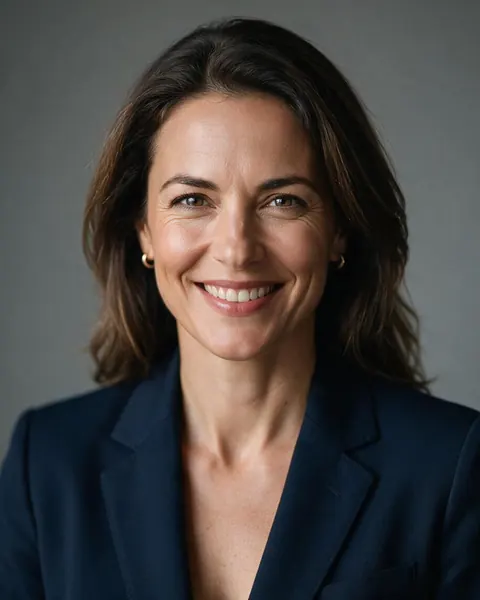
Executive Director Navy Blazer Soft Studio Key Light
Professional corporate headshot of executive woman in navy blazer smiling confidently with soft studio lighting, 16:9.
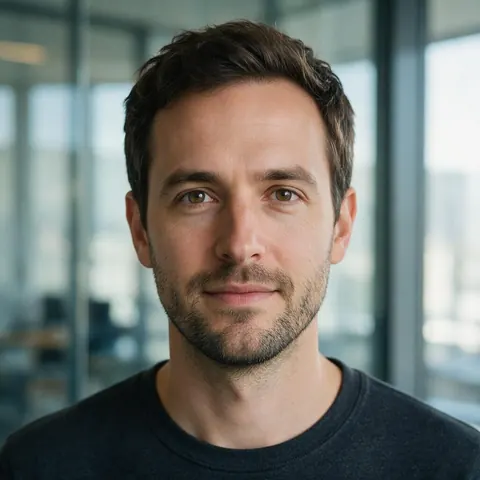
Tech Founder Charcoal Crewneck Glass Office Background
Modern tech professional headshot of man in charcoal crewneck with blurred modern glass office background, 16:9.
Creative Director Minimalist Blazer Editorial Lighting
Creative director professional headshot in stylish minimalist blazer with natural window lighting, 16:9.
Smartphone Selfie to LinkedIn Headshot
Before and after comparison of a casual smartphone selfie transformed into a professional LinkedIn headshot, 16:9.
Real results
Curated Professional Headshot Showcases
Compare executive navy blazers, charcoal crewnecks, creative director window lights, and before/after transformations.
How it works
How it works in the app
Step 1
Describe your image
Open Image Studio and type what you want to see — subject, style, lighting and mood.
Step 2
Pick an image model
Tap the model card to browse every image model, filter by use case and choose one.
Step 3
Set the aspect ratio and size
Open Output to choose a ratio such as 1:1, 9:16 or 16:9 and the resolution you need.
Step 4
Click Create
Choose how many images to make, then press Create — results land in your gallery.
See it in the app

Open Image Studio and type what you want to see — subject, style, lighting and mood.


FAQ
Frequently Asked Questions

Can recruiters and hiring managers tell if my LinkedIn headshot was generated by AI?
Often not, when the result still looks like you. Older apps tended to produce plastic-looking skin and blurry ears; current models such as Flux 2, Seedream and GPT Image 2 can keep skin texture, hair strands and eye catchlights so the result reads as a studio portrait. Keep it honest: your headshot should show your real face.
Link to this answerWhat is the best attire and color palette for an executive LinkedIn photo in 2026?
Solid, dark neutral colors—especially deep navy, charcoal, and dark slate gray—signal authority, trustworthiness, and competence across corporate, tech, finance, and legal industries. Avoid complex houndstooth or neon patterns that distract from your face.
Link to this answerHow many selfies do I need to upload for optimal accuracy?
Usually one. Kenerate AI does not train a model on your face, so one clear, recent, front-facing photo in even light is enough for an edit-capable image model or the Studio Headshot filter to use as a reference. Some models, such as MiniMax H3 Image, accept up to 9 reference photos if you want to add angles.
Link to this answerHow long does generation take compared to Aragon AI or HeadshotPro?
Services like Aragon and HeadshotPro train on your photos first, which can mean waiting 1 to 3 hours in a batch queue. Kenerate AI generates each headshot on demand on fast cloud GPUs, so you can review a result, adjust the prompt and try again right away.
Link to this answerDo credits on Kenerate AI expire at the end of the month?
No! All credits purchased on Kenerate AI remain permanently in your balance with zero expiration dates.
Link to this answerIs there a free trial available to generate my LinkedIn headshot?
Yes. Kenerate AI is free to start: sign up and you get free credits to try headshots in the Image Studio or the Studio Headshot filter before you buy anything. After that, one-time credit packs never expire, and there is no subscription required.
Link to this answer


By the Kenerate AI teamLast updated and reviewed

Upgrade Your LinkedIn Headshot Free Today
Free to start. No watermark, no subscription required, and credits that never expire.
Tried it? Tell us how it went