The best AI couple photo editing prompt starts by telling the model to keep both people exactly as they are, then changes one thing: the light, the background or the film look. Below are 30 copy-paste prompts for editing your own couple photos, covering anniversary, travel, cinematic, film, wedding-style and holiday looks, with the right model for each job and a real before-and-after edit, as of 4 November 2026.
These prompts are for photos of the two of you, or of people who have said yes. All of them are for tasteful, fully clothed edits of adults. If you'd rather create a couple portrait from scratch, try the AI couple photo generator instead.
What makes a good AI couple photo prompt?
Two faces are harder than one, because the model has to hold on to both. Build each prompt in the same order:
- Keep line: "Keep both people exactly the same: same faces, skin tones, hair, expressions and pose."
- The change: one main edit, such as new light, a new place or a new outfit.
- The setting: where you are, written as a scene and not a list of words.
- The light: golden hour, soft window light, street lamps.
- The finish: "35mm film", "soft grain", "natural colours".
- The guard: "Natural, not over-edited. No text anywhere."
Google's prompting guide for its image model makes the same points. Describe the scene instead of listing keywords, name what should change and say what must stay. It also suggests describing what you want and not what you don't: "an empty street" works better than "no cars".
How do you keep both faces the same?
Face drift is the main worry with couple edits. These habits help:
- Start with a sharp photo. Both faces should be clear, well lit and not too small in the frame.
- Avoid sunglasses and heavy shadows if you can, since the model has less to work from.
- Name what stays. "Same faces, skin tones, hair and expressions" works better than "keep us the same".
- Change one thing per edit. Do the light first, then the background. Big rewrites are where faces change.
- Don't edit an edit too many times. Google's guide warns that features can drift after many rounds, so go back to the original when that happens.
- Pick a model built for consistency when you're making a matching set.
Which Kenerate model should you use for couple edits?
All of these run in Kenerate's AI image editor on one credit balance. Credits are for one edit with one photo, checked on 4 November 2026.
| Model | Credits per edit | Best for |
|---|---|---|
| Seedream 5.0 Flash | 8.1 | Fast drafts and trying lots of looks |
| Qwen Image 3.0 | 9.9 | Simple background and light changes, open to free accounts |
| GPT Image 2.5 Sunburst | 11.7 | Precise edits and clean lettering, used for the example below |
| Seedream 5.0 Pro | 13.5 | Illustrated and painterly looks |
| Nano Banana 2.1 | 21 | Keeping two people consistent across a whole set |
New accounts get 25 free credits, and Qwen Image 3.0 is open on the free plan, so that's two edits before you buy anything. Downloads have no watermark.
A real example: from a grey day to golden hour
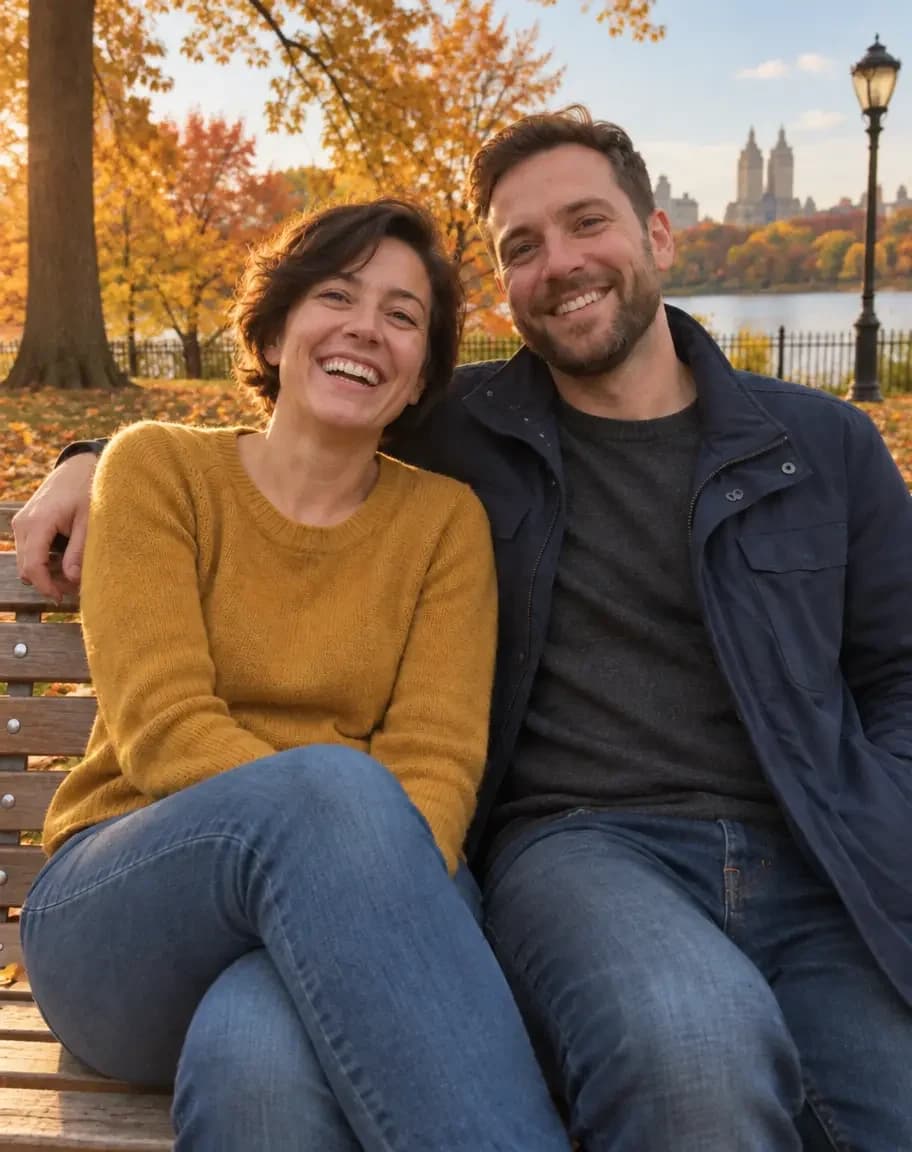
This is a real edit, and the only one we ran for this post. The couple in the picture don't exist. We generated the "before" image to stand in for your own photo, then ran the prompt below once on GPT Image 2.5 Sunburst for 11.7 credits, with no retouching afterwards.
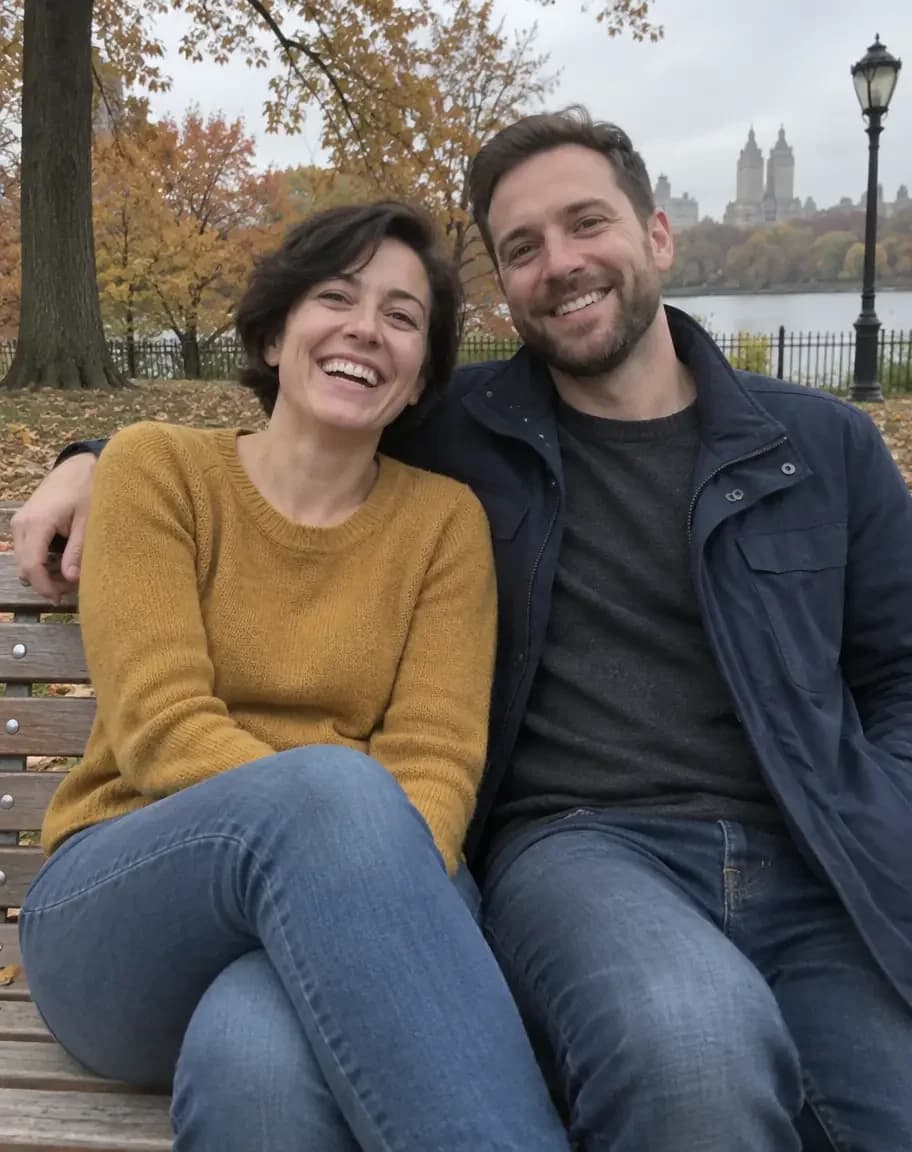
Keep both people exactly the same: same faces, skin tones, hair, expressions, pose and clothes. Change only the light and colour: warm late-afternoon golden hour sun from the left, soft glow on their faces, clearer sky, richer autumn leaves. Finish it like a 35mm film photo with soft grain and gentle warm tones. Natural, not over-edited. No text anywhere.
To our eye, both faces, the outfits and the pose stayed the same, while the light, sky and leaves changed, as the prompt asked. The result is at the top of this post. That was one run, so your results will vary with your photo.
30 copy-paste AI couple photo prompts
Upload your photo, paste a prompt and replace anything in [brackets]. Every prompt starts with the same keep line, shortened to "Keep both of us exactly the same." Use the longer version from the example if faces drift.
Anniversary
- Keep both of us exactly the same. Place us at a candlelit restaurant table with a small vase of roses, warm low light, soft focus behind us. Natural, not over-edited.
- Keep both of us exactly the same. Add a warm golden sunset behind us on a quiet hillside, soft breeze in our hair, gentle film tones.
- Keep both of us exactly the same. Turn this into an elegant studio anniversary portrait with a plain cream backdrop and soft window light.
- Keep both of us exactly the same. Add a tasteful gold banner across the top that reads "[10 YEARS TOGETHER]". No other text anywhere.
- Keep both of us exactly the same. Dress us in smart evening wear, a dark suit and a long navy dress, at a softly lit rooftop with string lights.
- Keep both of us exactly the same. Place us on a park bench under cherry blossom trees in full bloom, soft morning light, petals in the air.
Travel
- Keep both of us exactly the same. Place us on a stone bridge in Paris at blue hour, the Eiffel Tower soft in the distance, street lamps just coming on.
- Keep both of us exactly the same. Place us on a white terrace in Santorini above the blue sea, bright afternoon sun, keep our outfits.
- Keep both of us exactly the same. Place us in a Kyoto lane in autumn, red maple leaves and wooden houses behind us, soft overcast light.
- Keep both of us exactly the same. Put us on a cobbled street in Lisbon with a yellow tram passing behind us, warm late-afternoon sun.
- Keep both of us exactly the same. Place us at a mountain lookout in the Swiss Alps in warm jackets, clear morning sky, snowy peaks behind us.
- Keep both of us exactly the same. Put us in a travel postcard: a sunny coastal village behind us, slightly faded colours, a white border. No text anywhere.
Cinematic
- Keep both of us exactly the same. Make this look like a still from a romantic film: wide 2.39:1 framing, teal and amber grade, soft haze.
- Keep both of us exactly the same. Place us under one umbrella on a rainy city street at night, neon signs reflecting on wet pavement, shallow depth of field.
- Keep both of us exactly the same. Put us on a train platform in soft morning fog, warm station lights behind us, a quiet film-like mood.
- Keep both of us exactly the same. Place us at a seaside pier at dusk, a dramatic orange sky, long shadows, a calm film look.
- Keep both of us exactly the same. Set us in a cosy bookshop at night, warm lamps and tall shelves behind us, a soft rim light on our hair.
Film and retro
- Keep both of us exactly the same. Finish this like a 35mm film photo: soft grain, gentle warm tones, slightly faded blacks. Change nothing else.
- Keep both of us exactly the same. Make this a classic black-and-white portrait with rich contrast and fine grain. Change nothing else.
- Keep both of us exactly the same. Give this the look of a 1970s family album print: warm faded colours, soft focus, a thin white border.
- Keep both of us exactly the same. Make this look like an instant film photo with a white frame, soft flash and slightly washed-out colours.
- Keep both of us exactly the same. Make this look like a 1990s disposable camera shot: direct flash, a little grain, punchy colours.
Wedding style
- Keep both of us exactly the same. Turn this into an elegant engagement portrait in a sunlit garden, soft bokeh behind us, keep our outfits.
- Keep both of us exactly the same. Dress us in a classic white wedding gown with long sleeves and a black tuxedo, in a sunlit stone chapel courtyard.
- Keep both of us exactly the same. Add a soft floral arch of white roses behind us, with warm afternoon light and a fine-art wedding album look.
- Keep both of us exactly the same. Turn this into a save-the-date card with a cream border and the words "[ANA & LEO, 14.06.2027]" in elegant lettering. No other text anywhere.
Holidays
- Keep both of us exactly the same. Put us in cosy knit sweaters in front of a decorated Christmas tree, warm fairy lights, soft window light.
- Keep both of us exactly the same. Place us in a snowy street at dusk in winter coats, gentle snowfall, warm shop windows behind us.
- Keep both of us exactly the same. Add a soft Valentine's look: a warm café table, a small bunch of red tulips, rosy light. Natural, not over-edited.
- Keep both of us exactly the same. Place us on a rooftop on New Year's Eve in smart coats, fireworks soft in the distance, warm glow on our faces.
For more seasonal ideas and poses, see our Christmas photo ideas for couples. If you're also planning a celebration, our AI birthday photo prompts use the same format.
What size should a couple photo be?
The Instagram sizes are from Adobe Express's size guide. The print rows are our own arithmetic.
| Where it's going | Shape | Size |
|---|---|---|
| Instagram feed post | 4:5 | 1080 × 1350 |
| Stories, Reels and status | 9:16 | 1080 × 1920 |
| Square print or album | 1:1 | Your choice |
| Framed 8 × 10 print | 4:5 | 2400 × 3000 at 300 dots per inch |
Crop first if you want a different shape, so that nobody's head is cut off. For prints, run the final edit through the AI image upscaler.
How do you edit a couple photo on Kenerate, step by step?
- Pick your photo. Choose one where both faces are sharp.
- Open the AI image editor and upload it.
- Pick a model. Qwen Image 3.0 on a free account, or GPT Image 2.5 Sunburst for precise changes.
- Paste a prompt and swap anything in brackets.
- Generate once and compare the faces closely against your original.
- Adjust one line if needed, then run it again from the original photo.
- Download or upscale the keeper.
To edit only part of a photo, use Change Region to repaint just the area you brush, or Magic Eraser to remove a stranger in the background. You can also turn a finished still into a short clip in the video studio, though video needs a paid pack.
What goes wrong, and how do you fix it?
| Problem | Fix |
|---|---|
| One face changed more than the other | Use the long keep line and change one thing per edit |
| Our faces look too smooth | Add "natural skin texture, not over-edited" |
| Our clothes changed | Add "same clothes" to the keep line |
| Hands look odd | Use a photo with hands visible and clear, or crop them out |
| Unwanted text appeared | Add "No text anywhere" |
| Wrong spelling in a banner | Use GPT Image 2.5 Sunburst, and put the exact words in quotes |
| Too glossy or fake | Ask for "soft natural light" and "gentle film tones" |
| A matching set looks different | Use Nano Banana 2.1, with your first finished edit as a second reference |
What should you avoid?
Keep it respectful. Use photos of yourselves, or of people who have clearly said yes. Don't edit pictures of strangers, celebrities or an ex, and don't make a picture that suggests something happened when it didn't. When you share an edit in a place where it could be mistaken for an unedited photo, say that it's edited. And ask your partner before posting. Some people love a dreamy Paris shot, and some don't want their face in an AI tool at all.
Once you've found a look you both like, save the prompt. Reusing it on every anniversary photo gives you a matching set over the years. You'll find more everyday edits in our Nano Banana photo editing prompts.