GPT Image 2.6 pricing depends on where you use it. In ChatGPT, Images 2.6 is included in every subscription tier, within each plan's limits. In OpenAI's API, both versions — Sunburst and Flare — are billed by tokens at the same rates third-party guides list for GPT Image 2.5: $5 per million text-input tokens, $8 per million image-input tokens and $30 per million image-output tokens. On Kenerate AI, one price list covers both versions: 15 credits for a medium-quality 1K image, from 9 at low quality up to 255 at max quality in 4K. This guide breaks down each option, what a single image really costs, and how to spend less.
Updated 12 November 2026.
How much does GPT Image 2.6 cost in ChatGPT?
OpenAI's launch post says Images 2.6 is "available globally today in ChatGPT and Codex across all subscription tiers on desktop, mobile, and web". There's no separate price for images: what you pay is your ChatGPT plan, and how many images you can make depends on that plan's usage limits, which OpenAI adjusts over time. A third-party summary of OpenAI's help pages reports that "images with thinking" is limited to paid plans, and that GIF creation was still rolling out a few days after launch.
Good for: occasional images inside a chat you already pay for. Less good for: batches, exact control over quality and size, or a predictable per-image cost.
How much does the GPT Image 2.6 API cost per image?
The API bills tokens, not images. Third-party guides to OpenAI's pricing list the same rates for Sunburst and Flare:
| Token type | Price per 1M tokens |
|---|---|
| Text input | $5 (cached $1.25) |
| Image input (references, edits) | $8 (cached $2) |
| Image output | $30 |
What one image costs then depends on its size and quality, because larger and higher-quality images produce more output tokens. One third-party calculator puts a 1024 × 1024 GPT Image 2.6 image at roughly $0.025 at low, $0.043 at medium, $0.053 at high and $0.21 at max quality. Treat those as estimates: OpenAI doesn't publish a flat per-image price, and its usage dashboard is the only exact figure.
Two things change the bill that the headline rate hides:
- References cost input tokens. Every image you upload for an edit is billed at the image-input rate.
- Complexity is separate from quality. The new complexity setting changes how much the model plans; on Kenerate it doesn't change the price, and in the API it shows up only through the tokens used.
How much does GPT Image 2.6 cost on Kenerate?
Kenerate charges credits per image, the same for Sunburst and Flare, and shows the exact cost before you generate.
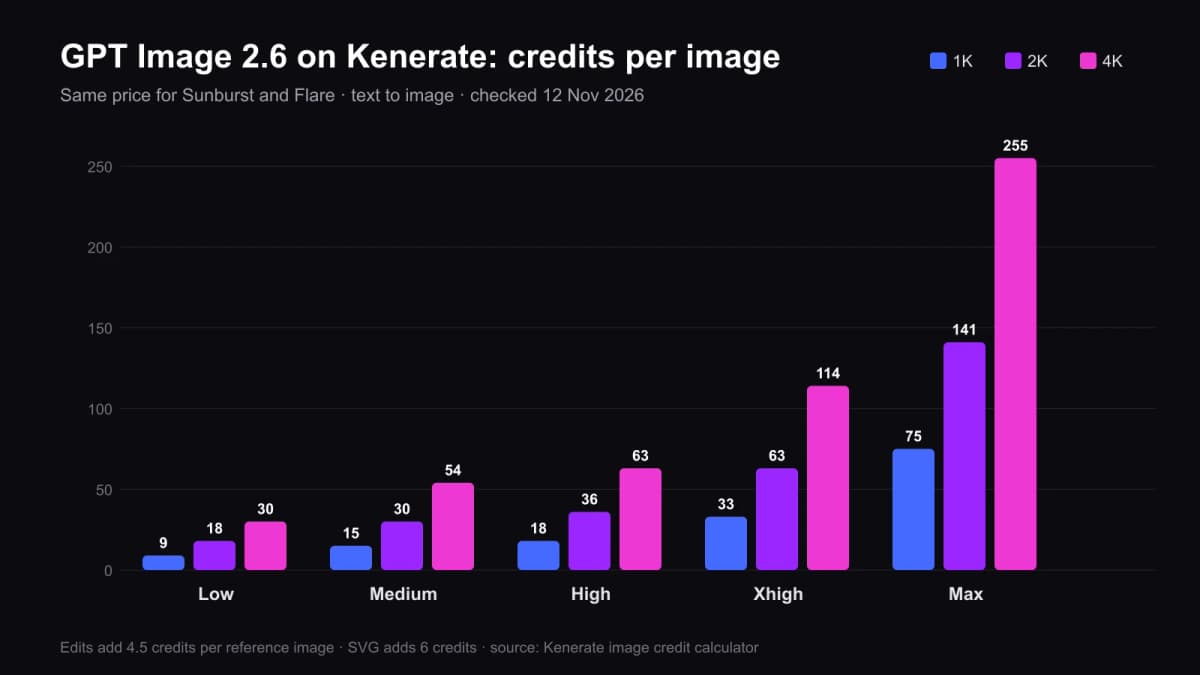
| Quality | 1K | 2K | 4K |
|---|---|---|---|
| Low | 9 | 18 | 30 |
| Medium | 15 | 30 | 54 |
| High | 18 | 36 | 63 |
| Xhigh | 33 | 63 | 114 |
| Max | 75 | 141 | 255 |
Extras: each reference image in an edit adds 4.5 credits (up to 16), and SVG output adds 6. A GIF costs the same as a still image at the same quality and size.
Credits come in one-time packs that never expire — no subscription. The smallest pack is $15 for 1,300 credits, which covers about 86 medium-quality 1K images (about $0.17 each). Larger packs bring the price per credit down: $49 buys 4,800 credits and $199 buys 20,000. New accounts get 25 free credits, but those run the free models (Flux 2 and Qwen Image); GPT Image 2.6 needs a pack.
Which way of paying for GPT Image 2.6 is cheapest?
| You want to… | Cheapest fit | Why |
|---|---|---|
| Make a few images now and then | ChatGPT plan you already have | No extra cost inside your limits |
| Build GPT Image 2.6 into your own app | OpenAI API | Lowest price per image at scale; you write the code |
| Make many images without code, pick quality and size | Kenerate credits | Pay per image, no subscription, credits never expire |
| Compare GPT Image 2.6 with other models | Kenerate credits | Nano Banana 2.1, Seedream, Flux and 200+ models on one balance |
On a single medium 1K image the API is cheaper than a small Kenerate pack. What credits buy is no code, no API key, GIF and SVG in the same studio, and other models on the same balance.
How does GPT Image 2.6 compare on price with other image models?
On Kenerate, at medium quality and 1K unless noted:
| Model | Credits per image | Note |
|---|---|---|
| GPT Image 2.6 Sunburst / Flare | 15 | GIF and SVG output, 16 references |
| GPT Image 2.5 Sunburst / Flare | 7.2 | Same 16 references, no GIF/SVG |
| GPT Image 2 | 18 | Previous generation, 3 quality tiers |
| Nano Banana 2.1 | 21 (1K) | 14 references, 8:1 banners, web search |
| Qwen Image 3.0 | 9 | On the free plan |
So GPT Image 2.6 costs about twice as much as 2.5 at the same tier. For a quote-heavy poster or a product edit that must be right the first time, the difference usually pays for itself in fewer retries; for drafts and variations, 2.5 or 2.6 at low quality is the better spend.
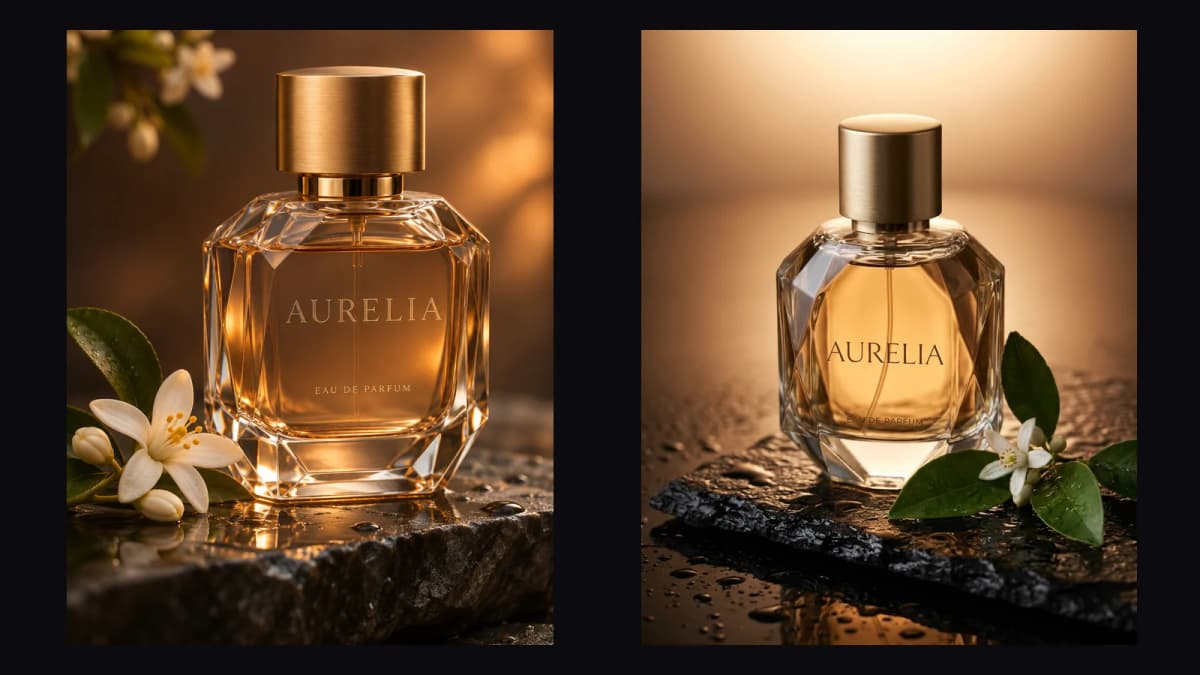
Same prompt, one try each: GPT Image 2.6 at 15 credits and Nano Banana 2.1 at 21. The full five-prompt test is on our GPT Image 2.6 vs Nano Banana 2.1 page.
6 ways to spend less on GPT Image 2.6
- Draft at low quality (9 credits at 1K) and re-run only the keeper at medium or high.
- Stay at 1K until the final — 4K at max costs 17 times as much as medium 1K.
- Use Flare for iterations. It costs the same as Sunburst but returns faster, so you test more ideas per minute.
- Send fewer references. Each one adds 4.5 credits; three good references beat ten mixed ones.
- Quote text and add "no other text" — a clean first try is the cheapest image.
- Use GPT Image 2.5 for volume. Same 16 references at 7.2 credits when you don't need GIF, SVG or 2.6's edit consistency.
GPT Image 2.6 pricing comes down to how you work: ChatGPT for the odd image, the API if you're building, and pay-per-image credits if you want control without code. Every price on this page was checked on 12 November 2026; the full model specs and outputs are on our GPT Image 2.6 model page, and what's new in the model is in our GPT Image 2.6 guide.