To write a good AI image prompt, describe one clear picture in this order: subject → action → setting → style → light → camera → constraints. Write it as one or two plain sentences, put any words that must appear in the image inside quotes, and say what to leave out in positive terms ("clean empty background") instead of a list of "no" words. Then change one thing per try. That works on every current model; the main difference between models is how you phrase it: sentences for GPT Image, Nano Banana, Seedream and FLUX, comma-separated tags for SDXL and Pony models.
Below: the method, how prompting changes by model family, before/after rewrites, a checklist and 30 examples. Checked 23 October 2026.
What makes an AI image prompt good?
A good prompt leaves the model few guesses about the things you care about. Three vendor guides agree:
- Google's guide for Gemini image generation (Nano Banana) puts its core rule in one line: "Describe the scene, don't just list keywords" (Google Developers Blog).
- OpenAI's GPT Image prompting guide recommends a fixed order (scene, subject, key details, then constraints) and says to state the purpose of the image, such as an ad or a UI mock (OpenAI Cookbook).
- Black Forest Labs' FLUX.2 guide uses "Subject + Action + Style + Context" and says word order matters, so the most important elements go first (BFL docs).
So a good prompt is specific (named materials, colors and light instead of "beautiful"), ordered (most important first), and single-minded (one picture, one style).
How do you write an AI image prompt step by step?
Use the seven slots below. You rarely need all seven, but going through them in order stops you forgetting the one that matters.
| # | Slot | What it answers | Weak | Strong |
|---|---|---|---|---|
| 1 | Subject | Who or what is the picture of? | "a woman" | "a silver-haired woman in her sixties wearing a mustard wool coat" |
| 2 | Action | What is happening? | — | "pouring tea from a cast-iron pot" |
| 3 | Setting | Where and when? | "outside" | "on a wooden balcony above a misty pine valley at dawn" |
| 4 | Style | Photo, painting, 3D, anime? | "artistic" | "editorial lifestyle photograph" / "gouache illustration" |
| 5 | Light | What does the light do? | "nice lighting" | "soft side light from the left, cool blue shadows" |
| 6 | Camera | Framing, angle, lens | "close" | "medium shot, eye level, 50mm, shallow depth of field" |
| 7 | Constraints | Text, colors, exclusions, aspect | "no ugly stuff" | "the cup reads "DAWN" in small serif letters; plain background; 4:5" |
- Subject: one main subject with two or three traits you'd notice first (age, clothing, material, color).
- Action: something to do, so poses aren't stiff and the model knows where to look.
- Setting: place plus time of day or weather; "rainy street at night" sets color and mood at once.
- Style: one medium and at most one movement. "Watercolor anime cyberpunk oil painting" averages into mush.
- Light: name the source and direction (window light, neon, golden hour, softbox).
- Camera: shot size, angle and, for photos, a lens ("85mm portrait lens").
- Constraints last: exact text in quotes, colors, what stays plain, and the aspect ratio. Set the ratio in the size setting too; "16:9" in words alone is not reliable.
Then generate, look, and change one slot per round, which is also what OpenAI's guide recommends.
How does prompting differ between AI image models?
There are two families today, and they want different grammar.
| Natural-language models | Tag-style models | |
|---|---|---|
| Examples (on Kenerate) | GPT Image 2 / 2.5, Nano Banana 2.1, Seedream 5.0, FLUX.2, Qwen Image 3.0 | Prefect Pony XL and other SDXL-based checkpoints |
| Best prompt form | 1–4 sentences, most important first | quality tags, subject tags, outfit, pose, setting, style |
| Text in the image | Yes: put the exact words in quotes | Weak; add text later in an editor |
| Exclusions | Write them as positive descriptions in the prompt | Usually a separate negative field (not on Kenerate's Pony XL) |
| Editing with references | Describe only the change and what must stay | Mostly img2img with a strength slider |
Natural-language models. GPT Image, Nano Banana, Seedream and FLUX.2 are built to read full sentences, so they follow relationships and prepositions ("behind", "to the left of", "holding"). OpenAI's guide adds: put literal text in quotes or capitals, and for edits say "change only X" and repeat what must stay the same. BFL's FLUX.2 guide says 30–80 words is "usually ideal" and that FLUX.2 has no negative prompts; describe what you want instead ("sharp focus throughout" rather than "no blur").
Tag-style models. SDXL checkpoints such as Pony were tuned on Danbooru-style tag lists, so they respond to short tags in order of importance, often with special quality tags in front. A Pony prompt looks like score_9, score_8_up, score_7_up, source_anime, rating_safe, solo, adult woman, red scarf, snowy street, night, city lights, looking at viewer. Kenerate's Pony XL model page shows working tag prompts you can copy.
Negative prompts. On Kenerate, only four image models expose a separate negative-prompt field: Bria 3.2, Wan 2.5, Nucleus Image and Kling Image v3. Every other model, including all GPT Image, Nano Banana, Seedream and FLUX versions, takes exclusions inside the main prompt. For when a negative field helps and when it hurts, see the negative prompts guide.
What do before-and-after prompt rewrites look like?
Each rewrite below fixes one or two missing slots. The "after" versions are written for natural-language models.
1. Product photo
- Before:
perfume bottle, luxury, 8k, best quality - After:
Studio product photograph of a square glass perfume bottle with a brushed gold cap, standing on wet black slate, a single softbox from the upper left creating a long highlight down the glass, dark charcoal background, 85mm, crisp reflections, blank label. - What changed: material, surface, light direction and lens replaced "luxury, 8k", which tell the model nothing concrete.
2. Portrait
- Before:
beautiful woman portrait, realistic - After:
Natural-light portrait of a woman in her thirties with short curly hair and freckles, wearing a rust linen shirt, sitting by a large window in a plant-filled apartment, soft overcast light on her face, eye level, 85mm, shallow depth of field, real skin texture. - What changed: specific traits instead of "beautiful", plus the photography cues OpenAI's guide recommends for realism.
3. Poster with text
- Before:
jazz poster midnight jazz friday - After:
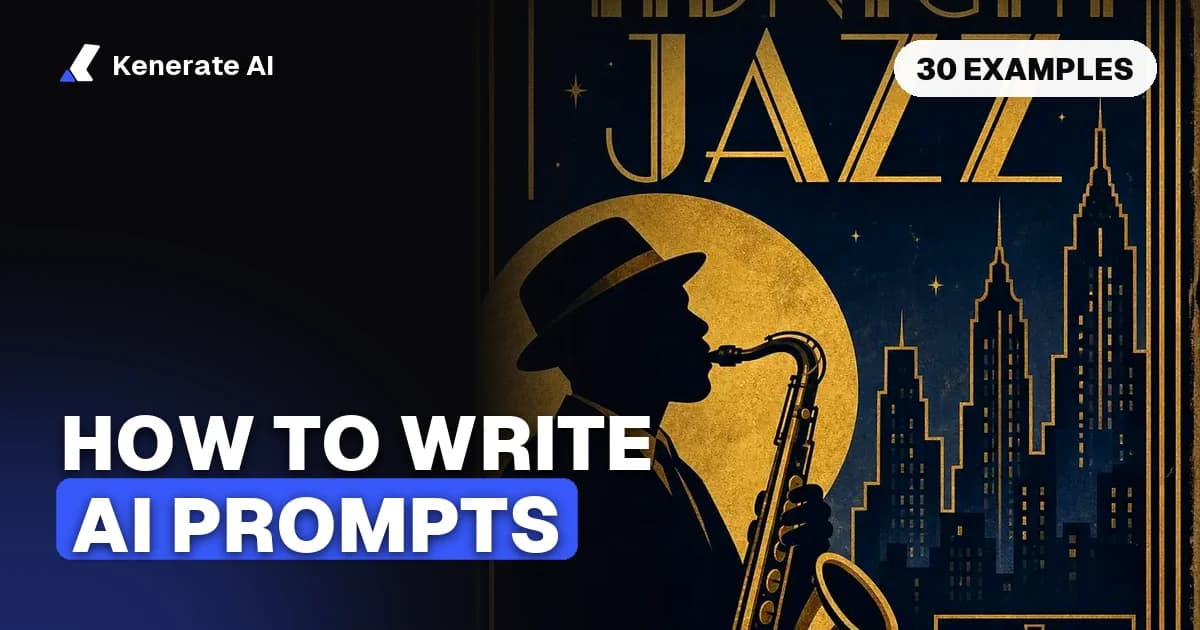
Vintage jazz festival poster with the exact text 'MIDNIGHT JAZZ' and 'FRIDAY 9 PM' in art deco lettering, saxophone player silhouette, gold and navy. - What changed: the words that must appear are quoted. This is the real prompt behind the poster on this post's cover (GPT Image 2, from Kenerate's AI flyer generator page).
4. Edit of an uploaded photo
- Before:
make it better and change the background - After:
Replace only the background with a sunlit beach at golden hour. Keep the person, their face, pose, clothing and the original camera angle exactly the same. Match the light on the person to the warm sunset direction. - What changed: one named change, an explicit keep-list, and a lighting match so the cut-out doesn't look pasted.
What should you check before you hit generate?
- One main subject, described with 2–3 concrete traits
- An action, and a setting with time of day or weather
- Exactly one style or medium
- Light source and direction
- Shot size and angle (lens for photos)
- Exact text in quotes, short, with placement
- Exclusions written as positive descriptions ("plain white background")
- Aspect ratio set in the size setting, not just in words
- No filler like "8k, masterpiece, best quality" on natural-language models
- For edits: one change, plus a list of what must stay
If you'd rather start from a short idea, Kenerate's AI prompt enhancer adds style, light and camera detail to a few words for free in the browser (rule-based), and the Enhance button inside the image studio does an AI rewrite for 1 credit, refunded if it fails.
30 AI image prompt examples you can copy
All 30 are written for natural-language models (GPT Image, Nano Banana, Seedream, FLUX.2, Qwen Image). Each follows the seven-slot order.
Photography and portraits
- Candid street photo of an elderly man in a tweed cap feeding pigeons on church steps, early morning fog, muted greens, 35mm, film grain.
- Corporate headshot of a woman in her forties with a grey bob and navy blazer, light-grey backdrop, soft key light from the right, 85mm.
- Environmental portrait of a potter at her wheel, hands in wet clay, warm tungsten workshop light, drying bowls behind her, shallow depth of field.
- Black-and-white photo of a jazz trumpeter mid-note on a small club stage, hard spotlight from above, smoke in the air, low angle.
- Golden-hour photo of two friends laughing on a rooftop under string lights, soft city skyline behind, 50mm, warm tones.
- Rainy night in Tokyo, a person with a clear umbrella crossing under red and blue neon signs, reflections on wet asphalt, cinematic wide shot.
Products and food
- Top-down flat lay of a ceramic coffee cup, a croissant and a folded newspaper on pale oak, morning window light from the left.
- White running shoes floating against a pastel mint background, soft shadow below, crisp mesh detail, centered, 4:5.
- Amber glass dropper bottle on a wet stone with green leaves around it, diffused daylight, shallow depth of field, blank label.
- Close-up of steaming ramen with a soft-boiled egg and spring onions on a dark wooden counter, side light catching the steam.
- Wireless speaker on a bookshelf in a cozy living room at dusk, warm lamp light, plants and vinyl records nearby, 35mm.
- Craft beer can covered in condensation on a bed of ice, dramatic rim light, deep blue background, droplets in sharp focus.
Posters, logos and text
- Retro travel poster with "LISBON" in bold cream letters at the top, a yellow tram on a steep cobbled street, flat mid-century illustration, yellow, teal and cream.
- Minimal logo for a bakery called "Rye & Co": a single wheat stalk inside a circle, flat vector, dark brown on off-white.
- Concert flyer reading "SUMMER SOUNDS" and "JULY 18 · CITY PARK" in a chunky rounded font, sunburst behind, orange and hot pink, 2:3.
- Mystery novel cover titled "The Glass Orchard": a lone figure walking through glass trees at night, moonlight, elegant serif title at the top.
- Flat infographic card titled "3 Ways to Save Water" with three icons (tap, shower, plant) and one short line under each, blue and white.
Illustration, anime and art styles
- Anime illustration of a young woman reading in a window seat during a thunderstorm, warm lamp light inside, rain streaks outside, soft cel shading.
- Watercolor of a fox asleep under a snowy pine, loose washes, visible paper texture, cold blue dawn light, lots of white space.
- Children's book illustration of a small robot watering a giant sunflower, gouache texture, pastel colors, gentle morning light.
- Ukiyo-e woodblock print of a great wave rolling toward a modern container ship, flat colors, fine black outlines, beige paper.
- Isometric 3D illustration of a tiny coffee shop on a floating island, clay-like materials, warm pastels, white background.
- Comic panel of a detective in a trench coat on a rooftop at night, bold ink lines, halftone shading, a speech bubble reading "Too quiet."
Places, fantasy and sci-fi
- Drone photo of turquoise rice terraces after rain, mist in the valleys, a tiny farmer in a conical hat for scale, overcast light.
- Scandinavian living room with a light-grey sofa, oak floor, linen curtains and a fiddle-leaf fig, bright midday light, wide-angle.
- Enchanted forest at twilight, glowing blue mushrooms along a stone path, fireflies, volumetric light through tall trees, painterly.
- Futuristic market on Mars under a glass dome, traders in dusty jumpsuits, red sky outside, warm stall lights, cinematic wide shot.
- Abandoned greenhouse overgrown with vines, shafts of afternoon sun through broken panes, dust in the air, 24mm.
- Knight in dented steel armor resting against a tree after battle, autumn leaves, overcast light, oil painting with visible brushstrokes.
- Cutaway illustration of a submarine in a deep-sea trench, glowing jellyfish outside the portholes, crew in cross-section rooms, technical drawing style.
More: AI art prompts, ChatGPT image prompts and AI portrait prompts.
Which model should you use for which kind of prompt?
Credits below are per image at the default setting on Kenerate, checked in the app's model config on 23 October 2026.
| Prompt type | Good model on Kenerate | Credits per image | Why |
|---|---|---|---|
| Posters, logos, text in the image | GPT Image 2.5 Sunburst | 7.2 (medium, 1K) | Strong text and layout |
| Photoreal people and products | GPT Image 2 | 18 (medium, 1K) | Realism |
| Same character or product across images | Nano Banana 2.1 | 21 (1K) | Up to 14 reference images |
| Illustration, posters, all-round | Seedream 5.0 Pro | 13.5 (1K) | Up to 10 references, up to 2K |
| Fast drafts, free plan | FLUX.2 Dev | 3 | On the free plan |
| Free plan, text in English or Chinese | Qwen Image 3.0 | 9 | On the free plan |
| Anime from tag prompts | Prefect Pony XL | 4.5 | Tag-style SDXL model |
The free plan includes FLUX.2 Dev, FLUX.2 Klein 4B, FLUX.2 Turbo, FLUX.2 Flash and Qwen Image 2.0, 2.0 Pro and 3.0, and new accounts get 25 sign-up credits. Model-specific tips: Flux prompts, Flux AI image generator online, how to use Nano Banana.
FAQ
How do you write a good AI image prompt?
Describe one picture in this order: subject, action, setting, style, light, camera, constraints. Use plain sentences for modern models, put any exact text in quotes, and change one thing at a time between tries.
How long should an AI image prompt be?
For natural-language models, one to four sentences is usually enough. Black Forest Labs calls 30–80 words "usually ideal" for FLUX.2; go longer only for complex scenes.
Should I use keywords or full sentences?
Full sentences for GPT Image, Nano Banana, Seedream, FLUX.2 and Qwen Image. Comma-separated tags only for SDXL / Pony-style models.
Do words like "8k", "masterpiece" and "best quality" help?
Little, on modern natural-language models: they don't describe anything in the frame. Spend those words on light, material and camera. Pony-style models are the exception: their own score tags do matter.
How do I stop the AI adding things I don't want?
Most models on Kenerate have no negative-prompt field, so describe the result you want in positive terms: "plain white background", "empty street", "label with no text". Only Bria 3.2, Wan 2.5, Nucleus Image and Kling Image v3 have a separate negative field there.
How do I get readable text in an AI image?
Put the exact words in quotes, keep them short, and say where they go and in what font style and color. Use a text-strong model such as GPT Image 2.5 or Qwen Image 3.0.
Can AI write my image prompts for me?
Yes. Kenerate has a free rule-based prompt enhancer and an AI Enhance button in the image studio (1 credit). Read the result and delete details you don't want.
Why does the same prompt look different on different models?
Each model fills unstated details with its own defaults. State the things you care about (light, framing, colors) instead of relying on a model's default look.
Sources
- OpenAI Cookbook: GPT Image Generation Models Prompting Guide
- Google Developers Blog: How to prompt Gemini 2.5 Flash Image Generation for the best results (28 August 2025)
- Black Forest Labs: Prompting Guide, FLUX.2 [pro] & [max]
- Google AI for Developers: Nano Banana image generation (Gemini API)