Restyle Video · your own look · motion and sound kept
Colorize video with AI — black and white footage to full colour
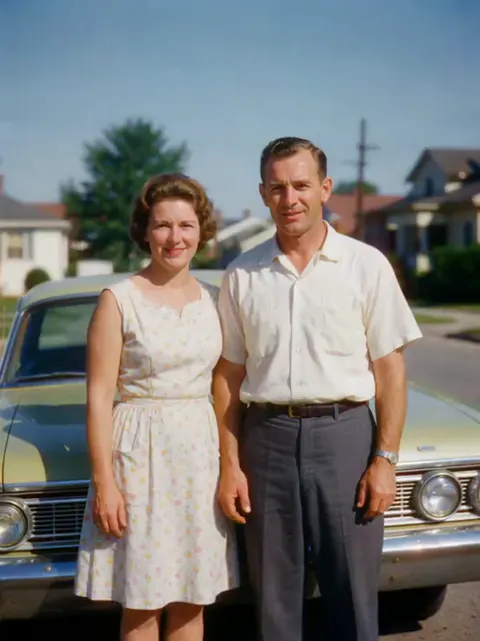
Upload a black-and-white clip, describe the colour you want, and Restyle Video re-renders every frame in full colour while the motion, framing and sound stay as filmed. Below, our colorized clip next to the real colours of the same shot.
- Black and white to full colour
- You can name the colours
- Motion and sound kept
- Clips up to 30 s
Updated by the Kenerate AI team




On this page
Quick answer

How do I colorize a black and white video?
To colorize a black and white video, upload a 3–15 second clip to Kenerate Restyle Video, choose “Your own look” and write “colorize into natural full colour, keep everything else the same”. Every frame is re-rendered in colour with the same motion, framing and sound. Our 3-second 480p clip cost 90 credits; Seedance 2.5 takes clips up to 30 seconds.
Key facts
- Tool
- Restyle Video · “Your own look”
- How you set the colours
- A written description, or up to 4 colour reference images
- Clip length
- 3–15 s (Kenerate tiers) · 4–30 s (Seedance 2.5)
- Kept
- Motion, camera path, framing, timing, sound
- Output
- 480p–1080p · 4K on Seedance 2.5 · MP4
- Upload
- Up to about 100 MB
- Keep in mind
- Colours are the AI's best guess; frames are redrawn
Real demo
Before and after: black and white to colour
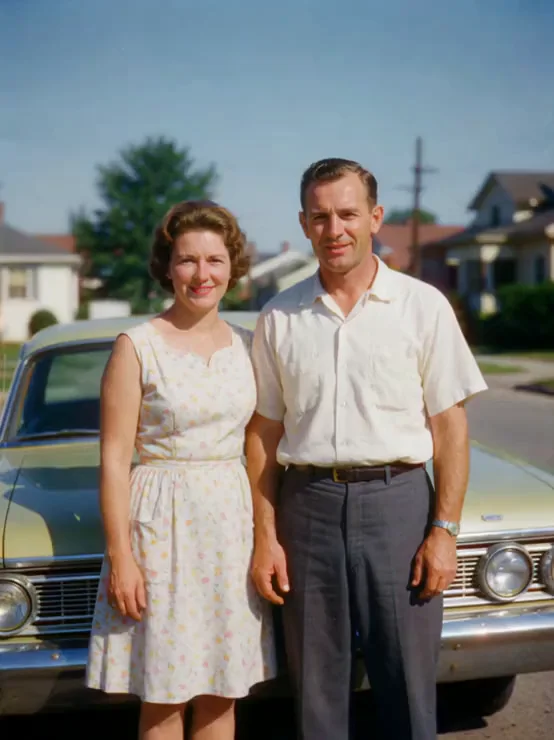
A 3-second black-and-white clip of a 1960s couple by their car, colorized in one run. Sky, trees, skin, the floral dress and the car all come back in colour; the glance between them and the camera stay as filmed.
- Black and white. Our source: 640 × 852, 3 s, with its original sound.
- Colorized. Kenerate Restyle at 480p, no preset, one sentence of prompt.
Kenerate Restyle, 480p: an unedited result made for this page on 18 November 2026, shown next to its source clip.
Colorize my clipReal demo
The AI's colours vs the real colours
We made the black-and-white clip from a colour clip, so we can check the guess. The AI got the sky, trees, white shirt and blue-grey trousers right. Its version is warmer and more saturated, the car came out greener than its true silver-green, and her hair more auburn.
- AI colorized. What Restyle chose from the grey tones alone.
- Real colours. The colour clip we turned black and white.
Same 3 seconds. To steer the colours, name them in the prompt (“the car is pale silver-green”).
Try it on your footageReal results
A black and white video, colorized
The colorized clip on its own. The card's prompt is the exact sentence we wrote in “Your own look”, with no colours named.
A real Kenerate Restyle output, one try, unedited. The couple are AI-generated, not real people.
How to
How to colorize a black and white video
- Time needed
- Steps
- 4 steps
Step 1
Open Restyle Video
Sign in to run it; everything happens in the browser.
Step 2
Add your black-and-white clip
Upload a video up to about 100 MB, or pick one from your History. The Kenerate tiers read 3–15 s; Seedance 2.5 reads 4–30 s.
Step 3
Choose “Your own look”
Skip the art presets and write: “colorize into natural, realistic full colour; keep the same people, faces, light, grain, framing and motion”.
Step 4
Name colours you know (optional)
“The car is pale silver-green, the dress cream with pink flowers.” Or add up to 4 colour photos from the same era as references.
See it in the app

Open Edit Studio and upload an image, or pick one from your history.


Watch the tour · 2:01
AI Edit, Magic Eraser, Change Region, light, style, expand, camera angle & chat edits
Chapters
Checked 19 November 2026
AI colorization: re-rendering vs a classic colorizer
Restyle Video re-renders every frame from a description. Classic colorizers add colour to the original pixels and leave the detail alone. Each is better at different jobs.
| Restyle Video (AI re-render) | Classic colorizer software | |
|---|---|---|
| How you set the colours | Write them, or add up to 4 reference images | Automatic, or colour hints you paint on key frames |
| What changes | Every frame is redrawn in colour | Only colour is added; the grey detail stays |
| Faces and fine detail | Can shift slightly (ours did) | Stay exactly as filmed |
| Clip length | 3–15 s, or 4–30 s on Seedance 2.5 | Usually any length |
| Best for | Short clips for social posts, intros and family edits | Archive films where every frame must stay authentic |
Restyle Video facts from Kenerate's tool schema and src/lib/video-edit-tools.ts; the second column describes how classic colorizers work in general.
Sources: Kenerate Restyle Video · Wikipedia — Film colorization
Engines
Which engine to colorize video with
All three take a written colour description or reference images. Start on Kenerate Restyle; switch for longer clips, 4K or finer texture.
- Used here
Kenerate
Kenerate Restyle
- Input
- Clip 3–15 s + up to 4 reference images
- Output
- 480p, 720p or 1080p
Open Kenerate RestyleBest for
Quick colorization that keeps every move; made our demo
Kenerate
Kenerate Restyle Pro
- Input
- Clip 3–15 s + up to 4 reference images
- Output
- 480p, 720p or 1080p
Open Kenerate Restyle ProBest for
Finer texture and cleaner edges on the same motion
- Up to 30 s
ByteDance
Seedance 2.5
- Input
- Clip 4–30 s + up to 4 reference images
- Output
- 480p to 4K
Open Seedance 2.5Best for
Longer clips and 4K, keeping faces and motion
On the Kenerate tiers, a clip longer than 15 s is trimmed: only the first 15 s are colorized. Seedance 2.5 refuses clips outside 4–30 s.
Tips
Getting natural colours from old footage
What we learned colorizing our clip on 18 November 2026.
A plain sentence works: we named no colours and the sky, trees and clothes came out right.
Name anything you know for sure: “the car is pale silver-green”. Without it, the AI guessed greener.
Ask for “natural, realistic colour, like 1960s colour film” to avoid an over-saturated modern look.
Keep “the same people and faces” in the prompt. Faces are redrawn, so check them before you share.
Restore damaged footage first: scratches and dust get colorized along with everything else.
Run 3–5 seconds first, then the rest of the film with the same words so the colours match.
FAQ
Colorize video questions
9 questions

How do I colorize a black and white video?
Upload the clip to Kenerate Restyle Video, choose “Your own look” and write “colorize into natural, realistic full colour; keep the same people, faces, light, framing and motion”. Run it and download the MP4. Our 3-second clip of a 1960s couple came back in full colour in one try.
Link to this answerCan AI colorize old videos?
Yes. Restyle Video re-renders each frame of a black-and-white clip in colour and keeps the motion, camera, timing and sound. It is not a filter over the old pixels: frames are redrawn, so faces and small details can come out slightly different from the original.
Link to this answerAre AI colorized colours accurate?
They are a well-informed guess, not a record. We tested it on a clip whose real colours we knew: sky, trees, shirt and trousers matched; the car came out greener than its true silver-green and the whole image warmer. If you know a colour, name it in the prompt.
Link to this answerIs there a free video colorizer?
Not on Kenerate: every Restyle run spends credits, and new accounts get 25 credits to try the site. Kenerate Restyle costs 15 credits per billed second at 480p, counting the clip's seconds and the result's, so our 3-second clip cost 90 credits.
Link to this answerHow long can the video be?
Kenerate Restyle and Restyle Pro read 3–15 seconds; a longer clip is trimmed to its first 15 seconds. Seedance 2.5 reads 4–30 seconds. For a whole film, cut it into shots and colorize each with the same prompt so the colours match.
Link to this answerDoes colorizing keep the sound?
Yes, by default. Restyle keeps the clip's own audio; our colorized clip has the same soundtrack as the source. Switch it off only if you want the engine to make new sound.
Link to this answerCan I choose the colours?
Yes. Name them in the prompt (“her dress is cream with pink flowers, the car pale silver-green”) or add up to 4 reference images, such as colour photos from the same place or era. The engine takes only the look from references, not their content.
Link to this answerCan I colorize a black and white photo instead?
Yes, with Kenerate's photo colorizer, which works on a single image. Colorizing the photo first and then animating it is another way to get a colour clip from an old print.
Link to this answerIs it okay to colorize historical footage?
Only colorize footage you shot or have the right to use, and label the result as AI-colorized. The colours are invented, so a colorized clip should not be presented as how the scene really looked.
Link to this answerIn depth
Colorizing video with AI, explained
How the AI picks colours, what it keeps, and where it can go wrong.
On this page
How AI video colorization works
A black-and-white frame only stores brightness. The colour has to be inferred from what the model recognises: skies are usually blue, leaves green, skin a warm tone. Restyle Video goes a step further and re-renders each frame from your clip and your description, so motion and framing come from the footage while the colour comes from the model.
That is why the result looks natural but can be wrong about things that could be any colour, such as a car, a dress or a door.
Our test: a clip whose real colours we knew
On 18 November 2026 we took 3 seconds of a colour clip of a fictional 1960s couple (made earlier with Wan 3), turned it black and white with grain, and colorized it with Kenerate Restyle at 480p:
- Right: blue sky, green trees, warm skin, white shirt, blue-grey trousers, a cream dress with pink and yellow flowers.
- Off: the car came out pale green instead of silver-green; her hair more auburn; the whole frame warmer and more saturated than the original.
- Redrawn: faces are close to the source but not identical; the glance between them and the timing match.
- Kept: the original soundtrack, the 3-second length and the framing. Cost: 90 credits.
Colorize, correct or restore?
Colorizing adds colour to black-and-white footage. Colour correction fixes the colour of footage that already has it, such as an orange cast; see our AI video color correction page. Restoration repairs damage like noise, scratches and tape wobble. For old films the usual order is restore, then colorize, then upscale.
Video colorizer online
Restyle Video runs in the browser: upload, write the colour sentence, run. There is no colorize preset; “Your own look” with a colour description is the colorizer, which also lets you name colours you know.
Black and white video to color with AI
Keep the prompt short and add a guard line: “colorize into natural full colour; keep everything else the same”. Compare the before/after view and check faces, hands and any lettering before you download.
Colorize an old home movie
Digitise the film or tape, cut it into shots of up to 15 seconds (30 on Seedance 2.5), restore heavy damage first, then colorize each shot with the same words so the family's clothes and the house keep the same colours from shot to shot.
Explore
Every Kenerate video tool
Generators, tools, models and guides — all in one studio.
By the Kenerate AI teamLast updated and reviewed
Sources: Kenerate Restyle Video · Wikipedia — Film colorization

Black and white in, colour out
Describe the colour and Restyle Video re-renders your clip in it, with every move and the sound kept. Only on footage you have the right to use.
Tried it? Tell us how it went