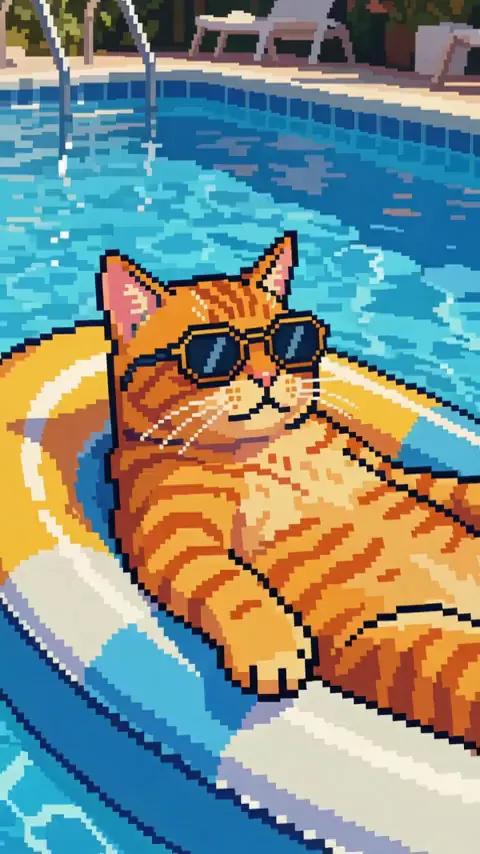
Pixel art preset · motion kept · up to 30 s
Pixel art video maker — turn any clip into a retro game scene
Upload a clip, pick the Pixel art preset and Restyle Video redraws every frame as 16-bit game art: square pixels, a limited palette and hard outlines, while the movement, camera and sound stay as filmed.
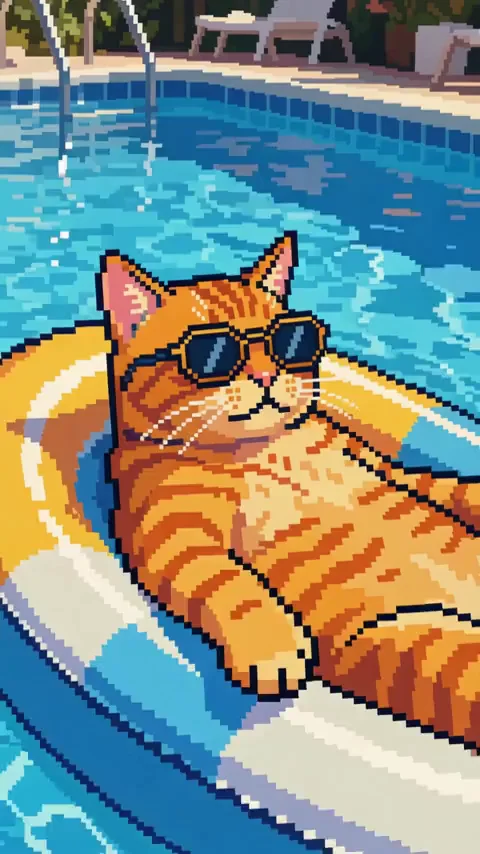
- 16-bit pixel art preset
- Motion and camera kept
- Clips up to 30 s
- Original sound kept
Updated by the Kenerate AI team




On this page
Quick answer

How do I turn a video into pixel art?
To turn a video into pixel art, upload a 3–15 second clip to Kenerate Restyle Video and pick the Pixel art preset. Every frame is redrawn as retro 16-bit game art, with square pixels, a limited palette and dithered shading, while the motion, camera and sound stay. Our 3-second 480p clip cost 90 credits; Seedance 2.5 takes up to 30 seconds.
Key facts
- Preset
- Pixel art: 16-bit, square pixels, limited palette, dithering
- Related looks
- Voxel · Low poly · Synthwave
- Clip length
- 3–15 s (Kenerate tiers) · 4–30 s (Seedance 2.5)
- Kept
- Motion, camera path, framing, timing, sound
- Output
- 480p–1080p · 4K on Seedance 2.5 · MP4
- Upload
- Up to about 100 MB
Real demo
Before and after: a video into pixel art
Three seconds of a cat lifting its sunglasses on a pool float, run through the Pixel art preset. The cat, float, pool tiles and water all become square pixels with hard outlines; the paw lift and the drift keep their exact timing. Two details changed: the round sunglasses came out octagonal and the paw pads turned red.
- Original. Our source: 3 s of an AI clip from our gallery, 540 × 948, with sound.
- Pixel art. Kenerate Restyle at 480p, Pixel art preset, no prompt.
Kenerate Restyle, 480p: an unedited result made for this page on 18 November 2026, shown next to its source clip.
Try Pixel artReal demo
Pixel art, voxel or low poly
Restyle Video has three game-art presets. The same 3-second rooftop clip from the style picker in each.
- Pixel art. Flat 16-bit sprites: square pixels, limited palette, dithered shading.
- Voxel. Everything built from small 3D cubes, like a block-building game.
- Low poly. Flat-shaded faceted 3D with clean gradients.
Style-preview clips from Restyle Video's preset grid: real Restyle outputs of one short source shot.
Pick a game lookReal results
A real clip, turned into pixel art
The pixel art clip on its own. We picked the preset and wrote nothing else.
A real Kenerate Restyle output, one try, unedited.
How to
How to make a pixel art video
- Time needed
- Steps
- 4 steps
Step 1
Open Restyle Video
Sign in to run it; everything happens in the browser.
Step 2
Add your clip
Upload a video up to about 100 MB, or pick one from your History. The Kenerate tiers read 3–15 s; Seedance 2.5 reads 4–30 s.
Step 3
Pick Pixel art
Open “All styles” and choose Pixel art. Voxel and Low poly are next to it if you want a 3D game look instead.
Step 4
Add a detail (optional)
One line such as “8-bit NES palette, chunky pixels” or “sunset palette”. Don't repeat the preset; add only what's extra.
See it in the app

Open Video Studio in Text to Video mode and write the shot — subject, action, camera move and light.


Watch the tour · 1:19
Text, image & reference to video, models, edit, extend & chat
Chapters
Checked 19 November 2026
AI pixel art vs a pixelate filter
A pixelate filter shrinks each frame and blows it back up, so you get blocks of the original colours. An AI restyle redraws each frame as pixel art, with outlines, a game palette and shading.
| Restyle Video · Pixel art | Pixelate / mosaic filter | |
|---|---|---|
| What you get | Drawn sprite-style art with outlines and dithered shading | Square blocks of the original colours |
| Palette | A limited game palette chosen by the AI | The footage's own colours, averaged |
| Small details | Redrawn, sometimes changed (our sunglasses did) | Blurred into blocks, never changed |
| Clip length | 3–15 s, or 4–30 s on Seedance 2.5 | Usually any length |
| Best for | Intros, game-style edits, social posts that look hand-made | Quick retro effects, censoring, long videos |
Restyle Video facts from src/lib/video-edit-tools.ts; the filter column describes how pixelate effects work in general.
Sources: Kenerate Restyle Video · Wikipedia — Pixel art
Engines
Which engine for pixel art video
All three apply the same Pixel art preset. Start on Kenerate Restyle; switch for longer clips, 4K or cleaner pixels.
- Used here
Kenerate
Kenerate Restyle
- Input
- Clip 3–15 s + up to 4 look references
- Output
- 480p, 720p or 1080p
Open Kenerate RestyleBest for
Quick pixel art that keeps every move; made our demo
Kenerate
Kenerate Restyle Pro
- Input
- Clip 3–15 s + up to 4 look references
- Output
- 480p, 720p or 1080p
Open Kenerate Restyle ProBest for
Cleaner pixel edges and steadier palettes
- Up to 30 s
ByteDance
Seedance 2.5
- Input
- Clip 4–30 s + up to 4 look references
- Output
- 480p to 4K
Open Seedance 2.5Best for
Longer clips and 4K uploads
On the Kenerate tiers, a clip longer than 15 s is trimmed: only the first 15 s are restyled. Seedance 2.5 refuses clips outside 4–30 s.
Tips
Clips that make good pixel art
Pixel art loses fine detail by design, so simple, readable shots work best.
One clear subject with a clean outline: a pet, a person, a car.
Readable action: a jump, a wave, a pour. Tiny movements vanish into the pixels.
Bright, even light gives the limited palette clean colour blocks.
Avoid small text and logos: letters turn into blocks.
Want chunkier pixels? Add “8-bit, very large pixels” as the detail line.
Only restyle footage you shot or have the right to use.
FAQ
Pixel art video maker questions
8 questions

How do I turn a video into pixel art?
Upload the clip to Kenerate Restyle Video, pick the Pixel art preset and run it. Every frame is redrawn as retro 16-bit game art while the motion, camera and sound stay. Our 3-second clip of a cat on a pool float came back as pixel art in one try, with no prompt.
Link to this answerCan AI make pixel art animation from a video?
Yes. Restyle Video's Pixel art preset turns live or AI footage into pixel art animation frame by frame, so the movement is your footage's real movement. To animate a pixel art still instead, make it with our image to pixel art tool and animate it in the Video Studio.
Link to this answerIs this the same as a pixelate filter?
No. A pixelate filter turns each frame into blocks of its own colours. Restyle redraws the frame as pixel art, with outlines, a limited palette and shading, so it looks like a game sprite. The trade-off: small details can change, like our cat's sunglasses.
Link to this answerHow long can the video be?
Kenerate Restyle and Restyle Pro read 3–15 seconds; a longer clip is trimmed to its first 15 seconds. Seedance 2.5 reads 4–30 seconds. For a longer video, cut it into scenes and run each with the Pixel art preset.
Link to this answerHow much does a pixel art video cost?
Restyle is priced per second, counting the clip's seconds and the result's: 15 credits per billed second at 480p, 30 at 720p and 60 at 1080p on Kenerate Restyle. Our 3-second clip at 480p cost 90 credits. Restyle Pro and Seedance 2.5 cost more.
Link to this answerCan I choose 8-bit instead of 16-bit?
Yes, roughly. The preset aims for 16-bit art; add a detail line such as “8-bit, very large pixels, NES-style palette” to push it chunkier. You can also add up to 4 look references of the pixel style you want.
Link to this answerIs the sound kept?
Yes, by default. Restyle keeps the clip's own audio unless you switch it off, in which case the engine makes new sound to fit the new look.
Link to this answerCan I make a pixel art GIF?
Restyle Video exports MP4. For a looping GIF, convert the MP4 in any GIF tool, or start from a still in our AI GIF generator.
Link to this answerIn depth
Pixel art video, explained
What the preset does to your footage, and what to expect.
On this page
What the Pixel art preset does
The preset tells the engine to redraw every frame and everything in it as retro 16-bit pixel art: crisp square pixels, a limited palette, dithered shading and a classic video-game look. Restyle keeps the motion, camera movement, framing, timing and the number of subjects, so the clip moves exactly like your footage.
Our test
On 18 November 2026 we ran 3 seconds of a cat-on-a-pool-float clip through Kenerate Restyle at 480p with the Pixel art preset and no prompt:
- Pixel art: hard black outlines, square pixels and flat colour blocks on the cat, float, tiles and water.
- Motion: the paw lifting to the sunglasses and the float's drift match the source frame for frame.
- Changed: the round sunglasses became octagonal and the paw pads turned red, as a sprite artist might draw them.
- Kept: the 3-second length, the vertical 9:16 frame and the sound. Cost: 90 credits.
Pixel art video vs animating a pixel art image
Restyling a video keeps real motion: your dog really runs, the camera really pans. Animating a pixel art still in the Video Studio invents the motion from a prompt instead, which is better when you have no footage, such as a game character idle loop. Both give an MP4.
Video to pixel art converter
Restyle Video works like a converter with one setting that matters: the Pixel art preset. Upload, pick it, run. If you want a 3D game look instead, try Voxel or Low poly on the same clip and keep the one you like.
8-bit video filter
Add “8-bit, very large pixels, NES-style palette” as the detail line on top of the Pixel art preset. The result is chunkier and uses fewer colours than the default 16-bit look.
Pixel art intro for a game channel
Film or generate a 3–5 second shot with one clear action, restyle it as pixel art, then add your title in an editor. Keep text out of the source clip: letters turn into blocks.
Explore
Every Kenerate video tool
Generators, tools, models and guides — all in one studio.
By the Kenerate AI teamLast updated and reviewed
Sources: Kenerate Restyle Video · Wikipedia — Pixel art

Your footage, as a retro game
Pick Pixel art and Restyle Video redraws every frame as 16-bit game art, with every move kept. Only on footage you have the right to use.
Tried it? Tell us how it went