Paintings · artwork · 2–30 s · with sound
Animate a painting with AI — make the scene move, keep the brushwork
Upload a painting, say what should move and get a short clip: clouds drifting, a windmill turning, a portrait that blinks. The trick is to animate the scene while the brush strokes, canvas and colours stay exactly as painted.
- Oil, watercolour, sketches, digital art
- Brush strokes and canvas kept
- You write the motion
- Native sound or silent
Updated by the Kenerate AI team




On this page
Quick answer

How do you animate a painting with AI?
To animate a painting, upload a photo or scan of it to Kenerate's Video Studio in image-to-video mode, describe 2–4 things that move (“the clouds drift, the windmill's sails turn”) and add “keep the brush strokes and canvas texture”. Wan 3.0 makes a 2–30 s clip with sound; our 5-second 480p windmill cost 75 credits.
Key facts
- Input
- One painting (photo or scan) + a motion prompt
- Default model
- Wan 3.0 (Alibaba)
- Clip length
- 2–30 s on Wan 3.0
- Resolution
- 480p–1080p on Wan 3.0, up to 4K on Seedance 2.5
- Shapes
- Keep the painting's shape, or 16:9 · 4:3 · 1:1 · 3:4 · 9:16
- Sound
- Generated with the clip (wind, water, music), or off
- Plan
- Video Studio needs a paid plan
Real results
Paintings, animated
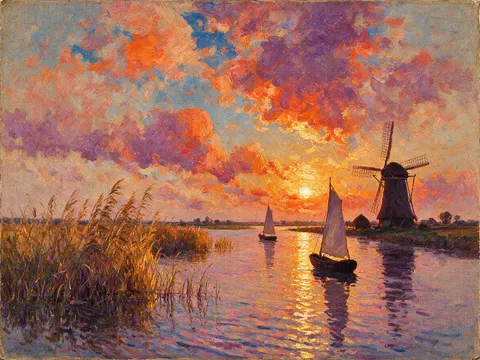
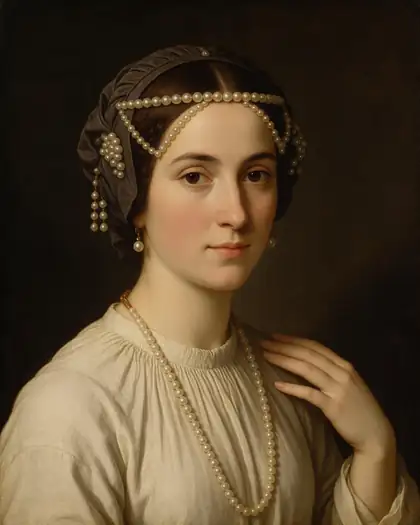
Two original paintings made with Seedream 5.0 Pro and animated on Wan 3: a landscape where the scene moves, and a portrait that blinks and speaks. Open one to copy both prompts.
Real, unedited image-to-video clips. The windmill was made for this page on 18 November 2026; neither painting copies a real artwork.
How to
How to animate a painting in 5 steps
- Time needed
- Steps
- 4 steps
Step 1
Photograph or scan the painting flat
Even light, no glare, the whole canvas in frame. Crop away the frame and the wall so the model sees only the painting.
Step 2
Open the Video Studio in image-to-video mode
Upload the image as the start frame. Leave the ratio empty to keep the painting's shape, or pick 4:3, 16:9 or 9:16.
Step 3
Name 2–4 things that move
Things that move in real life: clouds, water, sails, leaves, smoke, a blink. “The clouds drift, the windmill's sails turn, the water shimmers.”
Step 4
Ask the style to stay
Add “it stays an oil painting: keep the brush strokes, canvas texture and colours” and “static camera”, so it doesn't turn into a photo.
See it in the app

Open Video Studio in Text to Video mode and write the shot — subject, action, camera move and light.


Watch the tour · 1:19
Text, image & reference to video, models, edit, extend & chat
Chapters
Checked 19 November 2026
Animate a painting, make it talk, or paint a video?
Three different jobs that all end in a moving painting. Pick by what you start with.
| Animate the painting | Talking painting | Video as a painting | |
|---|---|---|---|
| You start with | One painting + a motion prompt | One painted face + a voice recording | A real video clip |
| What moves | Whatever you name: clouds, water, sails, a blink | Lips and face, in sync with the audio | Everything in your footage, redrawn in paint |
| Style kept by | Asking for it in the prompt | The avatar model | The Oil painting or Watercolor preset |
| On Kenerate | Video Studio (Wan 3.0 and others) | Avatar Talk | Restyle Video |
Avatar Talk and Restyle Video are separate Kenerate tools; their presets are listed in each tool.
Sources: Kenerate Video Studio · Every Painting Awakened (arXiv, 2025)
Engines
Which model to animate a painting with
From the Video Studio's live model list. Every model here takes your painting as the first frame.
- Used here
Alibaba
Wan 3.0
- Input
- Painting + prompt (+ end frame)
- Output
- 2–30 s · 480p–1080p · sound on or off
Open Wan 3.0Best for
Keeping brushwork and colours while the scene moves
Kuaishou
Kling v3 Pro
- Input
- Painting + prompt
- Output
- 3–15 s · sound
Open Kling v3 ProBest for
Expressive portraits: a glance, a smile
ByteDance
Seedance 2.5
- Input
- Painting + prompt (+ end frame)
- Output
- 4–30 s · up to 4K · sound
Open Seedance 2.5Best for
Large-screen and gallery displays in 4K
ByteDance
Seedance 1.5 Fast
- Input
- Painting + prompt
- Output
- 4–12 s · 720p or 1080p · sound
Open Seedance 1.5 FastBest for
Cheaper tests of water, sky and foliage motion
Lightricks
LTX 2.3
- Input
- Painting + prompt
- Output
- 5–20 s · up to 1080p · silent
Open LTX 2.3Best for
Cheapest silent drafts
Both clips above were made on Wan 3. For a painted face that speaks a recording you have, Avatar Talk is the better tool.
Tips
Prompts that keep a painting a painting
From our windmill run and the portrait, both on Wan 3.
"The clouds drift slowly, the water shimmers, the reeds sway; keep the brush strokes and canvas texture; static camera."
"She blinks slowly and a faint smile forms, subtle painterly motion, the camera holds still."
Name the medium: “it stays a watercolour” or “it stays a charcoal sketch”. Otherwise the model may drift toward a photo.
A static camera keeps the canvas texture still; a push-in makes the brush strokes swim.
Ask for movement that fits the scene. Our windmill turned and the boats glided because both are in the picture.
Sound is generated with the picture: describe it (wind, water, soft music) or switch it off.
FAQ
Animate painting questions
8 questions

How do I animate a painting with AI?
Photograph or scan the painting, upload it to Kenerate's Video Studio in image-to-video mode and describe what moves, such as “the clouds drift and the windmill's sails turn; keep the brush strokes and canvas texture; static camera”. Generate 5 seconds on Wan 3.0 and download the MP4.
Link to this answerCan AI make a painting move without changing the style?
Mostly, if you ask. In our windmill test on Wan 3.0 the sails, clouds, boats and water moved while the thick brush strokes and canvas texture stayed. Name the medium (“it stays an oil painting”) and keep the camera still; big camera moves make the texture swim.
Link to this answerWhat kind of paintings animate best?
Scenes with things that move in real life: sky, water, boats, trees, smoke, or a single face. Busy crowds, tiny figures and abstract work are harder, because the model has to guess what each mark is.
Link to this answerCan I animate a famous painting?
Paintings whose copyright has expired, which for most works means the artist died over 70 years ago, can usually be animated; museum photos of them may have their own terms. For living artists' work, animate only your own art or work you have permission to use.
Link to this answerCan I make a painted portrait talk?
Yes. Ask for a short line in the prompt, as in our portrait clip on Wan 3, or use Avatar Talk with your own voice recording for exact lip sync. Don't make a portrait of a real person say things they didn't say.
Link to this answerHow long can an animated painting be?
2 to 30 seconds per clip on Wan 3.0. For a gallery loop, 5 to 10 seconds with slow, subtle motion works best; join several clips in an editor for longer pieces.
Link to this answerHow much does it cost to animate a painting?
On Wan 3.0, 5 seconds cost 75 credits at 480p, 150 at 720p and 300 at 1080p. Our windmill clip cost 75 credits at 480p plus 13.5 for the Seedream 5.0 Pro painting. Video needs a paid plan; clips have no watermark.
Link to this answerDoes the animated painting have sound?
It can. Wan 3.0 generates sound with the picture; our windmill clip has the wind and water we asked for. Switch sound off on Wan 3.0 at the same price if you'll add music later.
Link to this answerIn depth
Animating paintings, explained
On this page
How a painting becomes a clip
The image-to-video model takes your painting as the first frame and predicts the frames after it, guided by the prompt. It has learned how clouds, water and faces move from video, so it moves those parts of the painting in the same way. It has also learned that most video is photographic, which is why it needs telling to keep the brushwork.
A 2025 research paper on painting animation (“Every Painting Awakened”) found the same tension: models animate what they recognise and can ignore an instruction to move something they don't.
Our test: a windmill at sunset
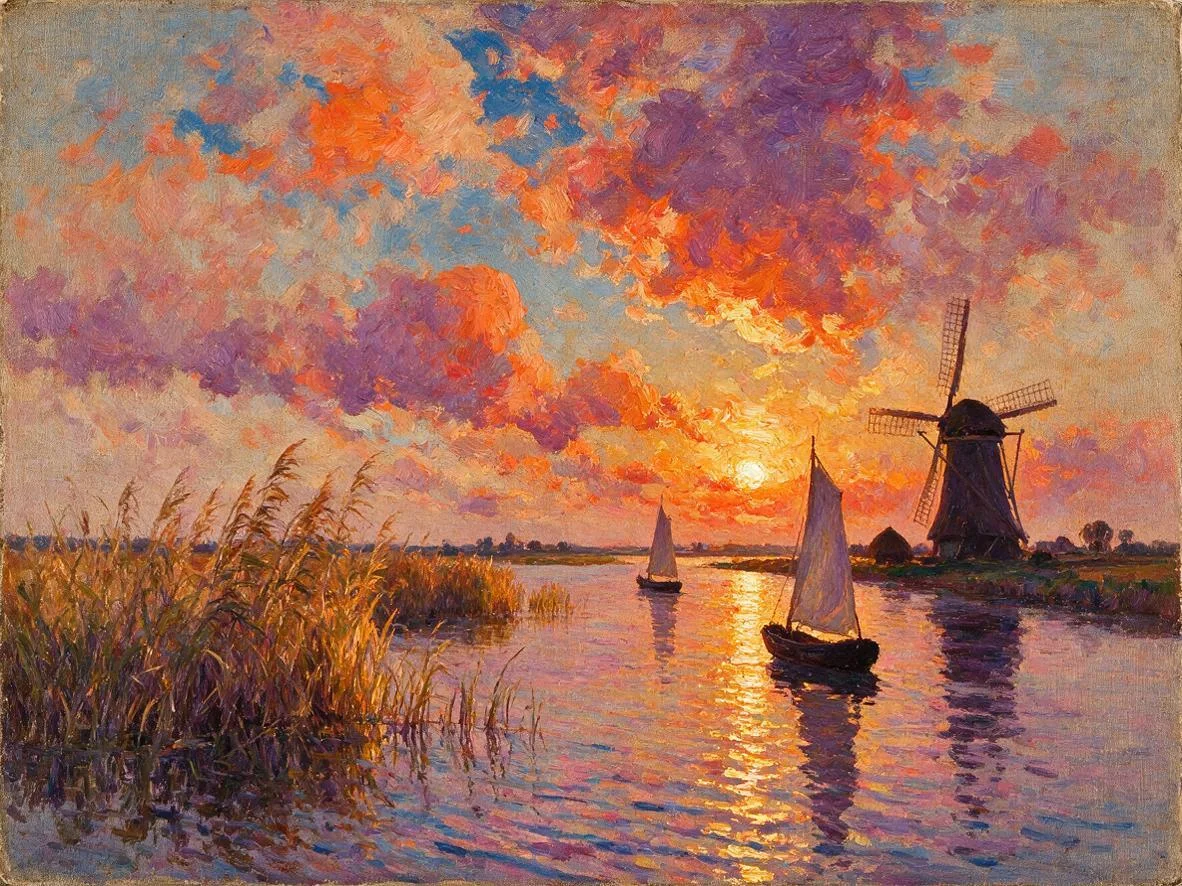
On 18 November 2026 we made an original Impressionist-style oil painting with Seedream 5.0 Pro and animated it on Wan 3.0, 5 seconds at 480p with sound, first try:
- Moved as asked: the windmill's sails turn, the clouds drift, the reeds sway, the sunset shimmers on the water.
- Moved more than asked: the near sailboat glides away down the canal rather than drifting in place.
- Kept: thick brush strokes, canvas texture and the orange-violet palette in every frame.
- Sound: wind and lapping water. Cost: 75 credits for the clip, 13.5 for the painting.
Copyright and credit
Animating a painting makes a new version of it. Use your own artwork, paintings in the public domain, or work you have permission for, and credit the artist when you share the clip. Label it as an AI animation so nobody mistakes it for the artist's own film.
Painting animator
Any image-to-video model is a painting animator when you upload a painting. What makes it work is the prompt: name what moves, name the medium, and keep the camera still.
Make a painting move for a gallery screen
Make a 5–10 second clip with slow motion and no sound, then loop it on the display. Seedance 2.5 renders up to 4K for large screens.
Animate my own artwork
Photograph your canvas or export your digital painting at full size, crop to the artwork, and animate it with the same palette words you'd use to describe it. Short clips of your own work suit portfolio posts and process reels.
Animate a drawing or sketch
Upload the scan and add “it stays a pencil sketch on paper”. Line drawings move best with small motions, such as hair in the wind or a turning head.
Explore
Every Kenerate video tool
Generators, tools, models and guides — all in one studio.
By the Kenerate AI teamLast updated and reviewed
Sources: Kenerate Video Studio · Every Painting Awakened (arXiv, 2025)

Animate your painting
Upload a painting, name what moves, keep the brushwork. A clip with sound, no watermark.
Tried it? Tell us how it went