

Fictional people · any age · any setting
AI Human Generator — realistic people from a text prompt
Describe a person — age, hair, clothes, mood, where they are — and get a photo of someone who doesn't exist: a market shopper, a woodworker, a hiker or a studio headshot.

- Photoreal people
- Any age, any look
- Free credits to start
- No watermark
Updated by the Kenerate AI team
Made with Kenerate
On this page
Quick answer
How do you generate a realistic human with AI?
An AI human generator makes a photo of a person who doesn't exist from a text description. On Kenerate AI you describe age, hair, clothing, expression, setting, light and lens, and GPT Image 2.5 Sunburst renders it — our five test people all came back photographic, with real skin texture, on the first try. To turn a drawing or cartoon into a real-looking person, upload it and use the cartoon to real life edit instead.
Key facts
- People generated
- 5 (ages ~20s to 70s)
- Photoreal on try 1
- 5 of 5
- Model
- GPT Image 2.5 Sunburst (OpenAI)
- Watch out for
- Unprompted signs and shop names
- Free-plan option
- Qwen Image 3.0
- Real people
- Not allowed — fictional only
- Watermark
- None
Gallery
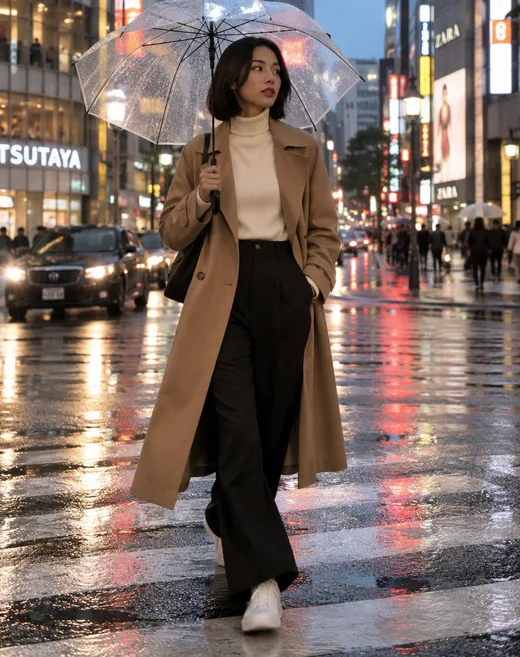
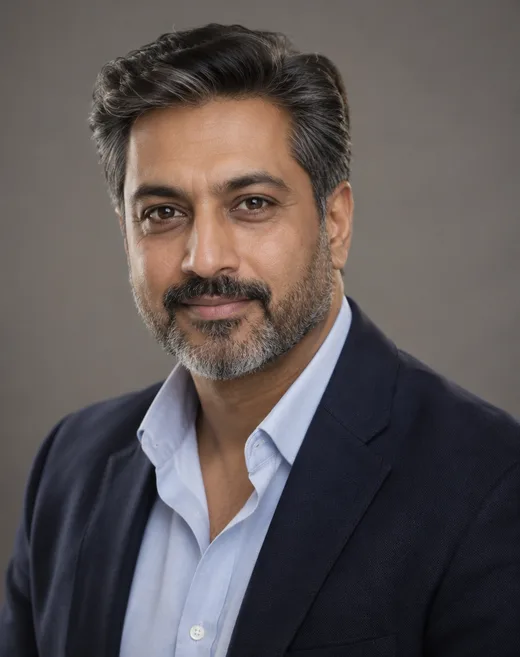
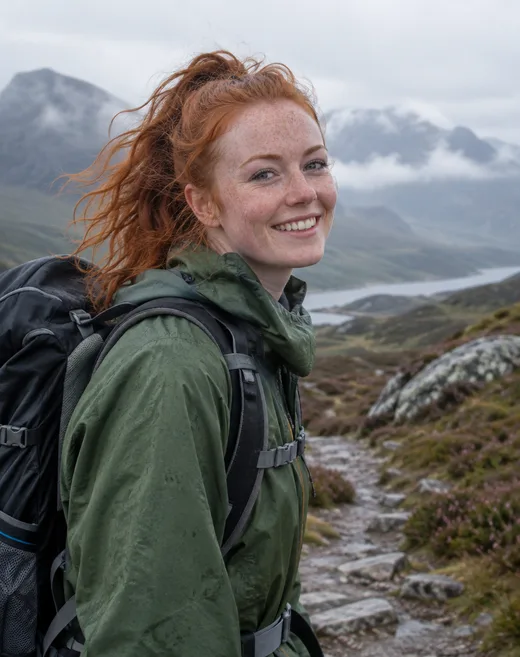
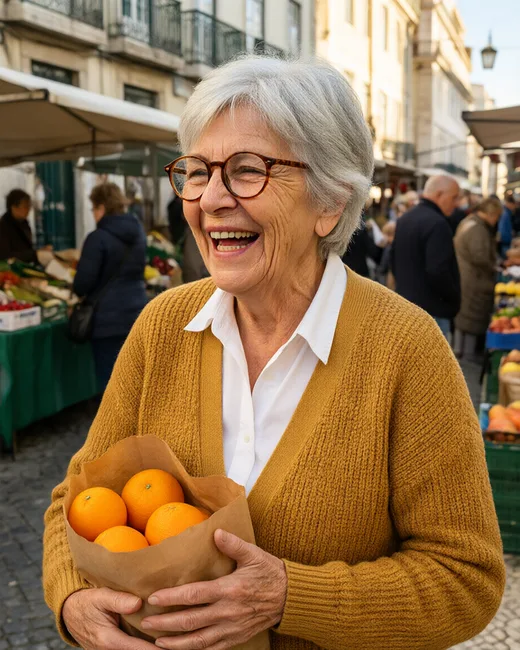
Five people who don't exist
Real GPT Image 2.5 Sunburst generations, one try each, plus one free-plan comparison. Open any one to copy the prompt.
Same prompt
One person, two models
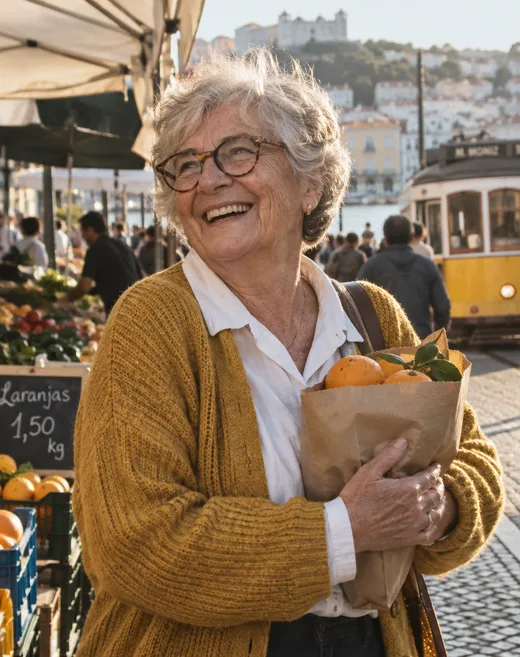
The same market-shopper prompt on GPT Image 2.5 Sunburst and on Qwen Image 3.0, a free-plan model. Both got the face, glasses, cardigan and oranges right; only Sunburst put her in a recognisable Lisbon, with a yellow tram and a price sign in Portuguese.
PromptCandid street portrait photo of a fictional woman in her early 70s with short silver hair, deep laugh lines and round tortoiseshell glasses, wearing a mustard knit cardigan over a white collared shirt, laughing while holding a paper bag of oranges at an outdoor market in Lisbon.
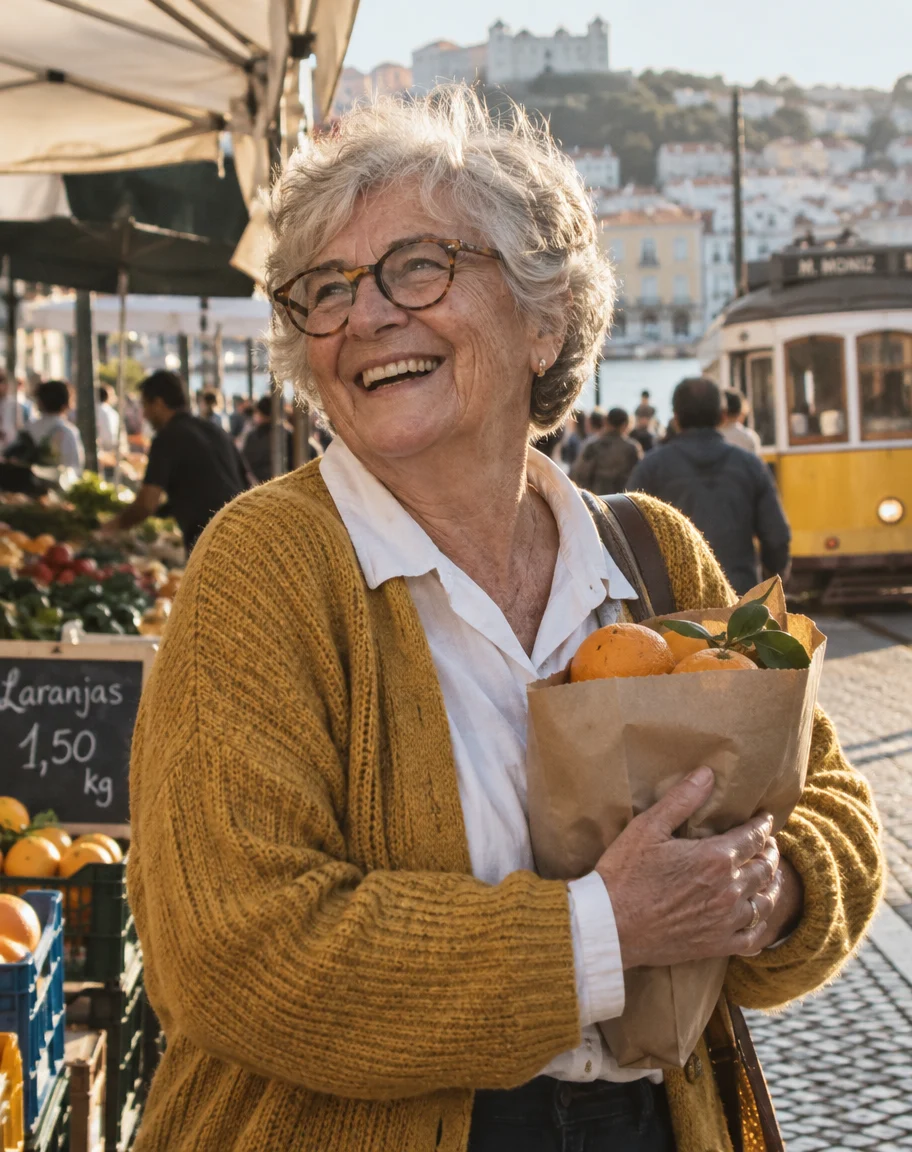 GPT Image 2.5 SunburstLisbon tram, castle, Portuguese price sign
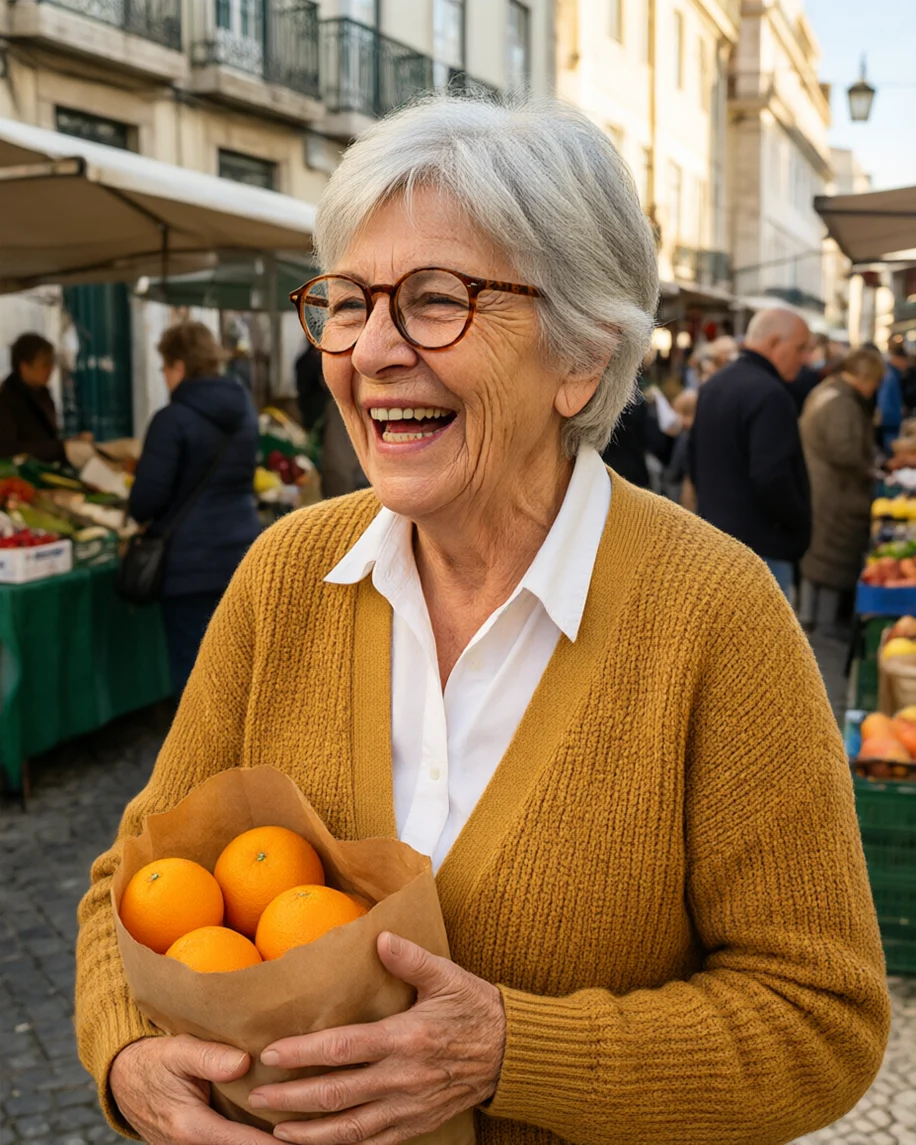 Qwen Image 3.0Free plan · right person, generic street
How to
How to use the AI human generator
- Time needed
- Steps
- 4 steps
Step 1
Open the Image Studio
Go to /app/image. Sign in free for starter credits.
Step 2
Pick GPT Image 2.5 Sunburst
It made all five people on this page photographic on the first try. Qwen Image 3.0 is the free-plan option.
Step 3
Describe the person
Age, look, clothes, expression, place, light and lens. Choose 4:5 for portraits or 9:16 for full body.
Step 4
Download
Regenerate for a different face, then download without a watermark — or upscale up to 4K.
See it in the app

Open Image Studio and type what you want to see — subject, style, lighting and mood.


Watch the tour · 1:23
Prompts, styles, references, edit, Arena & chat
Chapters
Tips
Get a person who looks real
What worked in our five tests.
Start with “a fictional” and an age range — “a fictional woman in her early 70s”.
Give two or three specific features: hair, glasses, beard, freckles, laugh lines.
Dress them — name the garment and its colour; it carries the whole look.
Put them somewhere real and give them something to do: shopping, working, walking.
Write a lens and a light source (85mm, window light, overcast) instead of “ultra realistic 8K”.
Ask for “natural skin texture” — and add “no text, no signs, no brand names” if you need a clean background.
Models
Models for generating people
What each model is good at. Open any one straight in the generator.

OpenAI
GPT Image 2.5 Sunburst
- Reference images
- Up to 16
- Output
- 1K–4K
Open GPT Image 2.5 SunburstBest for
Made all five people on this page

Google
Nano Banana 2.1
- Reference images
- Up to 14
- Output
- Up to 4K
Open Nano Banana 2.1Best for
Keeps the same person across many shots

ByteDance
Seedream 5.0 Pro
- Reference images
- Up to 10
- Output
- 1K · 2K
Open Seedream 5.0 ProBest for
Fashion and portraits at 2K
- Free plan

FAQ
AI Human Generator questions
9 questions
What is an AI human generator?
It is an image model that makes a photo of a person who doesn't exist from a text description. You write who they are — age, hair, clothes, expression — and where they are, and the model renders a new face each time. On Kenerate AI, GPT Image 2.5 Sunburst made all five people on this page photographic on the first try.
Link to this answerHow do I make a realistic human with AI?
Describe the person like a photographer would: “a fictional man in his 40s with salt-and-pepper hair, navy blazer, plain grey backdrop, 85mm lens, soft key light, natural skin pores”. A real light source, a lens and natural skin texture do more for realism than words like “hyper realistic 8K”, which push images toward the glossy AI look.
Link to this answerIs the AI human generator free?
Free to start. A new Kenerate account gets 25 credits on sign-up, and Qwen Image 3.0 is a free-plan model — our comparison runs the same prompt on it. GPT Image 2.5 Sunburst uses credits from one-time packs that never expire, with no subscription. Downloads carry no watermark.
Link to this answerCan I turn a drawing, cartoon or anime picture into a real person?
Yes — that is an image-to-image edit. Upload the picture in the Image Studio and ask for “a realistic photograph of a real person, same outfit and pose”. Our cartoon to real life AI page shows real results: a 3D cartoon and a flat 2D mascot came back fully photographic, while painted anime art came back only half-real.
Link to this answerCan I generate the same person in different photos?
Yes. Generate one person you like, then add that image as a reference and describe the new scene. Nano Banana 2.1 is built for keeping the same face across shots (up to 14 references), and GPT Image 2.5 Sunburst takes up to 16. Name what must stay — face, hair, glasses — and what changes.
Link to this answerCan I make AI images of real people or celebrities?
No. Don't use real people's names or photos to create images of them. This page is for fictional people: describe the look you want instead of naming someone. To use your own face, upload your own photo in the AI headshot or profile picture tools.
Link to this answerWhy did text or logos appear in my image?
Image models fill in believable details, and that includes signs. In our tests GPT Image 2.5 Sunburst added a wall sign with a slogan to the workshop and real shop names to the street scene, none of which we asked for. Add “no text, no signs, no brand names” to the prompt when you need a clean background.
Link to this answerCan I use the people I generate commercially?
The images are generated, not photos of real people, and Kenerate downloads carry no watermark. Check Kenerate's terms of service for usage rights, and avoid anything that makes a generated person look like a real, identifiable individual.
Link to this answerWhat size and shape can I get?
GPT Image 2.5 Sunburst renders at 1K to 4K in portrait, square or landscape ratios. We used 4:5 for every person on this page. For larger prints, the Image Upscaler takes any image up to 4K.
Link to this answerIn depth
AI Human Generator, explained
What works, what to avoid, and how to pick a model.
On this page
Text to human, or image to human?
People searching for an AI human generator want one of two things. Text to human: describe someone who doesn't exist and get a photo of them — that is what the gallery above shows. Image to human: upload a drawing, a cartoon, an anime character or a 3D render and get it back as a real-looking person.
Both run in the same Image Studio. Text to human needs only a prompt; image to human needs the picture as a reference plus a prompt that says what should become real. The second is covered step by step, with honest before-and-after results, on the cartoon to real life AI page.
A prompt that makes a person look real
Every prompt on this page follows the same order:
- Who: “a fictional woman in her early 70s”, with two or three features — silver hair, laugh lines, round glasses.
- Wearing: the garment and colour — “mustard knit cardigan over a white collared shirt”.
- Doing: an action — laughing, leaning on a workbench, walking across a crosswalk.
- Where: a real kind of place — a Lisbon market, a woodworking shop, a Scottish trail.
- Camera: a lens and a light — 85mm, late-afternoon sun, overcast soft light.
- Finish: “natural skin texture, real photograph”.
What we got
Five people on GPT Image 2.5 Sunburst at 4:5, one try each, plus one free-plan comparison:
- All five came back photographic, with wrinkles, freckles, pores and flyaway hair where the prompt asked for them.
- The market shopper came with unasked-for local detail: a yellow Lisbon tram, the castle on the hill and a price sign in Portuguese.
- Two scenes picked up text we didn't ask for: a slogan sign with a flag in the workshop, and real shop names in the neon street.
- Qwen Image 3.0, a free-plan model, matched the person — face, glasses, cardigan, oranges — but placed her on a generic street.