
Skip to content
ByteDance Seed · 5 versions on Kenerate

Seedream 5.0 Pro, Lite & Flash — ByteDance's image model

Seedream is ByteDance's image generation and editing model family. Kenerate runs Seedream 5.0 Pro, 5.0 Lite, 5.0 Flash, 4.5 and 4 — with up to 10 reference images each.

  • Real outputs
  • Official sources
  • 25 free credits
  • No watermark

Quick answer

Updated

Seedream is ByteDance Seed's image generation and editing model family. Seedream 5.0 Pro, announced on 8 July 2026, focuses on information-dense layouts, precise editing, realistic portraits and native input in 10+ languages. On Kenerate, 5.0 Pro costs 13.5 credits (27 at 2K) with up to 10 reference images; 5.0 Lite renders up to 4K for 10.5 credits and 5.0 Flash is 8.1 credits at up to 2K.

Maker
ByteDance Seed
5.0 Pro announced
8 July 2026
On Kenerate from
8.1 credits
References
Up to 10

About the model

What is Seedream?

Facts from the maker's own announcement and repository, linked below.

Seedream facts
MakerByteDance Seed
LatestSeedream 5.0 Pro — announced 8 July 2026
What it's forText to image and image editing: complex information visualisation, point and lasso editing, realistic portraits
LanguagesNative input in 10+ languages, incl. English, Chinese, Japanese, Korean, Spanish, French, German, Arabic
WeightsClosed — available through ByteDance and API partners
On Kenerate5.0 Pro, 5.0 Lite, 5.0 Flash, 4.5, 4 — up to 10 references each

Same prompt

Seedream 5.0 Pro vs Chroma vs Pony XL vs Neta Lumina

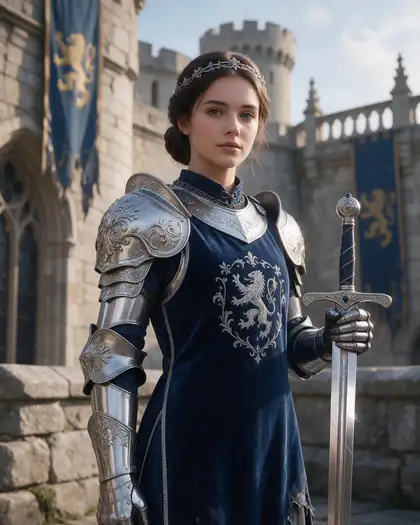
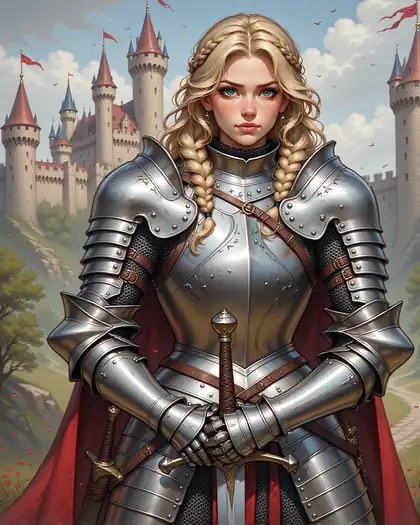
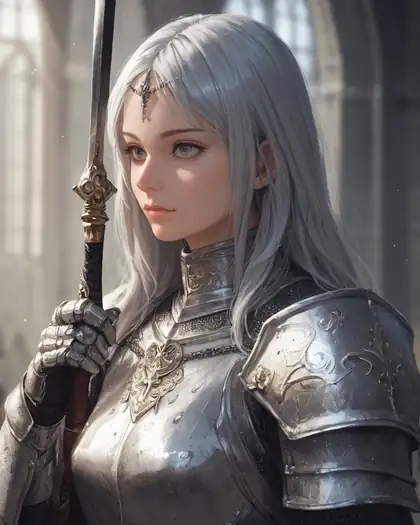
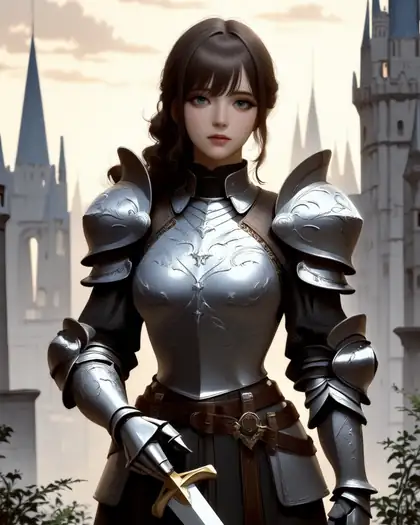
The same prompt on four models in /app/image. Seedream gives the most finished portrait; the open models cost a fraction.

  • Same prompt on Seedream 5.0 Pro
    Seedream 5.0 Pro27 credits · 2K
  • Same prompt on Chroma
    Chroma4 credits
  • Same prompt on Pony XL
    Pony XL4.5 credits · tags
  • Same prompt on Neta Lumina
    Neta Lumina3 credits
Prompt
Portrait of a female knight in ornate silver armor holding a sword, castle background, detailed, soft light

Models

Seedream on Kenerate

Every version in the generator, and what each is good at.

Seedream on Kenerate
ModelReference imagesMax sizeGood forOpen
Seedream 5.0 ProByteDanceUp to 101K–2KFlagship: best detail and editsOpen
Seedream 5.0 LiteByteDanceUp to 102K–4K4K at one flat priceOpen
Seedream 5.0 FlashByteDanceUp to 101K–2KFast 5.0 at a flat priceOpen
Seedream 4.5ByteDanceUp to 102K–4KTypography and poster layoutsOpen
Seedream V4ByteDanceUp to 101K–4KMulti-panel posters, layout-awareOpen

From our tests

Strengths and limits

  • The most finished portraits and fashion photos in our tests — skin, fabric and light look natural.
  • Follows long, specific prompts, including art-historical styles (ukiyo-e, baroque, pixel art).
  • Strong one-sentence edits that keep faces and composition when you say so.
  • Up to 10 reference images for combining people, products and scenes.
  • Costs more than open models — 27 credits at 2K vs 3–4.5 for Flux 2 Dev or Chroma.
  • Closed model: ByteDance's own filter applies and can refuse some prompts.
  • 5.0 Pro tops out at 2K on Kenerate; use 5.0 Lite for 4K.

Seedream is a closed model with ByteDance's own content filter, so explicit prompts may be refused. For adult art, use open models: uncensored AI image generator.

How to

How to use Seedream on Kenerate

  1. Step 1: Open Seedream in the generator

    Pick Seedream 5.0 Pro, Lite or Flash in /app/image — sign in free for 25 credits.
  2. Step 2: Choose resolution and ratio

    1K or 2K on 5.0 Pro (27 credits at 2K); up to 4K on 5.0 Lite for 10.5 credits.
  3. Step 3: Add references if you like

    Upload up to 10 images and say what each one contributes.
  4. Step 4: Generate and download

    No watermark. Switch on Private to keep it out of the public feed.

Try Seedream on your own prompt — 25 free credits on sign-up.

In depth

Seedream, in depth

Background, how to prompt it, and when to pick something else.

What's new in Seedream 5.0 Pro

ByteDance describes four focus areas for 5.0 Pro [1]:

  • Complex information visualisation — dense, professional layouts.
  • Interactive precision editing — point and lasso selection, material replacement.
  • Realistic imagery and portrait textures.
  • Native multilingual input and generation in 10+ languages.

Which Seedream to pick

Use 5.0 Pro for final images, portraits and edits where detail matters. Use 5.0 Lite when you need 4K — wallpapers, prints — at a flat 10.5 credits. Use 5.0 Flash for quick drafts at 8.1 credits. 4.5 and 4 remain good for poster and multi-panel layouts.

Prompting Seedream

Seedream reads full sentences well. Lead with the medium (photo, oil painting, anime), then subject, setting, light and camera. For edits, say what to change first, then list what must stay the same.


Tried it? Tell us how it went

We only publish real, verified reviews — never invented quotes. Send a line about your result (and whether we may quote you), and it will appear here.

Send a review

FAQ

Seedream questions

6 questions

Still stuck?

A real person answers — usually within a day.

01

What is Seedream?

Seedream is ByteDance Seed's family of image generation and editing models. The latest, Seedream 5.0 Pro, was announced on 8 July 2026.

02

Is Seedream 5.0 Pro free?

No. Seedream isn't on the free plan; any credit pack (from $15 for 1,300 credits) unlocks it at 13.5 credits an image, 27 at 2K. New accounts get 25 credits to try the free-plan models first.

03

What's the difference between Seedream 5.0 Pro, Lite and Flash?

On Kenerate: 5.0 Pro is the flagship (13.5 credits, 27 at 2K), 5.0 Lite renders up to 4K for a flat 10.5 credits, and 5.0 Flash is the fast version at 8.1 credits up to 2K.

04

Can Seedream edit images?

Yes. Upload up to 10 reference images and describe the change — outfit, background, style — and what to keep.

05

Does Seedream support 4K?

Seedream 5.0 Lite, 4.5 and 4 offer 4K sizes on Kenerate. 5.0 Pro renders up to 2K.

06

Does Seedream allow NSFW?

Seedream is closed and keeps ByteDance's content filter, so explicit prompts may be refused. Open models such as Chroma are the better choice for adult art.

See more of Kenerate AI in your Google resultsAdd kenerateai.com as a preferred source — Google shows more from your preferred sources in Top Stories and AI answers.

Explore

Every Kenerate image tool

Generators, design tools, photo edits, models and comparisons — all in one studio, on one credit balance.

Written by the Kenerate AI team

We run these models in the Kenerate generator. Model facts come from the makers' own pages; specs and limits were checked against our code; the examples are our own outputs. Last updated 27 September 2026. Corrections: hello@kenerateai.com.

Sources

Ready when you are

Try Seedream

25 free credits on sign-up. No watermark.

  • 25 free credits
  • No watermark
  • Credits never expire