

lodestones (Chroma1-HD on Hugging Face)
Chroma AI — the open Chroma1-HD model for photos and art
Chroma is an open 8.9-billion-parameter image model by lodestones, built from FLUX.1-schnell and trained on artistic, photographic and niche styles. On Kenerate it runs in the browser from a plain-sentence prompt.
- Architecture
- 8.9B-parameter model based on FLUX.1-schnell, with a slimmer timestep layer and T5 padding masking
- Training data
- 5 million images curated from a 20 million pool — artistic, photographic and niche styles
- Weights
- Open (Apache 2.0); Chroma1-HD, Chroma1-Base and the faster Chroma1-Flash

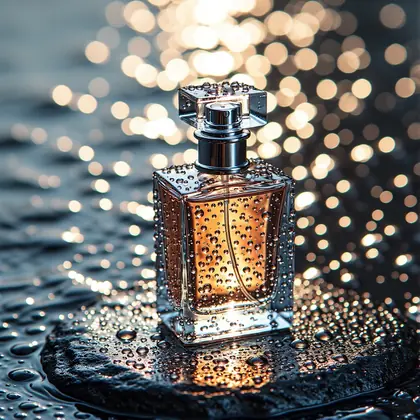
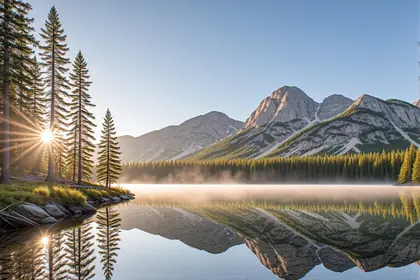
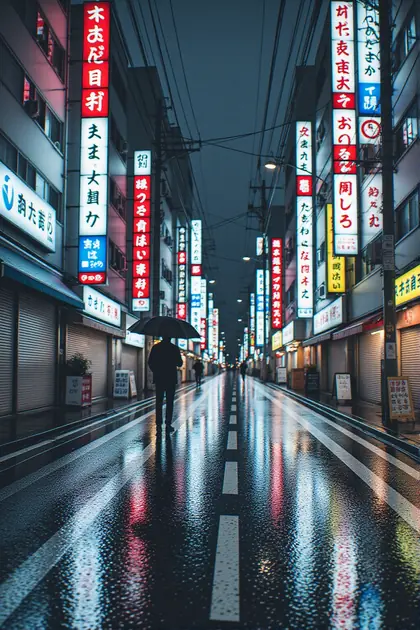
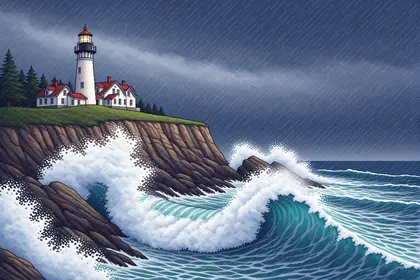
- Real outputs
- Official sources
- Free to start
- No watermark
Updated by the Kenerate AI team




Made with Kenerate


On this page
What is Chroma?

What is Chroma?
Chroma is an open 8.9-billion-parameter text-to-image model by lodestones, built from FLUX.1-schnell and released as Chroma1-HD under Apache 2.0. It was trained on 5 million images covering artistic, photographic and niche styles. On Kenerate AI, Chroma turns plain-sentence prompts into photos, product shots and paintings at up to 1536 px, with no setup.
Key facts
- Maker
- lodestones
- Size
- 8.9B parameters
- Based on
- FLUX.1-schnell
- Weights
- Open · Apache 2.0
- Training set
- 5M images, curated from 20M
- On Kenerate
- Text to image · up to 1536 px
- Prompts
- Plain sentences
Gallery
Chroma examples
Real outputs made on Kenerate. Open any image to copy its prompt and run it yourself.
Models
Chroma on Kenerate
Every version in the generator, and what each is good at.
From our tests
Strengths and limits
Good at
- Natural photo look from a plain sentence — the freckled portrait and breakfast table came out on the first try.
- Handles products, landscapes and paintings as well as people.
- Open weights under Apache 2.0, so you can also download, fine-tune and run it yourself.
- Sizes up to 1536×1536, in square, portrait, landscape, 16:9 and 9:16.
Limits
- Text to image only on Kenerate — no reference image upload. To edit an image, use an edit model such as Flux 2 in the AI image editor.
- No negative-prompt field on Kenerate; describe what you want instead of what to avoid.
- Some painting prompts lean illustrative rather than painterly (see the lighthouse).
- Not on the free plan — any credit pack unlocks it.
How to
How to use Chroma on Kenerate
Step 1
Open Chroma
Pick Chroma in /app/image. Any credit pack unlocks it.
Step 2
Describe the image
Write plain sentences: subject, setting, light and style, e.g. “photo” or “digital painting”.
Step 3
Pick a size
Square, portrait, landscape, 16:9, 9:16 or HD sizes up to 1536×1536.
Step 4
Download
Full size, no watermark. Reuse the seed to make close variations.
See it in the app

Open Image Studio and type what you want to see — subject, style, lighting and mood.


Watch the tour · 1:23
Prompts, styles, references, edit, Arena & chat
Chapters
FAQ
Chroma questions
11 questions

What is Chroma AI?
Chroma is an open text-to-image model made by lodestones and published on Hugging Face as Chroma1-HD. It has 8.9 billion parameters, is based on FLUX.1-schnell and was trained on 5 million images curated from a pool of 20 million, covering artistic, photographic and niche styles. On Kenerate it runs in the browser with no download or GPU.
Link to this answerWhat is Chroma good at?
Natural photo looks, product shots, landscapes and digital paintings from plain-sentence prompts. It was trained on 5 million images covering artistic, photographic and niche styles, and every example on this page came from a single sentence. For anime and tag-style prompts, Pony XL or Neta Lumina fit better.
Link to this answerIs Chroma open source?
Yes. lodestones released the Chroma1-HD weights under the Apache 2.0 licence, so you can download, fine-tune and run the model yourself, and there is a faster Chroma1-Flash variant. If you would rather not set up a GPU, Chroma runs on Kenerate in the browser with sizes up to 1536×1536 and no watermark.
Link to this answerIs Chroma free on Kenerate?
Chroma is not on the Kenerate free plan. Generations are credit-based, the cost of each image is shown before you generate, and credits come in one-time packs that never expire, with no subscription; see /pricing. Any credit pack unlocks Chroma along with the other paid models. The free plan covers models such as Flux 2 Dev and Qwen Image.
Link to this answerIs Flux Chroma the same as Chroma?
Yes. “Flux Chroma” is a name some sites use for the same model, because Chroma was built from Black Forest Labs' FLUX.1-schnell. It is not made by Black Forest Labs and is not part of the Flux 2 family: lodestones retrained it on its own dataset, changed the architecture and released it as Chroma1-HD under Apache 2.0.
Link to this answerIs Chroma based on FLUX.1-schnell?
Yes. The Chroma1-HD model card describes it as an 8.9B-parameter model based on FLUX.1-schnell. Lodestones shrank a 3.3B timestep-encoding layer, masked T5 padding tokens and retrained it on 5 million images curated from 20 million, so it shares Flux's design but not its training. Chroma1-HD was retrained from the v.48 checkpoint, not the older v.50.
Link to this answerWhat is the difference between Chroma1-HD, Chroma1-Base and Chroma1-Flash?
They are lodestones' published checkpoints. Chroma1-HD is the high-resolution finetune and the one most people mean by Chroma; Chroma1-Base is the base checkpoint meant for further finetuning; Chroma1-Flash has classifier-free guidance baked in so it needs fewer steps. The Chroma1-HD card's diffusers example uses 40 steps at guidance 3.0. On Kenerate there is one Chroma option and no step settings to tune.
Link to this answerCan I use Chroma images commercially?
The Chroma1-HD weights are released under the Apache 2.0 licence, which lets anyone use, modify and build on the model, including commercially. Images you make with Chroma on Kenerate are yours to download without a watermark. You are still responsible for what an image shows — trademarks, logos and real people need their own rights.
Link to this answerHow much does Chroma cost on Kenerate?
4 credits per image at any size up to 1536×1536. Credits come in one-time packs that never expire — $15 for 1,300 credits up to $999 for 100,000 — so one Chroma image works out to about $0.04–$0.046 depending on the pack. The exact cost is shown before you generate, and there is no subscription.
Link to this answerHow do I write prompts for Chroma?
Use plain sentences rather than tag lists: the subject, the setting, the light and the medium, such as photo, studio product shot or digital painting. Every example on this page was a single sentence. Kenerate has no negative-prompt field for Chroma, so describe what you want instead of what to avoid, and reuse a seed for close variations.
Link to this answerChroma vs Flux — what is the difference?
Chroma starts from FLUX.1-schnell, Black Forest Labs' fast open model, but lodestones retrained it on its own 5-million-image dataset, and changed parts of the architecture. Flux 2 is a newer Black Forest Labs family with reference-image editing. Pick Chroma for plain-sentence text to image with a natural photo look, and Flux 2 for edits.
Link to this answerIn depth
Chroma, in depth
Background, how to prompt it, and when to pick something else.
On this page
What makes Chroma different
Chroma takes FLUX.1-schnell [2] and retrains it on a 5-million-image dataset curated from 20 million, covering artistic, photographic and niche styles [1]. Lodestones also replaced a 3.3B timestep-encoding layer with a much smaller one and masked T5 padding tokens, bringing the model to 8.9 billion parameters.
That broad training set is why one model handles photos, product shots, landscapes and digital paintings from a single plain sentence, as the examples on this page show.
When to pick Chroma
Pick Chroma for open-weight text to image with a natural photo look. To change an existing image, use an edit model such as Flux 2 in the AI image editor; for anime and tag-style prompts, Pony XL or Neta Lumina fit better.
Chroma variants
Lodestones publishes several Chroma checkpoints on Hugging Face [1]. Other hosts also run older numbered ones such as v.48 and v.46 flash.
- Chroma1-HD — the 8.9B high-resolution finetune, retrained from v.48; Apache 2.0. The model card's diffusers example uses 40 steps and guidance 3.0.
- Chroma1-Base — the base checkpoint, meant as a starting point for your own finetunes.
- Chroma1-Flash — classifier-free guidance baked in, so it needs fewer steps and runs faster.
- Chroma on Kenerate — one hosted Chroma option for text to image, 8 sizes up to 1536×1536, seed control; no step or guidance settings to tune.
What Chroma costs on Kenerate
Every Chroma image costs 4 credits, whatever the size. Credits come in one-time packs that never expire, so the price per image depends on the pack:
- Starter — $15 for 1,300 credits: about 325 Chroma images, roughly $0.046 each.
- Larger packs lower the price per credit; at $999 for 100,000 credits an image is $0.04.
- Chroma is not on the free plan; the 25 sign-up credits work on the free-plan models such as Flux 2 Dev and Qwen Image 3.0.
By the Kenerate AI teamLast updated and reviewed
We run these models in the Kenerate generator. Model facts come from the makers' own pages; specs and limits were checked against our code; the examples are our own outputs.
Sources: lodestones — Chroma1-HD (Hugging Face) · Black Forest Labs — FLUX.1-schnell (Hugging Face)
