Gothic portrait · architecture · dark fantasy · goth anime
Gothic AI Generator — gothic portraits, dark fantasy and cathedrals
Type a gothic scene or upload your photo and get gothic art: candlelit portraits, Victorian goth outfits, cathedrals with rose windows, dark fantasy and gothic anime. Pick the model that suits the look.
- Photo to gothic portrait
- Text to gothic art
- Dark Fantasy and Gothic Horror presets
- No watermark
Updated by the Kenerate AI team
On this page
Quick answer
What is a gothic AI generator?
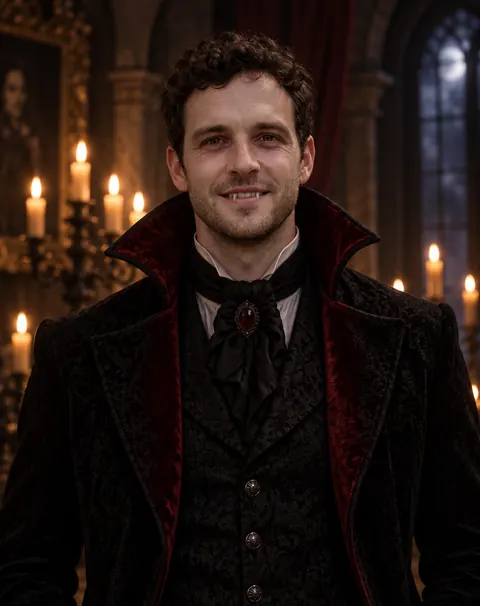
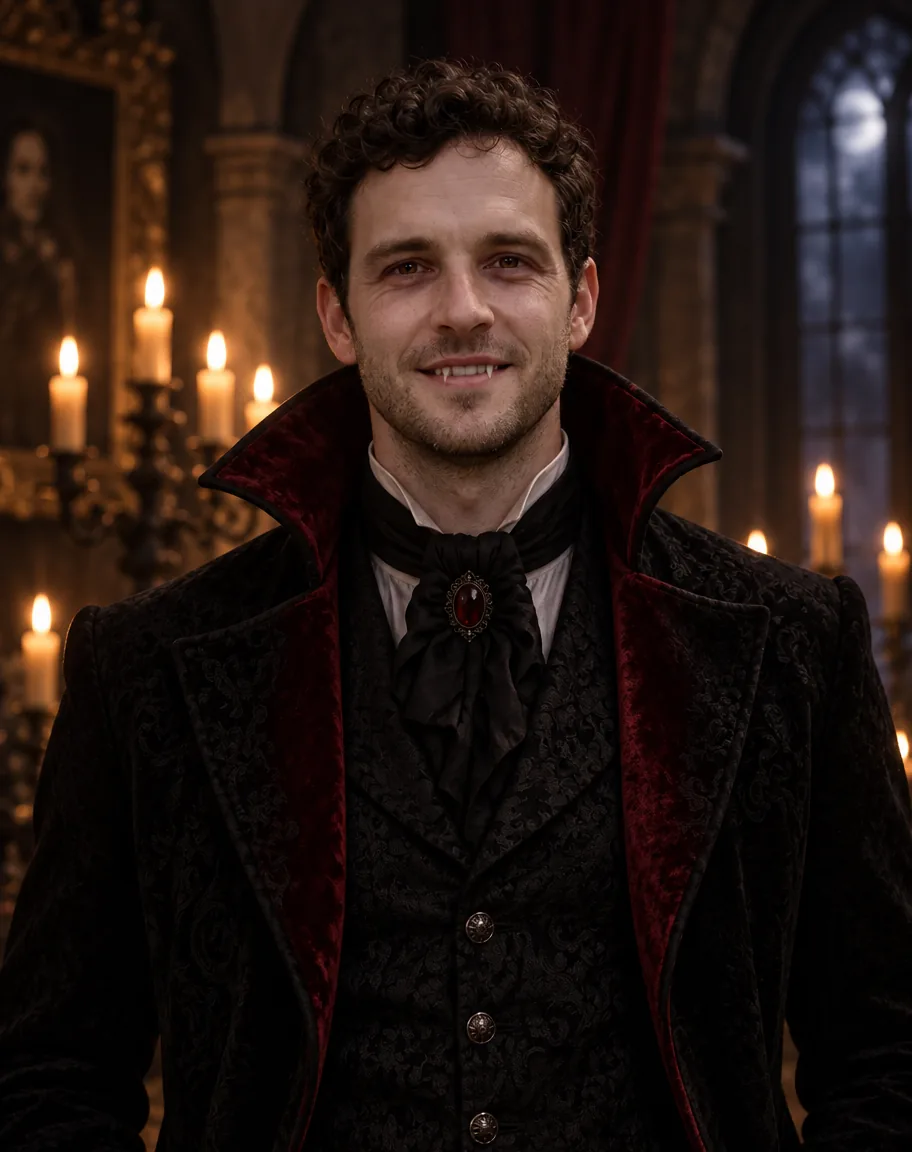
A gothic AI generator makes images in the gothic look — candlelit portraits, black velvet and lace, cathedrals with pointed arches and stained glass, misty dark-fantasy scenes — from a text prompt or your photo. On Kenerate AI, GPT Image 2.5 Sunburst turned our test photo into the candlelit vampire portrait below (11.7 credits for a one-photo edit), Seedream 5.0 Pro suits painted gothic illustration and architecture, and Image Studio has Dark Fantasy and Gothic Horror style presets.
Key facts
- One-click presets
- Dark Fantasy · Gothic Horror · Classic Oil
- Free plan
- Qwen Image 3.0
- Watermark
- None
Gallery
A real gothic portrait, prompt included
A GPT Image 2.5 Sunburst edit of our test photo, one try, first made for our Halloween photo page. The face, curls and stubble carried over; it gave an open smile with fangs where we asked for a closed-lip smirk. More prompts to copy are in the guide below.
How to
How to use the gothic AI generator
- Time needed
- Steps
- 4 steps
Step 1
Open Image Studio
Go to /app/image and sign in free — new accounts get starter credits.
Step 2
Choose text or photo
Type a scene, or upload a clear photo of yourself as a reference for a gothic portrait.
Step 3
Pick a model or preset
GPT Image 2.5 Sunburst for photo edits and photoreal portraits, Seedream 5.0 Pro for painted gothic art, or the Dark Fantasy / Gothic Horror style preset.
Step 4
Describe and download
Which gothic, the light, materials and medium. Regenerate if needed, then download without a watermark.
See it in the app

Open Image Studio and type what you want to see — subject, style, lighting and mood.


Watch the tour · 1:23
Prompts, styles, references, edit, Arena & chat
Chapters
Tips
How do you write a gothic AI prompt?
Name which gothic you mean, then the light and the materials.
Say which gothic: medieval architecture (“Gothic cathedral, pointed arches, rib vaults”), goth fashion (“Victorian goth, black velvet and lace”) or gothic horror (“misty graveyard, moonlight”).
Light does most of the work: “candlelit”, “moonlight through stained glass”, “cinematic low-key lighting”.
Give materials and colours: black velvet, lace, silver jewellery, wrought iron, old stone, deep red and black.
Name the medium: photoreal portrait, classical oil painting, ink illustration, or gothic anime with cel shading.
For a photo of you, write “keep the face recognisable” and the features to keep — hair, beard, glasses.
Add “no blood, no gore” when you want moody, not horror. Use 4:5 for portraits, 2:3 for tall cathedrals.
Models
Which AI model is best for gothic art?
What each model is good at. Open any one straight in the generator.

OpenAI
GPT Image 2.5 Sunburst
- Reference images
- Up to 16
- Output
- 1K–4K
Open GPT Image 2.5 SunburstBest for
Made the gothic portrait; photo edits, photoreal

ByteDance
Seedream 5.0 Pro
- Reference images
- Up to 10
- Output
- 2K
Open Seedream 5.0 ProBest for
Painted gothic illustration, architecture, gothic anime
Google
Nano Banana 2.1
- Reference images
- Up to 14
- Output
- Up to 4K
Open Nano Banana 2.1Best for
Same character in several gothic scenes
- Free plan

Alibaba
Qwen Image 3.0
- Reference images
- Up to 3
- Output
- 1K · 2K
Open Qwen Image 3.0Best for
Free plan; posters with gothic lettering
FAQ
Gothic AI Generator questions
8 questions
What is a gothic AI generator?
A tool that makes images in the gothic look — dark, candlelit portraits, black velvet and lace, cathedrals with pointed arches and stained glass, misty dark-fantasy scenes — from a text prompt or a photo. On Kenerate AI you do it in Image Studio with GPT Image 2.5 Sunburst, Seedream 5.0 Pro or the Dark Fantasy and Gothic Horror presets.
Link to this answerCan I turn my photo into a gothic portrait?
Yes. Upload a clear photo in Image Studio, pick GPT Image 2.5 Sunburst and describe the look: “Turn this photo into a gothic portrait of the same man, keep his face recognisable, black high-collared Victorian coat, candlelit gothic hall, low-key lighting.” Our test photo kept its curls and stubble; a one-photo edit costs 11.7 credits.
Link to this answerIs the gothic AI generator free?
Free to start. A new Kenerate account gets 25 credits on sign-up, and Qwen Image 3.0 is on the free plan. GPT Image 2.5 Sunburst costs 7.2 credits at 1K (11.7 for a one-photo edit) and Seedream 5.0 Pro 13.5; after the starter credits, credits come in one-time packs with no subscription. No watermark.
Link to this answerWhat's the difference between gothic and goth?
Gothic first meant the medieval European style of architecture that began at Saint-Denis near Paris in the 1140s — pointed arches, rib vaults, flying buttresses and stained glass. Goth is the music subculture from early-1980s Britain, with black clothes, dark makeup, silver jewellery and Victorian touches. Gothic horror is the literary mood of castles, mist and the uncanny. Say which one you want.
Link to this answerHow do I make gothic architecture with AI?
Name the parts: “Gothic cathedral nave at dusk, pointed arches, ribbed vaults, a rose window glowing, flying buttresses outside, old stone, light through stained glass, 2:3”. Seedream 5.0 Pro suits painted architecture; GPT Image 2.5 Sunburst suits a photoreal look. Add fog or moonlight for a darker mood.
Link to this answerCan it make gothic anime art?
Yes. Ask for “gothic anime illustration, cel shading, clean line art” with the outfit and setting — “black lace dress, silver cross earrings, candlelit library”. Seedream 5.0 Pro handles anime well; for a whole anime look, see our AI anime generator.
Link to this answerWhich style presets help?
Image Studio has 32 style presets that add words to your prompt. For gothic looks the useful ones are Dark Fantasy, Gothic Horror, Classic Oil, Black & White, Steampunk and Neon Noir. You can also restyle a photo with AI Filter's Renaissance look — velvet, lace and a dark umber background.
Link to this answerCan I use gothic AI art commercially?
Downloads carry no watermark. Under Kenerate's terms you are responsible for how you use what you generate, so check the terms and each model's licence. Don't prompt for a band's logo, album art or a living artist's signature style you don't have rights to, and only upload photos of yourself or of adults who agreed.
Link to this answerIn depth
Gothic AI Generator, explained
What works, what to avoid, and how to pick a model.
On this page
Which gothic look do you want?
“Gothic” covers three different looks, and a model mixes them unless you pick one. Gothic architecture is the medieval European style that began with the rebuilt choir of Saint-Denis near Paris in 1140–1144 and lasted into the 16th century, then came back as the Gothic Revival from the mid-1700s. Goth is the subculture that grew out of British post-punk clubs in the early 1980s. Gothic horror is the mood of castles, mist and candlelight.
- Architecture: pointed arches, rib vaults, flying buttresses, rose windows, stained glass, gargoyles.
- Goth fashion: black velvet, lace, high collars, silver jewellery, dark eyeliner; Victorian and Edwardian cuts.
- Gothic horror and dark fantasy: graveyards, fog, moonlight, ruined abbeys, candlelit halls.
Gothic AI prompts you can copy
Change the subject, keep the structure:
- Gothic portrait (photo): “Turn this photo into a gothic portrait of the same woman, keep her face recognisable, black lace high-collared dress, silver jewellery, candlelit stone hall, low-key lighting, photoreal, no text.”
- Cathedral: “Interior of a Gothic cathedral at dusk, pointed arches and rib vaults, a glowing rose window, coloured light on old stone, mist, 2:3, painted illustration.”
- Dark fantasy: “A lone knight in black armour at the gates of a ruined abbey under a full moon, fog, ravens, dark fantasy oil painting.”
- Victorian goth fashion: “Full-length fashion illustration of a Victorian goth outfit: black velvet coat, lace cravat, top hat, silver cane, plain grey background.”
- Gothic anime: “Gothic anime illustration of an adult woman in a black lace dress reading in a candlelit library, cel shading, clean line art, deep red and black palette.”
What we got
One real gothic portrait so far, one try on GPT Image 2.5 Sunburst:
- Kept: face shape, curly dark hair, stubble; the Victorian high collar and red lining came out as asked.
- Changed: we asked for a closed-lip smirk and got an open smile with fangs — say “mouth closed” twice if it matters.
- Setting: the candlelit gothic hall and low-key light came straight from the prompt.