

AI Filter · Plush Toy look
Plushie Filter — turn your photo into a plush toy
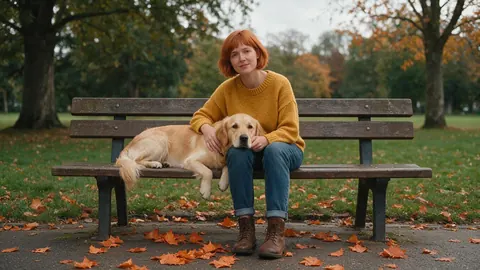
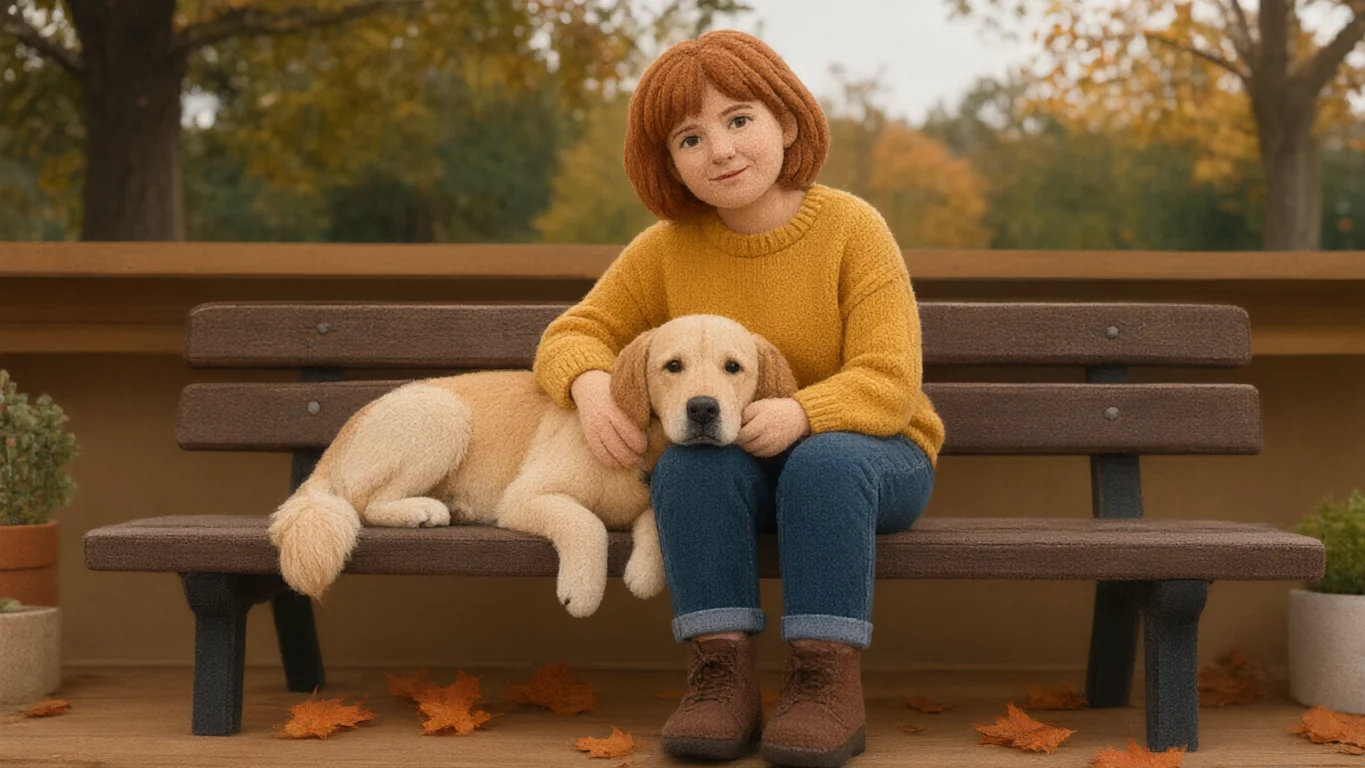
The Plush Toy look remakes your photo as a soft stuffed toy: fleece fabric, stitched seams, embroidered eyes and yarn-like hair — with your pose, outfit colours and even your pet kept.
- Photo to plushie
- Works on pets too
- No watermark
Updated by the Kenerate AI team
On this page
Quick answer
How do I turn a photo into a plushie?
To turn a photo into a plushie, upload it to Kenerate AI Filter and pick the Plush Toy look. It remakes the person — or the pet — as a soft stuffed toy with fleece fabric, stitched seams and embroidered eyes, while keeping the pose, hairstyle, clothing colours and props. One image costs 10 credits on the default engine, takes about 10–20 seconds and has no watermark.
Key facts
- Look
- Plush Toy (3D & Toy group, look id “plush”)
- Style
- Fleece fabric, stitched seams, embroidered eyes, sitting on a shelf
- Keeps
- Pose, hairstyle, clothing colours, props — and pets in the shot
- Input
- One photo · JPG, PNG or WebP · up to 20 MB
- Blend
- Mix with any other look at 70/30, Even or 30/70
Looks
Plush Toy and five other toy looks
All six turn you into a toy; they differ in material. Each card opens AI Filter with the look picked.
Plush Toy
A soft stuffed toy: fleece fabric, stitched seams, embroidered eyes, sitting on a shelf. The demo above.
Crochet
An amigurumi yarn doll with visible stitches, button eyes and rounded stuffed limbs — the knitted cousin of plush.
Claymation
Stop-motion plasticine with fingerprints and slightly lumpy shapes on a miniature set.
Vinyl Figure
A vinyl collectible with an oversized square head and black button eyes, in a windowed box.
Action Figure
A boxed collectible figure in a blister pack, with your name on the backing card and tiny accessories.
Brick Minifig
A plastic brick-toy minifigure with a printed face, claw hands, studs and a baseplate.
How to
How to turn a photo into a plushie
Four steps. The Plush Toy card above opens the tool with the look picked.
- Time needed
- Steps
- 4 steps
- You need
- A web browser · One photo (JPG, PNG or WebP)
Step 1
Add one photo
Upload, snap with the camera, paste, or pick from History or your Library — JPG, PNG or WebP up to 20 MB. A clear, well-lit shot works best; for a pet, get down to its eye level.
Step 2
Pick Plush Toy
It's in the 3D & Toy group, next to Claymation and Vinyl Figure.
Step 3
Add a Twist if you want
One extra instruction of up to 300 characters, such as “keep the park background” or “add a ribbon bow”. It's optional.
Step 4
Apply and compare
Drag the Compare slider, then Download, save to Cloud, Edit, Upscale, or use the result as the next photo to stack another look.
See it in the app

Open AI Filter and upload the photo you want to restyle.


Watch the tour · 1:46
56 looks in 7 groups, four engines, before / after, mix two looks, add a twist, hand-offs & chat
Chapters
Engines
Which engine for a plushie?
The fabric look is the same on every engine; the engine decides how much likeness, setting and texture you keep.
- Default
Alibaba
Qwen Image 3
- Strength
- Fast, faithful to the face · best value (default)
- Typical time
- About 10–20 s
Open Qwen Image 3Best for
The default and the demo engine: quickest, 10 credits, and faithful to clothes, hair, props and pets.
Kenerate
Kenerate Filter
- Strength
- Identity-locked re-render · bold style changes
- Typical time
- About 15–30 s
Open Kenerate FilterBest for
Identity-locked re-render: for when the plush face should still read clearly as you.
ByteDance
Seedream 5 Pro
- Strength
- Painterly & cinematic looks · rich texture
- Typical time
- About 20–40 s
Open Seedream 5 ProBest for
For a richer close-up — fuzzier fleece, visible thread and a soft depth of field.

OpenAI
GPT Image 2
- Strength
- Smartest with complex mixes · toys & posters
- Typical time
- About 30–60 s
Open GPT Image 2Best for
Tagged for toys: best for a whole family or several pets as matching plushies, or a toy-box layout.
Times are typical, not promised. Every engine returns one image per run, and a failed run is refunded automatically.
FAQ
Plushie filter questions
8 questions
How do I turn my photo into a plushie?
Upload the photo to Kenerate AI Filter, pick the Plush Toy look and press Apply. It remakes you as a soft stuffed toy — fleece fabric, stitched seams, embroidered eyes — while keeping your pose, hair and outfit colours. The default engine, Qwen Image 3, returns one image in about 10–20 seconds for 10 credits.
Link to this answerCan I turn my dog or cat into a plushie?
Yes. Pets in the photo are kept and turned into plush too, with their colouring and markings — the demo above is a woman and her golden retriever. Use a clear photo at the pet's eye level. For several pets as a matching set, GPT Image 2 handles it best.
Link to this answerHow much does the plush toy filter cost?
One image costs 10 credits on Qwen Image 3 or Kenerate Filter, 14 on Seedream 5 Pro and 21 on GPT Image 2. Each run returns one image, and a failed run is refunded automatically. New accounts get starter credits, and no subscription is required.
Link to this answerWill the plushie still look like me?
As much as a stuffed toy can. The face gets simplified with embroidered-style eyes, so likeness comes from your hairstyle, glasses, facial hair and clothing colours, which the look keeps. Use a waist-up photo, and try Kenerate Filter, the identity-locked engine, if the face drifts.
Link to this answerWhy did my plushie end up on a shelf?
The Plush Toy look describes a stuffed toy sitting on a shelf, so with some photos the engine moves the toy into that setting. To keep your real background, add a Twist such as “keep the original background”.
Link to this answerWhat's the difference between Plush Toy and Crochet?
Plush Toy is fleece or felt fabric with stitched seams and embroidered eyes. Crochet is an amigurumi doll with visible yarn stitches and button eyes. Both are in the 3D & Toy group, and you can blend them at 70/30, Even or 30/70.
Link to this answerWhat photos work best?
One clear subject or a small group, good light, and the face and outfit visible — JPG, PNG or WebP up to 20 MB. People who are small in a wide shot carry less detail, so crop in first. Only use photos of people who agree to it.
Link to this answerCan I turn the plushie into a video?
Not inside AI Filter, which returns one still image. Download the plushie and use it as the start frame in Kenerate image to video, then describe the motion, such as a wave or a little hop. Video uses a different tool and is priced per second.
Link to this answerIn depth
Photo-to-plushie, explained
What makes a picture read as a stuffed toy, how to keep it recognisable, and what to do with the result.
On this page
What makes a photo read as a plushie?
Texture and construction, more than shape. The Plush Toy look asks for fleece or felt fabric, visible stitched seams, embroidered eyes and slightly rounded, stuffed limbs, and it sits the toy on a shelf. In the demo above, the woman keeps her red bob, mustard jumper, jeans and boots, and her golden retriever becomes a fuzzy plush dog still resting on her lap.
Turning a pet into a plushie
Pets are the most common reason people search for this. Every look tells the engine to keep each subject and not add or remove anyone, so a dog or cat in the frame is turned into a plush too, with its colouring and markings. A few habits help:
- Shoot at the pet's eye level, with the whole head and ideally the body in frame
- Distinct markings (a white blaze, patches, a collar) survive best on Qwen Image 3 or Kenerate Filter
- For two or more pets as a matching set, use GPT Image 2
- The look can move the toy onto a shelf — add a Twist like “keep the original background” if you want the real setting
Getting a plushie that looks like you
A stuffed toy simplifies faces, so likeness comes from the things around the face: hair colour and cut, glasses, a moustache or beard, and the colours of your clothes. In the example of the older man in his bike workshop, his round glasses, white moustache, cardigan and wrench all make it through. Use a waist-up shot so the outfit shows, and switch to Kenerate Filter if the face drifts.
Plush, crochet or mixed?
Plush Toy gives a fleece or felt stuffed toy. If you want visible yarn stitches and button eyes, Crochet is the amigurumi version. AI Filter can also blend two looks into one image at 70/30, Even or 30/70 — Plush Toy with Claymation, for example, gives a soft toy on a miniature stop-motion set.
Can I get a real plush toy made?
Kenerate makes the picture, not the toy. Many custom plush makers work from a reference image, and a clean, front-facing plushie render is a useful brief: Upscale it first, and keep the original photo too, since makers usually want both. You can also animate the plushie — download it and use it as the start frame in Kenerate image to video.
Become a plushie
New accounts get starter credits. No subscription required.
Tried it? Tell us how it went