

Anthro · toony · anime · painterly · 3D
Furry AI Art Generator — anthro characters in any art style
Describe an anthro character — species, fur and markings, outfit, pose — name the art style, and get finished furry art: icons, full-body pieces, scenes and ref sheets. Original characters, safe for work.
- Any species
- Toony to painterly
- Same character again
- No watermark
Updated by the Kenerate AI team
Made with Kenerate
On this page
Quick answer
What is a furry AI art generator?
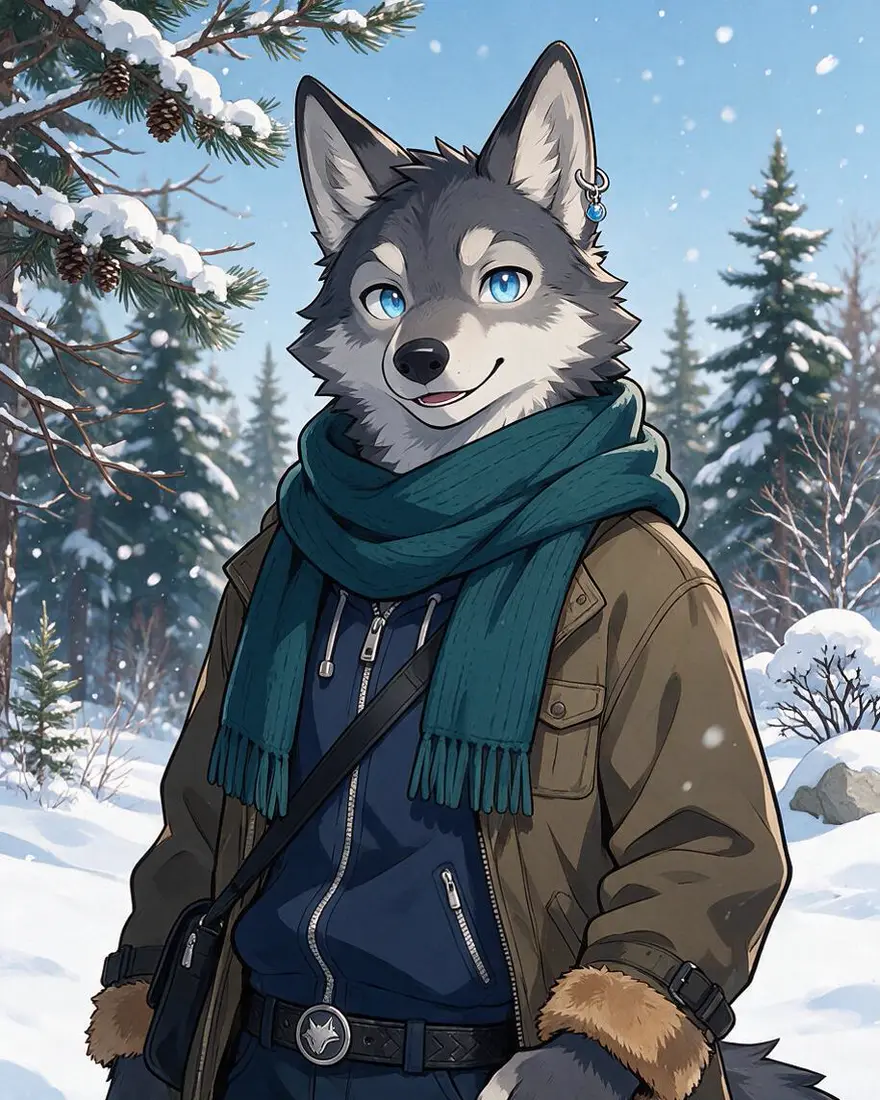
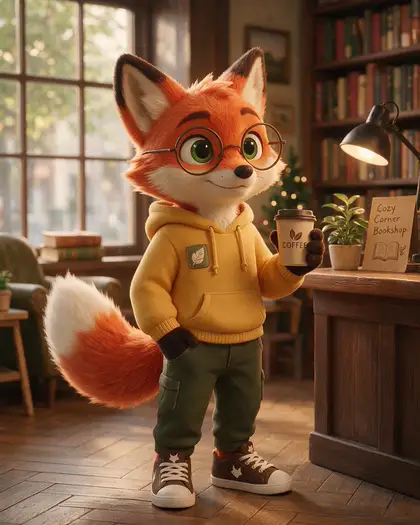
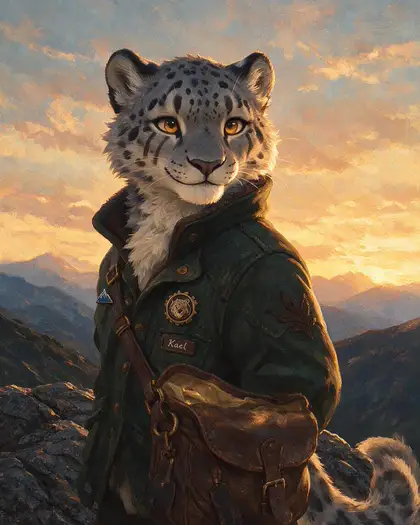
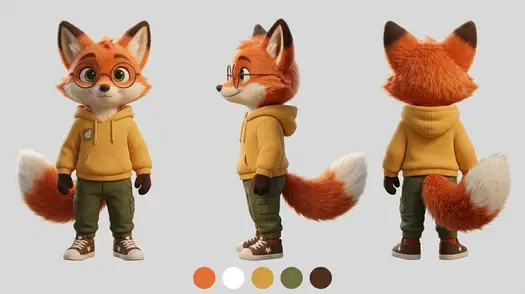
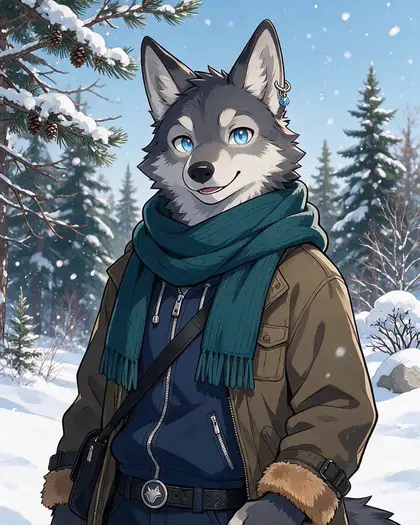
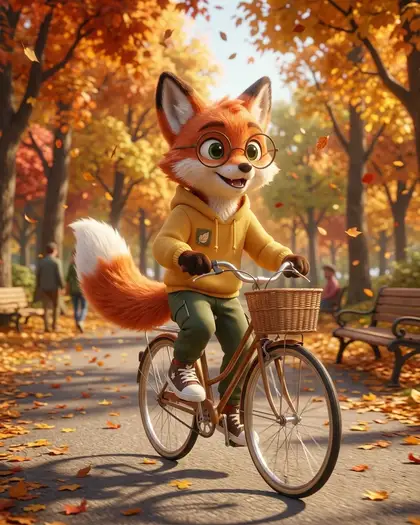
A furry AI art generator turns a text description of an anthropomorphic animal character — species, fur colours, markings, eyes, outfit, pose and art style — into finished artwork. On Kenerate AI you write that description in Image Studio and pick a model: Seedream 5.0 Pro drew the anime wolf, 3D fox and painterly snow leopard below in one try each, and Nano Banana 2.1 turned the fox into a front/side/back ref sheet. Everything on this page is SFW: original, clothed characters.
Key facts
- Styles shown
- Anime · 3D · painterly · ref sheet
- Same character again
- Nano Banana 2.1 · up to 14 refs
- Free plan
- Qwen Image 3.0
- Watermark
- None
Gallery
Three species, three styles, one ref sheet
Real Kenerate outputs, one try each, first made for our fursona generator page: an anime wolf, a 3D fox and a painterly snow leopard, then the fox's ref sheet and a new scene. Open any one to copy the prompt.
How to
How to use the furry AI art generator
- Time needed
- Steps
- 4 steps
Step 1
Open Image Studio
Go to /app/image and sign in free — new accounts get starter credits.
Step 2
Pick a model
Seedream 5.0 Pro for finished art in any style, Prefect Pony XL or Neta Lumina for cheap anime and toony drafts, Qwen Image 3.0 on the free plan.
Step 3
Describe the character
Species, fur and markings, eyes, outfit, art style and the shot (icon, full body, scene). Pick a 4:5 ratio for portraits, 16:9 for ref sheets.
Step 4
Reuse it
Download without a watermark, then add the picture as a reference in Nano Banana 2.1 for a ref sheet or new scenes of the same character.
See it in the app

Open Image Studio and type what you want to see — subject, style, lighting and mood.


Watch the tour · 1:23
Prompts, styles, references, edit, Arena & chat
Chapters
Tips
How do you write a good furry art prompt?
The order that worked in our tests: who, what they look like, the style, then the shot.
Start with “anthropomorphic” or “anthro” plus the species — “anthro red fox”, “anthro snow leopard”. Say “feral” only if you want normal animal anatomy.
Give fur colours and markings in plain words: “orange fur, white-tipped tail, dark socks”, “grey fur with black rosettes”.
Name eye colour, one accessory and the outfit — they are what make the character recognisable next time.
Name the style: cel-shaded anime, toony cartoon, stylised 3D animation, painterly digital art, watercolour or 16-bit pixel art.
Say the shot: icon (head and shoulders), half body, full body or a scene with a background.
Add “original character, fully clothed” to keep it SFW and avoid look-alikes of famous cartoon animals.
Models
Which AI model is best for furry art?
What each model is good at. Open any one straight in the generator.

ByteDance
Seedream 5.0 Pro
- Reference images
- Up to 10
- Output
- 2K
Open Seedream 5.0 ProBest for
Made the wolf, fox and snow leopard — anime, 3D, painterly
Google
Nano Banana 2.1
- Reference images
- Up to 14
- Output
- Up to 4K
Open Nano Banana 2.1Best for
Ref sheets and the same character in new scenes
Prefect
Prefect Pony XL
- Reference images
- None
- Output
- SDXL sizes
Open Prefect Pony XLBest for
Stylised anime and cartoon characters, cheap drafts
Neta
Neta Lumina
- Reference images
- None
- Output
- SDXL sizes
Open Neta LuminaBest for
Anime-specialist character art
- Free plan

Alibaba
Qwen Image 3.0
- Reference images
- Up to 3
- Output
- 1K · 2K
Open Qwen Image 3.0Best for
Free plan; badges with a readable name
FAQ
Furry AI Art Generator questions
9 questions
What is a furry AI art generator?
A tool that draws anthropomorphic animal characters — animals with human traits such as standing upright, expressions and clothes — from a text description. On Kenerate AI you describe species, fur, markings, outfit and art style in Image Studio and pick a model; Seedream 5.0 Pro made the anime wolf, 3D fox and painterly snow leopard on this page in one try each.
Link to this answerIs there a free furry AI art generator?
Free to start. A new Kenerate account gets 25 credits on sign-up, and Qwen Image 3.0 is on the free plan. Seedream 5.0 Pro costs 13.5 credits per image at 1K and Prefect Pony XL 4.5; after the starter credits, credits come in one-time packs with no subscription. Downloads carry no watermark.
Link to this answerWhat is the difference between anthro, feral and kemonomimi?
Anthro (anthropomorphic) characters have animal heads, fur and tails on a human-like body and usually wear clothes — the classic furry look. Feral means normal animal anatomy, like a realistic wolf. Kemonomimi is an anime term for a human with animal ears and a tail. Put the word you want in the prompt, because models guess differently without it.
Link to this answerWhich art styles can it do?
Any style you can name: cel-shaded anime, toony cartoon, stylised 3D animation, painterly digital art, watercolour, chibi, 16-bit pixel art and more. Image Studio also has one-click style presets (Modern Anime, 3D Animation, Cute Chibi, Retro Pixel, Soft Watercolor). For cheaper stylised drafts, try Prefect Pony XL or Neta Lumina.
Link to this answerHow do I keep the same furry character in every picture?
Save your best image, then add it as a reference in Nano Banana 2.1 (up to 14 references) and write “the same character — identical face, eye colour, glasses and hoodie — now …”. That is how our fox got a matching ref sheet and a new scene. List the details that must stay, every time.
Link to this answerCan it make a ref sheet?
Yes. Use your character as a reference and ask for “front, side and back full-body views on a plain light grey background, plus colour swatches, no text labels” in a 16:9 ratio. Nano Banana 2.1 kept our fox's glasses, hoodie patch, tail and colours across all three views. For a full fursona workflow, see our fursona generator.
Link to this answerWhich species work best?
Any species works if you name it clearly. Wolves, foxes, dogs, big cats and dragons are the most common furry species, and models know them well. For hybrids or made-up species, say which part comes from which animal — “fox ears and tail, snow leopard spots” — and give two or three colours.
Link to this answerIs the furry art safe for work?
This page and its examples are SFW: original, fully clothed adult characters. Add “original character, fully clothed, wholesome” to your prompt, and don't copy famous cartoon animals or other artists' characters you don't have rights to.
Link to this answerCan I use the furry art commercially?
Downloads carry no watermark. Under Kenerate's terms you are responsible for how you use what you generate, so check the terms and each model's licence for your project. If you sell art or badges, make sure the character is your own design.
Link to this answerIn depth
Furry AI Art Generator, explained
What works, what to avoid, and how to pick a model.
On this page
What counts as furry art?
Furry art is art of anthropomorphic animal characters: animals that stand, talk, show human expressions or wear clothes. The furry fandom grew around these characters, and most fans have a personal character, a fursona. Furry designs borrow heavily from American cartoons and Japanese anime, which is why style words matter so much in a prompt.
A generator only needs a clear description. It doesn't know your character until you describe it, so the first good image becomes your reference for everything after.
Which furry art style should you ask for?
Name one of these and the model follows it much more closely:
- Toony: bold outlines, big eyes, simple shapes — cartoon-like, good for icons and stickers.
- Anime: cel shading and clean line art, like our grey wolf.
- Stylised 3D: soft animated-film rendering, like our red fox.
- Semi-realistic or painterly: real fur texture and lighting, like our snow leopard.
- Chibi: a huge head on a tiny body, for emotes and badges.
- Pixel art: “16-bit pixel art, limited palette” for game-style sprites.
Which kind of furry picture do you need?
The usual formats, and the words to use for each:
- Icon or avatar: “head and shoulders, simple background”, 1:1.
- Badge: “waist-up, flat colour background, space for a name”; Qwen Image 3.0 handles readable text.
- Full body: “full body, standing pose”, 4:5 or 2:3.
- Scene: the character doing something somewhere — “riding a bicycle through an autumn park”.
- Ref sheet: front, side and back views, colour swatches, 16:9, from a reference image.