Boxes · labels · pouches · bottles · readable brand text
AI Packaging Design Generator — boxes, labels and pouches with your brand name spelled right
Describe the product, the format and the brand name in quotes — a tea box, a coffee pouch, a serum label — and get a packaging concept with the text lettered in, ready to show a designer, a printer or your customers before you order a single sample.
- Brand name lettered in
- Box, label, pouch, bottle
- Your own logo as a reference
- No watermark
Updated by the Kenerate AI team
On this page
Quick answer
How do you design product packaging with AI?
An AI packaging design generator turns a description — the product, the format (box, pouch, label, bottle) and your brand name in quotes — into a picture of the finished package. On Kenerate AI, Recraft V4.1 (12 credits) is built for type-led design, and GPT Image 2.5 Sunburst (7.2 credits at 1K) puts your own logo on the pack as a reference. In our tests all three brand names below came out spelled right — but two models added label copy we never asked for, including a net weight. It gives you a concept, not a print-ready dieline: check every word, the legal label text and the barcode before printing.
Key facts
- Type-led concepts
- Recraft V4.1 · Recraft V4.1 Pro at 2K
- With your own logo
- GPT Image 2.5 Sunburst · up to 16 references
- Brand names tested
- 3 of 3 spelled right
- Watch out for
- Extra label copy the model invents
- Fix one word
- Edit Text in Image in Edit Studio
- Output
- Concept image — not a dieline or vector file
- Free start
- Starter credits · Qwen Image 3.0 on the free plan
- Watermark
- None
Gallery
Three packages, three models, three brand names
Real outputs from our model tests, one try each, all fictional brands. Every brand name came out spelled right; open any one to copy the prompt.
How to
How to use the AI packaging design generator
- Time needed
- Steps
- 4 steps
Step 1
Open Image Studio
Go to /app/image and pick Recraft V4.1 — or GPT Image 2.5 Sunburst if you'll add your own logo. Sign in free for 25 starter credits.
Step 2
Pick the shape
3:4 for a box or bottle front, 1:1 for a pouch or jar, 3:1 on Sunburst for a wrap-around label.
Step 3
Describe the pack
Product, format, material, palette, type feel — and every word in quotes. Add your logo as a reference if you have one.
Step 4
Check, fix, hand over
Read every word, fix a wrong one with Edit Text in Image, upscale to 4K, then take the concept to your designer or printer.
See it in the app

Open Image Studio and type what you want to see — subject, style, lighting and mood.


Watch the tour · 1:23
Prompts, styles, references, edit, Arena & chat
Chapters
Tips
Packaging concepts with text you can read
What worked in our tests, and what to check before anything goes to print.
Put the brand name and every other word in quotes: 'MOSS & MINT', “Herbal tea”, “12 tea bags”.
Name the format and the material: folding carton, stand-up kraft pouch, amber glass dropper bottle, matte black tin.
Give a palette and a type feel: “sage green and cream, thin elegant serif”, “bold black sans-serif on kraft”.
Keep the front to the brand, the product name and one line; long ingredient lists are where letters slip.
Read every word on the result — models add copy you didn't ask for, like a net weight or a city name.
Have your own logo? Add it as a reference on GPT Image 2.5 Sunburst and say “use this logo exactly as it is”.
Making a product line? Reuse the first design as a reference and change only the flavour name and colour.
Models
Which AI model is best for packaging with text?
What each model is good at. Open any one straight in the generator.

Recraft
Recraft V4.1
- Output
- 5 ratios
Open Recraft V4.1Best for
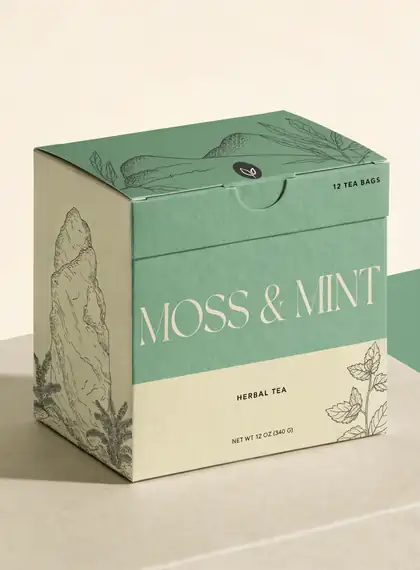
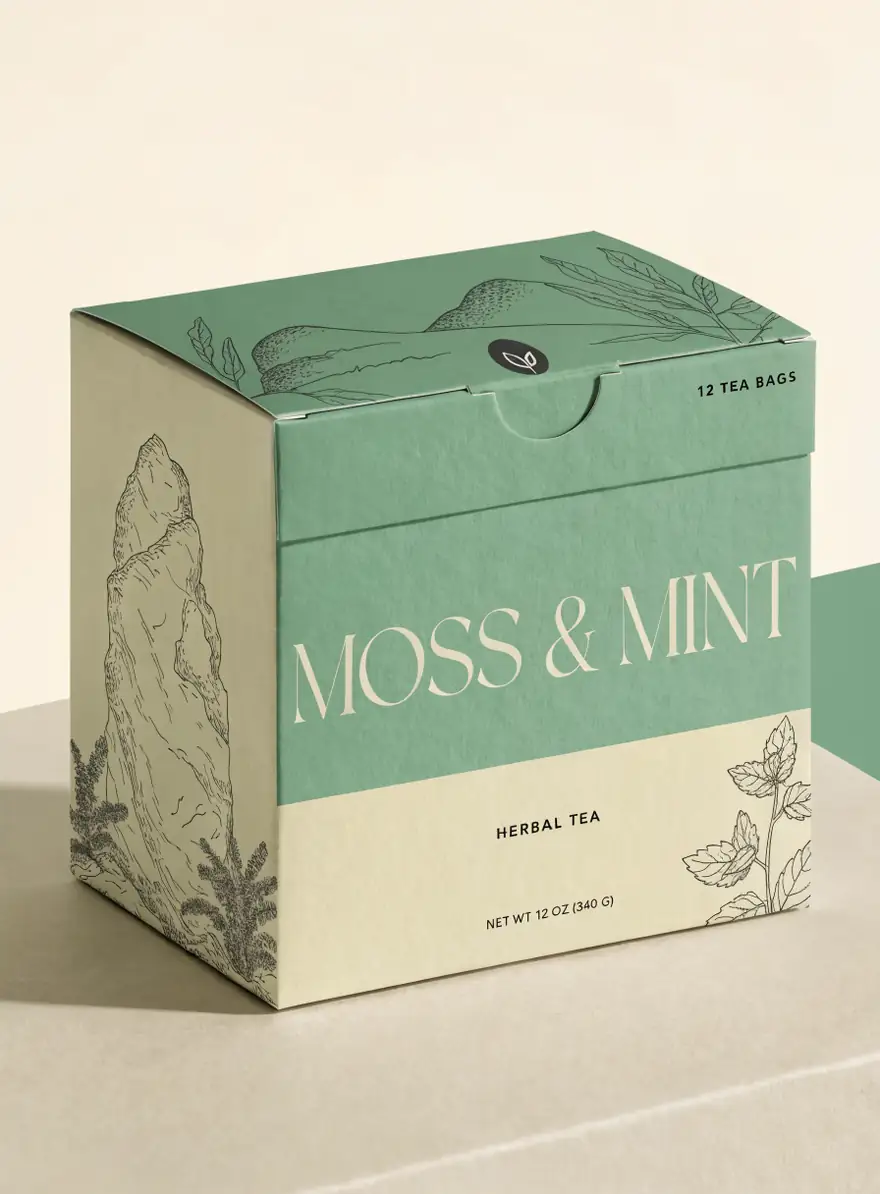
Type-led box and label concepts; made the tea box above

OpenAI
GPT Image 2.5 Sunburst
- Reference images
- Up to 16
- Output
- 1K–4K
Open GPT Image 2.5 SunburstBest for
Your own logo on the pack; longer text; wide label ratios
ByteDance
Seedream 4.5
- Reference images
- Up to 10
- Output
- 2K–4K
Open Seedream 4.5Best for
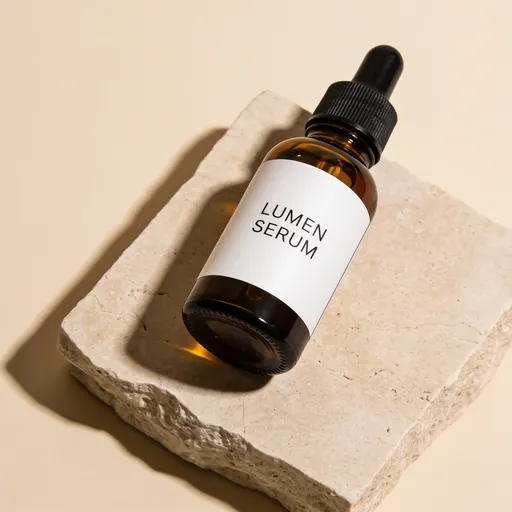
Photoreal label shots; made the serum bottle above
Google
Nano Banana 2.1
- Reference images
- Up to 14
- Output
- Up to 4K
Open Nano Banana 2.1Best for
The same pack across a product line
- Free plan

FAQ
AI Packaging Design Generator questions
9 questions
How do I design product packaging with AI?
Describe the product, the format and material, a palette and a type feel, and put every word in quotes — “a folding tea carton labelled 'MOSS & MINT', botanical line drawings, sage green and cream, thin serif”. On Kenerate's Image Studio, Recraft V4.1 makes it for 12 credits. Read every word on the result, then refine one detail at a time.
Link to this answerWill the AI spell my brand name right?
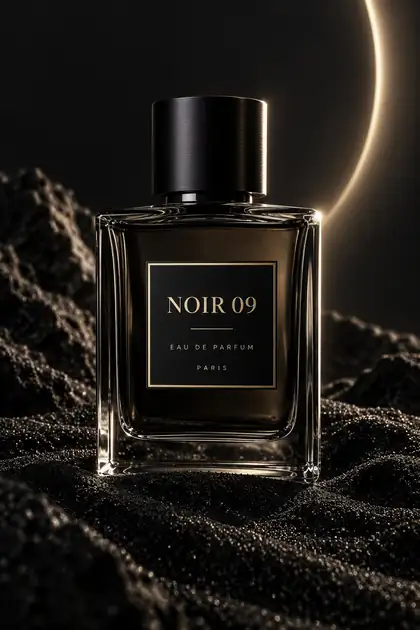
Usually, for short names in quotes. In our tests Recraft V4.1 ('MOSS & MINT'), Seedream 4.5 (“LUMEN SERUM”) and GPT Image 2 ('NOIR 09') all spelled the brand right on the first try. Two of them also added copy we didn't ask for — “12 tea bags”, a net weight, “Eau de parfum · Paris” — and our Ideogram v4 packaging test came back on a fake checkerboard background. Longer text slips more often; fix a wrong word with Edit Text in Image.
Link to this answerCan I put my own logo on the packaging?
Yes. Upload your logo as a reference on GPT Image 2.5 Sunburst (up to 16 references) and say “use this logo exactly as it is, centred on the front”. A 1K design with one reference costs 11.7 credits. Recraft V4.1 doesn't take references on Kenerate, so use it for concepts from text. For brand-critical work, place your original logo file over the final design in your editor.
Link to this answerIs there a free AI packaging design generator?
You can start free. A new Kenerate account gets 25 starter credits — two Recraft V4.1 concepts, or three GPT Image 2.5 Sunburst designs at 1K — and Qwen Image 3.0 is on the free plan for drafts. After that, credits come in one-time packs that never expire, with no subscription. Downloads have no watermark.
Link to this answerCan AI make a print-ready dieline?
No. An image model gives you a picture of the package, not a die-cut template, vector artwork, bleed or colour profile. Use the AI concept to decide the look, then build the final file on your printer's dieline in a design tool, or hand both to a packaging designer. Upscaling to 4K helps for presentations, not for print production.
Link to this answerWhat text does a product label legally need?
It depends on the product and the country. In the US, the Fair Packaging and Labeling Act asks consumer goods to show what the product is, the name and place of business of the maker, packer or distributor, and the net quantity in both metric and US units. Food, cosmetics and drugs have extra FDA rules. Never print a net weight or claim the AI invented — write that copy yourself and check it.
Link to this answerCan the AI make a real barcode?
No — a model only draws stripes that look like a barcode; they won't scan as your product. In the US you get a real UPC from GS1 US: a single GTIN for one product, or a GS1 Company Prefix for many. Leave a blank space for it in the prompt (“an empty white rectangle on the back panel for the barcode”) and add the real code in your design file.
Link to this answerHow is this different from a mockup or product photo generator?
This page designs the package itself. The AI mockup generator puts a logo you already have onto t-shirts, mugs, totes, caps, signs and cards, and the AI product photo generator turns photos of a product you already own into studio and lifestyle shots without changing it. Many brands use all three in that order: design the pack, print a sample, photograph it.
Link to this answerCan I design a whole product line that matches?
Yes. Make the first package, then add it as a reference and change only what differs: “same box, same layout and type, flavour name 'LEMON BALM', pale yellow instead of green”. Nano Banana 2.1 (14 references) and GPT Image 2.5 Sunburst (16) are built for keeping a design consistent across variants.
Link to this answerIn depth
AI Packaging Design Generator, explained
What works, what to avoid, and how to pick a model.
On this page
Packaging formats and the words to use
Name the format, the material and the finish. Ratios are the ones in Kenerate's Image Studio:
- Folding carton (tea, cosmetics, electronics): “folding carton, matte uncoated board, three-quarter view” — 3:4 or 1:1.
- Stand-up pouch (coffee, snacks, pet treats): “stand-up kraft pouch with a resealable zip and a clear window” — 3:4.
- Label on a bottle or jar (sauces, candles, skincare): “amber glass jar with a wrap-around paper label” — 1:1; 3:1 on GPT Image 2.5 Sunburst for the flat label.
- Can (drinks): “slim 330 ml aluminium can, full-wrap print, condensation drops” — 2:3.
- Tube (creams, paint): “squeeze tube with a flip cap, soft-touch finish” — 3:4 or 9:16.
- Tin (tea, mints, balms): “round tin with an embossed lid” — 1:1.
- Mailer box (subscription, e-commerce): “kraft mailer box, printed inside lid, tissue paper” — 4:3 or 16:9.
- Backing card (press-on nails, jewellery, small parts): “printed backing card with a hang hole, product on the front” — 3:4.
The prompt that gets readable packaging
Six parts, in this order:
- Product and format: “a folding carton for a fictional herbal tea”.
- Every word in quotes, with its place: brand 'MOSS & MINT' large on the front, “Herbal tea” small below.
- Palette: two or three colours — “sage green and cream”.
- Type feel: “thin elegant serif”, “bold condensed sans-serif”, “hand-lettered script”.
- Graphics: “botanical line drawings”, “a single geometric pattern”, “no illustration”.
- View and light: “three-quarter view on a stone surface, soft daylight” for a mockup, or “flat front panel, plain background” for artwork.
Which model for which packaging job?
Picked from Kenerate's model list and our tests:
- Concept from text, type-led: Recraft V4.1, 12 credits — Recraft's design model; spelled 'MOSS & MINT' right. V4.1 Flash (2.4 credits) for many quick drafts, V4.1 Pro (75) for 2K renders.
- Your own logo on the pack: GPT Image 2.5 Sunburst, 7.2 credits at 1K plus 4.5 per reference — up to 16 references, wide 3:1 label ratio.
- Photoreal label on a real-looking product: Seedream 4.5, 12 credits at any size from 2K to 4K — spelled “LUMEN SERUM” right.
- Logos kept intact on many products: Seedream 5.0 Pro, 13.5 credits at 1K — kept all six test logos intact on our AI mockup generator page.
- A consistent product line: Nano Banana 2.1, 21 credits — up to 14 references.
- Ideogram v4, 15 credits, is also built for text; in our model test it rendered short words cleanly but garbled longer text, and its packaging came back on a fake checkerboard background.
From AI concept to printed package
Treat the AI image as the brief, not the file. Get the dieline from your printer, rebuild the design on it in a design tool with your real logo, and set the bleed and colours they ask for. Before you print, read every word on the package — the models in our tests added a weight, a bag count and a city we never asked for.
Write the legal copy yourself: in the US the Fair Packaging and Labeling Act asks for the product's identity, the maker's or distributor's name and place of business, and the net quantity in metric and US units; food, cosmetics and drugs have more rules. Barcodes come from GS1 US, not from the image — leave a blank panel for one.
What we got
Three packages from three models, one try each, fictional brands:
- Recraft V4.1 tea box: 'MOSS & MINT' spelled right in a thin serif with botanical drawings — and it added “12 tea bags”, “Herbal tea” and a “Net wt 12 oz (340 g)” line we didn't ask for.
- Seedream 4.5 serum bottle: “LUMEN SERUM” spelled right on a clean white label, nothing extra added.
- GPT Image 2 perfume: 'NOIR 09' spelled right on a black-and-gold label, plus “Eau de parfum” and “Paris” that weren't in the prompt.