

Your own photo · platinum to caramel · highlights
Blonde hair filter — find your shade before you bleach
Upload a photo of yourself and preview platinum, ash, honey or caramel blonde — or just highlights and balayage — while your haircut, face and background stay as they are. Then take the shade you like to your colourist.
- Your own photo
- 10 shades and 5 highlight looks
- Keeps your haircut and face
- No watermark
Updated by the Kenerate AI team
On this page
Quick answer
What would I look like blonde?
To see what you'd look like blonde, upload a clear photo of yourself to an AI image editor and name the exact shade — for example "honey blonde with soft golden highlights, same haircut; keep my face and skin tone the same". Kenerate's blonde hair filter opens the editor with that instruction filled in. Pick the shade by your undertone: cool skin suits ash, platinum and champagne; warm skin suits honey, golden and caramel; neutral skin can wear bronde or beige blonde. Swap in highlights or balayage to see a softer change.
Key facts
- Works on
- Your own photo, or one you have permission to edit
- What changes
- Hair colour only — cut and texture stay
- Cool undertone
- Ash · platinum · champagne
- Warm undertone
- Honey · golden · caramel · sandy
- Neutral undertone
- Light blonde · bronde · beige blonde
- Default model
- Qwen Image 3.0 (free plan)
- Watermark
- None
Shade guide
Which blonde suits you? Shades by undertone
Look at the veins on your inner wrist in daylight: greenish means warm, blue or purple means cool, a mix means neutral. Then copy the prompt words into the filter.
| Shade | Undertone it suits | Prompt words |
|---|---|---|
| Platinum blonde | Cool | icy platinum blonde, almost white, cool-toned, no yellow |
| Ash blonde | Cool | light ash blonde, cool smoky tone, no brassiness |
| Champagne blonde | Cool | soft champagne blonde, pale with a hint of beige |
| Honey blonde | Warm | warm honey blonde with golden glints |
| Golden blonde | Warm | rich golden blonde, sunny and warm |
| Caramel blonde | Warm | caramel blonde, a deep warm golden-brown blonde |
| Sandy blonde | Warm | natural sandy blonde, light brown-blonde |
| Light blonde | Neutral | natural light blonde, neither ashy nor golden |
| Bronde | Neutral | bronde, a soft blend of light brown and blonde |
| Beige blonde | Neutral | soft beige blonde, natural and muted |
Highlights
Highlights filter: five ways to go lighter without going fully blonde
Keep your base colour and add blonde only where you want it. Pair any of these with a shade from the table above.
| Look | What it looks like | Prompt words |
|---|---|---|
| Classic highlights | Defined, evenly spaced blonde strands through the hair | fine evenly spaced blonde highlights through my hair, keep my natural base colour |
| Balayage | Painted on freehand where light would hit — soft, lighter towards the ends, roots stay natural | soft blonde balayage, natural darker roots, lighter towards the ends, blended |
| Babylights | Very fine, subtle highlights for a sun-kissed look | very fine subtle blonde babylights, sun-kissed, barely noticeable |
| Money piece | Two bright blonde sections framing the face | bright blonde face-framing money piece at the front, the rest of my hair unchanged |
| Ombré | Dark roots fading to blonde ends | ombré from my natural roots to blonde ends, smooth fade |
Same prompt
Before and after: brown to platinum
The original brown hair and a real Seedream 5.0 Pro edit to platinum blonde. The haircut, smile and background didn't change.
PromptChange her hair colour to platinum blonde, same haircut. Keep her face, expression, skin, clothing, the grey background and the lighting exactly the same.
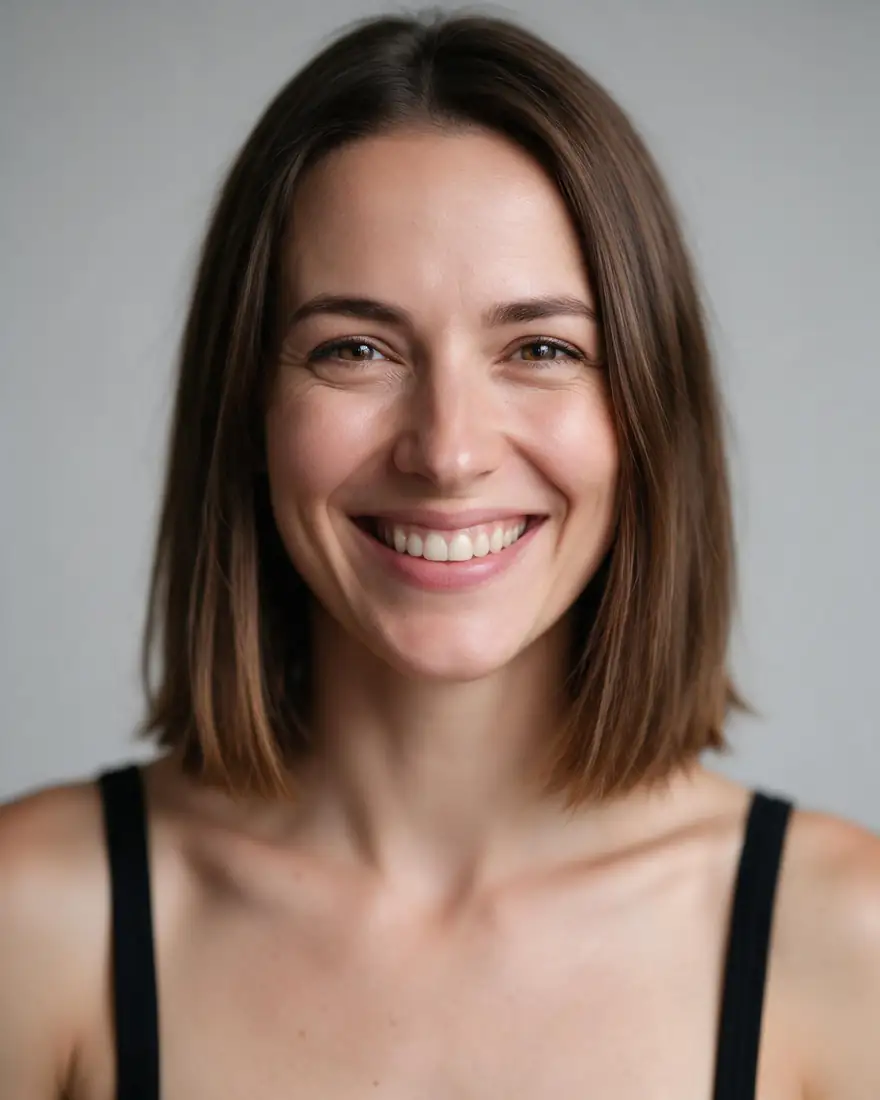 OriginalNatural brown
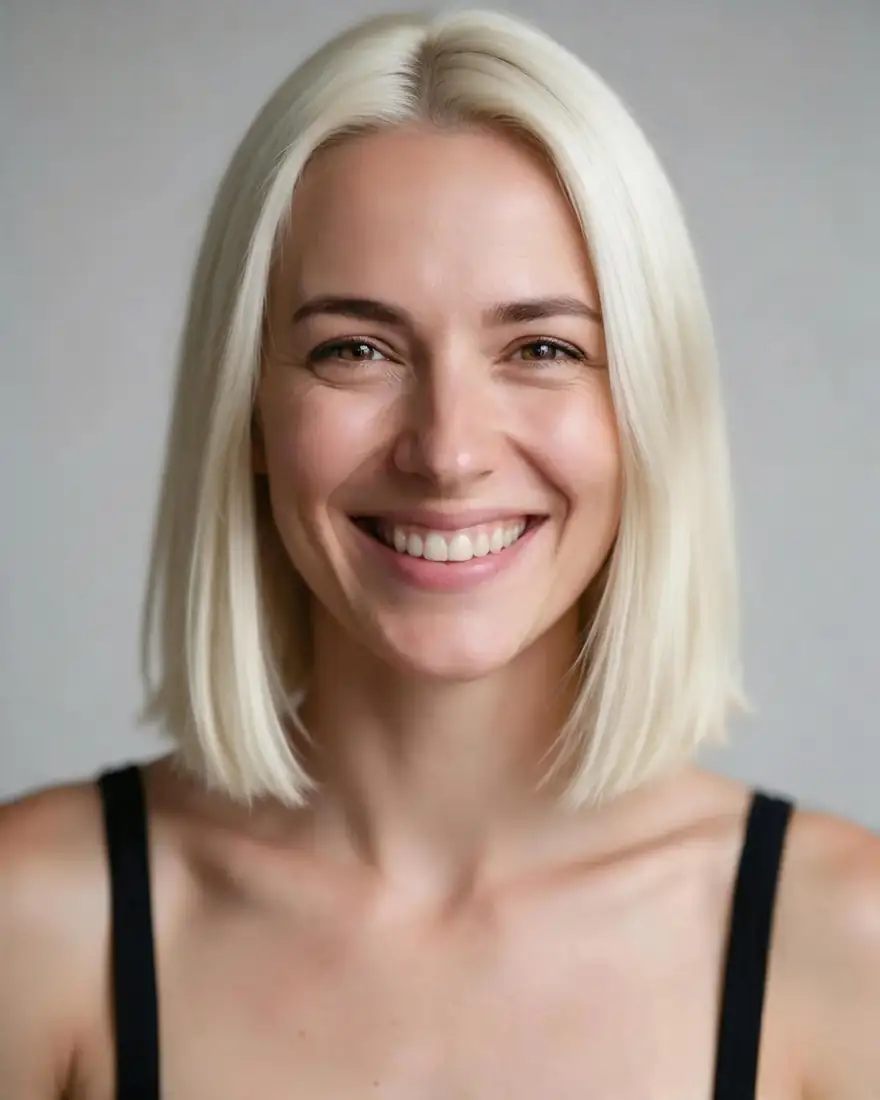 Platinum blondeSeedream 5.0 Pro · 2K
How to
How to use the blonde hair filter
- Time needed
- Steps
- 4 steps
Step 1
Open the blonde hair filter
Press “Add your photo”. Image Studio opens with the honey-blonde instruction in the prompt box. Sign in free for starter credits.
Step 2
Upload your photo
Add a clear, front-facing photo of yourself in daylight, with your hair visible.
Step 3
Pick your shade or highlights
Keep honey blonde, or swap in prompt words from the shade or highlights tables — platinum, ash, caramel, balayage, money piece.
Step 4
Create and compare
Press Create, then try a second shade on the same photo. Download the one you like without a watermark and show it to your colourist.
See it in the app

Open Edit Studio and upload an image, or pick one from your history.


Watch the tour · 1:23
Prompts, styles, references, edit, Arena & chat
Chapters
Tips
Get a blonde preview that looks real
Small prompt habits that make a filter result look like hair, not a wig.
Name the exact shade — “ash blonde”, “honey blonde” — not just “blonde”, or you'll get a generic yellow.
Add “same haircut and the same hair texture” so only the colour changes.
Say “keep my eyebrows the same colour” unless you want them lightened too.
For a realistic grow-out, ask for “natural darker roots”.
Use a photo in daylight; warm indoor light makes every blonde look golden.
Try one cool and one warm shade on the same photo and compare them side by side.
Models
Models for blonde hair edits
What each model is good at. Open any one straight in the generator.
- Free plan
Alibaba
Qwen Image 3.0
- Reference images
- Up to 3
- Output
- 1K or 2K
Open Qwen Image 3.0Best for
Default here · free plan
ByteDance
Seedream 5.0 Pro
- Reference images
- Up to 10
- Output
- Up to 2K
Open Seedream 5.0 ProBest for
Made the platinum example on this page
Google
Nano Banana 2.1
- Reference images
- Up to 14
- Output
- 1K to 4K
Open Nano Banana 2.1Best for
Strong at keeping your face identical

OpenAI
GPT Image 2.5 Sunburst
- Reference images
- Up to 16
- Output
- 1K to 4K
Open GPT Image 2.5 SunburstBest for
Fine detail for thin highlights
FAQ
Blonde Hair Filter questions
8 questions
What would I look like blonde?
Upload a clear photo of yourself to the blonde hair filter and press Create. The editor opens with a honey-blonde instruction filled in and changes only your hair colour, keeping your haircut, face and background. Swap in another shade — platinum, ash, caramel — to compare a cool and a warm blonde on the same photo.
Link to this answerWhich blonde suits my skin tone?
Go by undertone. Cool undertones (bluish wrist veins) suit ash, platinum and champagne blonde; warm undertones (greenish veins) suit honey, golden, caramel and sandy blonde; neutral undertones can wear light blonde, bronde or beige blonde. Colour guides don't all agree — some pair contrasting tones instead — so trying one cool and one warm shade on your own photo is the quickest check.
Link to this answerIs there a highlights filter?
Yes — use the same filter and replace the shade with a highlight look from the table: “fine evenly spaced blonde highlights through my hair, keep my natural base colour”, a soft balayage, babylights, a face-framing money piece or an ombré. Because the instruction keeps your base colour, only the strands you describe go lighter.
Link to this answerWhat's the difference between highlights and balayage?
Highlights give a more defined, evenly spaced result and need more frequent salon visits. Balayage is painted on freehand where light would naturally hit, so it's softer and grows out more seamlessly. In the filter, write “fine evenly spaced blonde highlights” or “soft balayage with natural darker roots”.
Link to this answerIs the blonde hair filter free?
Yes, to start. A new Kenerate account gets free starter credits, and Qwen Image 3.0, the default model here, is on the free plan. Seedream 5.0 Pro, Nano Banana 2.1 and GPT Image 2.5 Sunburst use credits from a one-time pack with no subscription, and bought credits don't expire. Results download without a watermark.
Link to this answerCan I go from dark brown to platinum like in the preview?
The preview shows the colour, not the process. Going from dark hair to platinum usually takes bleaching in stages, so take the image to a colourist, who can judge your hair's condition and tell you what's realistic and how many sessions it needs.
Link to this answerWill the filter change my face or skin?
It shouldn't: the instruction says to keep your face, eyebrows, expression, skin tone and background exactly the same, and instruction-based editors change what you name. If a run lightens your skin or eyebrows, run it again or try Nano Banana 2.1, which is strong at keeping a face identical.
Link to this answerCan I use someone else's photo?
Only your own photo, or one the person has agreed to. Changing someone's hair still edits their likeness, so share the result only with their consent. Never upload photos of anyone under 18; Kenerate's content rules apply to every edit.
Link to this answerIn depth
Blonde Hair Filter, explained
What works, what to avoid, and how to pick a model.
On this page
How does a blonde hair filter work?
It's an instruction edit. Your photo and one sentence go to an image model's edit endpoint; the model recolours the strands to the shade you name and keeps their shine, shadows and texture, so the result moves like your own hair. Older filters laid a flat colour or a wig over your head, which is why they looked pasted on.
How to write a blonde prompt
Four parts are enough:
- The shade: “ash blonde”, “honey blonde”, “platinum”.
- Where it goes: all over, “highlights from the root”, “balayage, lighter towards the ends”, “money piece at the front”.
- What stays: “same haircut and the same hair texture”, “natural darker roots”.
- What must not change: “keep my face, eyebrows, skin tone, clothing and background exactly the same”.
Before you book the salon
A preview narrows the choice; your colourist decides what's possible. Bring two previews — your favourite shade and a safer one — and ask how many sessions it takes and how often it needs toning.