

Same face · pixie cut
Pixie Cut Filter
Wondering how you'd look with a pixie haircut? Upload your own photo and preview a pixie before you commit to the chop. Your face, expression and background stay the same.
- Keeps your face
- Classic, long or undercut
- Free to start
- No watermark
Updated by the Kenerate AI team
On this page
Quick answer
What is a pixie cut filter?
A pixie cut filter shows you with a pixie haircut on your own photo, so you can see how you'd look before the scissors come out. Kenerate AI opens its image editor with the pixie instruction filled in; you add a clear photo, and the model redraws only the hair while your face, expression and background stay the same. Ask for a classic crop, a long pixie, an undercut or pixie bangs — each run is a separate edit of your original photo.
Key facts
- Works on
- Your own photo
- What changes
- Hair only
- Default model
- Qwen Image 3.0
- Styles
- Classic, long, undercut, bixie, bangs
- Examples below
- Seedream 5.0 Pro edits
- Free start
- Starter credits
- Watermark
- None
Same prompt
Before and after: three pixie cuts on the same photo
A fictional adult and real Seedream 5.0 Pro edits, one sentence each. Her face, smile and the grey background didn't change. The bangs version came out as a shaggier, longer pixie than a classic crop — name the length (“ear-length”, “cropped at the nape”) and re-run if that happens.
PromptGive her a short textured pixie cut. Keep her face, expression, skin, clothing, the grey background and the lighting exactly the same.
 OriginalStraight shoulder-length
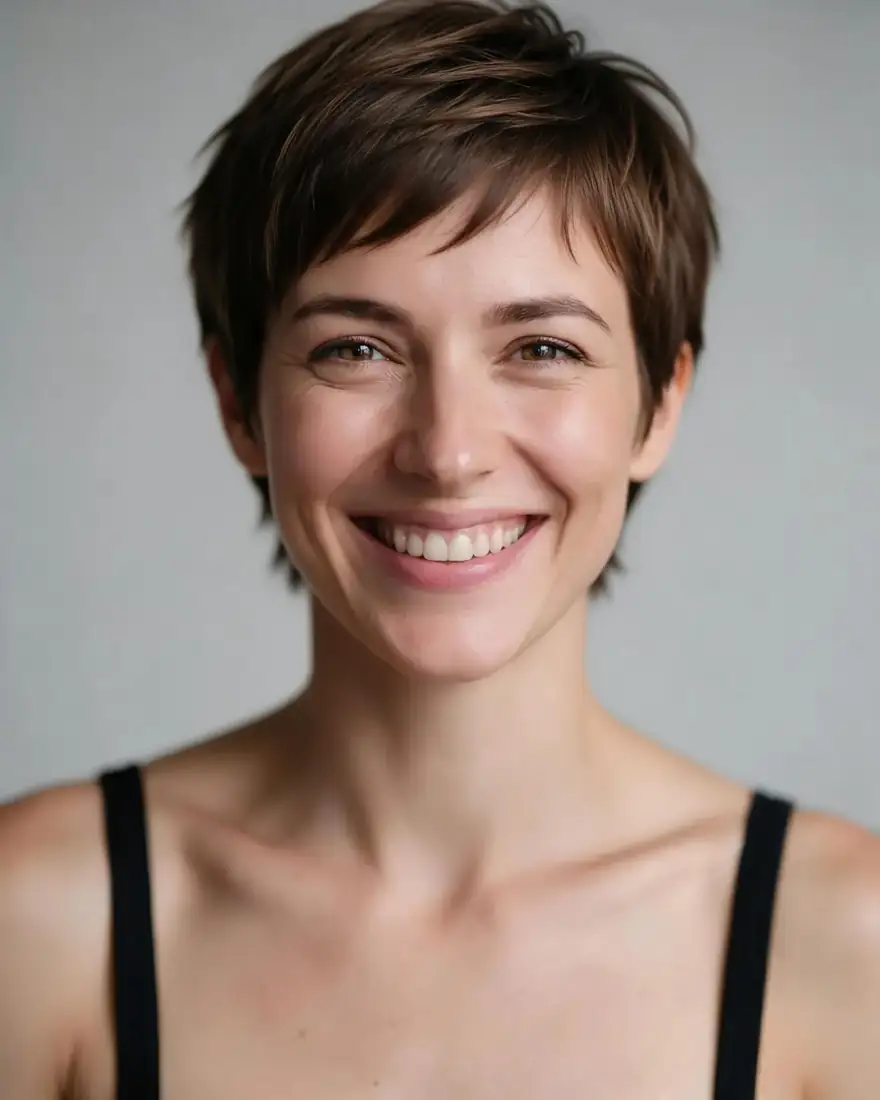 Pixie cutSeedream 5.0 Pro · 2K
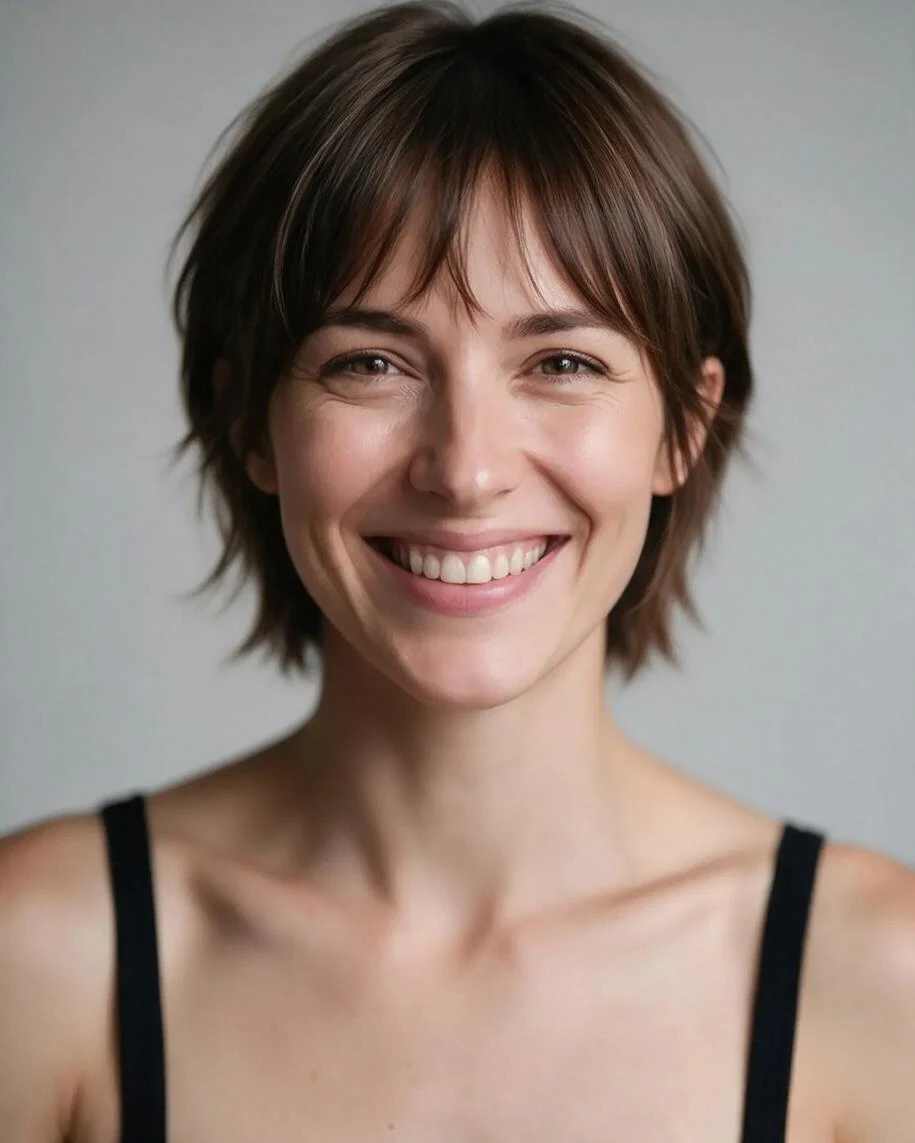 Long pixie with bangsWispy curtain bangs
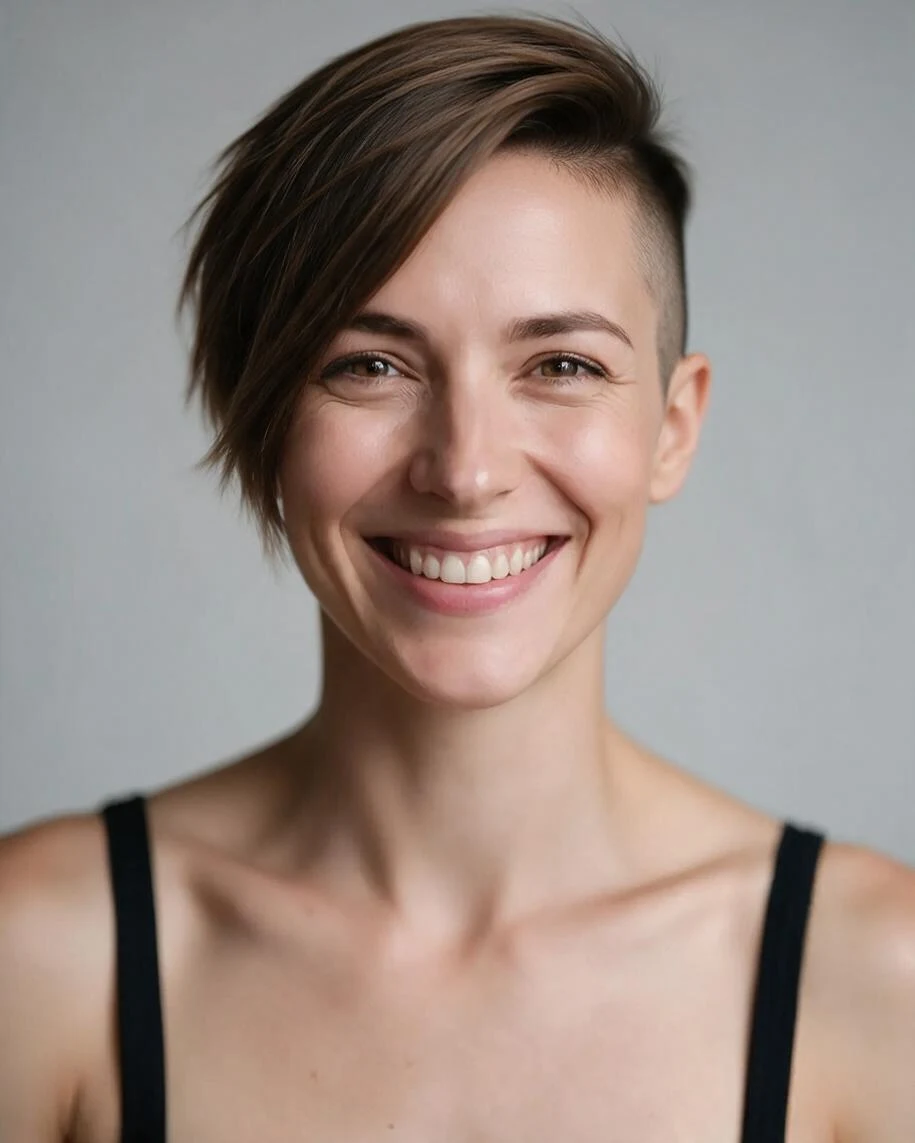 Undercut pixieClipped sides, long top
How to
How to use the pixie cut filter
- Time needed
- Steps
- 4 steps
Step 1
Open the pixie cut filter
Press “Add your photo”. The image studio opens with the pixie cut instruction in the prompt box. Sign in free for starter credits.
Step 2
Upload your photo
Add a clear, front-facing photo of yourself in good light, with your hairline visible.
Step 3
Pick the style and create
Keep Qwen Image 3.0 (free plan) or pick Seedream 5.0 Pro, change the pixie style in the prompt if you like, then press Create.
Step 4
Compare and download
Try two or three pixie styles and download the one you like without a watermark.
See it in the app

Open Edit Studio and upload an image, or pick one from your history.


Watch the tour · 1:23
Prompts, styles, references, edit, Arena & chat
Chapters
Tips
Get a realistic pixie cut preview
What makes the preview believable.
Use a front-facing photo with your hairline and ears visible.
Name the style: “classic pixie”, “long pixie”, “undercut pixie”, “pixie with curtain bangs”.
Keep “keep my face and background the same” in the prompt.
Long hair? The model has to guess your head shape under it, so try two photos.
Add a colour in the same sentence if you want one: “platinum pixie cut”.
Want it even shorter? Try the buzz cut filter instead.
Models
Models for pixie cut edits
What each model is good at. Open any one straight in the generator.
- Free plan

Alibaba
Qwen Image 3.0
- Reference images
- Up to 3
- Output
- 1K or 2K
Open Qwen Image 3.0Best for
Default here · free plan
ByteDance
Seedream 5.0 Pro
- Reference images
- Up to 10
- Output
- 2K
Open Seedream 5.0 ProBest for
Used for the examples on this page

Google
Nano Banana 2
- Reference images
- Up to 14
- Output
- 1K (square today)
Open Nano Banana 2Best for
Good edits; square for now
FAQ
Pixie Cut Filter questions
9 questions
How would I look with a pixie haircut?
Upload a clear, front-facing photo of yourself to the pixie cut filter and press Create. Kenerate AI opens the image editor with the instruction already written: a short textured pixie, same face, same background. You only add the photo. In the examples on this page the same woman went from shoulder-length hair to three different pixies while her face and smile stayed the same.
Link to this answerIs the pixie cut filter free?
Yes, to start. A new Kenerate account gets free starter credits, which work on free-plan models such as Qwen Image 3.0, the default here. Seedream 5.0 Pro, used for the examples on this page, needs a one-time credit pack rather than a subscription, and credits you buy never expire. Results download without a watermark.
Link to this answerWill the pixie cut filter change my face?
It shouldn't. The prompt asks the model to keep your face, expression, skin, clothing, background and lighting exactly the same, and instruction-based editors repaint only what you name. In all three Seedream 5.0 Pro examples on this page the face and smile stayed the same. If a result drifts, run it again or add “same face shape, same jawline”.
Link to this answerWhich pixie styles can I try?
Any you can describe. Edit the prompt before you press Create: “classic cropped pixie”, “long pixie”, “bixie”, “undercut pixie with clipped sides”, “pixie with curtain bangs”, “asymmetric pixie”. Each run is a separate edit of your original photo, so you can line up a few styles side by side and show the winner to your stylist.
Link to this answerDoes the pixie cut filter work with long or curly hair?
Yes. Going from long to short is the classic use — the example on this page starts from straight shoulder-length hair. With very long or very curly hair the model has to imagine your head shape underneath, so use a photo with your hairline and ears visible and run it two or three times. Curly hair stays curly unless you ask for it straightened.
Link to this answerWhat's the difference between a pixie, a long pixie and a bixie?
A classic pixie is cropped short at the back and sides with a little more length on top. A long pixie keeps more length everywhere, often ear-length with soft layers. A bixie sits between a bob and a pixie — pixie-short layers with a bob's shape around the jaw. Name whichever one you want in the prompt and the filter previews that version.
Link to this answerCan I try a pixie cut with a different hair colour?
Yes, in the same sentence: “give me a platinum blonde pixie cut” or “a copper long pixie”. The model changes the cut and the colour in one edit. If you only want to test colour on your current cut, the AI hair color changer does that without touching the length.
Link to this answerIs this the same as the TikTok or Snapchat short hair filter?
No. Camera filters on TikTok, Snapchat or Instagram overlay a hairstyle live while you film. This one edits a still photo with an AI image model, which redraws the hair to match your head and lighting, and you can name the exact pixie style, length or colour. It works in any browser, and the result downloads without a watermark.
Link to this answerCan I use someone else's photo?
Only with their permission. A haircut preview still edits a real person's likeness, so use your own photo or one the person has agreed to, and share the result only with their consent. Never upload a photo of a minor; the filter is for editing your own pictures. Kenerate's content rules apply to every edit.
Link to this answerIn depth
Pixie Cut Filter, explained
What works, what to avoid, and how to pick a model.
On this page
How the pixie cut filter works
The filter is an instruction edit, not a sticker. Your photo goes to an image model's edit endpoint with one sentence asking for a pixie cut, and the model redraws only the hair, so the hairline, ears and head shape follow your photo.
Pixie styles to try
Name the style in the prompt — each of these previews differently:
- Classic pixie: cropped back and sides, a touch more length on top.
- Long pixie: ear-length with soft layers — the easiest first step from long hair.
- Bixie: between a bob and a pixie, with jaw-framing shape.
- Undercut pixie: clipped or shaved sides with longer, textured hair on top.
- Pixie with bangs: curtain, wispy or blunt — say which.
- Asymmetric pixie: one side noticeably longer than the other.
Before you cut
A few things the preview can't tell you:
- How it grows out: a pixie passes through an awkward stage on the way back to long hair, usually months of it.
- Upkeep: a sharp pixie needs a trim roughly every 4–6 weeks to keep its shape.
- Texture: very thick or very curly hair wears a pixie differently — ask your stylist how yours will sit day to day.