Claude connector · Claude Code · MCP
Claude AI Video Generator — make videos right inside Claude
Claude can plan a shot list and write the prompts, but it has no video model of its own. Add Kenerate as a connector and Claude makes the clip too — text to video, image to video, talking avatars and upscales — on Wan 3.0, Seedance 2.5, Veo 3.1, Kling 3 and more.



- claude.ai, Desktop and Claude Code
- Sign in, no key needed
- Clips up to 30 s
- Same credits as the app
Updated by the Kenerate AI team
On this page
Quick answer
Can Claude AI generate videos?
Claude can't generate videos on its own — it's a text model with no video model inside. To make video in Claude, add a video tool through a connector (MCP). With the Kenerate connector you paste one URL into Claude, sign in, and ask: Claude writes the prompt, calls `generate_video` on a model like Wan 3.0 or Seedance 2.5, waits for the render with `wait_for_generation` and gives you the clip. Video needs a paid Kenerate plan, the same as in the app.
Key facts
- Native video model in Claude
- No — text, code and images in, text out
- How to add one
- Custom connector (MCP)
- Works in
- claude.ai, Claude Desktop, mobile, Claude Code
- Video tools
- generate_video, talking_avatar, upscale_video, add_subtitles…
- Video models
- Wan 3.0, Seedance 2.5 / 2.0, Veo 3.1, Kling 3…
- Longest clip
- 30 s (Wan 3.0, Seedance 2.5)
- Plan needed
- Paid plan for video
Gallery
Start frames you can hand to Claude
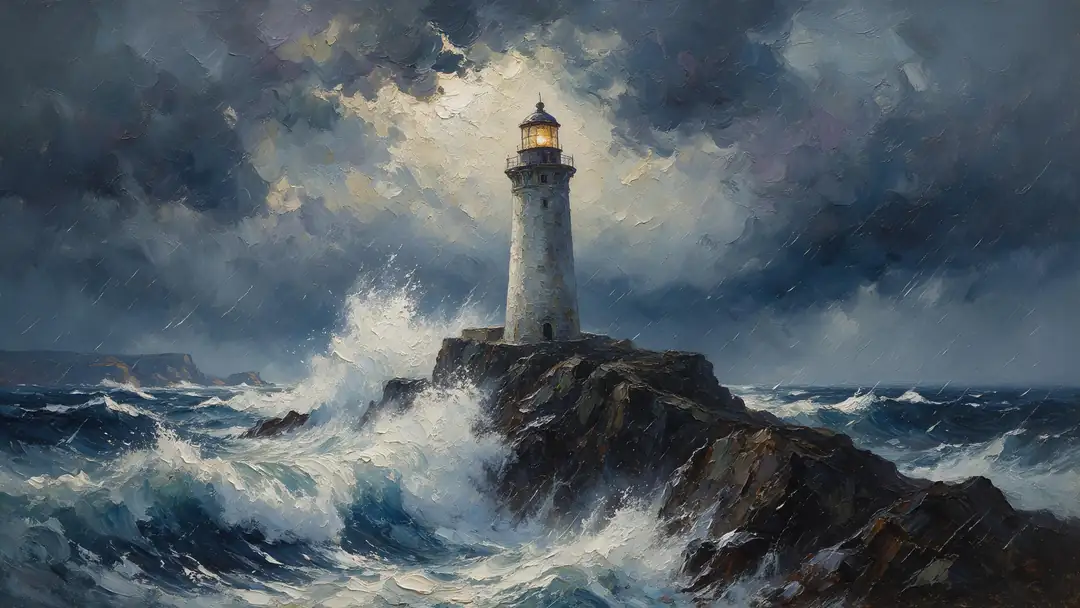
Image to video keeps a product or a face exactly as it is, so the best Claude workflow is frame first, motion second. These Seedream 5.0 Pro stills became 5-second Wan 3 clips on our image-to-video page — the motion prompts are below.
How to
How to use the claude AI video generator
- Time needed
- Steps
- 4 steps
Step 1
Add the connector
In Claude open Customize → Connectors → + Add → Add custom connector. Name it Kenerate and paste https://mcp.kenerateai.com/mcp — or use the “Add to Claude” button on /app/mcp, which fills both in.
Step 2
Sign in to Kenerate
Click Add, then Connect. A Kenerate page opens: sign in and click Allow. No API key needed. Video runs on a paid Kenerate plan.
Step 3
Switch it on in a chat
In a chat click + → Connectors and turn on Kenerate. Claude Code instead: run claude mcp add --transport http kenerate https://mcp.kenerateai.com/mcp, then /mcp → Authenticate.
Step 4
Ask for a video
“Use Kenerate to make a 5-second 9:16 clip of…”. Claude picks the model, runs generate_video, waits for the render and hands you the link; the clip is also saved in your Kenerate history.
See it in the app

Open Video Studio in Text to Video mode and write the shot — subject, action, camera move and light.


Watch the tour · 1:23
Prompts, styles, references, edit, Arena & chat
Chapters
Tips
Get better videos out of Claude
What works when Claude drives the video tools.
Ask Claude to call estimate_cost before generate_video — video is priced per second, so the length and resolution set the price.
Draft short and cheap (Wan 3.0 at 480p, 5 s), then re-run or upscale_video only the keeper.
Make the frame first: have Claude run generate_image, check the still, then animate it with image to video. Products and faces stay exact.
Describe motion, camera and sound in the video prompt — the frame already covers what things look like.
Pick the shape up front: 9:16 for Reels and Shorts, 16:9 for YouTube, 1:1 or 4:5 for feeds.
Renders take minutes. Claude polls wait_for_generation until the clip is ready; you can keep chatting meanwhile.
Models
Video models Claude can use through Kenerate
What each model is good at. Open any one straight in the generator.
Alibaba
Wan 3.0
- Reference images
- Up to 10
- Output
- 2–30 s · up to 1080p
Open Wan 3.0Best for
Drafts, vertical social, value — 15 credits/s at 480p

ByteDance
Seedance 2.5
- Reference images
- Up to 30
- Output
- 4–30 s · up to 4K
Open Seedance 2.5Best for
Cinematic, multi-shot, long clips

ByteDance
Seedance 2.0
- Reference images
- Up to 9
- Output
- 4–15 s · up to 4K
Open Seedance 2.0Best for
Image-to-video ads, dialogue, anime
Google
Veo 3.1
- Reference images
- Up to 3
- Output
- 4, 6 or 8 s · up to 4K
Open Veo 3.1Best for
Short clips with native sound
Kuaishou
Kling v3 Pro
FAQ
Claude AI Video Generator questions
10 questions
Can Claude AI generate videos?
Not by itself. Claude reads text, code and images and writes text; it has no video model. Add a video tool as a connector (MCP) and Claude can make clips: it writes the prompt, calls the tool, waits for the render and gives you the result. With Kenerate that tool is generate_video, plus image-to-video, talking avatars and upscaling.
Link to this answerHow do I add a video generator to Claude?
Open Customize → Connectors → + Add → Add custom connector, name it Kenerate and paste https://mcp.kenerateai.com/mcp. Click Add, then Connect, sign in to Kenerate and click Allow. Then switch Kenerate on in a chat with + → Connectors. The “Add to Claude” button on kenerateai.com/app/mcp fills in the name and URL for you.
Link to this answerIs the Claude AI video generator free?
Connecting is free — Claude's free plan can add one custom connector and Kenerate doesn't charge for the connection. Making video is not: it needs a paid Kenerate plan, exactly as in the app, and costs credits per second. Wan 3.0 is the cheapest place to start at 15 credits a second at 480p. Images, music and speech follow your plan's normal rules.
Link to this answerDoes it work in Claude Code and Claude Desktop?
Yes. A connector added on claude.ai syncs to Claude Desktop and mobile. In Claude Code run claude mcp add --transport http kenerate https://mcp.kenerateai.com/mcp (add --scope user for every project), start claude, type /mcp and pick kenerate → Authenticate. Claude Code can then save the clip links into your project.
Link to this answerWhich video models can Claude use?
Through Kenerate: Wan 3.0 (up to 30 s), Seedance 2.5 (up to 30 s, 4K), Seedance 2.0, Veo 3.1, Kling 3 and more of the app's video models. Claude can call list_models or pick_model to choose one for the job, or you can name the model in your message.
Link to this answerCan Claude turn my image into a video?
Yes. Share the image in the chat (Claude uploads it with upload_media) or let Claude make one with generate_image first, then ask for the motion. generate_video uses the picture as the first frame, so products, characters and faces stay as they are.
Link to this answerHow long are the videos and how long do they take?
Wan 3.0 and Seedance 2.5 go up to 30 seconds per clip, Seedance 2.0 and Kling 3 up to 15, Veo 3.1 up to 8. Renders usually take a few minutes; Claude checks with wait_for_generation and posts the link when the clip is done.
Link to this answerCan Claude add a voice-over, music or subtitles?
Yes, with separate tools on the same connector: generate_speech for a voice-over, generate_music for a music bed, add_subtitles for captions and dub_video for another language. Several video models also make native sound. Joining clips or mixing an audio track into a video is a local editing step, not an MCP tool.
Link to this answerDo I need an API key?
Not for claude.ai, Claude Desktop or Claude Code — they sign in with OAuth: you click Allow on a Kenerate page. Keys are for apps without sign-in and for scripts. Either way, the connection shows on /app/mcp and deleting it disconnects Claude.
Link to this answerWhat will Claude refuse to make?
Kenerate applies the same rules as its app whatever the client: content involving minors, sexual content of real people and illegal content are always refused.
Link to this answerIn depth
Claude AI Video Generator, explained
What works, what to avoid, and how to pick a model.
On this page
Why Claude needs a connector to make video
Claude is a language model. It can write a script, a shot list or an animation in code, but it can't render footage. The Model Context Protocol (MCP) is how Claude uses outside tools, and a connector is an MCP server it can call.
Add a video connector and the work splits naturally: Claude turns a rough idea into precise prompts — subject, motion, camera, sound — and the video model renders them. Claude also handles the waiting: video jobs run in the background and Claude checks on them until the clip is ready.
The video tools Claude gets
The Kenerate connector has 29 tools. The video ones:
- generate_video — text to video, or image to video with a start frame.
- talking_avatar — a portrait plus a voice track becomes a speaking video.
- motion_control and restyle_video — copy motion from a clip, or restyle footage.
- upscale_video, add_subtitles and dub_video — finish and localise a clip.
- estimate_cost, pick_model and wait_for_generation — price, choose and track the job.
The motion prompts behind the start frames above
Each still was animated with Wan 3 at 720p for 5 seconds, with sound, on our image-to-video page. Ask Claude for the same:
- Painted storm: “Huge waves crash against the cliff, the lighthouse beam sweeps through the storm, the brush strokes shimmer, thunder and surf.”
- Product reveal: “The sneaker spins slowly in mid-air and bounces softly on the pink backdrop, playful product reveal, upbeat music.”
- Anime countryside: “The little red train chugs across the hills, clouds drift, grass waves in the breeze, whimsical anime style, cheerful music.”
- Fantasy art: “The jade dragon slowly uncoils around the temple, mist rolling off its scales, it opens its eyes, deep rumble.”