VHS look · image to video · 4:3
Analog Horror Video Maker — VHS-style found footage from a prompt
Make the eerie, low-fi clips analog horror runs on: empty rooms on worn tape, a test card that lingers too long, a calm announcer saying something wrong. Write a scene, add the Vintage 1980s VHS style in Video Studio and let Wan 3.0 animate it — with tape hiss and a spoken line.
- VHS and camcorder look
- Image or text to video
- Native sound on
- 4:3 like old TV
Updated by the Kenerate AI team
On this page
Quick answer
How do you make an analog horror video with AI?
An analog horror video imitates old television and home tapes — VHS noise, tracking lines, test cards, a flat narrator — to suggest something is wrong rather than show it. To make one on Kenerate AI, write or upload an eerie start frame, open Video Studio with Wan 3.0, add the Vintage 1980s VHS style tag, pick 4:3, and keep sound on for tape hiss and a spoken line. The genre was named by Local 58 (Kris Straub, 2015).
Key facts
- Genre named by
- Local 58 (Kris Straub, 2015)
- The look
- VHS and analog TV, 1960s–2000s
- VHS style
- “Vintage 1980s VHS” tag in Video Studio
- Video model
- Wan 3.0 · 2–30 s · 4:3 or 16:9
- Narration
- Native sound or Voice Studio
- Video needs
- A paid credit pack
Gallery
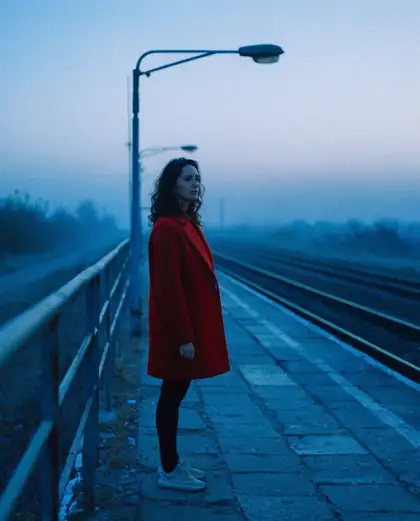
A start frame with the right unease
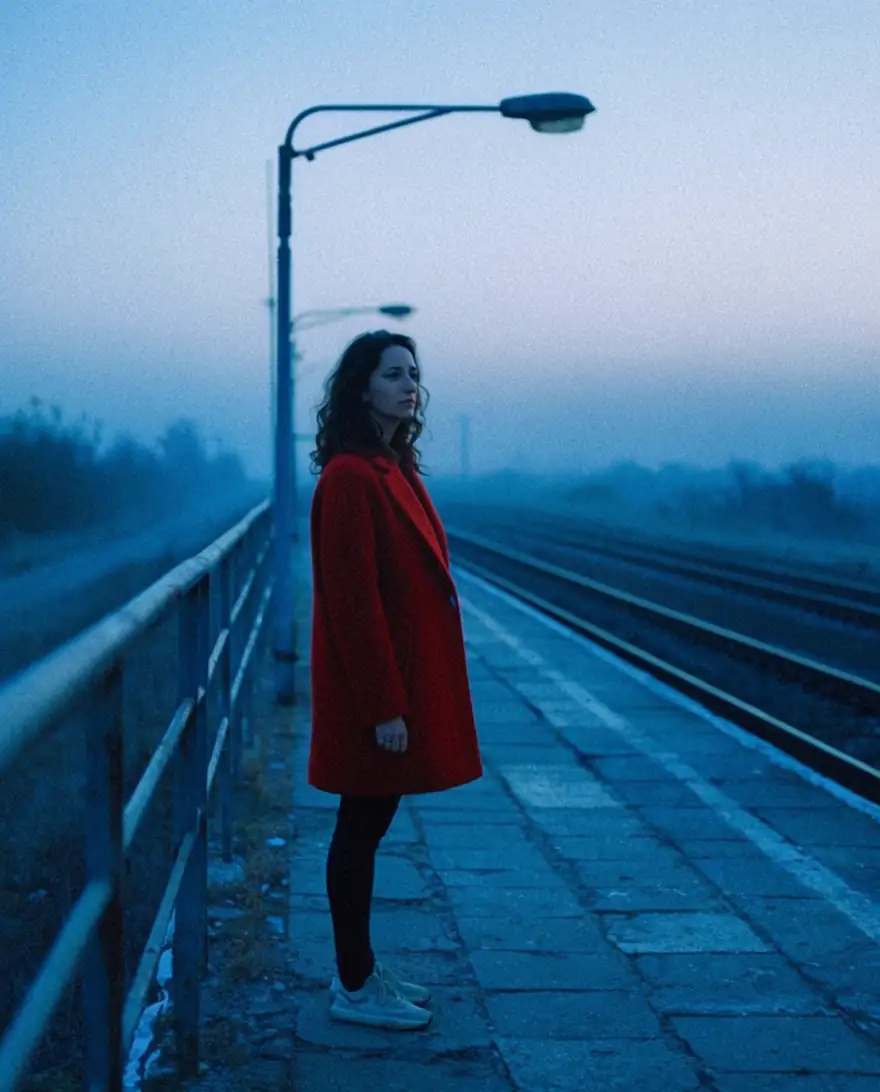
A real Krea 2 Large still from our gallery: fog, an empty platform, one figure, cold dusk light. Analog horror often starts with a frame like this — then the tape look and the motion come from the video prompt.
How to
How to use the analog horror video maker
- Time needed
- Steps
- 4 steps
Step 1
Make or upload a start frame
In /app/image, describe an empty, ordinary place — a hallway, a parking lot at night, a test card. Or upload your own photo. Sign in free for starter credits.
Step 2
Open Video Studio with Wan 3.0
Send the frame to /app/video, pick Wan 3.0, set 4:3 and 480p, 5–10 seconds. Add the “Vintage 1980s VHS” style tag.
Step 3
Describe the motion and the sound
One slow event and the audio: tape hiss, a low hum, and any spoken line in quotes. Keep sound on.
Step 4
Cut it together
Download the clips and join them in your editor with title cards, captions and narration from Voice Studio.
See it in the app

Open Video Studio in Text to Video mode and write the shot — subject, action, camera move and light.


Watch the tour · 1:23
Prompts, styles, references, edit, Arena & chat
Chapters
Tips
Make it unsettling, not gory
What the genre's best-known series do, turned into prompt habits.
Imply, don't show. A figure at the end of a hallway, a door that's open when it wasn't — no blood, no wounds.
Name the medium: “1980s VHS camcorder footage, tape noise, tracking lines, washed-out colour, slight wobble”.
Pick 4:3 and 480p. Old TV was square-ish and soft, so the cheap draft setting is also the right look.
Keep the camera still or handheld, and let nothing happen for a beat — long pauses are scarier than jump scares.
Add on-screen text (timestamps, warnings, station cards) in your editor — AI video often garbles small letters.
Invent your station and your alert tone. Don't copy real channels or the real emergency-alert sound.
Models
Tools for analog horror clips
What each model is good at. Open any one straight in the generator.
Alibaba
Wan 3.0
- Reference images
- Up to 10
- Output
- 2–30 s · 480p–1080p · 4:3
Open Wan 3.0Best for
VHS drafts with native sound

ByteDance
Seedance 2.0
- Reference images
- Up to 9
- Output
- 4–15 s
Open Seedance 2.0Best for
More expressive motion, spoken lines
FAQ
Analog Horror Video Maker questions
8 questions
What is analog horror?
Analog horror is a horror style, mostly on YouTube, that imitates late-20th-century television and tapes: VHS noise, test cards, public-service announcements and instructional videos where something is quietly wrong. It grew out of found footage. Kris Straub's Local 58 (2015) gave it its name; Gemini Home Entertainment, The Mandela Catalogue and Kane Parsons' Backrooms followed.
Link to this answerHow do I make an analog horror video with AI?
Make a start frame of an ordinary, empty place, then animate it in Kenerate's Video Studio with Wan 3.0. Add the “Vintage 1980s VHS” style tag, set 4:3 and 480p, describe one slow event, and keep sound on for tape hiss and a spoken line. Join the clips with title cards in your editor.
Link to this answerHow do I get the VHS look?
Name it in the prompt: “1980s VHS camcorder footage, tape noise, tracking lines, scanlines, washed-out colour, slight frame wobble”. In Video Studio the “Vintage 1980s VHS” tag adds VHS camcorder artefacts, tracking glitches and scanlines to your prompt in one tap. A low resolution (480p) and 4:3 frame make it more convincing.
Link to this answerCan I turn my own phone footage into analog horror?
Yes. Open Restyle Video and describe the look in your own words — “worn 1980s VHS tape, faded colour, noise and tracking lines” — or start from the Film noir or Vintage 70s preset. The standard engine takes clips of 3 to 15 seconds. It aims for stable, clean frames, so heavy tape glitches are easier to get in a fresh Wan 3.0 generation.
Link to this answerCan the AI add a narrator or an emergency broadcast voice?
Wan 3.0 and Seedance 2.0 make native sound when audio is on, so a short line in quotes can be spoken in the clip. For a longer, flat announcer voice, write the script in Voice Studio — ElevenLabs Eleven v3, MiniMax Speech, or Qwen3 voice design, where you describe the voice in words — and lay it under the clips in your editor.
Link to this answerCan I use the real Emergency Alert System sound?
Better not. In the US, 47 CFR § 11.45 bars sending EAS tones, or simulations of them, outside real alerts and authorised tests, and the FCC has fined TV networks for using them in shows. The sound can also alarm real viewers. Make your own tone and your own fictional station.
Link to this answerIs the analog horror video maker free?
Free to start: a new account gets starter credits for start frames in the Image Studio. Video needs a paid credit pack; credits never expire and downloads have no watermark. Drafting at 480p for 5 seconds keeps each try cheap.
Link to this answerDoes it make gore or graphic violence?
This page is about atmosphere, not gore — analog horror works by implication, and the best-known series barely show anything. Keep prompts non-graphic; Kenerate's content rules apply to every generation.
Link to this answerIn depth
Analog Horror Video Maker, explained
What works, what to avoid, and how to pick a model.
On this page
What makes analog horror work
Analog horror borrows the look of things people trusted: local TV, public-service announcements, training tapes, home videos. The fear comes from that familiar format going slightly wrong — an instruction that makes no sense, a figure that shouldn't be there, a broadcast that won't end.
The tape also hides things. Noise, blur and low resolution cover what a viewer can't quite see, which is why the genre uses so few jump scares — and why AI video, which can look a little uncanny, suits it. Keep the scene ordinary and let the medium do the work.
Prompts to try
Untested starting points for Wan 3.0 — 4:3, 480p, 5–10 seconds, sound on, with the Vintage 1980s VHS tag:
- Empty platform: static shot of a foggy train platform at dusk, a woman in a red coat stands still, the street lamp flickers twice, she slowly turns her head toward the camera. Tape hiss, a distant train horn.
- Test card: an old colour-bar test card on a CRT TV in a dark living room, the picture rolls, for one second a silhouette appears in the bars, then the card returns. Low electrical hum.
- Hallway: handheld camcorder walks down a 1990s motel hallway with patterned carpet, every door closed, the last door is open a crack, the camera stops. Footsteps, tape noise.
- Announcer: a calm 1980s local news presenter at a desk says “Please stay indoors and do not look at the sky tonight.” Slight smile, picture wobbles.
- Instructional tape: a cheerful cartoon-style safety tape slide, the narrator says “If you see the visitor, stay calm and count to ten,” then the audio slows down.
Build a series, not a clip
Most analog horror is told across several short tapes. Plan the pieces:
- A fictional station or company with its own name, logo card and tone.
- Three to six clips of 5–10 seconds, each with one strange detail.
- Title cards and timestamps added in your editor, where text stays sharp.
- Narration from Voice Studio for the parts that need a longer script.
- The same start frame or reference images for recurring places and figures.