Photo to Thanksgiving · dinner table · orchard · harvest art
AI Thanksgiving Photo Generator — your photo at the harvest table
Upload a photo and get a Thanksgiving portrait that still looks like you — carving the turkey at a candlelit table or holding a pumpkin in a golden orchard — plus table scenes and harvest art for cards and posts, in time for 26 November.
- Keeps your face
- Dinner, orchard and harvest art
- Copy-ready prompts
- No watermark
Updated by the Kenerate AI team
On this page
Quick answer
How do you turn a photo into a Thanksgiving picture with AI?
An AI Thanksgiving photo generator redraws your photo as a Thanksgiving picture: same face, new autumn scene — a candlelit dinner table, a golden orchard, a cosy knit and a pumpkin. On Kenerate AI you upload a photo in Image Studio, describe the scene, and GPT Image 2.5 Sunburst edits it for 11.7 credits; both of our photo tests below kept the face, one try each. Text-only scenes like a dinner table start at 1.5 credits with Kenerate Flash. US Thanksgiving 2026 is Thursday 26 November.
Key facts
- Thanksgiving 2026
- Thursday 26 November
- Examples made
- 4 (host · orchard · table · cornucopia)
- Face kept
- Yes, in both photo edits
- Watermark
- None
Gallery
Two photo edits, a table and a cornucopia
Real Kenerate outputs, one try each — two photo edits that kept the face, a dinner-table scene from text and a painterly harvest illustration. Open any one to copy the prompt.
Same prompt
The photo, then the Thanksgiving version
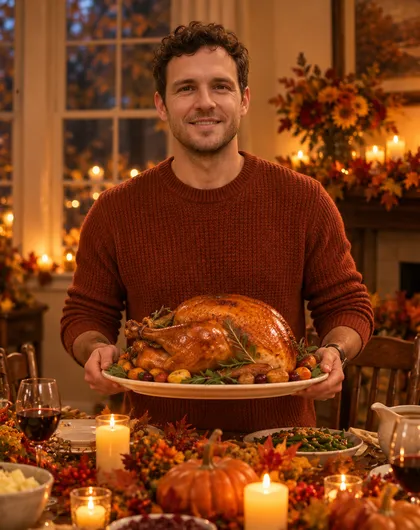
One AI-made test photo in, one GPT Image 2.5 Sunburst edit out for 11.7 credits. His curls, stubble and face shape carried through; the sweater, turkey and candlelit table came from the prompt — plus wine glasses and a mantel it added on its own.
PromptTurn this photo into a Thanksgiving dinner portrait of the same man. Keep his face recognisable — same curly dark hair, stubble, eyes and face shape. Rust-coloured knit sweater, a platter with a golden roast turkey, a festive table with candles, pumpkins and autumn leaves.
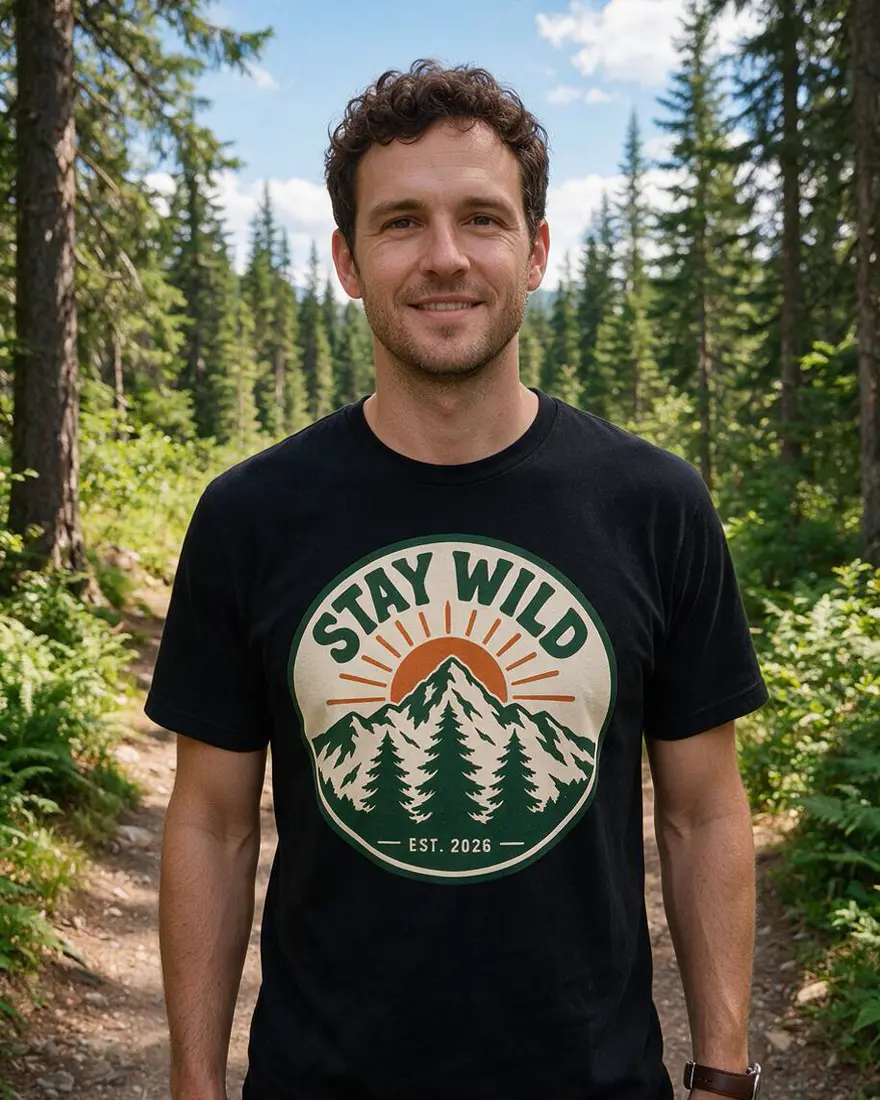 PhotoInput
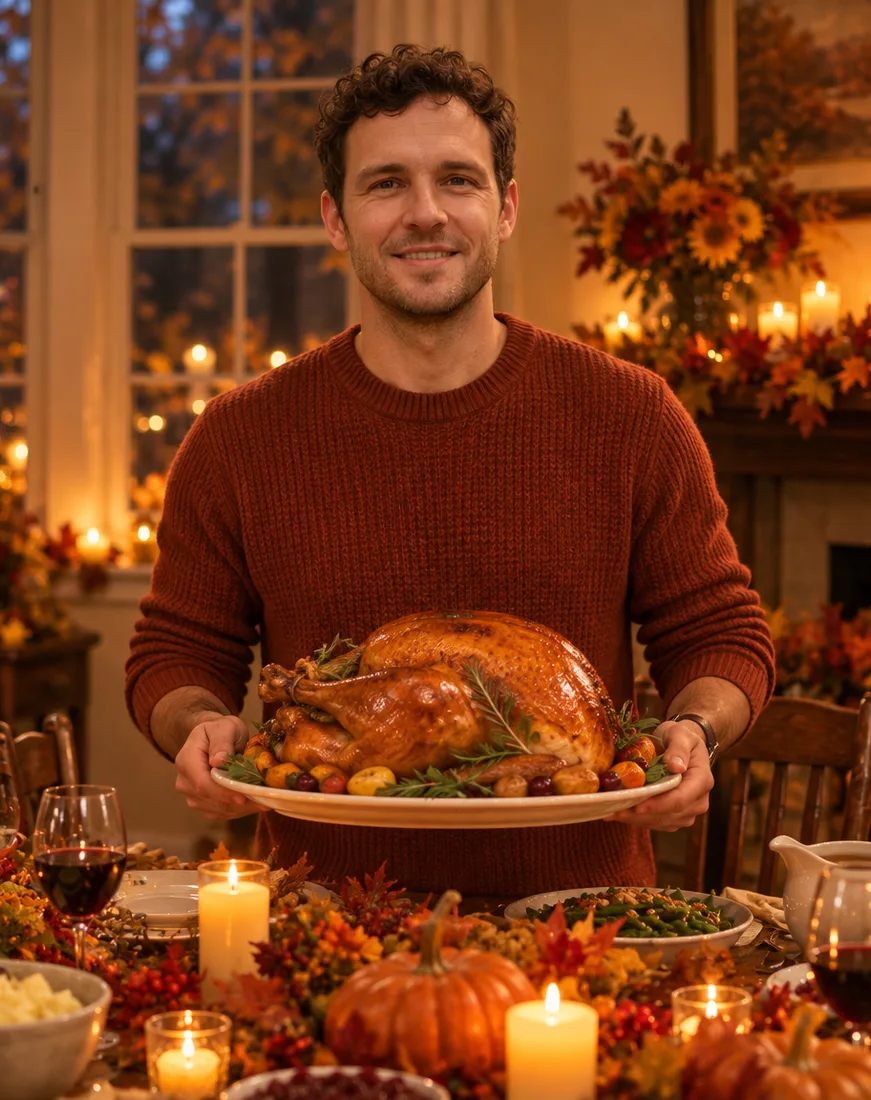 Thanksgiving hostGPT Image 2.5 Sunburst
How to
How to use the AI thanksgiving photo generator
- Time needed
- Steps
- 4 steps
Step 1
Upload your photo
In /app/image, add a clear photo as the reference. Sign in free for 25 starter credits.
Step 2
Pick GPT Image 2.5 Sunburst
It kept the face in both of our Thanksgiving tests. Kenerate Flash makes text-only scenes for 1.5 credits.
Step 3
Describe the scene
Outfit, setting and light — or paste a prompt from the gallery and swap the details.
Step 4
Download or go again
Download with no watermark, or change one detail and rerun. Send the keeper to the card maker or image-to-video.
See it in the app

Open Image Studio and type what you want to see — subject, style, lighting and mood.


Watch the tour · 1:23
Prompts, styles, references, edit, Arena & chat
Chapters
Tips
Get a Thanksgiving photo that still looks like you
What worked in our two photo tests.
Start with “turn this photo into … of the same person” and name what to keep: hair, beard, glasses, smile.
Describe three things: the outfit (a knit sweater, a scarf), the scene (dinner table, orchard, porch) and the light (candlelight, golden hour).
Name real Thanksgiving props — a roast turkey, pumpkin pie, cornucopia, hay bales, falling leaves — instead of “festive”.
Use a clear, front-facing photo in good light; the face is what the model copies.
Say “no text” so lettering doesn't creep onto napkins or signs.
Expect small extras: our host picture gained wine glasses and a mantel we never asked for. Regenerate or name what to leave out.
Only edit photos of yourself or of adults who agreed — prompts about children are blocked.
Models
Models for Thanksgiving photos
What each model is good at. Open any one straight in the generator.

OpenAI
GPT Image 2.5 Sunburst
- Reference images
- Up to 16
- Output
- 1K–4K
Open GPT Image 2.5 SunburstBest for
Made both photo edits above
Kenerate AI
Kenerate Flash

ByteDance
Seedream 5.0 Pro
- Reference images
- Up to 10
- Output
- Up to 2K
Open Seedream 5.0 ProBest for
Painterly harvest art; made the cornucopia
Google
Nano Banana 2.1
FAQ
AI Thanksgiving Photo Generator questions
9 questions
How do I turn my photo into a Thanksgiving picture with AI?
Upload a clear photo in Kenerate's Image Studio, pick GPT Image 2.5 Sunburst and describe the scene: “Turn this photo into a Thanksgiving dinner portrait of the same man, keep his face recognisable, rust knit sweater, roast turkey on a platter, candlelit table.” Our test photo came back with the same curls, stubble and face shape for 11.7 credits.
Link to this answerCan I make Thanksgiving AI images without a photo?
Yes. Describe the scene from scratch — a dinner table, a cornucopia, an autumn porch — and skip the reference photo. Kenerate Flash made the table scene above for 1.5 credits; Seedream 5.0 Pro made the painterly cornucopia for 13.5.
Link to this answerIs there a free AI Thanksgiving image generator?
You can start free: a new Kenerate account gets 25 starter credits — over sixteen Kenerate Flash scenes at 1.5 credits, or two Sunburst photo edits. After that, credits come in one-time packs with no subscription, and downloads have no watermark.
Link to this answerCan I make a Thanksgiving family photo with AI?
Yes, if everyone in it is an adult who agreed. Upload the group photo, describe the scene once — “same people, cosy knits, candlelit Thanksgiving table” — and name what to keep. GPT Image 2.5 Sunburst takes up to 16 reference images. Prompts about children are blocked, so keep it to the grown-ups.
Link to this answerCan I add a Thanksgiving background to a photo?
Yes. Describe only the backdrop and say what must stay: “Keep this person exactly as they are, replace the background with a candlelit Thanksgiving dining room with a set table and autumn garlands.” The table scene above works as a plain backdrop too.
Link to this answerWill it still look like me?
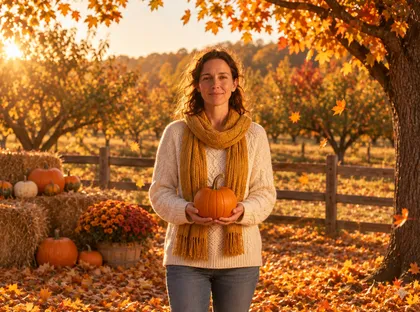
In both of our photo tests, yes — his curls and stubble, her wavy hair and smile all carried over. Two things to know: the model can add props you didn't ask for (our host gained wine glasses and a mantel), and a detail can drift. Say “keep the face recognisable”, then regenerate if something is off.
Link to this answerCan I turn the picture into a Thanksgiving card or invite?
Yes. Make the photo here, then open the AI Thanksgiving card generator to add the greeting and layout, or the AI invitation maker for a Friendsgiving invite. The picture downloads without a watermark, so any card tool can use it.
Link to this answerWhat should I write for Thanksgiving AI art?
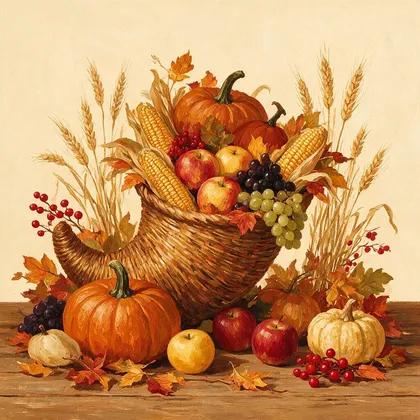
Name the objects, the palette and the style: “a cornucopia overflowing with pumpkins, apples, corn and autumn leaves, painterly folk-art style, burnt orange and cream, no text”. That exact prompt made the harvest illustration above on Seedream 5.0 Pro.
Link to this answerCan I animate my Thanksgiving photo?
Yes. Send the finished picture to Image to video in the studio to add drifting leaves, flickering candles or steam from the turkey. Video uses credits from a paid pack.
Link to this answerIn depth
AI Thanksgiving Photo Generator, explained
What works, what to avoid, and how to pick a model.
On this page
Thanksgiving AI prompts you can copy
The first four are the prompts behind the gallery above, shortened (open any image for the full one); the rest are untested starting points — add your photo and swap the details:
- Dinner host: “Turn this photo into a Thanksgiving dinner portrait of the same person. Keep the face recognisable. Rust knit sweater, a platter with a golden roast turkey, candlelit table with pumpkins and autumn leaves.”
- Orchard portrait: “Turn this photo into an autumn portrait of the same person: cream cable-knit sweater, mustard scarf, holding a small pumpkin in a sunlit orchard with hay bales and falling leaves, golden hour.”
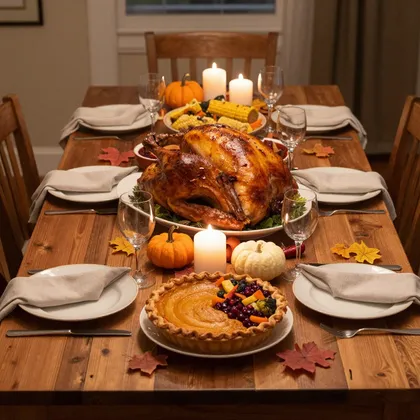
- Table scene (no photo): “A Thanksgiving dinner table from above: golden roast turkey, pumpkin pie, cranberry sauce, candles, small pumpkins and autumn leaves on a rustic wooden table. Warm candlelight. No people, no text.”
- Harvest art (no photo): “A cornucopia overflowing with pumpkins, apples, grapes, corn and autumn leaves, painterly folk-art style, burnt orange, ochre and cream, no text.”
- Family at the table: “Keep everyone's faces recognisable; seat them around a candlelit Thanksgiving table with a roast turkey, warm evening light, cosy knits.”
- Autumn porch: “Keep this person exactly as they are; put them on a wooden porch with pumpkins on the steps, a wreath of autumn leaves on the door and late-afternoon sun.”
- Friendsgiving post: “Same person, face recognisable, raising a glass of cider at a long table of side dishes with string lights above, warm and candid, 4:5 crop.”
- Vintage postcard: “Redraw this scene as a 1950s Thanksgiving postcard illustration: a turkey and autumn leaves border, muted warm colours, slightly textured paper look, no text.”
What makes a good Thanksgiving photo
The model needs three things: a clear photo to copy the face from, an outfit and props it can draw, and a place for it all to happen. Thanksgiving pictures live on warmth — candlelight, golden hour, amber tones — so name the light every time.
For art without a face, name the style. “Photorealistic” gave us the table scene; “painterly folk-art with visible brush texture” gave us the cornucopia. The same objects in two styles make a photo for posts and an illustration for cards.
What we got
Four pictures, one try each:
- Host (GPT Image 2.5 Sunburst edit, 11.7 credits): curls, stubble and face shape kept; sweater, turkey and table as asked — plus wine glasses and a fireplace mantel the prompt never mentioned.
- Orchard (GPT Image 2.5 Sunburst edit, 11.7 credits): her face and wavy hair kept; came back full-length in jeans rather than the head-and-shoulders crop of the input.
- Table scene (Kenerate Flash from text, 1.5 credits): convincing candlelit spread, but the pumpkin pie grew a strange berry-and-vegetable topping on one side.
- Cornucopia (Seedream 5.0 Pro, 13.5 credits): the painterly folk-art style landed exactly as described.