Día de Muertos · calavera face paint · Catrina · ofrenda
Day of the Dead AI Filter — calavera and Catrina looks on your own photo
Upload a photo of yourself and get Día de Muertos calavera face paint, a marigold crown or a full Catrina look — same face, same eyes — in time for 1–2 November, with no makeup kit and no template to fight.
- Keeps your face
- Calavera, Catrina or ofrenda
- Copy-ready prompts
- No watermark
Updated by the Kenerate AI team
On this page
Quick answer
How do you put Day of the Dead face paint on a photo with AI?
A Day of the Dead AI filter paints your photo with Día de Muertos calavera makeup — a white skull base, painted teeth, flowers and swirls — and can add a marigold crown, a Catrina hat or an ofrenda behind you, while keeping your face recognisable. On Kenerate AI you upload the photo in Image Studio and describe the look: Kenerate Flash edits it for 3 credits, GPT Image 2.5 Sunburst for 11.7 credits with finer paint detail. Día de Muertos is on 1–2 November; UNESCO lists it as Intangible Cultural Heritage.
Key facts
- Looks shown
- Calavera face paint · Catrina · ofrenda scene
- Face kept
- Yes, in both photo edits below
- Día de Muertos 2026
- Sunday 1 and Monday 2 November
- Who it's for
- Adults — children's photos are blocked
- Watermark
- None
Gallery
Two photo edits, a Catrina and an ofrenda
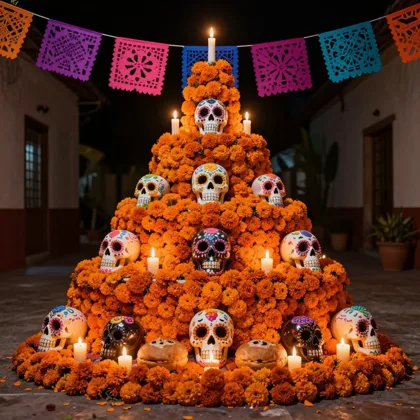
Real Kenerate outputs, one try each — two photo edits that kept the face, a Catrina portrait from text and an ofrenda you can use as a backdrop. Open any one to copy the prompt.
Same prompt
The photo, then the calavera
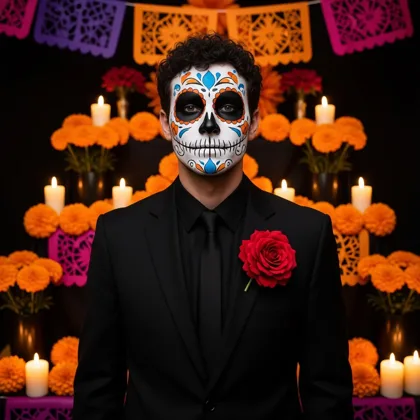
One AI-made test photo in, one Kenerate Flash edit out for 3 credits. His curls, eyes and face shape carried through under the paint; the suit, rose and ofrenda came from the prompt.
PromptGive this same man Day of the Dead calavera face paint … Keep his curly dark hair, stubble, eyes and face shape recognisable. Black suit with a red flower in the lapel, in front of an ofrenda with orange marigolds, candles and papel picado.
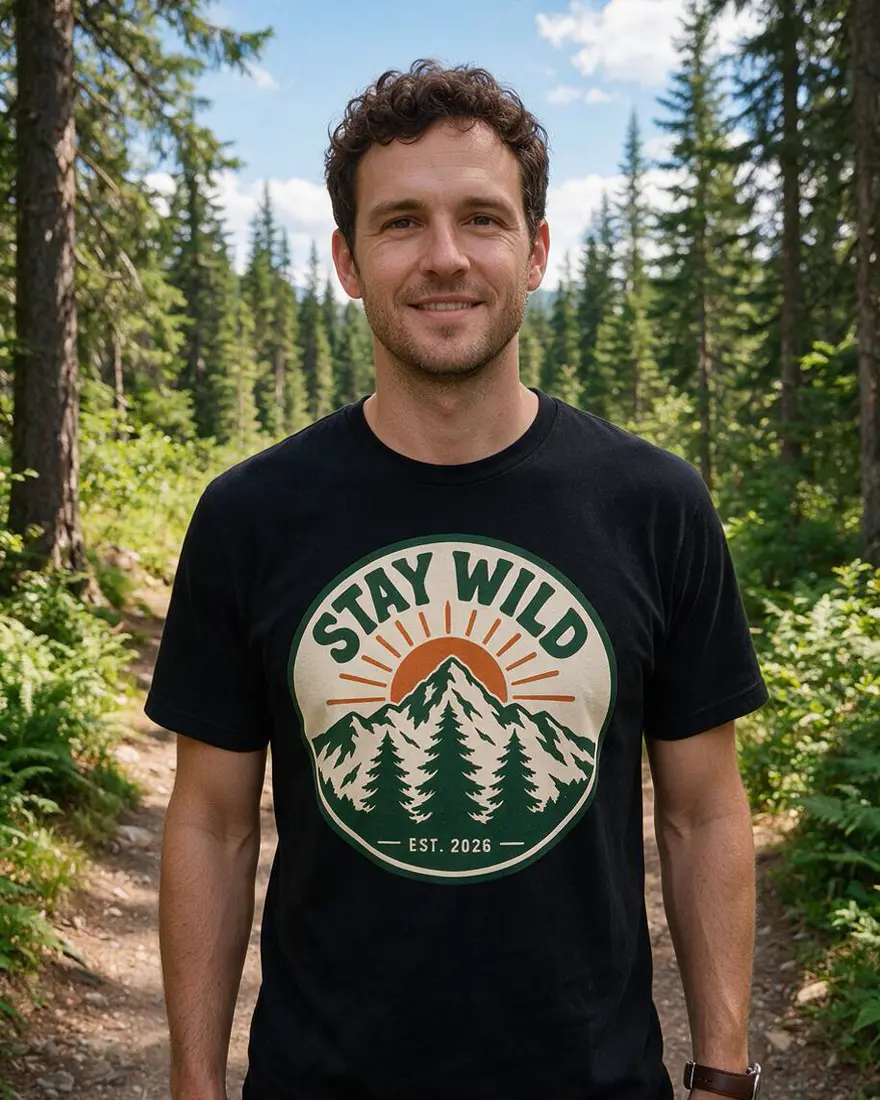 PhotoInput
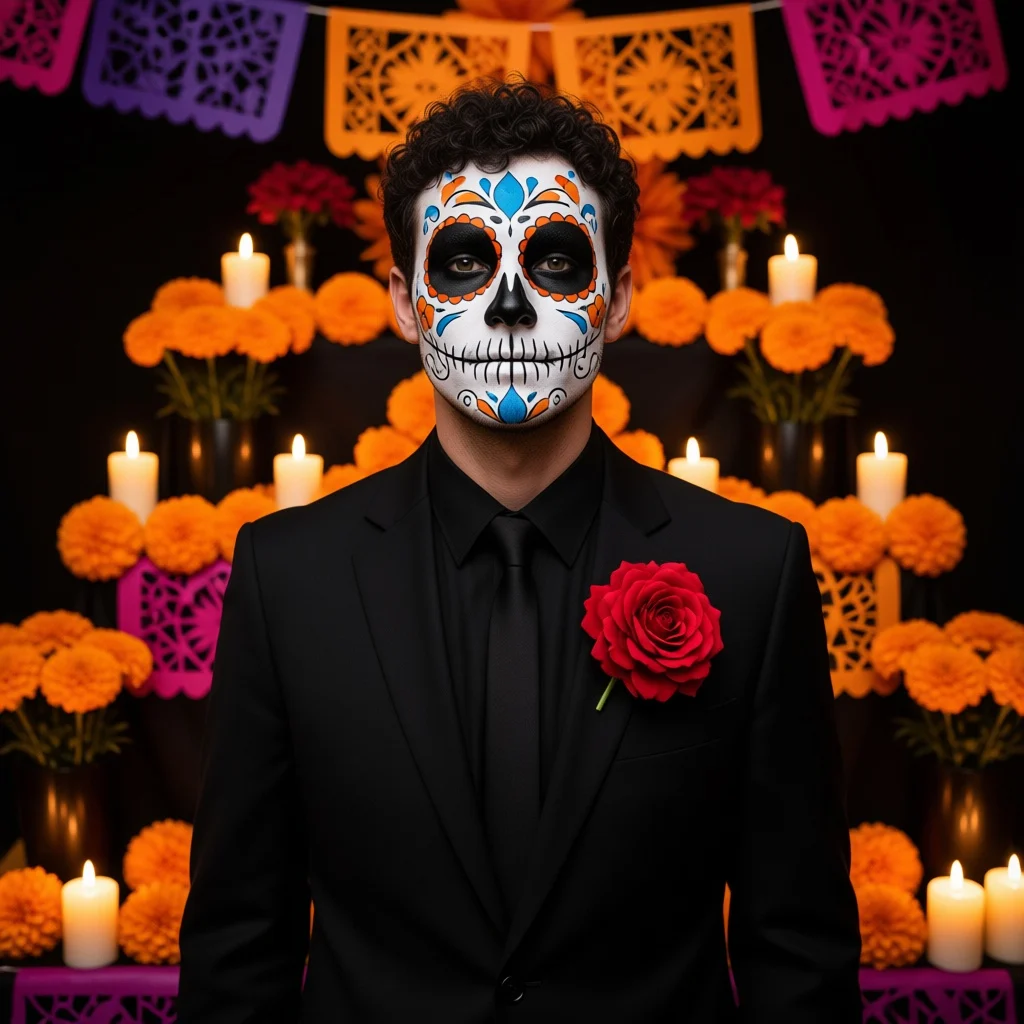 CalaveraKenerate Flash edit
How to
How to use the day of the dead AI filter
- Time needed
- Steps
- 4 steps
Step 1
Open Image Studio
Go to /app/image and pick Kenerate Flash for a quick 3-credit edit, or GPT Image 2.5 Sunburst for finer paint. Sign in free for 25 starter credits.
Step 2
Add your photo
Upload one clear, front-facing photo of yourself as the reference — JPG, PNG or WebP.
Step 3
Describe the look
Paste a prompt from the examples and change the colours, the flowers or the backdrop: calavera paint, a Catrina hat, an ofrenda behind you.
Step 4
Download or tweak
Download it with no watermark, or change one detail at a time and run it again. Upscale the keeper for a print or a frame.
See it in the app

Open Edit Studio and upload an image, or pick one from your history.


Watch the tour · 1:23
Prompts, styles, references, edit, Arena & chat
Chapters
Tips
Getting a Day of the Dead look that still looks like you
What to write so the paint lands on your face, not on a stranger's.
Start with “give this same person…” and end with “keep the face shape, eyes and hair recognisable” — that's what kept both faces above.
Name the parts of the paint: white base, black eye sockets and nose, painted teeth over the lips, flowers or swirls on the forehead and cheeks.
Pick two or three colours for the details (blue and orange, pink and black) instead of “colourful”, so the paint stays clean.
Name the real details of the holiday — cempasúchil marigolds, papel picado, candles, an ofrenda — rather than “spooky”; it is a remembrance, not a horror theme.
Use a clear, front-facing photo in good light; a face that fills a third of the frame keeps the most detail.
Say “no text” to stop stray lettering on the papel picado.
Only edit photos of yourself or of adults who agreed, and keep it to costume and makeup — not a portrait of someone who has died.
Models
Which model is best for a Day of the Dead filter?
What each model is good at. Open any one straight in the generator.
Kenerate AI
Kenerate Flash
- Reference images
- Up to 5
- Output
- 1K
Open Kenerate FlashBest for
Cheapest; kept the face in our calavera test

OpenAI
GPT Image 2.5 Sunburst
- Reference images
- Up to 16
- Output
- 1K–4K
Open GPT Image 2.5 SunburstBest for
Finest paint detail; follows long prompts

ByteDance
Seedream 5.0 Pro
- Reference images
- Up to 10
- Output
- Up to 2K
Open Seedream 5.0 ProBest for
Illustrated Catrina and folk-art posters
- Free plan

FAQ
Day of the Dead AI Filter questions
9 questions
How do I put Day of the Dead face paint on my photo?
Upload a clear photo of yourself to Kenerate's Image Studio, pick an image model and describe the paint — for example “give this same person Day of the Dead calavera face paint: white base, black eye sockets and nose, painted teeth, small flowers on the forehead; keep the face recognisable”. Kenerate Flash returns it for 3 credits; GPT Image 2.5 Sunburst for 11.7 with finer detail.
Link to this answerIs there a free Day of the Dead filter online?
You can start free. A new Kenerate account gets 25 starter credits — about eight Kenerate Flash photo edits at 3 credits each — and Qwen Image 3.0 is on the free plan. After that, credits come in one-time packs with no subscription. Downloads have no watermark.
Link to this answerWill it still look like me?
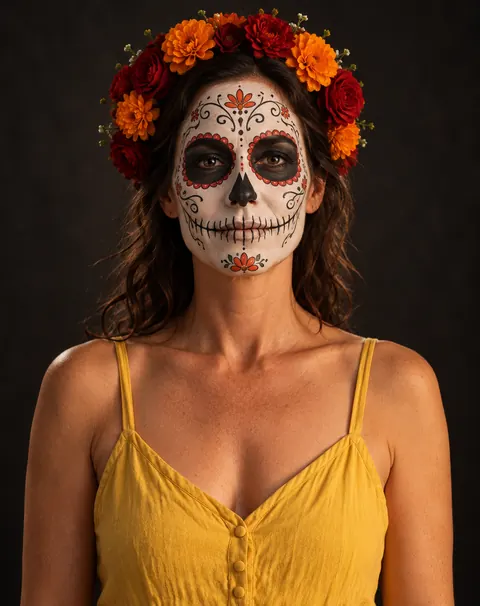
In our two photo tests it did: the man kept his curls, eyes and face shape under the calavera paint, and the woman kept her eyes and wavy hair under the skull paint. Say “keep the face shape, eyes and hair recognisable” in the prompt, and use a front-facing photo in good light. If a face drifts, run it again or switch to GPT Image 2.5 Sunburst.
Link to this answerWhat's the difference between a calavera, a sugar skull and La Catrina?
A calavera is a skull, and in Día de Muertos it shows up as face paint, poems and decorations. Sugar skulls (calaveras de azúcar) are decorated sugar skulls placed on ofrendas. La Catrina is a specific figure — an elegant skeleton lady in a wide hat — that began as an etching by José Guadalupe Posada in the early 1910s and was named by Diego Rivera.
Link to this answerWhen is the Day of the Dead in 2026?
Día de Muertos is celebrated on 1 and 2 November — a Sunday and a Monday in 2026 — with preparations from late October. UNESCO describes it as a festivity for the temporary return of deceased relatives, with petals, candles, favourite dishes and paper cut-outs on the home altar.
Link to this answerIs a Day of the Dead filter respectful?
It can be. The holiday is about remembering family, so use its real elements — marigolds, an ofrenda, candles, papel picado — rather than turning it into a generic horror skull, and treat the face paint as a celebration, not a costume joke. Don't use it to make portraits of people who have died; AI “resurrections” in Day of the Dead ads drew criticism in Mexico.
Link to this answerCan I do a group or couple photo?
Yes, if everyone in it is an adult who agreed. Describe each person's paint in one prompt so the looks match — the same white base, a different flower colour per person. GPT Image 2.5 Sunburst takes up to 16 reference images, Kenerate Flash up to 5. Faces that are small in a wide shot keep less detail, so crop in.
Link to this answerCan I use it on my kids' photos?
No. Kenerate's moderation blocks prompts about children every time, so this tool is for adults only. For children's face paint, a printed calavera design or a face-painting guide is the safer route.
Link to this answerCan I use the picture as a makeup reference?
Yes — that's a good use. A filtered photo shows where the white base, the eye sockets and the flowers sit on your own face before you pick up a brush. Patch-test face paint on your arm a day or two before, as the FDA advises for Halloween makeup.
Link to this answerIn depth
Day of the Dead AI Filter, explained
What works, what to avoid, and how to pick a model.
On this page
What Día de Muertos is
Día de Muertos is a Mexican celebration on 1 and 2 November when families welcome back the spirits of relatives who have died. UNESCO, which inscribed it as Intangible Cultural Heritage in 2008, describes petals and candles laid along the route home, the dead's favourite dishes set around the home altar and the tomb, and paper cut-outs (papel picado) as decoration. It mixes pre-Hispanic rites with Catholic feasts.
The skull imagery is affectionate rather than frightening: calaveras laugh, dress up and dance. That's why the best filter results look warm and festive — marigold orange, magenta and candlelight — not like a Halloween horror effect.
Day of the Dead looks to try (untested prompts)
Starting points we haven't run yet — add your photo as the reference, paste one and change the colours:
- Half-face calavera: “paint only the left half of this same person's face as a calavera — white base, black eye socket, painted teeth — keep the right half natural; marigold crown; keep the face recognisable”.
- Catrín: “turn this same man into an elegant Catrín: calavera face paint, a black bowler hat with a marigold, a vintage three-piece suit and a pocket watch chain”.
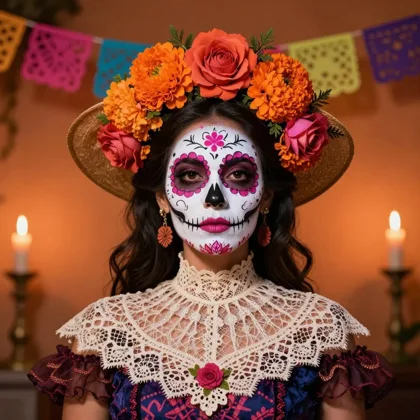
- Catrina hat: “give this same woman a wide-brimmed Catrina hat covered in marigolds and feathers, calavera face paint with pink roses on the cheeks, a lace shawl”.
- Candlelit portrait: “calavera face paint in blue and gold on this same person, holding a single white candle, dark background, soft candlelight on the face”.
- Papel picado backdrop: “keep this same person unchanged and replace the background with colourful papel picado banners and strings of marigolds in a sunny plaza”.
- Folk-art poster: “redraw this same person as a Mexican folk-art illustration with calavera face paint, marigolds and papel picado border, flat bright colours, no text”.
Calavera, sugar skull or Catrina — which look?
Three looks people mean when they search for a Day of the Dead filter:
- Calavera face paint — the skull painted on your own face: white base, dark eye sockets and nose, stitched teeth over the lips, flowers and swirls. The two photo edits above.
- Sugar skull — the decorated skull itself, the kind placed on an ofrenda. Good as a design or a backdrop rather than on a face; see the ofrenda example.
- La Catrina — the elegant skeleton lady in a big flowered hat, from José Guadalupe Posada's early-1910s etching, named by Diego Rivera in a 1947 mural. A full costume, not only paint.
Keeping it respectful
Día de Muertos is a family remembrance, so the respectful version of a filter uses its real symbols — cempasúchil marigolds, candles, an ofrenda, papel picado — and leaves out horror props like blood or monsters. A filtered selfie for a party, an invite or a makeup plan is in the spirit of the calaveras; a portrait of a relative who has died is not something to make with AI, and AI “resurrections” in Mexican ads were criticised for exactly that.
Kenerate keeps the tool to adults: prompts about children are blocked, and you should only upload photos of yourself or of adults who said yes.
What we got
The photo edits above, one try each:
- Calavera (Kenerate Flash, 3 credits): curls, eyes and face shape kept; the blue and orange petals landed where asked. It came back square, not the 4:5 we asked for.
- Skull paint (GPT Image 2.5 Sunburst, 11.7 credits): detailed paint and a flower crown, eyes and hair kept; her yellow sundress stayed in the frame.
- Catrina (Kenerate Flash, 1.5 credits): we asked for a folk-art illustration and got a photo-real portrait instead — strong costume, wrong style. Seedream 5.0 Pro is the better pick for an illustrated Catrina.