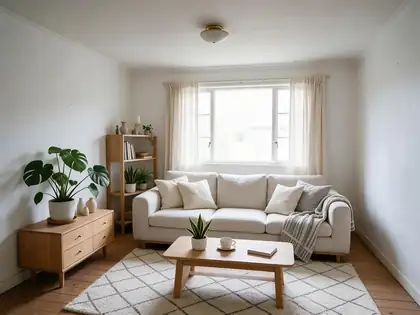
Empty room → furnished · same walls and windows · labelled for listings
Virtual Staging AI — furnish an empty room from one photo
Upload a photo of an empty or half-empty room, pick a style, and get it furnished — sofa, rug, lamps, plants — with the same walls, floor, windows and camera angle. Then label it “virtually staged” and post the original next to it.
- Same room, new furniture
- Five styles tested
- Disclosure rules explained
- No watermark
Updated by the Kenerate AI team
On this page
Quick answer
What is virtual staging AI, and how do you use it?
Virtual staging AI adds furniture and decor to a photo of an empty room so buyers can picture how it lives, while the walls, floor, windows and camera angle stay the same. On Kenerate AI you upload the room to Seedream 5.0 Pro, name the style and say “add only furniture and decor”. Because the photo is no longer the room as it is, label it “virtually staged” and show the original next to it — NAR's Code of Ethics bars misleading images, and MLSs such as CRMLS require the label and the unaltered photo.
Key facts
- Best model here
- Seedream 5.0 Pro edit
- Styles tested
- 5 · Scandinavian, Japandi, mid-century, boho, industrial
- What may change
- Movable furniture and decor only
- What must stay
- Walls, floors, windows, doors, fixtures, views
- Label
- “Virtually staged” on or under the photo
- Original photo
- Right before or after the staged one (CRMLS)
- Free start
- Starter credits · Qwen Image 3.0 on the free plan
- Watermark
- None
Gallery
One near-empty room, four staged versions
Real Seedream 5.0 Pro edits at 2K of one test photo — a bare living room with a single sofa. One try each; open any one to copy the prompt.
Same prompt
Before, staged — and one that went too far
Scandinavian kept the walls, window, floor and ceiling light and only added furniture, decor and curtains. The industrial version added an exposed-brick wall and ceiling beams the room doesn't have: fine as a design idea, not allowed in a listing photo.
PromptRedesign this living room in Scandinavian style: light oak, white and grey textiles, a new light sofa, plants, a wool rug. Keep the same room, walls, window and camera angle.
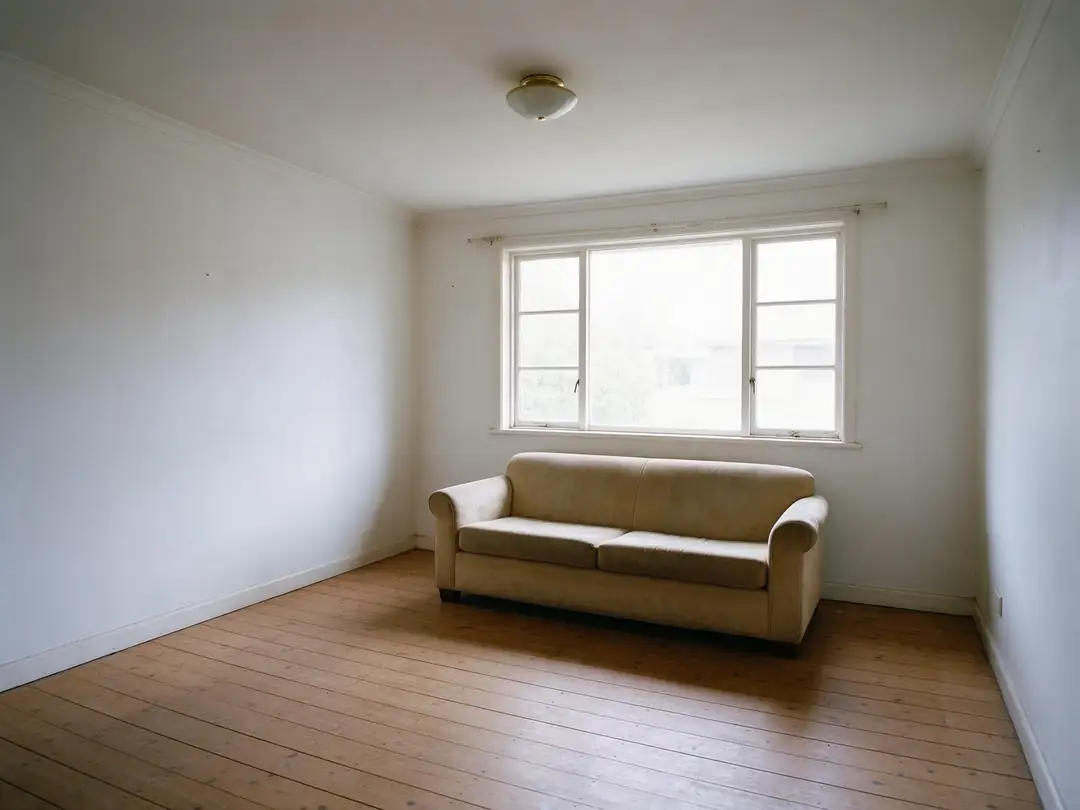 OriginalBare room, one sofa
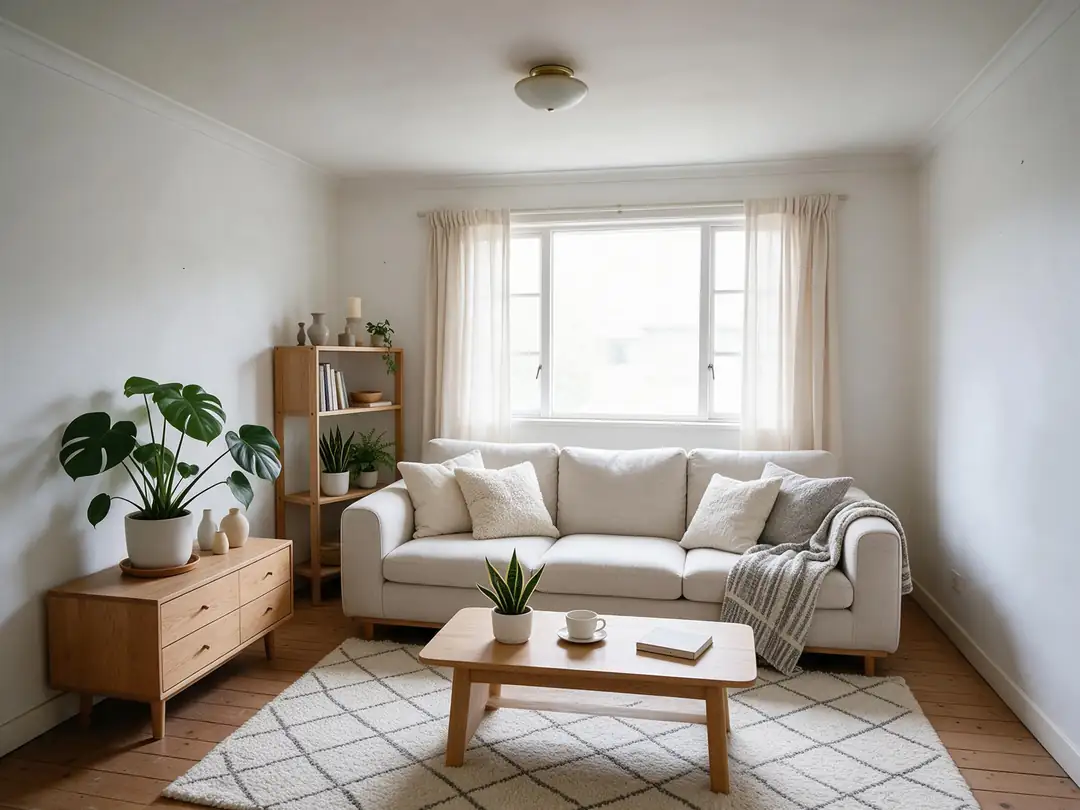 StagedFurniture and decor only
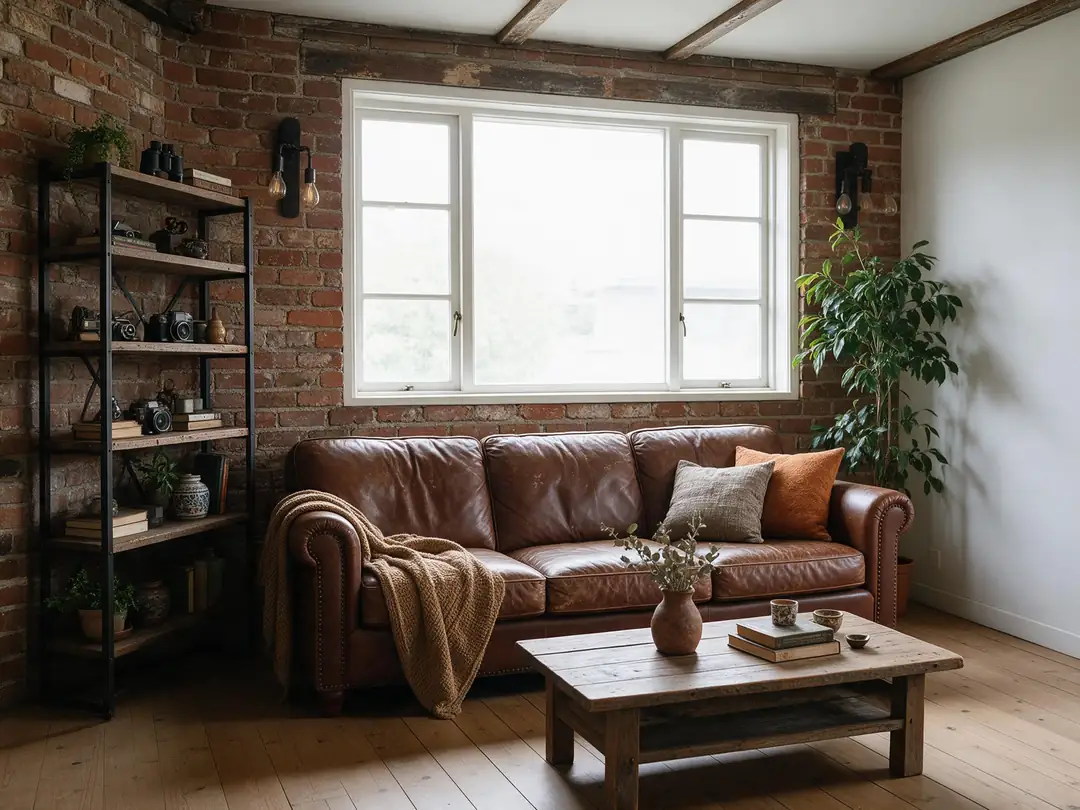 Too farAdded brick wall and beams
How to
How to use the virtual staging AI
- Time needed
- Steps
- 4 steps
Step 1
Photograph the empty room
Straight and level, wide but not fisheye, daylight plus the room's own lights.
Step 2
Upload it to Seedream 5.0 Pro
In /app/image, add the photo as a reference. Sign in free for 25 starter credits.
Step 3
Describe the staging
Room use, style and key pieces — plus “add only furniture and decor; keep walls, floor, windows and fixtures the same”.
Step 4
Check, label, publish
Compare with the original at full size, then post it labelled “virtually staged” with the original beside it.
See it in the app

Open Image Studio and type what you want to see — subject, style, lighting and mood.


Watch the tour · 1:23
Prompts, styles, references, edit, Arena & chat
Chapters
Tips
Staging that still shows the real room
What worked in our tests, and what the listing rules expect.
Shoot the empty room straight and level, from a corner, in daylight with the lights on — the model keeps what it can see.
Say what may change: “add only movable furniture, rugs, lamps, art and plants”.
Say what must stay: “keep the walls, wall colour, floor, windows, doors, ceiling, light fittings and the view exactly the same”.
Name the room's use and the style: “a bedroom with a queen bed, Scandinavian style”.
Avoid style words that imply building work — “exposed brick”, “beams”, “new flooring” — or the model may add them.
Zoom in and compare with the original before posting: furniture scale, door swings, outlets and window frames.
Label every staged photo “virtually staged” and put the original right next to it.
Models
Models for virtual staging
What each model is good at. Open any one straight in the generator.

ByteDance
Seedream 5.0 Pro
- Reference images
- Up to 10
- Output
- Up to 2K
Open Seedream 5.0 ProBest for
Made the staged rooms on this page
Google
Nano Banana 2.1
- Reference images
- Up to 14
- Output
- Up to 4K
Open Nano Banana 2.1Best for
Stage with real furniture from product photos

OpenAI
GPT Image 2.5 Sunburst
- Reference images
- Up to 16
- Output
- 1K–4K
Open GPT Image 2.5 SunburstBest for
Precise, instruction-following edits
- Free plan

FAQ
Virtual Staging AI questions
9 questions
What is virtual staging AI?
Software that adds furniture and decor to a photo of an empty room, so buyers and renters can see how the space could be used. AI tools do it from a photo and a prompt, instead of a designer building the room in 3D. On Kenerate AI you upload the room to Seedream 5.0 Pro and describe the style; the walls, window and camera angle stay the same.
Link to this answerIs virtual staging legal for real estate listings?
Yes, if it doesn't mislead. NAR's Code of Ethics asks members to present a true picture and bars misleading images (Standard of Practice 12-10). Many MLSs add their own rules: CRMLS, following California's AB 723 from 1 January 2026, requires a label such as “virtually staged” and the unaltered photo immediately before or after the staged one. Check your own MLS's rules before you post.
Link to this answerDo I have to label virtually staged photos?
Label them every time. Even where your MLS doesn't spell it out, an unlabelled staged photo can mislead buyers, and NAR's Code of Ethics bars misleading images. CRMLS asks for “virtually staged” or “digitally altered” in the photo description; NorthstarMLS's proposed guidelines accept the caption, the file name shown in the listing viewer, or text on the photo itself.
Link to this answerWhat can't virtual staging change?
Anything that stays with the property. CRMLS names wall colour, flooring, cabinets and landscaping; NorthstarMLS's proposed guidelines list walls, floor coverings, doors and windows, roofing, siding, ceilings, fireplaces and driveways, and limit staging to personal property such as furniture and decor. In our tests the industrial style added a brick wall and beams — exactly the kind of change to throw away.
Link to this answerWhich AI model is best for virtual staging?
On Kenerate, Seedream 5.0 Pro: in our tests it kept the walls, window and camera angle of the room in all five styles. Nano Banana 2.1 is the pick when you want specific furniture from product photos (up to 14 reference images). Qwen Image 3.0 is on the free plan for drafts.
Link to this answerIs virtual staging AI free?
Free to start. A new Kenerate account gets 25 starter credits, and Qwen Image 3.0 is a free-plan model. Seedream 5.0 Pro and the other models use credits from one-time packs — no subscription. Downloads have no watermark.
Link to this answerCan I virtually remove furniture from an occupied room?
Yes — the Magic Eraser in Edit Studio removes what you paint over, and you can then stage the cleared room. Under CRMLS rules, virtually clearing furniture that won't convey counts as a digitally altered image, so it needs the same label and the original photo. For clutter and photo fixes, see AI real estate photo editing.
Link to this answerCan AI stage a room with the furniture I'll actually sell or rent with it?
Yes. Add photos of the real pieces as extra reference images — Nano Banana 2.1 takes up to 14, Seedream 5.0 Pro up to 10 — and say “place the sofa from image 2 against the left wall”. Check the scale: AI may draw a sofa larger or smaller than the real one.
Link to this answerVirtual staging vs AI interior design — what's the difference?
Virtual staging furnishes an empty listing photo and must not change the room itself. AI interior design redesigns a room you live in — new colours, wall finishes and furniture — as ideas before you buy or paint, so changing the walls is the point there.
Link to this answerIn depth
Virtual Staging AI, explained
What works, what to avoid, and how to pick a model.
On this page
Virtual staging styles, side by side
Pick one style for the whole listing so the rooms feel like one home. Each line: what it looks like, then the words to put in the prompt.
- Modern — clean lines, grey and white, black metal accents · “modern staging, low grey sofa, glass coffee table, black floor lamp”.
- Transitional — the safe choice for most buyers, classic shapes in neutral tones · “transitional staging, beige upholstered sofa, wood coffee table, neutral rug”.
- Scandinavian — light oak, white and grey textiles, plants · “Scandinavian staging, light sofa, oak sideboard, wool rug, plants” (tested above).
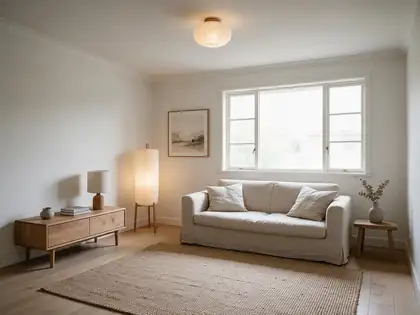
- Japandi — low wooden furniture, linen, paper lamps, few objects · “Japandi staging, linen sofa, low oak console, paper floor lamp” (tested above).
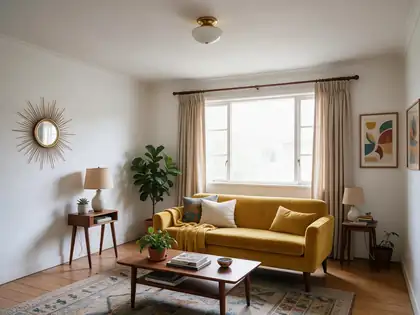
- Mid-century modern — walnut, tapered legs, one bold colour · “mid-century staging, walnut furniture, mustard sofa, sunburst mirror” (tested above).
- Coastal — white, sand and soft blue, linen and rattan · “coastal staging, white slipcover sofa, rattan chair, blue cushions”.
- Farmhouse — warm wood, cream fabrics, simple shapes · “farmhouse staging, cream sofa, reclaimed-wood coffee table, woven baskets”.
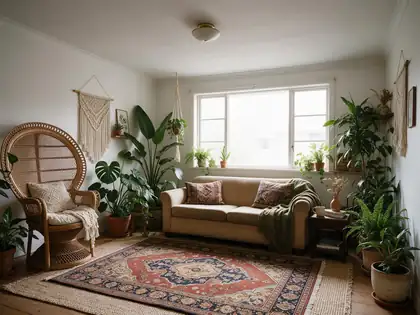
- Boho — rattan, layered rugs, many plants · “boho staging, rattan chair, layered rugs, macrame, plants” (tested above — busy for a listing).
- Industrial — leather and metal; ask for furniture only · “industrial-style furniture only: leather sofa, black metal shelves — do not add brick or beams”.
The prompt that protects the room
Most staging mistakes come from not telling the model what it may not touch. This template works for any room:
- “Virtually stage this empty [living room / bedroom / dining room] in [style] style.”
- “Add only movable furniture and decor: [three or four key pieces].”
- “Keep the walls, wall colour, floor, windows, doors, ceiling, light fittings, outlets and the view through the window exactly the same.”
- “Same camera angle and lens, realistic scale, natural daylight from the window.”
Disclosure: what NAR and the MLSs ask for
NAR's Code of Ethics (2026 edition) asks Realtors to present a true picture in their advertising, and Standard of Practice 12-10 applies that to images, including misleading ones. It doesn't prescribe a label, but MLSs do.
CRMLS, following California's AB 723 (in effect since 1 January 2026), treats photos edited with software or AI to add, remove or replace furniture, appliances or decor as digitally altered. Each needs a label such as “virtually staged” or “digitally altered” in the photo description, and the original, unaltered photo must appear immediately before or after it. Real property features — wall colour, flooring, cabinets, landscaping — may not be changed at all. CRMLS starts with a warning and then a fine if it isn't fixed.
NorthstarMLS's proposed guidelines (July 2026) limit staging to adding or removing personal property, require an unaltered “before” image for every staged room, and accept the disclosure in the caption, in the file name shown in the listing viewer, or on the photo. Rules differ by MLS and state — check yours, and when in doubt, label it.
What we got
Five styles of one bare living room, one try each, on Seedream 5.0 Pro at 2K:
- Scandinavian, Japandi, mid-century, boho: walls, window position and floor kept; new sofa, rugs, tables, lamps and plants added.
- Scandinavian also added curtains — decor, but worth mentioning if the window treatments don't stay with the home.
- Industrial: a convincing room, but it added an exposed-brick wall and ceiling beams. Never use a result like that in a listing.