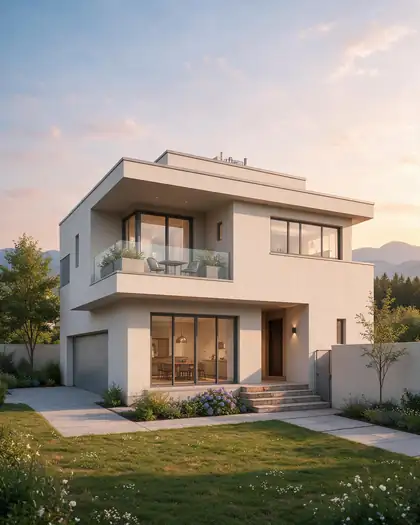
Text to render · sketch to render · house exterior ideas
AI Architecture Generator — concept renders of houses and buildings
Describe a building — “a two-storey modern house with a flat roof and a big balcony” — or upload your sketch, and get a photoreal concept render in the style, materials and light you name. For ideas and client conversations, not construction drawings.
- From text or a sketch
- Styles, materials, time of day
- Free credits to start
- No watermark
Updated by the Kenerate AI team
On this page
Quick answer
How do you design a house or building with AI?
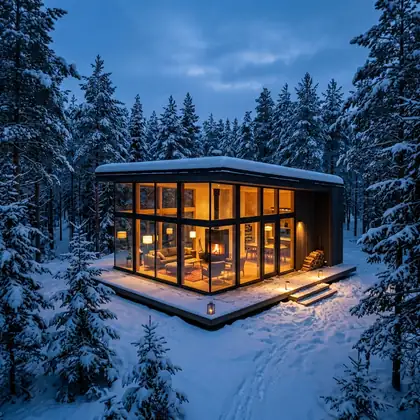
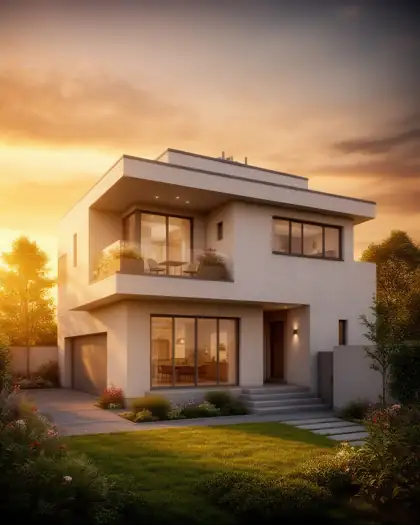
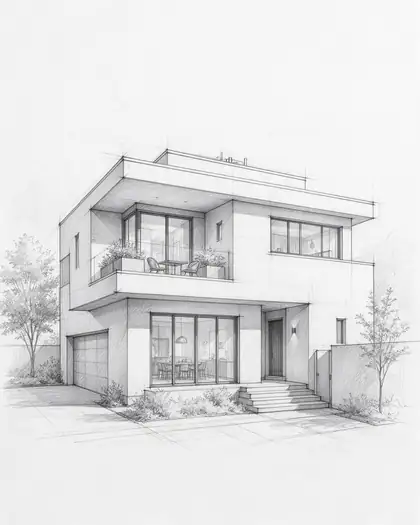
An AI architecture generator turns a description or a sketch into a concept render of a house or building — style, materials, landscaping and light included. On Kenerate AI, Seedream 5.0 Pro turned our pencil sketch of a modern house into a golden-hour render that kept the flat roof, balcony, windows and garage, and Nano Banana 2 made a glass cabin from text alone. These are concept images, not construction documents: they aren't to scale and don't check structure or codes, so real drawings still come from a licensed architect or designer.
Key facts
- Sketch to render
- Seedream 5.0 Pro edit · kept the design in our test
- Text to render
- Nano Banana 2 / 2.1 · GPT Image 2.5 Sunburst
- Free-plan option
- Flux 2 Dev — also kept the sketch
- Watch out
- Z Image Base at 80 % drew a different house
- Other views
- Camera Angle in Edit Studio
- Output
- Image, up to 2K–4K by model — not CAD
- Free start
- Starter credits
- Watermark
- None
Gallery
A sketch, its renders, and a cabin from text
Real outputs, one try each, first made for our sketch-to-image and Nano Banana 2 pages. Open any one to copy the prompt.
Same prompt
One sketch, three models
Same sketch, same prompt. Seedream 5.0 Pro and Flux 2 Dev kept the flat roof, balcony, windows and garage. Z Image Base at 80 % strength drew a different house with a pitched roof — a reminder to compare every render with your drawing.
PromptTurn this sketch into a photorealistic architectural render of the same house at golden hour, same shape and windows, landscaped garden
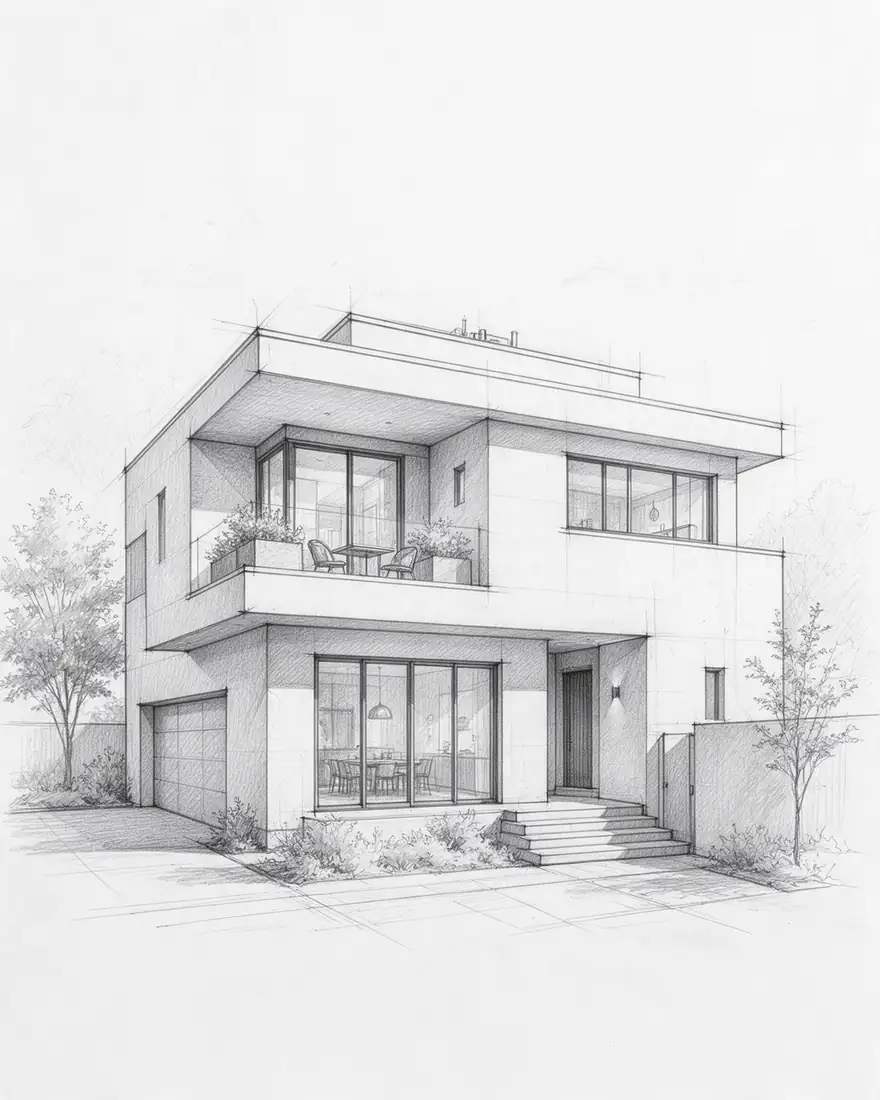 SketchInput
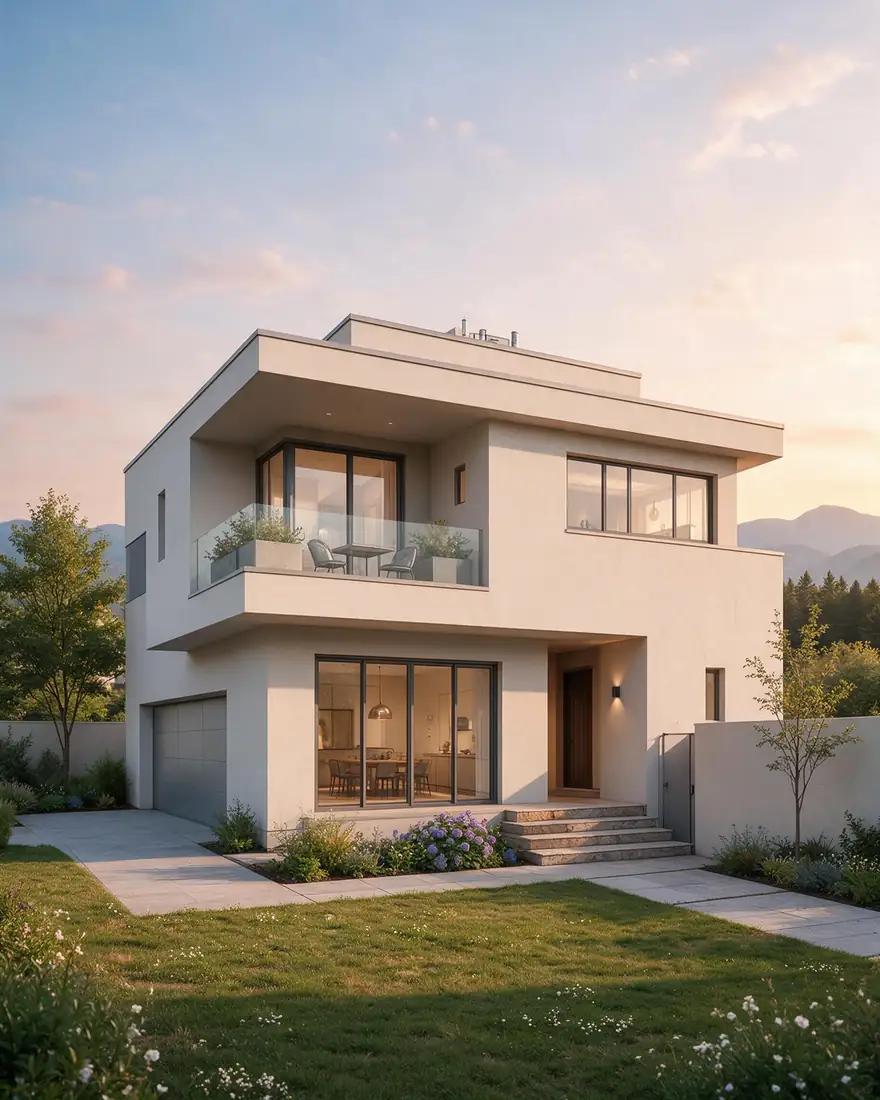 Seedream 5.0 ProKept the design
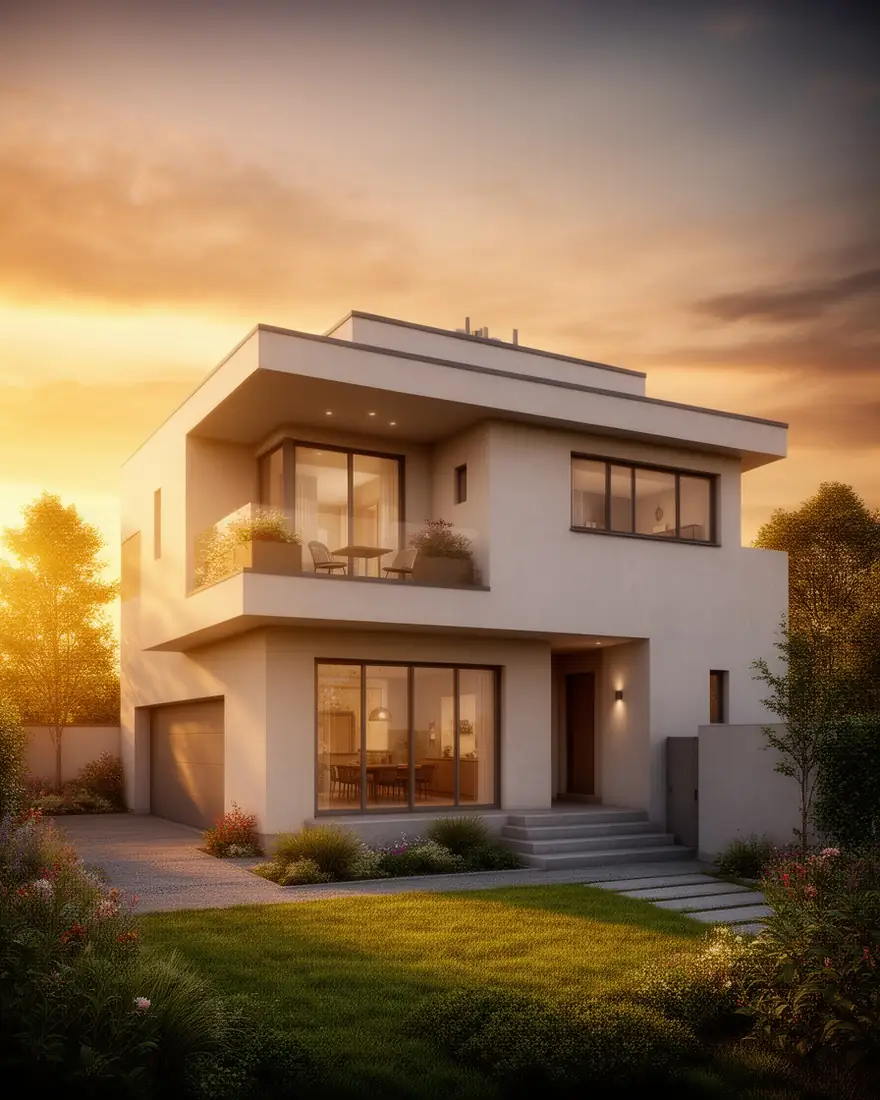 Flux 2 DevKept the design · free plan
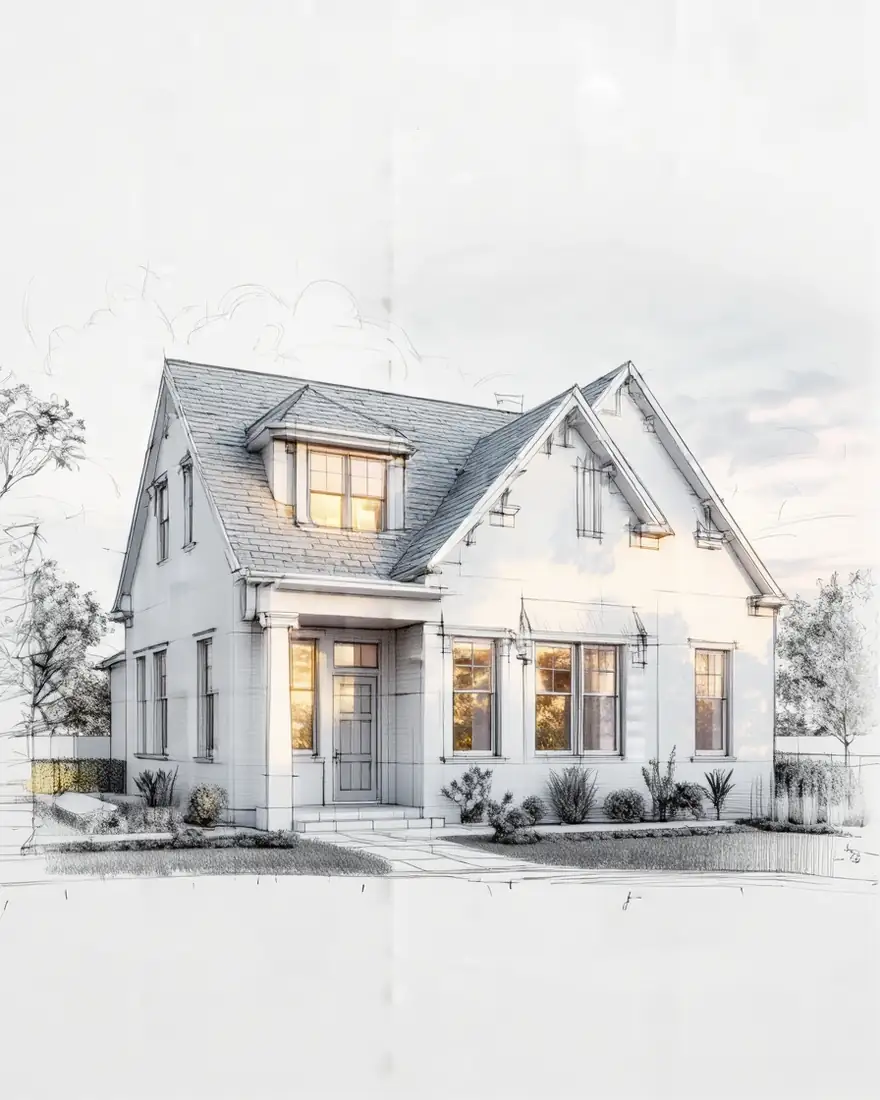 Z Image Base (80 %)Drew a different house
How to
How to use the AI architecture generator
- Time needed
- Steps
- 4 steps
Step 1
Open the Image Studio
Go to /app/image and pick Seedream 5.0 Pro (sketch) or Nano Banana 2.1 (text). Sign in free for starter credits.
Step 2
Add your sketch or describe the building
Upload a clear photo of the drawing, or write the type, floors, roof, style and materials.
Step 3
Set style, site and light
“Same shape and windows, timber and white render, landscaped garden, golden hour, architectural photography.”
Step 4
Compare, vary, download
Check it against the sketch, try other styles or a new camera angle, then download without a watermark.
See it in the app

Open Image Studio and type what you want to see — subject, style, lighting and mood.


Watch the tour · 1:23
Prompts, styles, references, edit, Arena & chat
Chapters
Tips
Renders that stay true to the design
What worked in our tests and what architects ask for in a concept image.
With a sketch, always say “same shape, same roofline, same windows” — the model keeps what you name.
Name the style and two or three materials: “modern, white render, timber cladding, black window frames”.
Set the scene: site, landscaping, season and time of day — golden hour and blue hour flatter most buildings.
Ask for “architectural photography, eye-level, straight verticals” for a realistic camera.
Make other views from your favourite render with Camera Angle in Edit Studio, then check the design still matches.
Compare every render with the drawing: models can change roofs, floors or window counts.
Treat the result as a concept. Sizes, structure and code compliance come from real drawings.
Models
Models for architecture renders
What each model is good at. Open any one straight in the generator.

ByteDance
Seedream 5.0 Pro
- Reference images
- Up to 10
- Output
- Up to 2K
Open Seedream 5.0 ProBest for
Sketch to render — kept our house design
Google
Nano Banana 2.1
- Reference images
- Up to 14
- Output
- Up to 4K
Open Nano Banana 2.1Best for
Text to render; same building across views from references

OpenAI
GPT Image 2.5 Sunburst
- Reference images
- Up to 16
- Output
- 1K–4K
Open GPT Image 2.5 SunburstBest for
Fine detail, long design briefs
- Free plan
Black Forest Labs
Flux 2 Dev
- Reference images
- Up to 3
- Output
- 2048 px
Open Flux 2 DevBest for
Free plan; also kept the sketch
FAQ
AI Architecture Generator questions
9 questions
What is an AI architecture generator?
A tool that makes concept images of buildings — houses, cabins, offices, interiors — from a written description or a sketch. You describe style, materials, site and light; the model renders it. On Kenerate AI, Seedream 5.0 Pro turns sketches into renders and Nano Banana 2.1 or GPT Image 2.5 Sunburst work from text.
Link to this answerCan AI design a house?
It can design how a house looks — massing, style, materials, colours, landscaping — as a picture. It doesn't produce a buildable design: no dimensions, structure, services or code checks. NCARB's mission is to license architects to protect the public's health, safety and welfare, which is why real drawings come from a licensed architect or qualified designer.
Link to this answerHow do I turn my sketch into a render?
Photograph the sketch in good light, upload it to Seedream 5.0 Pro in the Image Studio and write: “Turn this sketch into a photorealistic architectural render of the same house at golden hour, same shape and windows, landscaped garden.” Our pencil sketch came back with the same flat roof, balcony, windows and garage.
Link to this answerWhich AI model is best for architecture?
For sketch to render, Seedream 5.0 Pro kept our design most faithfully; Flux 2 Dev, a free-plan model, also kept it. For renders from text, Nano Banana 2.1 or GPT Image 2.5 Sunburst. Avoid high strength settings on Z Image Base for this job — at 80 % it drew a different house.
Link to this answerIs the AI architecture generator free?
Free to start. A new Kenerate account gets 25 starter credits, and Flux 2 Dev — which kept our sketch's design — is on the free plan. Seedream 5.0 Pro and the other models use credits from one-time packs, no subscription. No watermark.
Link to this answerCan I see my own house with a new exterior?
Yes. Upload a photo of your house to AI Edit or Change Region in Edit Studio and describe the change: “paint the walls sage green, black window frames, a new oak front door; keep the house shape and garden the same.” It's a visual idea for you and your builder — don't use an edited exterior in a sale listing as if it were real.
Link to this answerCan I get the same building from different angles?
Yes. Use Camera Angle in Edit Studio on your favourite render to re-shoot it from another viewpoint, or add the render as a reference in Nano Banana 2.1 (up to 14 references) and ask for “the same house from the garden side”. Check that windows and roof lines still match.
Link to this answerAre AI renders to scale or usable for planning permission?
No. They're images, not measured drawings, and proportions can drift between renders. Planning and permit applications need dimensioned drawings that meet local rules — use AI renders as mood images alongside real drawings, never instead of them.
Link to this answerWho owns the renders I make?
Kenerate's terms say the copyright and ownership of what you generate belongs to you. If you start from someone else's drawing or photo, make sure you have the right to use it.
Link to this answerIn depth
AI Architecture Generator, explained
What works, what to avoid, and how to pick a model.
On this page
Architecture styles for AI renders
Each line: what the style looks like, then the words that get it.
- Modern minimalist — flat roofs, white render, big glass · “modern minimalist house, flat roof, white render, floor-to-ceiling glass”.
- Scandinavian / Nordic — simple gables, timber, black frames · “Nordic house, steep gable roof, black timber cladding, black window frames”.
- Mid-century modern — low, long, wide eaves · “mid-century modern house, low-pitched roof, wide eaves, clerestory windows, stone and wood”.
- Farmhouse — board-and-batten, porch, metal roof · “modern farmhouse, white board-and-batten siding, black metal roof, wraparound porch”.
- Mediterranean — stucco, terracotta, arches · “Mediterranean villa, white stucco, terracotta roof tiles, arched windows, olive trees”.
- Japanese — timber, deep eaves, garden · “Japanese house, dark timber, deep overhanging eaves, engawa veranda, moss garden”.
- Brutalist — raw concrete, heavy volumes · “brutalist building, board-formed concrete, cantilevered volumes, deep window reveals”.
- Tropical modern — open plan, shade, pools · “tropical modern villa, timber louvres, deep shade, infinity pool, palms”.
- Craftsman — gables, tapered columns · “Craftsman bungalow, low gable roof, tapered porch columns, shingle siding”.
- Cabin — glass, timber, landscape · “modern glass cabin in a pine forest at blue hour, warm interior light” (Nano Banana 2, above).
A prompt template for a building render
Fill in the brackets; the order matters less than naming each part:
- Type and size: “a [two-storey family house / small office / cabin]”.
- Form: “[flat / gable / butterfly] roof, [balcony, porch, garage]”.
- Style and materials: “[style], [two or three materials], [window frame colour]”.
- Site: “on a [suburban plot / hillside / lakeside], [landscaping]”.
- Light and camera: “[golden hour / overcast / blue hour], architectural photography, eye level, straight verticals”.
- With a sketch, add: “same shape, same roofline, same windows as the sketch”.
What AI renders can and can't do
Good for: exploring styles and materials fast, showing a client three directions before anyone draws properly, mood boards, competition and portfolio concepts, and seeing a house you might build before you meet an architect.
Not for: dimensions, structure, energy performance, building codes or permit drawings. A render can show a cantilever that couldn't stand or a room that couldn't fit. NCARB's licensing system exists to protect the public's health, safety and welfare — real drawings go through a licensed professional.