Your yard · any garden style · same house, fence and trees
AI Garden & Landscape Design — redesign your yard from one photo
Upload a photo of your backyard or front yard, name a style — cottage, Japanese, xeriscape, Mediterranean, modern — and see it redesigned with new beds, paths and patio, while the house, fence and trees stay where they are.
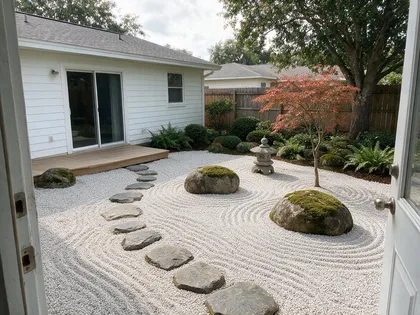
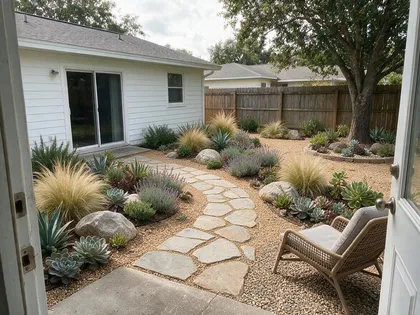
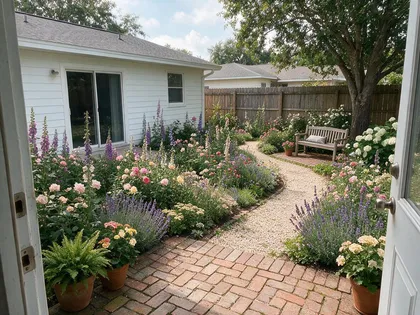
- Same yard, new garden
- Three styles tested
- Prompts included
- No watermark
Updated by the Kenerate AI team
On this page
Quick answer
What is AI garden and landscape design, and how do you use it?
AI landscape design — or an AI garden design generator — turns a photo of your own yard into a redesigned garden — new planting beds, paths, patio and seating — while the house, fence, trees and camera angle stay the same. On Kenerate AI you upload the photo to Seedream 5.0 Pro, name the style and say what must stay. In our test one plain backyard became a cottage garden, a Japanese garden and a drought-tolerant xeriscape. Treat the result as a visual concept: check plants for your hardiness zone and water, and call 811 before you dig.
Key facts
- Best model here
- Seedream 5.0 Pro edit
- Styles tested
- 3 · cottage, Japanese, xeriscape
- Input
- One photo of your yard
- What stays
- House, doors, fence, trees — say so in the prompt
- References
- Up to 10 (Seedream) · 14 (Nano Banana 2.1)
- Output
- Concept image, not a planting plan
- Free start
- 25 starter credits · Qwen Image 3.0 on the free plan
- Watermark
- None
Gallery
One backyard, three gardens
Real Seedream 5.0 Pro edits of one test photo — a plain lawn with a fence, a tree and a concrete slab. One try each; open any one to copy the prompt.
Same prompt
Before and after
All three kept the house, sliding door, window, fence and tree. The Japanese version also moved the seating: it turned the slab by the house into a timber deck and covered the front slab in gravel. The xeriscape added one chair, not the two we asked for.
PromptRedesign this backyard as an English cottage garden: deep curved flower borders with lavender, roses, foxgloves and catmint along the fence, a gravel path, a small wooden bench under the tree, the concrete patio replaced by weathered brick pavers with two potted plants. Keep the same house, sliding door, fence, tree, sky and camera angle.
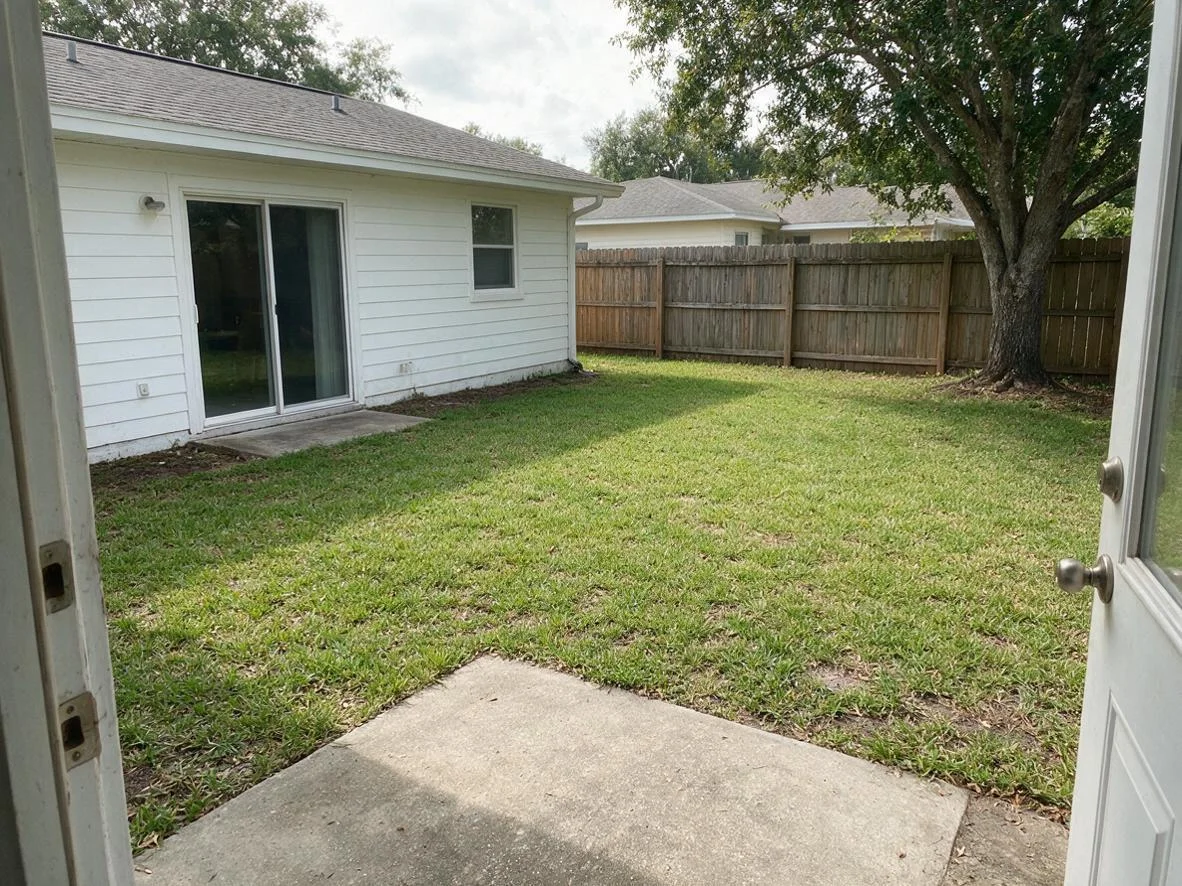 OriginalLawn, fence, one tree
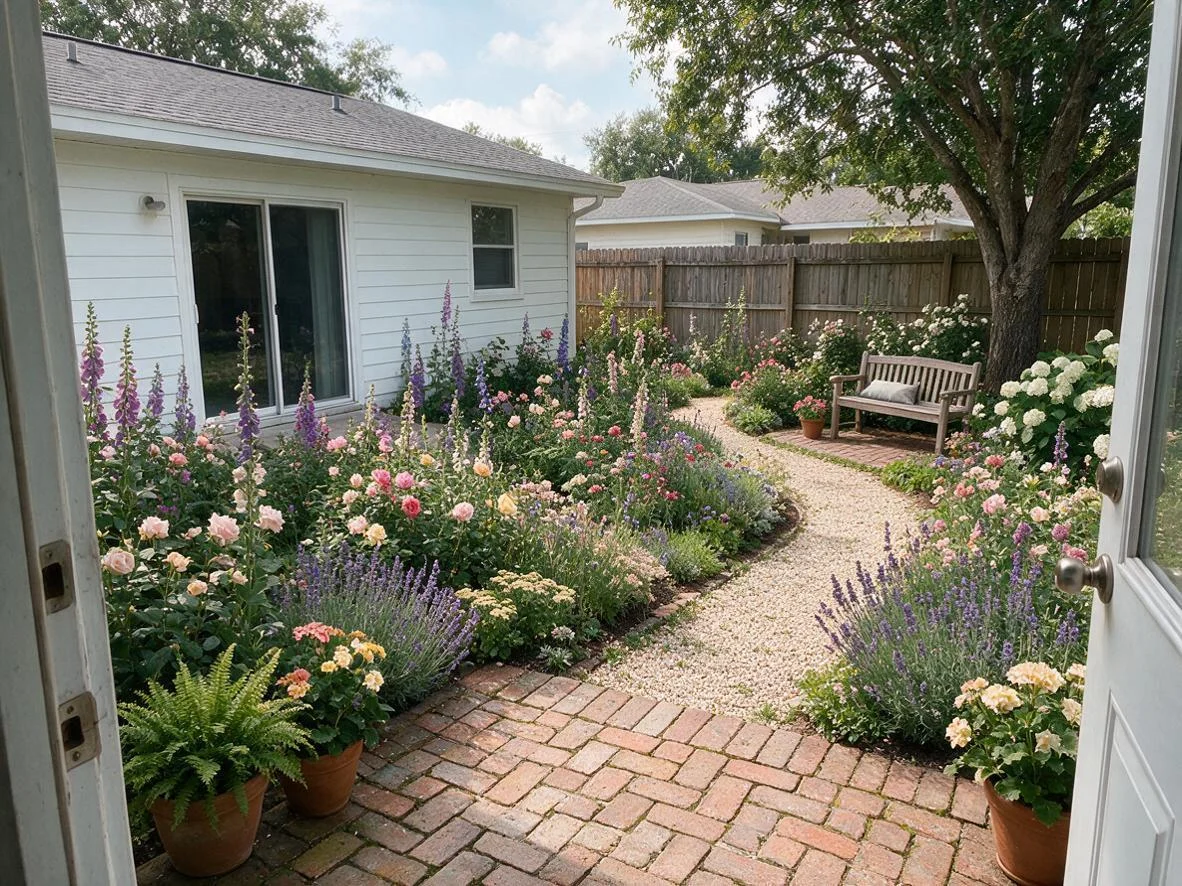 CottageSeedream 5.0 Pro · 1K
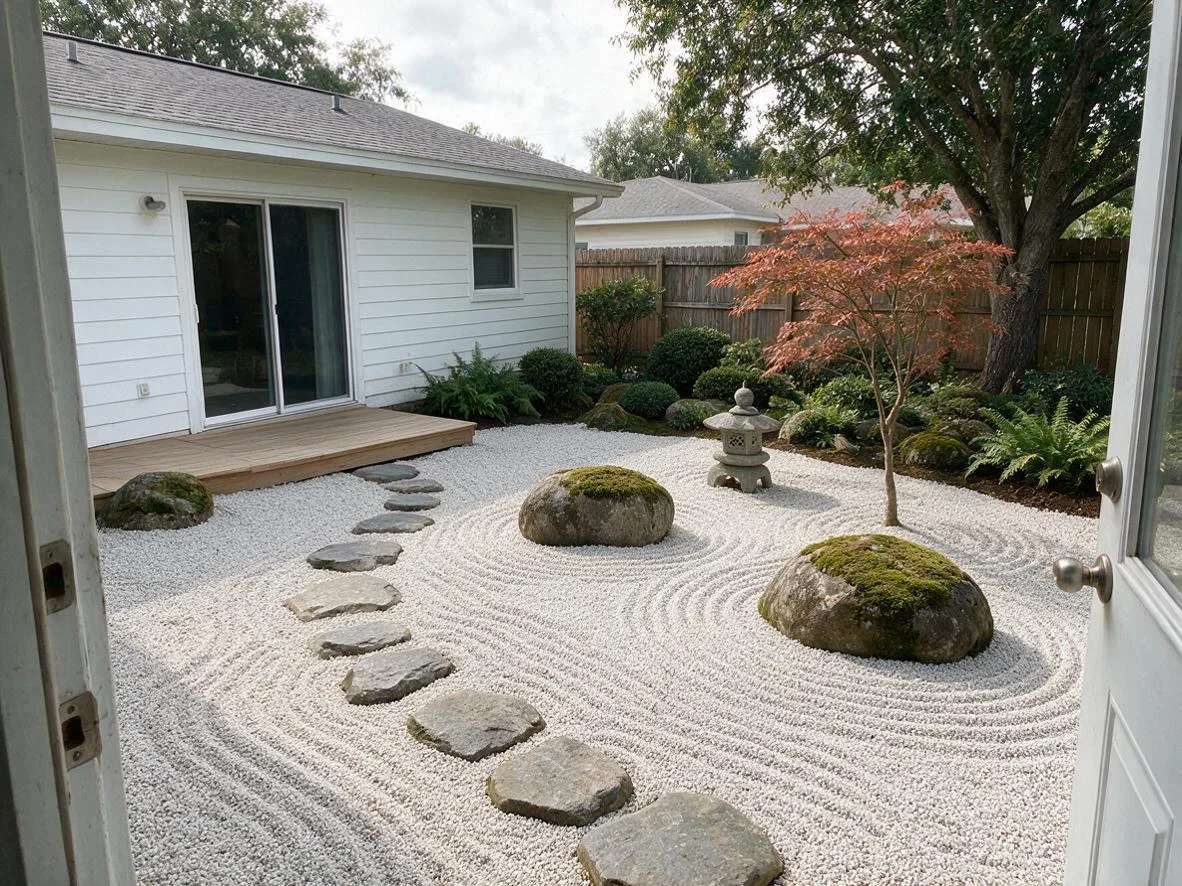 JapaneseSeedream 5.0 Pro · 1K
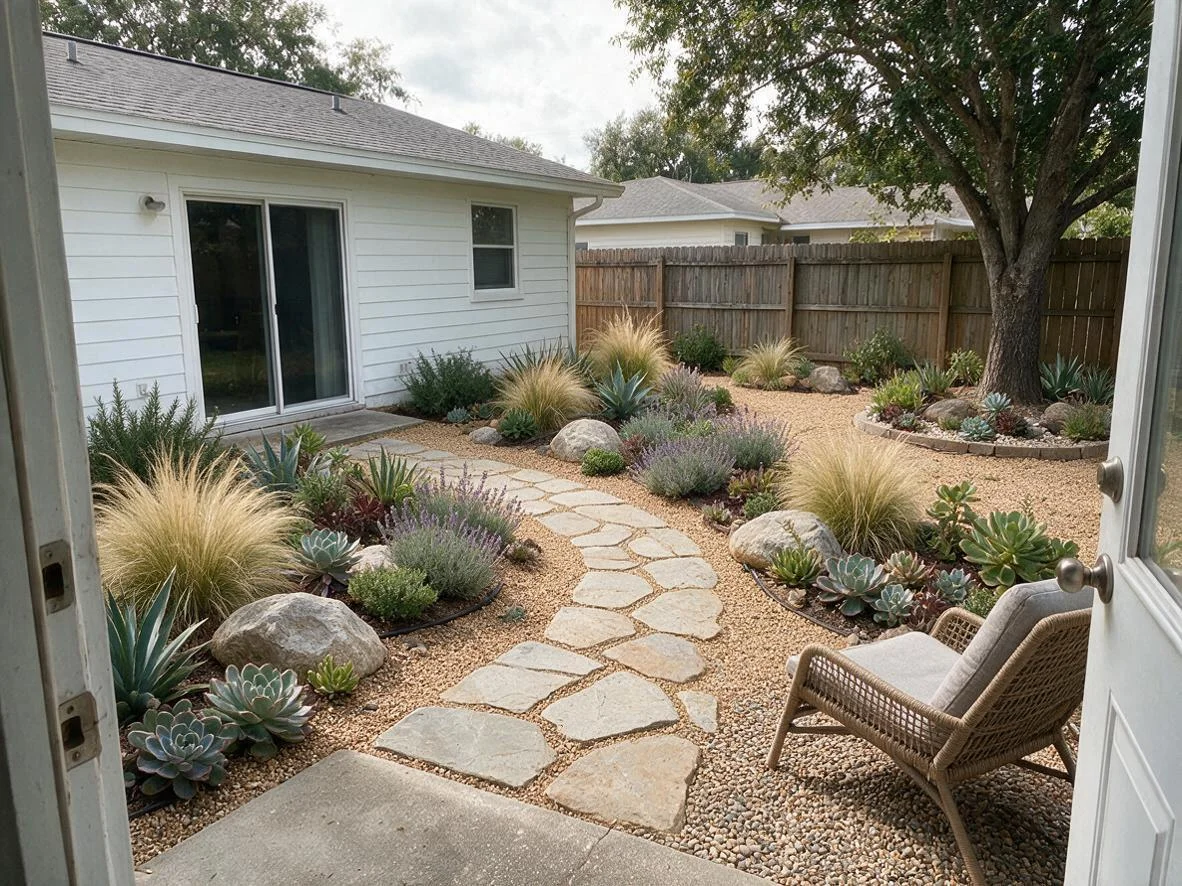 XeriscapeSeedream 5.0 Pro · 1K
How to
How to use the AI garden design generator
- Time needed
- Steps
- 4 steps
Step 1
Photograph your yard
Level, daylight, from the door or the street, whole space in frame.
Step 2
Upload it to Seedream 5.0 Pro
In /app/image, add the photo as a reference. Sign in free for 25 starter credits.
Step 3
Describe the garden
Style, path, patio, seating and plants — plus “keep the same house, fence, trees and camera angle”.
Step 4
Compare and refine
Try two or three styles, then change one zone at a time; downloads have no watermark.
See it in the app

Open Image Studio and type what you want to see — subject, style, lighting and mood.


Watch the tour · 1:23
Prompts, styles, references, edit, Arena & chat
Chapters
Tips
Garden redesigns that still look like your yard
What worked in our test.
Shoot from where you usually stand — the back door or the street — level, in daylight, with the whole yard in frame.
List what must stay: “keep the same house, doors, windows, fence, trees and camera angle”.
Name the style plus three or four real elements: path material, patio, seating, a few named plants.
Say what replaces what: “replace the lawn with gravel”, “turn the slab into a brick patio”.
Change one zone at a time — just the border, just the patio — when you want to compare options.
Check the result against the photo: things the model moved or added (a deck, an extra tree) aren't in your yard.
Before you buy plants, check them for your hardiness zone, sun and water.
Models
Models for garden and landscape design
What each model is good at. Open any one straight in the generator.

ByteDance
Seedream 5.0 Pro
- Reference images
- Up to 10
- Output
- Up to 2K
Open Seedream 5.0 ProBest for
Made the gardens on this page
Google
Nano Banana 2.1
- Reference images
- Up to 14
- Output
- Up to 4K
Open Nano Banana 2.1Best for
Add real furniture, planters or pavers from product photos

OpenAI
GPT Image 2.5 Sunburst
- Reference images
- Up to 16
- Output
- 1K–4K
Open GPT Image 2.5 SunburstBest for
Precise, instruction-following edits
- Free plan

FAQ
AI Garden Design Generator questions
10 questions
What is AI landscape design or an AI garden design generator?
A tool that redesigns a photo of your yard or garden — new beds, paths, patio, seating and plants — from a text prompt, so you can see an idea in your own space before you hire anyone or buy anything. On Kenerate AI you upload the photo to Seedream 5.0 Pro, name the style and say what must stay, such as the house, fence and trees. Landscape design covers the whole plan — hardscape such as patios, paths and walls, plus planting, lawn and lighting — and garden design usually means the planting; the workflow here is the same for both.
Link to this answerCan AI design my garden from a photo?
Yes, as a picture. In our test Seedream 5.0 Pro turned one plain backyard into a cottage garden, a Japanese garden and a xeriscape, and kept the house, door, fence and tree each time. It gives you a concept image, not a measured plan or a plant list, so use it to choose a direction and then plan the details.
Link to this answerIs there a free AI garden design generator?
You can start free. A new Kenerate account gets 25 starter credits, and Qwen Image 3.0 is on the free plan for quick drafts. Seedream 5.0 Pro, which made the gardens on this page, costs 13.5 credits per edit at 1K from one-time credit packs — no subscription. Downloads have no watermark.
Link to this answerDoes it work for front yards and curb appeal?
Yes. Photograph the front of the house from the street or the pavement, and ask to keep the house, driveway and windows the same while you change the lawn, beds, path and lighting. Name what should stay visible, such as the front door and house number, so the model doesn't hide them behind planting.
Link to this answerWhich garden styles can I try?
Any style you can describe. We tested cottage, Japanese and xeriscape here; Mediterranean (gravel, olive, lavender, terracotta), modern minimalist (clean lines, large pavers, grasses), tropical, wildflower meadow, kitchen garden with raised beds and a family lawn with play space all work as prompts. Name three or four concrete elements, not just the style word.
Link to this answerWill the plants it shows grow where I live?
Not necessarily — an image model picks plants for the look, not for your climate. Check every plant against your hardiness zone (in the US, the USDA Plant Hardiness Zone Map), your sun and shade, soil and rainfall, or ask a local nursery. You can also name plants you know grow well in the prompt. The 2023 USDA map is based on the average annual extreme minimum winter temperature and can be searched by ZIP code, so it covers winter cold only; EPA WaterSense recommends plants defined as low water use or drought tolerant for your area.
Link to this answerCan it design a drought-tolerant or low-maintenance garden?
Yes, as a concept: ask for a xeriscape or a low-water garden and name the materials — gravel or decomposed granite, flagstone, ornamental grasses, succulents, lavender, rosemary — as in our example above. Then confirm the plants suit your region; drought-tolerant in one climate can be thirsty in another.
Link to this answerCan I add my own patio furniture or planters?
Yes. Add photos of the real pieces as extra references with your yard photo and say where they go — Nano Banana 2.1 takes up to 14 reference images, Seedream 5.0 Pro up to 10. Check the scale against the real space: AI may draw a chair or planter bigger or smaller than it is.
Link to this answerCan AI design hardscape — patios, paths and retaining walls?
It can show them. Name the material and shape — “square bluestone patio by the door, curved gravel path with steel edging, low stone seat wall” — and keep the house, fence and trees the same. It can't see slope, drainage or what's under the ground, so treat any wall, step or raised deck as an idea: check local permit rules and ask a contractor or engineer before building, and call 811 before digging in the US.
Link to this answerIs an AI garden design as good as a landscape designer?
No — it is a fast way to explore ideas, not a design service. It doesn't measure the site, check drainage, levels, soil or utilities, or produce a planting plan. Use it to decide what you like, then take the images to a designer or garden centre. In the US, call 811 before digging so buried utility lines are marked.
Link to this answerIn depth
AI Garden Design Generator, explained
What works, what to avoid, and how to pick a model.
On this page
Garden styles and the words to use
Each line: what the style looks like, then the words that worked or that we'd put in the prompt.
- Cottage — loose, full flower borders and a soft path · “curved borders with lavender, roses, foxgloves and catmint, gravel path, bench” (tested above).
- Japanese — gravel, stone, moss and a few shaped trees · “raked gravel, moss-covered stones, stepping stones, Japanese maple, stone lantern” (tested above).
- Xeriscape / drought-tolerant — gravel mulch and low-water plants · “decomposed granite, flagstone path, ornamental grasses, agaves, succulents, boulders” (tested above).
- Mediterranean — warm gravel, terracotta and silver foliage · “gravel terrace, olive tree in a terracotta pot, lavender, rosemary, rendered wall”.
- Modern minimalist — clean lines and few materials · “large grey pavers, rectangular raised beds, ornamental grasses, black steel edging”.
- Kitchen garden — raised beds and paths · “four timber raised beds with vegetables and herbs, bark paths, a small greenhouse”.
- Family garden — lawn plus zones · “keep a lawn for play, a patio with a dining table, a border along the fence, string lights”.
- Front yard curb appeal — tidy and welcoming · “new path to the front door, low hedge, flowering shrubs, path lights; keep the house, door and driveway the same”.
AI landscape design: front yard, backyard, hardscape and planting
Landscape design is the whole outdoor plan — the hard surfaces (patio, paths, steps, walls, edging), the planting, the lawn or what replaces it, and how you move through and use the space. An AI image of your own yard is the fastest way to try that plan visually; it can't measure levels, drainage or soil, so each part below ends with what to check in the real yard.
- Front yard — curb appeal and a clear way in: “wide stone path from the driveway to the front door, foundation planting of low evergreen shrubs and perennials under the windows, one small flowering tree, path lights; keep the house, door, house number and driveway the same”. Keep the door and house number visible, and plant clear of windows and utility meters.
- Backyard — zones for how you use it: a dining patio by the door, lawn or play space in the middle, a planted border or privacy screen along the fence, and a path that joins them. Name each zone in the prompt and say which surface replaces the lawn or slab.
- Hardscape — patios, paths, decks, steps, low walls and edging: name the material and the shape (“square bluestone pavers”, “curved gravel path with steel edging”). The image won't show slope, drainage or footings; for retaining walls, raised decks or anything that changes the ground level, check local rules and ask a contractor or engineer before you build.
- Xeriscape and drought-tolerant — gravel or decomposed granite, flagstone, grasses, succulents and Mediterranean herbs (our xeriscape example above). EPA WaterSense says to choose plants defined as low water use or drought tolerant for your own area — a drought-tolerant plant in one region can need watering in another.
- Planting and hardiness — an image model picks plants for the look. In the US, find your zone on the 2023 USDA Plant Hardiness Zone Map (search by ZIP code): zones are based on the average annual extreme minimum winter temperature, in 10 °F zones with 5 °F half zones. Hardiness covers winter cold only, so also check sun, soil, rainfall and mature size with a local nursery.
- Before you dig — in the US, call 811 a few days ahead so buried utility lines are marked.
The prompt that keeps it your yard
Most odd results come from not saying what may not change. This template works for back and front yards:
- “Redesign this [backyard / front yard] as a [style] garden.”
- “Add: [path material], [patio or deck], [seating], [three or four plants].”
- “Replace: [the lawn / the concrete slab] with [new surface].”
- “Keep the same house, doors, windows, fence, trees, sky and camera angle.”
From picture to real garden
An AI image is a mood board for your own yard. Before you build any of it, check the plants against your hardiness zone and conditions, measure the space, and think about drainage and how you'll water it. Xeriscaping — a term Denver Water coined in 1981 — is about planning for low water use, not just swapping lawn for gravel.
In the US, call 811 a few days before you dig so buried utility lines are marked. For walls, decks, large trees or level changes, talk to a landscape designer or contractor.
What we got
Three styles of one plain backyard, one try each, on Seedream 5.0 Pro at 1K:
- Cottage: kept the house, sliding door, window, fence, tree and sky; added borders, a gravel path, a bench and a brick patio as asked.
- Japanese: kept the house, fence and tree; turned the slab by the house into a timber deck and covered the front slab in raked gravel — a change to the layout, fine for an idea.
- Xeriscape: kept the front slab and the tree; added grasses, succulents, boulders and a flagstone path, but one chair instead of the two in the prompt.