Sketch to render · paint, wheels, angles · no badges
AI Car Design Generator — concept car renders from a sketch or a prompt
Draw a side profile or describe the car — body style, stance, lights, wheels — and get a studio concept render. Then try paints and wheels, new angles and a location shot, with no one else's logo on it.
- Sketch or text to render
- Paint, wheels, angles
- No brand badges
- No watermark
Updated by the Kenerate AI team




On this page
Quick answer

How do you design a car with AI?
An AI car design generator turns a sketch or a description into a concept car render — a studio shot of a car that doesn't exist yet. On Kenerate AI you upload your sketch to Seedream 5.0 Pro, which kept lines most faithfully in our sketch-to-image tests, and say “same shape, studio concept render”; then change the paint, wheels or angle. It makes images, not engineering: no CAD, no dimensions or aero data, and no real makers' logos.
Key facts
- Start from
- A sketch, a photo of a model, or a text prompt
- Sketch to render
- Seedream 5.0 Pro (up to 2K)
- Same car, new shots
- Nano Banana 2.1 (up to 14 references)
- New angles
- Camera Angle tool
- Free plan model
- Qwen Image 3.0
- Logos and badges
- Leave them off — invent your own
- Also possible
- 3D model or video (paid plans)
- Watermark
- None
Gallery
A car in a scene
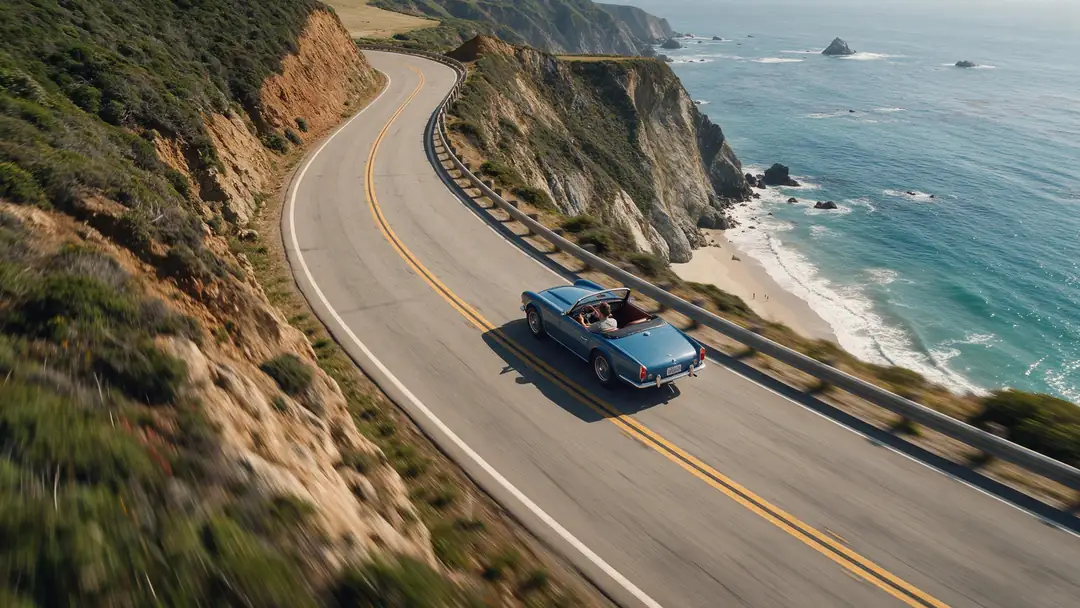
One real Seedream 5.0 Pro still, made from the prompt shown for our video-to-video page: an unbadged vintage-style convertible on a coast road. It shows the last step — putting a car into a location shot. We haven't published concept-car renders on this page yet.
How to
How to use the AI car design generator
- Time needed
- Steps
- 4 steps
Step 1
Sketch or describe the car
Photograph a clean side-profile sketch, or write the body style, proportions and details. Sign in free for starter credits.
Step 2
Render it in Image Studio
Upload the sketch to Seedream 5.0 Pro as a reference and say “same shape, studio concept render, no badges”.
Step 3
Try paint, wheels and angles
Change one thing per edit — paint, wheels, lights — and get front three-quarter or rear views with Camera Angle.
Step 4
Put it in a scene
Place the same car on a road or in a showroom, upscale for print, or animate it on a paid plan.
See it in the app

Open Image Studio and type what you want to see — subject, style, lighting and mood.


Watch the tour · 1:23
Prompts, styles, references, edit, Arena & chat
Chapters
Tips
Prompts a car designer would write
Image models respond to the words designers use for proportion and stance.
Start with body style and era: two-door coupé, compact crossover, shooting brake, pickup, 1960s GT, near-future EV.
Name the proportions: long bonnet, short overhangs, low roofline, wide track, wheels pushed to the corners.
Give the signature details: a full-width light bar, split headlights, a fastback rear, a cab-forward stance.
Ask for a side view on a plain studio background first — it's the easiest view to judge and to keep consistent.
With a sketch, add “same shape, keep every line” so the model doesn't redesign it.
Write “no badges, no logos, no text” — and design your own emblem if you want one.
Models
Models for car design
What each model is good at. Open any one straight in the generator.

ByteDance
Seedream 5.0 Pro
- Reference images
- Up to 10
- Output
- Up to 2K
Open Seedream 5.0 ProBest for
Most faithful to a sketch in our sketch-to-image tests
Google
Nano Banana 2.1
- Reference images
- Up to 14
- Output
- Up to 4K
Open Nano Banana 2.1Best for
Keeping one car the same across views and scenes

OpenAI
GPT Image 2.5 Sunburst
- Reference images
- Up to 16
- Output
- 1K–4K
Open GPT Image 2.5 SunburstBest for
Your own emblem or lettering; precise edits
- Free plan

Alibaba
Qwen Image 3.0
- Reference images
- Up to 3
- Output
- 1K · 2K
Open Qwen Image 3.0Best for
Free plan — quick concept drafts
FAQ
AI Car Design Generator questions
8 questions

How do I design a car with AI?
Start from a sketch or a description. In Kenerate's Image Studio, upload a side-profile sketch to Seedream 5.0 Pro and write “turn this sketch into a studio concept render of the same car, same shape, satin silver paint, no badges”. Then change one thing per edit — paint, wheels, lights — and make new angles and scenes of the same car.
Link to this answerCan AI turn my car sketch into a realistic render?
Yes. Add the sketch as a reference image and say “same shape, keep every line”. Clean, dark lines on white paper and a side view work best; faint pencil and busy perspective drawings give the model more to guess. Our sketch-to-image page shows real sketch-to-render results from the same model.
Link to this answerCan I use real car brands or logos?
Leave them off. Car makers' names and badges are trademarks, and many vehicle shapes are protected as design patents, so a render that copies them can still cause trouble even if AI drew it. Write “no badges, no logos, no text”, design your own emblem, and never present a render as a real maker's upcoming model.
Link to this answerIs there a free AI car design generator?
Kenerate is free to start: a new account gets starter credits, and Qwen Image 3.0 is on the free plan for quick drafts. Seedream 5.0 Pro, Nano Banana 2.1 and GPT Image 2.5 Sunburst use credits from one-time packs. Downloads carry no watermark.
Link to this answerCan I see my concept from other angles?
Yes. The Camera Angle tool makes new views of the same object from one image, such as a front three-quarter or a rear view. Sides the first image didn't show are guessed by the model, so check details like the tail lights and wheel design before you share them.
Link to this answerCan I change the paint or wheels on a photo of my own car?
Yes — upload the photo and say what changes and what stays: “same car, now matte forest green with bronze five-spoke wheels, keep everything else the same”. It's a visual preview: the model doesn't check wheel fitment, wrap materials or ride height.
Link to this answerCan I make a 3D model or a video of my design?
On a paid plan, yes. 3D Studio turns a single image into a 3D model file (GLB) for previews, and Video Studio animates a still — the convertible above became a short driving clip on our video-to-video page. Neither is a production model.
Link to this answerIs an AI render good enough to build a car from?
No. It's a mood image and a brief: there are no CAD surfaces, dimensions, packaging, aerodynamics or safety data behind it. Designers use renders like these to explore and pitch ideas, then move to CAD and clay models.
Link to this answerIn depth
AI Car Design Generator, explained
What works, what to avoid, and how to pick a model.
On this page
What an AI car design generator is good for
It's fast exploration. A designer, a student or a car fan can go from a napkin sketch to a believable studio render, then try ten paint colours, three wheel designs and a night scene before lunch. That's useful for pitching an idea, a portfolio page, a game or film vehicle, or just seeing whether a shape works.
It isn't engineering. The model draws what a car looks like, not how it's built: it doesn't know whether the doors open, the engine fits or the roof meets crash rules. Use the renders to decide and to brief, then hand the shape to CAD.
Car-design words that work as prompts
Name the parts and proportions you care about — the model follows them:
- Stance: wide track, low ride height, wheels pushed to the corners, short overhangs.
- Profile: long bonnet and set-back cabin (classic GT), cab-forward (EV), fastback or squareback rear.
- Greenhouse: the glass area — tall and airy, or a thin slot under a low roof.
- Beltline and shoulder: the line under the windows and the muscle over the rear wheels.
- Lights and face: full-width light bar, split headlights, a closed-off grille for an EV.
- Finish: gloss, satin or matte paint, two-tone roof, carbon trim, wheel colour.
AI render, clay model or CAD?
Three ways a car design takes shape, and what each one gives you:
- AI render: minutes per idea, any style or scene, but only a picture — no real surfaces or dimensions.
- Clay or physical model: shows light on real surfaces at real scale; slow and expensive to change.
- CAD: exact surfaces and dimensions engineers can build from; needs a trained designer and time.
By the Kenerate AI teamLast updated and reviewed
We build and run the Kenerate generator. Every example is a real output of the model named under it; models and presets were checked against the app's code.
Sources: Kenerate Image Studio · Kenerate Camera Angle tool · USPTO — Trademark basics · USPTO — Design patent application guide · Kenerate terms (output ownership)